



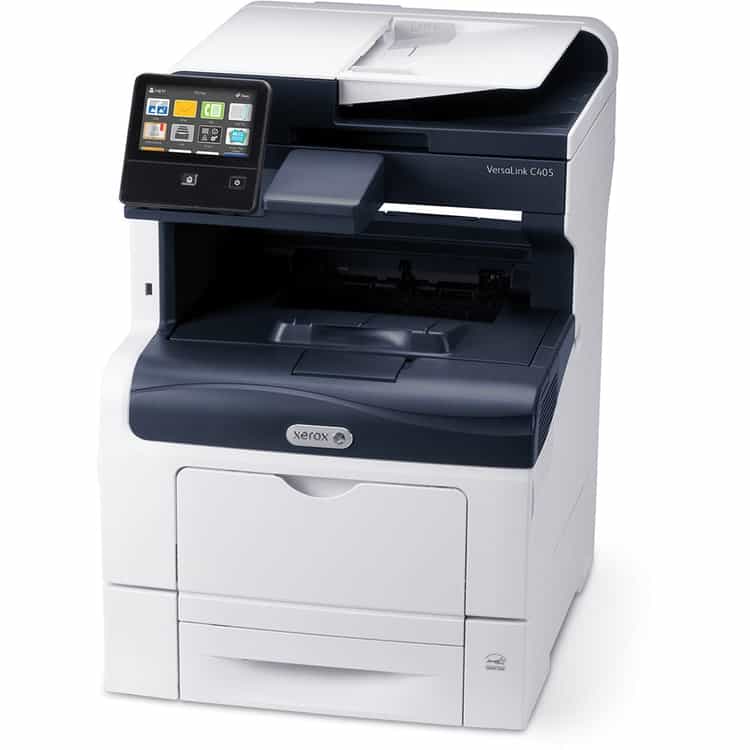
Color Printer
The color printer has become an indispensable tool, especially for those working from a home office or seeking a reliable printer for home use. Whether it’s an inkjet printer, a color inkjet all-in-one printer, or a color laser, maximizing its potential is crucial for achieving the best results. Brands like HP printers have set a benchmark in the industry, offering devices that cater to various needs.
However, many users face challenges, from selecting the right paper for their compact photo printer to maintaining the vibrant quality color of the ink. Some might be on the lookout for a great printer that balances cost and performance. Understanding these challenges and proactively addressing them can make a significant difference in the output quality and overall printing experience.


Choosing the Right Paper
- Types of Paper:
- Bond
- Offset
- Index
- Cover
Each type of paper has its unique characteristics suitable for different printing needs. For instance, an all-in-one inkjet might produce vibrant color pages on glossy paper, ideal for photo printing. On the other hand, a color laserjet might work best with bond or offset paper for official documents.
- Significance of Paper Weight and Finish:
- Weight: Determines the thickness of the paper. Heavier weights are ideal for documents that need durability, like business cards.
- Finish: Can be glossy, matte, or textured. A photo printer, for instance, would work best with glossy finishes to enhance image quality.
Experimenting with various paper types is essential. For instance, if you’re using an Epson or HP OfficeJet Pro, you might find that certain papers enhance the vibrancy of your color printing.
Maintaining Your Inkjet Printer
Ink is the lifeblood of any printer, especially inkjet printers. However, there are common issues users face:

- Signs of Dried-Out Ink: If your color printer starts producing faded or streaky prints, it might be a sign of dried-out ink cartridges. This is especially common in printers that aren’t used regularly.
- Prevention Tips:
- Regularly use your printer, even if it’s just a few pages per minute, to keep the ink flowing.
- Store ink cartridges in a cool, dry place.
- Ensure proper connectivity between the cartridge and the printer. Sometimes, cleaning the cartridge head can help.
Planning Your Document
Before hitting the print button on your all-in-one printer or wireless device, planning is crucial.
- Key Questions to Consider:
- What is the purpose of the document?
- Is it for official use or personal?
- Will it require duplex printing or single-sided prints?
- Understanding Your Printer’s Capabilities:
- Not all printers, be it HP, Epson, or others, have the same capabilities. Some might be excellent for color inkjet prints, while others might be tailored for black and white laser printers outputs.
- Knowing your printer’s strengths and limitations can guide your design process.
- Tips for Accurate Color Representation:
- Ensure your device settings match your printer’s capabilities. For instance, if you’re using an all-in-one inkjet, ensure the settings are optimized for color inkjet prints.
- Consider additional finishing features. Some printers offer binding, stapling, or other finishing options that can elevate the look of your document.
By understanding and optimizing each aspect of your printing process, from paper selection to ink maintenance, you can unlock the ultimate results from your color printer, ensuring high-quality outputs every time.
Understanding Monitor vs. Printer Discrepancies
One of the most common challenges faced by users of home printers is the discrepancy between how colors appear on a monitor and how they print on paper. This is primarily due to the difference in color models used by screens and printers.
- RGB vs. CMYK:
- RGB (Red, Green, Blue) is the color model used by electronic displays, including computer monitors and television screens. It’s an additive color model where colors are created by combining red, green, and blue light at various intensities.
- CMYK (Cyan, Magenta, Yellow, Black) is the color model used by printers. It’s a subtractive color model where colors are produced by combining cyan, magenta, yellow, and black inks.
To achieve the best color match, it’s essential to convert your digital designs from RGB to CMYK before printing. This ensures that the colors you see on your screen are the colors you get on paper.
- Tips for Accurate Color Matching:
- Use a calibrated monitor to ensure color accuracy.
- Preview your designs in CMYK mode before printing.
- Test print on the variety of paper types you intend to use, as paper can influence color output.
Calibrate Your Printer to Get Correct Color for a more in-depth guide on achieving accurate color representation.
Optimizing Color Laser Printer Applications
The software you use to print can significantly influence the final output. Whether you’re using an all-in-one inkjet printer or a color laser printer, the right application can make all the difference.
- Importance of Using the Right Application:
- Different applications interpret color data differently. For instance, a design might appear differently when printed from Adobe Illustrator compared to Microsoft Word.
- Some applications, like the Canon Pixma software or Epson EcoTank suite, are tailored for specific printer models, ensuring optimal print quality.
- Implementing a Standard Printing Protocol:
- Consistency is key. Once you find an application that delivers the desired results with your printer, stick to it.
- Regularly update your printer drivers and software to ensure compatibility and access to the latest features.
Evaluating Your Home Printer Suitability
As technology advances, so do printers. If you’re still using an older model, you might not be getting the best possible results.
- Signs You Might Need a New Printer:
- Frequent jams or mechanical issues.
- Declining print quality despite regular maintenance.
- Incompatibility with newer operating systems or software.
- Benefits of Managed Print Providers:
- Access to the latest printer models, like the HP Color LaserJet Pro MFP M283fdw or the Canon Pixma MG3620.
- Regular maintenance and support, ensuring consistent print quality.
- Cost savings, as providers often offer packages that include ink or toner refills.
What People Also Ask
Why do the colors on my print not match my screen?
This discrepancy is a common challenge for many home printer users. The primary reason is the difference in color models: screens use RGB, while printers, whether it’s an all-in-one inkjet printer or a color laser printer, utilize CMYK. Brands like Canon Pixma and Epson EcoTank often provide software tools to help calibrate and match colors. Before printing, especially for high-quality outputs, it’s beneficial to calibrate your monitor and convert designs to CMYK. This ensures that the vibrant color pages per design you see on your color touchscreen matches the printed output.
How often should I replace the ink in my printer?
The frequency of ink replacement depends on your usage and the print quality you desire. For instance, if you’re using a supertank printer or an inkjet all-in-one, you might notice longer intervals before needing a refill. However, it’s essential to replace ink cartridges when the print quality declines or if the printer software, like HP Smart, indicates low ink levels. Regularly checking printer reviews can also provide insights into the ink costs and page yield of various models, ensuring you get the most out of your color pages per cartridge.
Can I use any paper for printing photos?
Technically, you can print on any paper. However, for the best photo quality, especially if you’re using a specialized photo printer like the Canon Pixma MG3620, it’s recommended to use photo paper. This type of paper is specially designed to produce vibrant, high-quality images. The paper tray of many best all-in-one printers can accommodate a variety of paper types, but for photos, the glossy or matte finish of photo paper will yield the best results.
Is wireless printing secure?
Wireless printing, especially from a wireless color inkjet printer or a wireless color all-in-one cartridge-free supertank, offers unparalleled convenience for both home and office use. However, with the rise of smart devices and interconnected networks, security is paramount. It’s essential to secure your network to prevent unauthorized access. Always use strong passwords, ensure your printer’s firmware is up-to-date, and consider using a VPN for added security, especially in a home office or small business setting.
Why is my printer printing slowly?
Several factors can influence the print speeds of your printer, be it a monochrome laser or a color laserjet pro mfp m283fdw. High-resolution settings, for instance, require more data processing, leading to slower prints. Memory issues in older models or outdated drivers can also reduce speed. If you need a printer for high-volume tasks, consider models known for faster ppm in color and black. Regularly updating your printer’s drivers and optimizing settings, like reducing print quality for draft prints or adjusting the paper capacity, can enhance performance. Also, reading up on printer works and reviews can provide tips for optimizing your specific model.

Conclusion
In the realm of digital printing, the color printer stands as a testament to technological advancement. Whether it’s a home printer for personal projects or an office printer for professional documents, the potential these machines hold is immense. From the Canon Pixma that delivers stunning photo prints to the Epson EcoTank with its revolutionary ink system, the choices available to consumers today are vast.
However, with great power comes great responsibility. To truly harness the potential of these machines, one must delve deep into their intricacies. It’s not just about having the best home printer or the latest all-in-one color inkjet. It’s about understanding the nuances of print quality, the importance of page yield, and the role of the paper tray in determining output.
Different printers, be it the HP Color LaserJet Pro or the Canon printer, have unique strengths. It’s essential to experiment with various settings, paper types, and inks to find the perfect combination for your needs.
Beyond the hardware, the software plays a pivotal role. Whether you’re using the HP Smart application or the software suite that comes with the Epson EcoTank ET-2850, ensuring that you’re using the latest drivers and optimizing settings can make a world of difference.
In conclusion, the world of color printing is vast and filled with possibilities. From photo paper that brings memories to life to automatic duplex printing that adds a touch of professionalism, the options are endless. As you embark on your printing journey, remember to experiment, optimize, and always strive for the best color output. The potential of your printer is just waiting to be unlocked.