


A backup and recovery strategy plan is a business’s safety net against data loss. It’s a structured approach to protect vital information and ensure operational continuity.
A robust plan involves:
- Identifying Critical Data: Knowing what information is essential.
- Choosing Backup Methods: Deciding how to copy data (e.g., full, incremental).
- Selecting Storage Locations: Picking where to store copies (on-site, off-site, cloud).
- Defining Recovery Goals: Setting targets for recovery speed (RTO) and acceptable data loss (RPO).
- Regular Testing: Ensuring backups work when needed.
Data loss from hardware failure, human error, or cyberattacks can be catastrophic. The average cost of a data breach reached $4.35 million in 2022, and 40% of small businesses never reopen after a disaster. Without a solid plan, your company faces lost revenue, damaged reputation, and potential legal issues. A proactive approach is essential for survival and peace of mind.
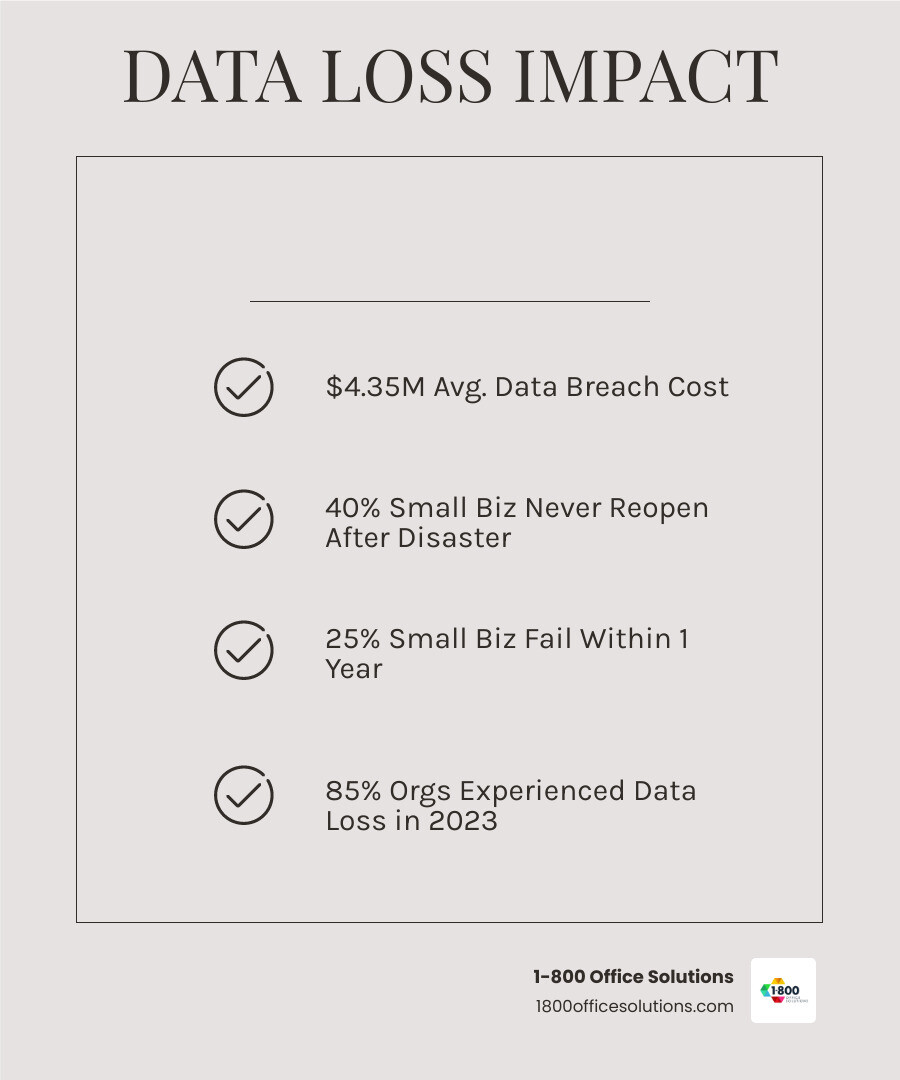

Data loss can come from anywhere. Proofpoint’s 2024 Data Loss Landscape Report shows that 85% of organizations experienced at least one data loss incident in 2023. These incidents range from accidental deletions to sophisticated ransomware attacks. Business continuity hinges on robust data protection.
A strong backup and recovery strategy plan is also crucial for maintaining customer trust, safeguarding your reputation, and ensuring compliance, especially in regulated industries where inadequate backups can lead to stiff penalties.
What is a Backup and Recovery Strategy?
At its core, a backup and recovery strategy plan is a documented set of policies and procedures to withstand and recover from any data loss incident. It’s an actionable plan covering everything from prevention to restoration.
This process involves:
- Creating secure copies: Regularly duplicating critical data.
- Storing them safely: Using secure, accessible, and often off-site locations.
- Restoring data after incidents: Following clear procedures to bring data back online quickly.
- Ensuring business operations continue: Minimizing downtime and disruption.
A well-defined strategy is fundamental to incident response, preventing operations from grinding to a halt.
Backup vs. Replication: Key Differences
Data backup and replication serve distinct purposes. Understanding the difference is key to effective data protection.
- Backup: Creates a separate ‘cold copy’ of data at a specific point in time.
- Purpose: Long-term retention and recovery from corruption, deletion, or disaster.
- Recovery: Restores data to a specific point in the past; restoration takes time.
- Use Case: Ideal for recovering from ransomware or for compliance and archiving.
- Replication: Creates a ‘hot copy’ of production data in near real-time.
- Purpose: High availability and quick failover if a primary system fails.
- Recovery: Provides immediate access to data with minimal downtime.
- Use Case: Ensures continuous operation of critical applications.
Use replication for continuous uptime and backup for historical versions and disaster recovery. A combination of both offers the most robust protection.
Core Components of a Robust Backup and Recovery Strategy Plan
A robust backup and recovery strategy plan relies on strong foundational principles, smart planning, and careful resource allocation to ensure your data is safe and recoverable. To explore different options, see our guide on 4 Data Backup Solutions to Consider.
The 3-2-1 Rule and Its Modern Evolution
The 3-2-1 rule is a time-tested approach to data protection. This simple rule states you should have:
- Three copies of your data: Your primary data plus at least two backups.
- Two different types of media: Store copies on different storage types (e.g., hard drive and cloud) to avoid a single point of failure.
- One off-site copy: Keep at least one copy in a separate physical location to protect against local disasters like fire or flood.
As cyber threats evolve, this rule has been updated to the 3-2-1-1-0 Evolution to counter threats like ransomware:
- One immutable or air-gapped copy: This copy cannot be altered or deleted, making it safe from attackers. An air-gapped copy is disconnected from the network, providing a powerful shield, which is critical since 97% of modern ransomware incidents now target backup repositories.
- Zero recovery errors: This goal emphasizes the need for regular, successful testing to ensure your backups are complete, uncorrupted, and fully recoverable. Alarmingly, 46% of businesses have never tested their backups for recoverability.
This evolved rule provides a more comprehensive defense against modern cyber threats.
Defining Your RTO and RPO
Two key metrics guide your backup and recovery strategy plan: Recovery Time Objective (RTO) and Recovery Point Objective (RPO). These metrics determine how much downtime and data loss your business can tolerate.
- Recovery Time Objective (RTO): The maximum acceptable time your business can be down after an incident. An RTO of two hours means critical systems must be restored within that window.
- Recovery Point Objective (RPO): The maximum amount of data you can afford to lose, measured in time. An RPO of one hour means you need backups at least every hour to avoid losing more than 60 minutes of data.
These objectives determine your backup frequency and strategy. A high-volume e-commerce site might need an RTO and RPO of mere minutes, while another business might tolerate a 24-hour RPO. Finding the right balance between your business needs and budget is key.
Choosing Your Backup Solution: Cloud, On-Premises, or Hybrid
Selecting the right backup solution is a critical step. Each option—cloud, on-premises, or hybrid—offers distinct advantages.
| Feature | On-Premises | Cloud | Hybrid |
|---|---|---|---|
| Cost | High initial investment (hardware, software, setup) | Lower upfront costs, pay-as-you-go, scalable operational expenses | Balances initial hardware investment with flexible ongoing cloud costs |
| Scalability | Limited by physical hardware; expanding means buying and installing new equipment | Highly scalable; easily increase or decrease capacity on demand | Offers flexible scaling; combines on-site control with the elastic capacity of the cloud |
| Seguridad | Full control over security measures and physical access to your data | Relies on the provider’s security (often very robust); security is a shared responsibility model | Combines tight on-site control for your most sensitive data with the advanced security features of cloud providers for backups |
| Accessibility | Limited to your physical location; often requires VPN for remote access | Accessible from anywhere with an internet connection, offering great flexibility | Flexible access; fast local access combined with remote cloud accessibility for off-site needs |
| Control | Complete control over your data and the underlying infrastructure | Less direct control; you rely on the cloud provider for management | High control over critical data kept on-site, with added flexibility for off-site cloud backups |
| Recovery Speed | Potentially faster for local recoveries if the issue is small | Can vary depending on data size and your internet speed; very large data restores can take longer | Combines the speed of local recovery for immediate needs with the resilience of off-site cloud recovery for disasters |
- On-premises: You own and manage all backup hardware and software in-house. This provides maximum control, which is ideal for businesses with strict compliance or data sensitivity requirements, but it comes with high upfront costs and management overhead.
- Cloud: These solutions offer excellent flexibility, scalability, and cost-effectiveness. You can easily adjust storage capacity as needed and benefit from the provider’s robust security features. For small businesses, the lower upfront costs and remote accessibility are major advantages.
- Hybrid: This approach combines on-premises storage for fast access to critical data with cloud storage for scalable, off-site backups. It offers a balance of control, flexibility, and redundancy, making it a popular choice for many businesses.
The best choice depends on your RTO/RPO, budget, compliance needs, and desired level of control.
Building Your IT Disaster Recovery Plan: Step-by-Step
Your IT disaster recovery plan (IT DRP) is the detailed blueprint that puts your backup and recovery strategy plan into action. It’s a step-by-step guide to restore all IT operations after a major disruption, ensuring a confident and documented incident response. To clear up common misconceptions, read our article, Forget These Disaster Recovery Myths.


Step 1: Conduct a Business Impact Analysis (BIA)
A Business Impact Analysis (BIA) helps you understand what you’re protecting by identifying critical functions and the potential consequences of their disruption.
During a BIA, you should:
- Identify critical business functions: Determine the essential processes that keep your company running, like customer service or financial processing.
- Assess the potential impacts of disruption: Evaluate the consequences of an outage, including lost revenue, reputational damage, and legal issues. Verizon’s 2024 Data Breach Investigations Report notes that 62% of financially motivated incidents involved ransomware or extortion, with an average loss of $46,000 per breach.
- Prioritize recovery efforts: Based on the potential impact, decide which systems to restore first. This helps set realistic RTOs and RPOs for different applications.
A solid BIA is the foundation for a custom and effective recovery strategy.
Step 2: Automate and Secure Your Backups
With your priorities set, focus on making your backups automatic and secure to minimize human error and protect against threats.
Key actions include:
- Automate backup schedules: Use automated systems to ensure data is backed up consistently and reliably, reducing the risk of missed backups.
- Encrypt data in transit and at rest: This non-negotiable step protects sensitive information from unauthorized access, even if storage media is compromised.
- Implement access controls and multi-factor authentication (MFA): Limit who can access, modify, or restore backups to authorized personnel. MFA adds a critical layer of security beyond just a password.
- Use immutable backups to protect against tampering: Immutable backups cannot be altered or deleted for a set period, providing a clean copy for restoration in case of a ransomware attack or internal threat.
Step 3: Document Your Comprehensive IT Disaster Recovery Plan
An effective backup and recovery strategy plan must be clearly documented. Your IT DRP serves as an instruction manual in a crisis, reducing confusion and speeding up recovery.
Your IT DRP should include:
- A formal document: A living document that is reviewed and updated regularly.
- Defined roles and responsibilities: Clearly assign who does what during a disaster, with primary and secondary contacts.
- A communication plan: Detail how you will communicate with employees, customers, and stakeholders during an incident.
- Step-by-step recovery procedures: Provide clear, actionable instructions for restoring systems and data, documenting best practices for data loss prevention.
- Vendor contact lists: Maintain an up-to-date list of critical vendors and their support contacts.
- Reference to industry standards: Use frameworks like the NIST Special Publication 800-34 Rev. 1 to build a robust and compliant plan.
Maintaining and Evolving Your Strategy for Long-Term Resilience
Your backup and recovery strategy plan is a living document that requires continuous improvement and adaptation to new business needs, technologies, and threats. Treating your plan as dynamic helps you stay ahead of potential issues and avoid the Common Pitfalls of Business Continuity Planning.


How to Effectively Test Your Backup and Recovery Strategy Plan
Testing is the most critical part of your strategy. It’s the only way to confirm your backups are recoverable and your procedures work. A sobering 46% of businesses have never tested their backups for recoverability, leaving them dangerously exposed.
Regular testing builds confidence, familiarizes your team with the recovery process, and identifies gaps in your plan. We recommend conducting various tests:
- Walkthroughs: Team reviews of the plan to discuss roles and steps.
- Sandbox testing: Restoring data in an isolated environment to verify functionality without impacting live operations.
- Full recovery tests: Simulating a real disaster by restoring entire systems to measure your actual RTO and RPO.
Document the results of every test to drive improvement. Resources like NIST Special Publication 800-84 offer guidance on testing programs, which are often a compliance requirement.
Addressing Emerging Threats Like Ransomware
Modern ransomware is sophisticated and often targets backup repositories to prevent recovery. Your backup and recovery strategy plan needs specific defenses against this threat.
To counter ransomware, implement:
- Air-gapped and immutable storage: Air-gapped backups are isolated from the network, while immutable storage prevents data from being altered or deleted for a set period. These are crucial defenses against ransomware.
- Anomaly detection and clean recovery validation: Use tools to monitor backups for unusual activity. Before restoring, validate data integrity to ensure you are not reintroducing malware. This is vital, as 60% of organizations have experienced unrecoverable information due to ransomware attacks.
How to Evolve Your Plan and Educate Your Team
Your plan must evolve with your business and the threat landscape.
- Conduct regular reviews: Review your plan annually and after any significant IT change or data incident to ensure it remains relevant.
- Scale with business growth: Your backup solution must scale with your data volume. Cloud platforms offer an easy way to increase capacity without large hardware investments.
- Provide ongoing employee training: Human error is a leading cause of data incidents. Educate employees on backup best practices, phishing awareness, and their role in the recovery plan. NIST Special Publication 800-50 provides guidance for building a security awareness program.
Conclusión
A solid backup and recovery strategy plan is the bedrock of a resilient business, ensuring your operations continue even when the unexpected happens. From defining your RTO and RPO to choosing between on-premises, cloud, or hybrid solutions, every step is crucial for keeping your data safe. Building a comprehensive IT disaster recovery plan, securing backups with automation and immutability, and regular testing are essential for protecting against modern threats like ransomware.
Your plan should be a living document, evolving with your business and requiring regular testing and team training to ensure its effectiveness. Staying ahead of emerging threats and reinforcing best practices across your organization is key to long-term data safety.
At 1-800 Office Solutions, we are a nationwide leader in managed IT services, specializing in custom strategies built on expertise, reliability, and cost-efficiency. We help businesses across Florida, Michigan, Georgia, North Carolina, Pennsylvania, New York, and beyond steer digital challenges with confidence. Don’t leave your business’s future to chance.
Ready to secure your business’s future with peace of mind? Explore our expert Backup and Disaster Recovery Solutions today!
What is the difference between a backup strategy and a disaster recovery plan?
A backup strategy focuses specifically on creating, storing, and managing copies of your data. It defines what data to copy, how often, and where to store it. A disaster recovery plan (DRP) is a broader, comprehensive guide that outlines the entire process of restoring your IT operations—including hardware, software, and applications—after a major outage. Your backup strategy is a critical component of your overall DRP.
How often should a business test its backups?
The frequency depends on your RTO/RPO goals, but regular testing is essential. An untested backup is unreliable. As a best practice, perform smaller backup tests (like file restores) at least quarterly. Conduct full disaster recovery simulations at least annually, which aligns with industry standards like NIST 800–53 CP-4. Regular testing confirms your data is recoverable and that your team is prepared.
For small businesses, cloud backup solutions offer significant advantages:
• Lower upfront costs: Avoid large investments in hardware and software by paying a predictable subscription fee.
• Easy scalability: Quickly increase or decrease storage capacity as your business needs change, without buying new equipment.
• Remote accessibility: Access and restore data from anywhere with an internet connection, supporting flexible work environments.
• Robust security: Benefit from enterprise-grade security features like encryption and MFA, managed by the provider.
• Reduced management overhead: The cloud provider handles infrastructure maintenance, freeing up your IT resources to focus on core business activities.