



Protecting your business network from cyber threats is a fundamental function essential for survival and growth. A single breach can lead to devastating financial loss, crippling operational downtime, and irreversible damage to your company’s reputation. For many businesses, the primary challenge is knowing where to begin when confronted with a vast array of security tools and complex strategies.
This guide demystifies the process by breaking down the 12 essential types of network security into clear, manageable components. You will find practical explanations of what each security layer does, why it matters, and how it contributes to a robust, multi-layered defense system. By the end, you will have a practical roadmap for implementing a security strategy that protects your critical data and supports your business objectives.
You will gain a clear understanding of everything from foundational firewalls and access controls to advanced threat detection systems like SIEM and EDR. We will explore how these elements work together to create a unified shield for your digital assets. To truly build a resilient digital fortress, it’s essential to consider broader data security strategies that extend beyond network perimeters, ensuring every aspect of your information lifecycle is protected. Our goal is to empower you to make informed decisions and build a defense that is both effective and scalable for your organization’s unique needs.
1. Firewalls: The Foundational Gatekeepers of Your Network


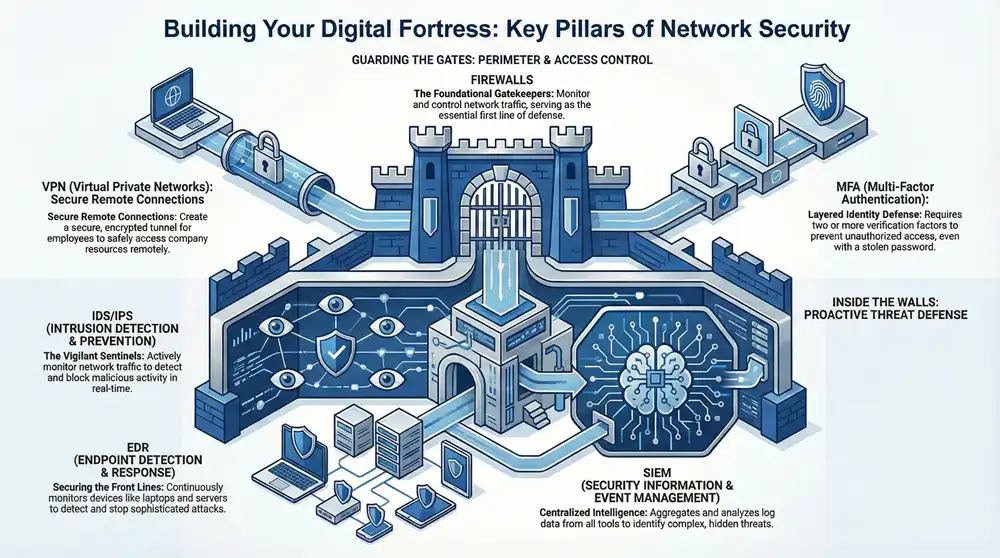
A firewall is a network security system that monitors and controls incoming and outgoing network traffic based on a predefined set of security rules. It establishes a barrier between a trusted internal network and an untrusted external network, such as the internet. By meticulously inspecting data packets, firewalls serve as the essential first line of defense, blocking malicious traffic and preventing unauthorized access before it can breach your perimeter. These can be hardware appliances, software applications, or cloud-based services.
Implementation Considerations for Businesses
For small and mid-sized businesses, implementing a firewall is a non-negotiable step in building a secure network. A medical clinic, for instance, would configure a Next-Generation Firewall (NGFW) like a Fortinet FortiGate to not only block unauthorized IP addresses but also inspect application traffic to prevent rogue software from exfiltrating sensitive patient data. This demonstrates a core principle: deny all traffic by default and only permit specifically approved connections.
Expert Insight: A common mistake is focusing only on inbound threats. Effective firewall management requires egress filtering to control outbound traffic, which can stop malware from “phoning home” or prevent internal data from being sent to unauthorized external locations.
To maximize a firewall’s effectiveness, businesses should:
- Apply the Principle of Least Privilege: Start with a “deny-all” rule and only create specific “allow” rules for necessary business functions.
- Conduct Regular Rule Audits: Periodically review and remove outdated, redundant, or overly permissive rules that could create security gaps.
- Enable Comprehensive Logging: Ensure all firewall activity is logged and forwarded to a centralized security information and event management (SIEM) system for threat analysis and correlation, a key component of our managed IT services.
2. Intrusion Detection and Prevention Systems (IDS/IPS): The Vigilant Network Sentinels
Intrusion Detection and Prevention Systems (IDS/IPS) are a critical layer of network security that actively monitors network traffic for malicious activity or policy violations. An IDS functions like a surveillance camera, detecting suspicious behavior and sending an alert, while an IPS acts as a security guard, not only detecting but also actively blocking the identified threat in real-time. By analyzing traffic flows against a database of known attack signatures and behavioral anomalies, these systems can stop advanced threats that might otherwise slip past a traditional firewall.
Implementation Considerations for Businesses
For growing businesses, deploying an IDS/IPS adds a necessary layer of proactive threat hunting beyond basic perimeter defense. A financial services firm, for example, would use an IPS like Cisco’s Firepower to monitor for signs of a SQL injection attack attempting to steal client data. The system would instantly identify the malicious request pattern, block the attacker’s IP address, and log the event, preventing a potentially devastating data breach before it happens. This highlights its role in providing deep visibility into network activities.
Expert Insight: A common oversight is the “set it and forget it” approach. An untuned IDS/IPS can generate a high volume of false positives, leading to alert fatigue. Continuous tuning and rule customization based on your specific network environment are essential to ensure that genuine threats are prioritized and addressed promptly.
To optimize your IDS/IPS deployment, your business should:
- Deploy Both Network and Host-Based Systems: Use network-based IDS/IPS at key network junctures and host-based systems on critical servers for comprehensive coverage.
- Keep Signatures and Rules Updated: Regularly update the threat signature database to protect against the latest exploits and attack vectors.
- Integrate with a SIEM: Feed IDS/IPS alerts into a centralized SIEM platform to correlate them with other security events, providing a holistic view of potential threats as part of a continuous monitoring strategy.
3. Virtual Private Networks (VPN): Securing Remote Connections
A Virtual Private Network (VPN) creates a secure, encrypted tunnel over a public network like the internet, ensuring data confidentiality and integrity. It allows remote employees, branch offices, and partners to connect to a company’s private network as if they were physically present. By masking the user’s true IP address and encrypting all traffic passing through protocols like IPsec or SSL/TLS, VPNs are a cornerstone among the different types of network security for protecting data in transit.
Implementation Considerations for Businesses
For any business with a remote or hybrid workforce, implementing a VPN is critical for maintaining secure access to internal resources. A distributed marketing agency, for example, would deploy a business VPN solution like Cisco AnyConnect to allow its team members to securely access shared project files and internal servers from anywhere. This prevents eavesdropping on sensitive client data when employees use public Wi-Fi at a coffee shop or airport.
Expert Insight: Not all VPNs are equal. For business use, avoid consumer-grade services and opt for a business-focused solution that offers centralized management, dedicated IP addresses, and robust access controls. This ensures you maintain full control over who accesses your network and how.
To optimize your business VPN’s security posture:
- Enforce Multi-Factor Authentication (MFA): Add an extra layer of security beyond just a password to verify user identities before granting network access.
- Use Strong Encryption Standards: Configure your VPN to use modern, strong encryption algorithms like AES-256 to protect data against brute-force attacks.
- Keep Software Updated: Regularly update the VPN server software and client applications on all devices to patch known vulnerabilities and security flaws.
4. Multi-Factor Authentication (MFA): Layering Your Identity Defenses
Multi-Factor Authentication (MFA) is a critical security layer that moves beyond a simple password. It requires users to present two or more verification factors to gain access to a resource, effectively combining something they know (a password), something they have (a phone or hardware token), and something they are (a fingerprint or facial scan). Even if an attacker steals a user’s password, MFA acts as a powerful barrier, preventing unauthorized entry into your network and applications.


Implementation Considerations for Businesses
For any business, MFA is one of the most effective controls to prevent credential theft. An engineering firm, for instance, would enforce MFA using an app like Duo Security for all remote access to its network, cloud applications like Office 365, and its VPN. This ensures that even if an engineer’s laptop password is compromised at an off-site location, the attacker cannot access sensitive project blueprints without the second verification factor from the engineer’s authorized mobile device.
Expert Insight: Avoid relying solely on SMS-based MFA. Cybercriminals can use “SIM swapping” attacks to intercept text message codes. Prioritize more secure methods like authenticator apps (e.g., Google Authenticator, Okta Verify) or physical hardware keys like a YubiKey for your most sensitive accounts.
To deploy MFA effectively, businesses should:
- Prioritize Privileged Accounts: Start by enforcing MFA on all administrative, executive, and IT accounts, as these are the highest-value targets for attackers.
- Educate and Train Users: Clearly communicate the importance of MFA and provide straightforward instructions on how to set it up and use it to ensure widespread adoption.
- Monitor for Bypass Attempts: Actively log and review failed MFA attempts, as this can be an early indicator of a targeted attack against an employee’s account, a key function of our continuous monitoring services.
5. Data Loss Prevention (DLP): Protecting Your Most Valuable Asset
Data Loss Prevention (DLP) is a comprehensive network security strategy that employs tools and processes to ensure sensitive data is not lost, misused, or accessed by unauthorized users. Unlike firewalls that guard the perimeter, DLP systems focus on the data itself, classifying and monitoring it whether it’s in use, in motion across the network, or at rest in storage. By enforcing granular policies, these solutions can detect and prevent the unauthorized transmission of confidential information, from intellectual property to customer financial details. Understanding modern threats, such as data breaches and the rising threat of infostealer malware, highlights the critical role of DLP in a modern security framework.
Implementation Considerations for Businesses
For businesses handling regulated information, such as an accounting firm managing client tax records, implementing a DLP solution like Microsoft Information Protection is essential for compliance. The firm would first classify documents containing Social Security numbers as “Highly Confidential.” Then, a DLP policy would be created to automatically block any attempt to email these files to an external address or upload them to an unsanctioned cloud service, preventing both accidental leaks and malicious theft.
Expert Insight: Many DLP implementations fail because they are too restrictive, hindering employee productivity. The key is to start with monitoring mode to understand how data flows legitimately before activating blocking rules. This data-driven approach minimizes business disruption and false positives.
To maximize a DLP system’s effectiveness, businesses should:
- Start with Data Discovery and Classification: You cannot protect what you don’t know you have. Use DLP tools to find and classify sensitive data across your network.
- Develop Granular Policies: Create specific rules based on data type, user roles, and context rather than broad, one-size-fits-all restrictions.
- Educate Employees: Train your team on data handling policies and the importance of protecting sensitive information to reduce accidental breaches.
6. Network Segmentation and Zero Trust Architecture
Network segmentation is the practice of dividing a computer network into smaller, isolated sub-networks or zones. This controls the flow of traffic between them, effectively containing breaches within a single segment and preventing lateral movement. This approach is a core component of a Zero Trust Architecture, a modern security model that abandons the outdated “trust but verify” mindset. Zero Trust operates on the principle of “never trust, always verify,” requiring strict identity verification for every person and device trying to access resources on the network, regardless of their location.
Implementation Considerations for Businesses
For businesses handling sensitive information, such as a law firm, implementing segmentation is critical. The firm would create separate network segments for guest Wi-Fi, internal operations, and a highly restricted zone for confidential client case files. This ensures a breach on the guest network cannot spread to critical systems. Adopting a Zero Trust framework from vendors like Cisco or Palo Alto Networks would further demand that even a partner-level attorney must continuously re-authenticate their identity and device health to access the client data segment, making it one of the most robust types of network security.
Expert Insight: A common misconception is that Zero Trust is a single product. It’s a strategic approach and an architectural framework. True implementation requires integrating multiple technologies, including identity and access management (IAM), multi-factor authentication (MFA), and micro-segmentation, to build a comprehensive defense.
To effectively deploy these strategies, businesses should:
- Map Data Flows: Before creating segments, thoroughly understand how data moves across your network to define logical boundaries without disrupting business operations.
- Start with Micro-segmentation: Begin by isolating your most critical assets, like financial servers or customer databases, into their own secure micro-segments.
- Enforce Strict Access Policies: Utilize strong IAM controls to ensure that users and devices only have access to the specific segments and resources they absolutely need. As networks become more distributed, a comprehensive approach is vital, and you can learn more about Secure Access Service Edge (SASE) to see how these principles are evolving.
7. Endpoint Detection and Response (EDR): Securing Your Digital Front Lines
Endpoint Detection and Response (EDR) is an advanced security solution that shifts focus from the network perimeter to individual endpoint devices like laptops, servers, and smartphones. It provides continuous monitoring and collection of endpoint data with the goal of detecting, investigating, and responding to sophisticated cyber threats. By leveraging behavioral analysis and machine learning, EDR tools like CrowdStrike Falcon or Microsoft Defender for Endpoint can identify advanced threats that traditional antivirus software might miss, providing the visibility needed for rapid incident response.
Implementation Considerations for Businesses
For businesses of any size, endpoints are often the primary target for attackers. An engineering firm, for example, would deploy an EDR solution on all workstations to detect unusual process behavior, such as a CAD application attempting to encrypt files, which could indicate a ransomware attack in progress. The EDR platform would immediately isolate the compromised device from the network to prevent the threat from spreading while security teams investigate the alert. This proactive capability is a cornerstone of modern types of network security.
Expert Insight: EDR is not a “set-and-forget” tool. Its true value comes from active threat hunting, where security analysts proactively search for indicators of compromise within the EDR data. This moves your security posture from reactive to proactive.
To get the most from an EDR solution, businesses should:
- Establish Incident Response Playbooks: Define clear, step-by-step procedures for how your team will respond to different types of EDR alerts, from investigation to remediation.
- Integrate with a SIEM: Feed EDR alerts and data into a centralized SIEM platform to correlate endpoint activity with other network events for a complete security picture.
- Train Your Security Team: Ensure your IT or security operations center (SOC) staff are fully trained on the EDR platform’s capabilities, including threat hunting and forensic analysis, a key part of our managed detection and response services.
8. Security Information and Event Management (SIEM): The Central Hub for Security Intelligence
Security Information and Event Management (SIEM) is a powerful solution that provides a holistic view of an organization’s information security. It functions by aggregating log data from a multitude of sources across your network, including firewalls, servers, endpoints, and applications. The SIEM platform then analyzes this data in real-time, correlating events to identify potential security threats, anomalous behavior, and policy violations that would be invisible in isolation. This centralized intelligence is crucial for rapid threat detection, incident response, and meeting compliance requirements.
Implementation Considerations for Businesses
For growing businesses, a SIEM like Microsoft Sentinel or Splunk is a force multiplier for a lean IT team. An engineering firm, for instance, could configure its SIEM to collect logs from its CAD software servers, firewalls, and employee workstations. If the system detects an unusual number of file access attempts from a single user account after hours, followed by a large data transfer to an external IP, it can trigger an automated alert. This allows security personnel to investigate a potential data exfiltration attempt immediately, protecting valuable intellectual property.
Expert Insight: A common pitfall is “alert fatigue,” where analysts are overwhelmed by too many low-priority notifications. The key is to establish a clear baseline of normal network activity first, which allows you to fine-tune alerting rules to only flag genuinely suspicious deviations.
To deploy a SIEM effectively, businesses should:
- Prioritize Critical Data Sources: Start by integrating logs from your most critical assets, such as domain controllers, firewalls, and servers hosting sensitive data.
- Develop Use-Case-Driven Alerts: Define specific threats you want to detect (e.g., malware infection, unauthorized access) and build correlation rules to identify them.
- Integrate with Response Workflows: Connect your SIEM to a Security Orchestration, Automation, and Response (SOAR) platform to automate containment actions, such as isolating a compromised endpoint.
9. Web Application Firewalls (WAF): Protecting Your Digital Storefront
A Web Application Firewall (WAF) is a specialized type of network security designed to protect web applications by filtering and monitoring HTTP/HTTPS traffic between the application and the internet. Unlike standard firewalls that act at the network layer, a WAF operates at the application layer (Layer 7), providing a crucial defense against attacks like SQL injection, cross-site scripting (XSS), and cross-site request forgery (CSRF). It acts as a shield in front of your website or API, analyzing requests to block malicious payloads before they reach your servers.
Implementation Considerations for Businesses
For any business with a public-facing website or application, especially e-commerce sites or client portals, a WAF is essential. For example, an online retailer could use a cloud-based WAF like Cloudflare to instantly block traffic from known malicious bots attempting to scrape pricing data or execute fraudulent transactions. The WAF’s rules can be configured to specifically protect against vulnerabilities listed in the OWASP Top Ten, a standard awareness document for web application security.
Expert Insight: A key WAF function is virtual patching. When a new vulnerability is discovered in your application’s software, a WAF rule can be deployed immediately to block exploit attempts, giving your development team time to create and deploy a permanent fix without taking the application offline.
To leverage a WAF for maximum protection, businesses should:
- Enable Rules Gradually: Start in a “monitor-only” mode to identify legitimate traffic patterns and avoid blocking real users, then gradually enable blocking rules.
- Implement Strategic Rate Limiting: Configure rules to block IP addresses that make an excessive number of requests in a short period, which is a common sign of a brute-force or denial-of-service attack.
- Integrate Threat Intelligence: Use WAF services that incorporate up-to-date threat intelligence feeds to automatically block traffic from newly identified malicious sources.
10. Network Access Control (NAC): The Network’s Bouncer
Network Access Control (NAC) acts as a security bouncer for your network, verifying the credentials of every user and device before granting access. This technology enforces security policies on all endpoints seeking to connect, ensuring they meet predefined compliance and security standards. By authenticating users and assessing device health-checking for up-to-date antivirus software, patch levels, and security configurations-NAC prevents unauthorized or non-compliant devices from becoming an entry point for threats.
Implementation Considerations for Businesses
For organizations with a diverse mix of corporate-owned devices, employee-owned devices (BYOD), and IoT devices, NAC is an essential component of a zero-trust architecture. A financial services firm, for example, would use a NAC solution like Cisco ISE or FortiNAC to automatically profile any device attempting to connect. If a consultant’s laptop with an outdated operating system tries to join the Wi-Fi, NAC can automatically quarantine it to a guest network with no access to sensitive client data until it is patched and compliant.
Expert Insight: The biggest hurdle in NAC deployment is often balancing security with user experience. Start with a “monitor-only” mode to discover and profile all devices on your network without blocking them. This provides valuable visibility to build effective policies before moving to active enforcement.
To get the most out of your NAC implementation, businesses should:
- Start with High-Risk Segments: Begin your rollout by applying policies to critical areas like server subnets or Wi-Fi networks used by guests and contractors.
- Integrate with Other Security Tools: Connect your NAC to your firewall, endpoint protection platform, and vulnerability scanner to create a cohesive security ecosystem.
- Automate Remediation: Configure policies that automatically guide non-compliant users to self-remediation portals to update their systems, reducing the burden on IT staff.
11. DNS Security and Filtering: The Internet’s Address Book Protection
DNS (Domain Name System) security involves measures that protect the internet’s “address book” from compromise. DNS translates human-readable domain names (like yourcompany.com) into machine-readable IP addresses. DNS security and filtering solutions intercept these requests, check them against continuously updated threat intelligence databases, and block access to malicious, fraudulent, or policy-violating websites before a connection is even established. This preventative approach is one of the most effective types of network security for stopping threats at the earliest possible stage.
Implementation Considerations for Businesses
For nearly any organization, DNS filtering is a critical, low-overhead security layer. An accounting firm, for instance, could deploy a service like Cisco Umbrella across its network and remote endpoints. This would instantly block employees from accidentally clicking on phishing links in emails that impersonate financial institutions, preventing credential theft and potential data breaches. It also allows the firm to enforce acceptable use policies by blocking access to non-work-related categories like gambling or social media, improving productivity and reducing risk.
Expert Insight: DNS security isn’t just about blocking bad websites. It’s a powerful tool against advanced malware. Many threats use DNS for command-and-control (C2) communications. By monitoring for and blocking suspicious DNS query patterns, you can neutralize malware that has already bypassed other defenses.
To leverage DNS security effectively, businesses should:
- Deploy at Multiple Layers: Implement DNS filtering on the network gateway, on servers, and directly on endpoints to protect users both in the office and remotely.
- Monitor DNS Query Logs: Regularly review logs for unusual activity, such as a high volume of requests to unknown domains, which can indicate a malware infection.
- Integrate with Other Tools: Combine DNS intelligence with your firewall and SIEM to get a more comprehensive view of threats and orchestrate faster responses. This integration is a core part of our managed detection and response (MDR) service.
12. Secure Email Gateways (SEG): Guarding the Primary Threat Vector
A Secure Email Gateway (SEG) is a specialized security solution that acts as a checkpoint for all inbound and outbound email traffic. Positioned between your internal network and the internet, it filters messages for malicious content, spam, and phishing attempts before they ever reach an employee’s inbox. By inspecting attachments, links, and message content against advanced threat intelligence, SEGs neutralize one of the most common vectors for cyberattacks, making them a critical layer in any comprehensive network security strategy.
Implementation Considerations for Businesses
For any business, email is both a critical tool and a major vulnerability. A law firm, for example, would deploy an SEG like Mimecast or Microsoft Defender for Office 356 to scan incoming emails for ransomware hidden in attachments and check outgoing messages for sensitive client information, preventing accidental data leaks. This proactive filtering significantly reduces the risk of a breach originating from a simple, deceptive email, which is a key threat to organizations of all sizes.
Expert Insight: Many businesses mistakenly assume their cloud email provider’s built-in security is sufficient. While helpful, it often lacks the advanced sandboxing, URL rewriting, and impostor protection that a dedicated SEG provides to stop sophisticated, zero-day phishing attacks.
To effectively deploy an SEG, businesses should:
- Implement Email Authentication: Configure and enforce SPF, DKIM, and DMARC records to prevent domain spoofing and improve email deliverability.
- Enable Attachment Sandboxing: Use sandboxing features to safely execute and analyze unknown attachments in an isolated environment before delivery.
- Establish Data Loss Prevention (DLP) Rules: Create policies within the SEG to scan outbound emails for sensitive keywords, financial data, or PII to prevent data exfiltration. Our guide offers more detail on effective cloud-based email security solutions.
Unify Your Defenses with a Strategic Partner
Understanding the different types of network security is the essential first step toward building a resilient defense against modern threats. A truly robust security posture is not about deploying a single product but strategically layering multiple, complementary technologies to create a comprehensive defense-in-depth strategy.
From foundational defenses like firewalls to internal controls like Network Segmentation, each component plays a unique and vital role. Advanced solutions such as Endpoint Detection and Response (EDR) provide the deep visibility and rapid response capabilities necessary to stop sophisticated attacks before they can cause significant damage. The goal is to build a cohesive ecosystem where each layer supports the others, closing security gaps and creating a formidable barrier against intruders.
The challenge for most businesses lies not in understanding the what, but in mastering the how. Implementing, configuring, and managing this complex array of security technologies requires specialized expertise and continuous monitoring that can overwhelm internal IT teams.
This is where the value of a strategic partnership becomes clear. An effective security program is an ongoing process that involves:
- Continuous Monitoring: Actively watching for threats 24/7/365.
- Proactive Threat Hunting: Searching for hidden indicators of compromise that automated systems might miss.
- Expert Management: Ensuring all security tools are correctly configured, updated, and optimized.
- Incident Response: Having a clear plan to contain and neutralize threats the moment they are detected.
A managed security services provider acts as an extension of your team, bringing enterprise-grade expertise and technology to your organization without the associated overhead. This approach transforms your security from a reactive cost center into a proactive, business-enabling function. At 1-800 Office Solutions, we translate the complexity of network security into a clear, manageable, and effective cybersecurity strategy tailored to your business needs.
Ready to build a tailored, enterprise-grade security fortress for your organization? Contact 1-800 Office Solutions today for a consultation and discover how our managed cybersecurity services can unify your defenses and protect your most critical assets. Learn more at 1-800 Office Solutions and take the first step toward true peace of mind.