
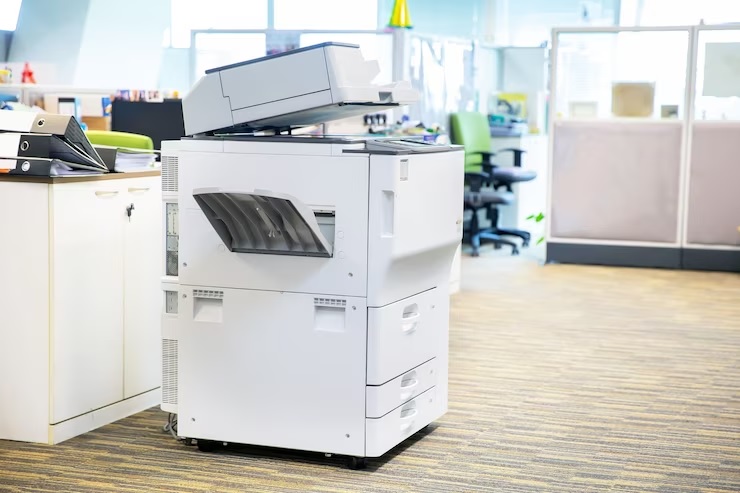
Copier Dimensions in Miami: What Fits, What Does Not, and What to Ask
Machine size, service clearance, doorway math, and the dealer questions worth asking before a copier ever reaches your floor.
Quick Answer
Copier dimensions in Miami offices range from roughly 18 inches wide for a compact A4 desktop unit to 48 inches wide for a floor-standing A3 machine with a finisher attached. But the number worth planning around is not the machine footprint. It is the service clearance envelope, which typically adds 24 inches of width, 30 inches of depth, and about 60 inches of vertical room. Measure that envelope, your doorways, and your elevator before you sign anything.
Why Size Comes First
The Measurement Most Miami Offices Skip
A copier arrives on a pallet. Two technicians roll it off the truck, wheel it toward the door, and stop. The doorway is 30 inches. The machine plus its cart is 34. Everyone stands around in the Brickell parking garage while somebody calls the property manager about the freight elevator.
This happens more than dealers like to admit. And it is entirely preventable with a tape measure and ten minutes.
Copier dimensions in Miami come with a local wrinkle. Older buildings in Little Havana, Coral Gables, and parts of downtown were not designed around 350-pound office equipment. Narrow service corridors. Tight turns. Elevators sized for people, not pallets. Newer towers in Doral and Aventura are easier, though loading dock scheduling can still eat a delivery window.
So before the conversation turns to price, it turns to physical fit. At 1800 Office Solutions, we walk the placement path with a client before the order goes in, and it has saved a lot of rescheduled installs.
Typical hourly rate for a copier service technician visit outside a maintenance agreement. Cramped installations drive more of these calls, because restricted airflow and blocked access make routine problems worse.
Source: Strategic Technology Partners of Texas, printer space requirements guidance, 2026
Real Numbers
Copier Dimensions by Size Class
Copier size tracks three things: print speed, paper capacity, and finishing options. A 25 page-per-minute desktop unit and a 70 page-per-minute production machine are not in the same category of object. One sits on a credenza. The other needs its own corner and a dedicated circuit.
Here is what the classes actually measure. Figures below are manufacturer base dimensions and reflect published specs; verify the exact model spec sheet before planning, since configurations vary.
| Class | Example Model | W x D x H (inches) | Weight | Typical Fit |
|---|---|---|---|---|
| Compact A4 desktop | Canon imageRUNNER ADVANCE DX C259iF | 18 x 20 x 24 | Around 70 lbs | Small office, satellite suite, 2 to 10 users |
| Mid-size A3 floor unit | Canon imageRUNNER ADVANCE DX C3930i | 23 x 27 x 36 | Around 130 lbs | 10 to 40 users, general commercial office |
| Full-size A3 workhorse | Xerox AltaLink C8270 (base) | 24.4 x 31.2 x 46 | Around 352 lbs | High-volume floor, 40 to 150 users |
| Full-size plus finisher | Xerox AltaLink C8230 configured | Up to 48 x 27 x 44 | 200+ lbs | Legal, print room, booklet and staple work |
Notice the jump in the last row. A stapling finisher or booklet maker hangs off the side of the machine and catches output. It can add a foot or more of width on its own. High-capacity feeders push depth. Extra paper drawers raise the base.
Weight matters too. Anything above roughly 200 pounds is a two-person move at minimum, and moving it across a raised floor or a tile lobby usually means plywood sheets and a conversation with building management.
What About Wide-Format?
Architecture and engineering firms in Miami often need 24-inch or 36-inch roll-fed plotters alongside a standard office copier. Those are a different planning problem: long and shallow rather than deep and tall, with roll loading clearance at the back. Budget wall space, not corner space.
The Real Constraint
Machine Size Versus Service Clearance
Here is the distinction almost every buyer misses. Machine size describes the box sitting still. Service clearance describes the room the box needs to actually work.
Manufacturers call the second one the service space envelope. It accounts for paper trays sliding out, side doors swinging open, toner cartridges coming forward, and a technician kneeling beside the machine with a parts tray. Space requirements are always larger than the physical footprint. Always.
A Working Rule of Thumb
Plan for at least 24 inches of extra width, 30 inches of extra depth, and 60 inches of vertical room above and around the unit. Applied to that mid-size A3 machine at 23 by 27 inches, the real floor claim becomes closer to 47 by 57 inches. That is a meaningfully different piece of your floor plan.
- Front clearance. Paper drawers pull out 18 to 24 inches. The document feeder lid tilts back. Someone has to stand there.
- Side clearance. Toner access and jam clearance doors are usually on the right side of A3 machines, and finishers occupy the left.
- Rear clearance. Ventilation and cable routing. Pushing a machine flush against drywall traps heat.
- Overhead clearance. The scanner lid and automatic document feeder need swing room, so a low shelf above the unit is a problem.
- Technician access. Repairs take longer, and sometimes require moving the machine entirely, when nobody can get a hand behind it.
What Goes Wrong Without the Clearance
- Overheating from restricted airflow, which shortens component life
- Degraded print quality as internal temperatures climb
- More frequent service calls and longer repair times on each one
- Failed delivery day, because the install crew cannot safely place the unit
- Workplace safety exposure, since OSHA clearance and egress expectations apply to equipment corridors too
Miami Specifics
Measuring Your Office Before Delivery Day
Ten minutes with a tape measure prevents most install failures. Walk the entire path the machine will travel, from the truck to its final resting spot, and write down the narrowest point.
The Path Checklist
- Loading dock or street access. Many downtown Miami and Brickell buildings restrict freight deliveries to specific windows. Book early.
- Freight elevator interior depth and door width. A machine on a moving cart is taller and wider than the machine alone.
- Every doorway on the route. Standard commercial doors run 32 to 36 inches, though older Miami buildings sometimes surprise you with 28.
- Corner turns. A 46-inch-tall unit on a cart needs swing radius in a hallway, not just width.
- Floor type and thresholds. Carpet transitions, tile lips, and raised access floors all matter at 350 pounds.
- Stairs. If stairs are unavoidable, say so up front. That changes crew size and sometimes cost.
Power, Network, and Climate
Most office copiers run on a standard 120V outlet. High-capacity machines with fusers that spike on wake-up may want a dedicated circuit, and sharing a circuit with a space heater or a break room microwave causes intermittent faults nobody can diagnose for weeks.
Network is simpler but still worth checking. A wired Ethernet drop near the placement point is more stable than wireless, particularly for scan-to-folder workflows. Wireless works. It just introduces one more variable.
Then there is the Miami factor: heat and humidity. Copiers dislike both. A machine tucked into an unconditioned storage closet, or parked in direct afternoon sun through a west-facing window, will jam more and fade faster. Paper absorbs humidity and curls, which shows up as misfeeds nobody attributes to the weather.
Minimum extra width and depth to plan around a floor-standing office copier, on top of the machine’s own footprint, before finishing accessories are added.
Source: manufacturer service envelope guidance summarized by print vendors, 2026
Money Questions
Cost and Contract Questions to Ask a Miami Copier Dealer
Once the machine fits, the contract becomes the risk. Copier leases are where margin hides, and the sticker payment rarely tells the whole story.
Most US businesses pay somewhere between $89 and $450 per month to lease a copier, with the majority of small and mid-sized offices landing in the $150 to $400 range on a 36 to 60 month term. Cost-per-page service adds roughly $0.01 to $0.015 for black and white and $0.06 to $0.12 for color. Those are industry ranges reported across dealer pricing guides, not quotes; your actual number depends on volume, speed, and configuration. Our own copier lease rates breakdown goes deeper on how the math works.
| Cost Component | Typical Range | Question to Ask |
|---|---|---|
| Base monthly lease | $89 to $450 | Is this a $1 buyout or fair market value lease? |
| B&W cost per page | $0.01 to $0.015 | Is toner included, or billed separately? |
| Color cost per page | $0.06 to $0.12 | Does a page with any color count as full color? |
| Monthly page minimum | Varies by contract | What is the overage rate, and does it match my contracted rate? |
| Annual escalation | 0% to 10% per year | Is there an escalation clause, and is it capped? |
| End-of-lease return shipping | Roughly $300 to $800 | Who pays freight when the term ends? |
| Property tax | Varies | Bundled into the payment or billed separately? |
Get the Line Items in Writing
Ask for an itemized quote before anything gets signed. Lease, service, parts, labor, toner, monitoring, reporting. If a component is not spelled out, it is not guaranteed, and the verbal assurance from a sales rep does not survive a change in account manager.
- Minimum volume commitment. Contract 5,000 pages and print 3,000, and you still pay for 5,000. Right-size the commitment to real usage, not optimistic usage.
- Overage rate parity. Some agreements charge a higher per-page rate above the minimum than below it.
- Buyout math. Ask what the buyout is today and at end of term. If the answer is fair market value, ask how FMV gets calculated and whether it is capped.
- Auto-renewal language. Many leases roll into an additional term unless you give written notice inside a specific window. Calendar that date the day you sign.
- Early termination. What happens if you outgrow the machine in year two, or downsize?
Service Reality
Response Time, Technicians, and Uptime
A copier that breaks is not an inconvenience for one person. It is a bottleneck for a whole floor, and in a law office or a medical practice it can stall billing and intake.
So ask about service the way you would ask about an insurance policy, not a feature list.
- Guaranteed response window. Four hours, next business day, or best effort? Get the number, then get it in the contract.
- Technician location. A dealer with techs based in Miami-Dade responds differently than one dispatching from Orlando. Ask where the nearest tech actually sits.
- Parts inventory. Does the local branch stock fusers and drums for your model, or does everything ship?
- First-call fix rate. A dealer who tracks this will tell you. A dealer who does not track it will change the subject.
- Loaner policy. If the machine is down for three days, what happens?
- After-hours coverage. Plenty of Miami offices run past six. Ask whether support does.
Hurricane Season Is a Service Question
South Florida businesses carry a risk most markets do not. Power interruptions, surge damage, and week-long access problems after a storm all affect equipment. Ask how the dealer handles storm-related downtime, whether surge protection is recommended for your configuration, and how quickly they resume dispatch after a closure. It is an awkward question in March. It is the only question in September.
Often Overlooked
The Data Security Questions Nobody Asks
Modern multifunction copiers contain storage. Scanned contracts, printed patient records, faxed tax documents, all of it can persist on an internal drive. The machine is a networked endpoint, and it deserves the same scrutiny as a workstation.
Federal guidance treats it that way. NIST Special Publication 800-88 covers media sanitization across storage types and explicitly includes printers and copiers, defining clear, purge, and destroy as the accepted methods. The FTC’s digital copier data security guidance makes the same point for businesses in plainer language.
Ask These Before the Lease Ends, Not After
- Drive sanitization at end of lease. How is it done, is there a fee, and do you receive a certificate of data destruction?
- Encryption at rest. Is the internal drive encrypted while the machine is in service?
- Overwrite scheduling. Can image overwrite run automatically after each job?
- User authentication. Badge, PIN, or open access at the panel?
- Firmware updates. Who applies them, and on what cadence?
- Audit logging. For HIPAA-covered practices and firms under client confidentiality obligations, can you pull a record of who scanned what?
A good dealer answers all six without hesitating. Sanitization at no charge with a destruction certificate is the answer worth hearing. Our managed print services team builds these controls into the deployment rather than bolting them on later.
Fit and Function
Warranty, Upgrades, and Workflow Questions
Warranty Coverage
- Duration. Does coverage span the full lease term, or lapse in year three of a five year deal?
- Scope. Which parts and labor are covered, and which are consumables you buy?
- Exclusions. Power surge damage, water intrusion, and user error are common carve-outs. In South Florida the first two are not hypothetical.
Upgrade Paths
Businesses grow, shrink, and change what they print. A five year lease on a machine sized for the company you were is an expensive mistake.
- Can you upgrade mid-term, and what does the remaining balance do?
- Are newer models available on upgrade, or only refurbished stock?
- Does an upgrade restart the clock on a fresh full term?
Document Workflow Integration
The copier is a node in a document process, not an island. Check compatibility before signing, since retrofitting a workflow after installation costs more than choosing correctly.
- Scan to email, network folder, SharePoint, or your document management platform
- OCR quality on searchable PDF output, which varies more between models than spec sheets suggest
- Mobile and cloud printing for hybrid staff
- Driver support for the operating systems your team actually runs
- Accounting codes if you bill print costs back to clients or matters
Industry Fit
A Coral Gables law firm cares about booklet finishing, Bates-friendly output, and confidentiality controls. A Doral logistics company cares about durability and high-volume black and white throughput. A Miami medical practice cares about HIPAA-aligned access controls and reliable scanning. Same category of machine, different right answer. Compare options across our copy machine lease lineup with your actual use case in front of you, and read our deeper copier dimensions explainer if you want the measurement detail.
Local Support
How 1800 Office Solutions Helps
We have placed equipment in South Florida offices, which means we have measured a lot of narrow Miami doorways and negotiated a lot of freight elevator windows.
Pre-Install Site Review
We measure the path, the placement point, and the service envelope before the order is placed, not on delivery day.
Right-Sized Recommendations
Machine class matched to real print volume and floor space, so you are not paying for a production unit doing 2,000 pages a month.
Transparent Line Items
Itemized quotes covering lease, service, parts, labor, and toner. No surprise overage structure buried in an addendum.
Security Built In
Drive encryption, image overwrite, and end-of-lease sanitization with a destruction certificate, aligned to NIST guidance.
Delivery Logistics
Dock scheduling, elevator reservations, and crew sizing handled up front so install day is uneventful.
An Honest Caveat
No dealer fits every business. If your office prints under 500 pages a month, a leased A3 multifunction machine is probably the wrong tool and a good desktop unit purchased outright will cost you less over five years. If you need genuine production printing with in-line perfect binding, a specialized print house partner may serve you better than any office dealer. We would rather say so early than sell you a machine you regret in month eighteen. Ask any dealer, including 1800 Office Solutions, where their solution stops being the right one.
Common Questions
Copier Dimensions and Dealer Questions: FAQ
How much space does an office copier need in total?
Take the machine footprint and add roughly 24 inches of width, 30 inches of depth, and 60 inches of vertical clearance. A mid-size A3 unit measuring 23 by 27 inches therefore claims closer to 47 by 57 inches of usable floor area once trays, doors, and technician access are counted.
What are typical copier dimensions for a small Miami office?
A compact A4 multifunction unit runs about 18 inches wide, 20 inches deep, and 24 inches tall, weighing near 70 pounds. That fits on a sturdy credenza or a rolling stand. Offices with 10 or more regular users usually step up to a floor-standing A3 machine around 23 by 27 by 36 inches.
Will a copier fit through a standard office door?
Usually, but not always. Commercial doors typically run 32 to 36 inches wide, and most floor-standing copiers measure 23 to 30 inches at the base. The risk comes from the delivery cart adding width and height, and from older Miami buildings with narrower interior doors. Measure the narrowest point on the full route.
How much does a copier weigh?
Compact desktop multifunction units weigh around 70 pounds. Mid-size floor machines run near 130 pounds. Full-size A3 workhorses reach 350 pounds or more before finishing accessories. Anything past 200 pounds needs a two-person crew and floor protection.
Do finishers and extra trays change the footprint?
Significantly. A stapling finisher or booklet maker extends the side of the machine to catch output, sometimes adding a foot of width. High-capacity feeders add depth, and additional paper drawers raise the base. Always plan around the configured machine, never the base model listed on the spec sheet.
Where can I find a copier’s official space requirements?
Space requirement diagrams rarely appear on public product pages, though basic dimensions do. Manufacturer installation guides contain them, and your dealer can supply the drawing for the exact configuration quoted. Requesting it is a reasonable ask, and reluctance to provide it is a small warning sign.
What does it cost to lease a copier in Miami?
Reported industry ranges put most US businesses between $89 and $450 per month, with small and mid-sized offices commonly landing between $150 and $400 on a 36 to 60 month term. Service cost per page adds roughly a penny for black and white and six to twelve cents for color. Local quotes vary with volume, speed, and configuration.
The recurring offenders are page volume minimums you pay whether or not you print, overage rates that exceed your contracted rate, annual escalation clauses, separately billed property tax, end-of-lease return freight running $300 to $800, and hard drive sanitization fees. Ask about each one specifically and get the answers in writing.
Is there data stored on my office copier?
Very likely yes. Most networked multifunction devices retain scanned and printed images on an internal drive. NIST Special Publication 800-88 addresses sanitization for printers and copiers directly, and the FTC publishes guidance for businesses on the same risk. Ask about encryption at rest, automatic image overwrite, and a certificate of data destruction at end of term.
Does Miami humidity affect copier performance?
It does. Paper absorbs moisture and curls, which produces misfeeds and jams people rarely trace back to climate. Machines placed in unconditioned closets or direct afternoon sun also run hotter and fail sooner. Keep equipment in conditioned space, and store paper sealed until use.
How fast should a copier dealer respond to a service call?
Four hours is a strong commitment in a dense market like Miami-Dade, and next business day is common. What matters more is whether the number appears in your contract and where the nearest technician is physically based. A dealer dispatching from Orlando cannot realistically meet a four hour window in Coral Gables.
Should I lease or buy a copier?
Depends on volume and cash position. Under roughly 500 pages a month, buying a good desktop unit outright usually costs less over five years. Higher volumes favor leasing, because service, parts, and toner bundle into a predictable monthly number and upgrades stay available. This is general information rather than financial advice, so run the numbers against your own tax and cash flow situation.
Can I upgrade a copier mid-lease?
Often, though terms vary widely. Some dealers roll the remaining balance into a new agreement, which quietly extends your total commitment. Ask before signing what a mid-term upgrade would actually cost and whether it restarts a full term.
Get a Free Consultation on the Right Copier for Your Space
Our team will measure your placement path, size the machine to your real print volume, and give you an itemized quote with no buried fees.
GET A FREE CONSULTATION
(888) 574-5120
1-800 Office Solutions | Your One Source For Everything Office