
Color Copier Machine in Palm Beach: Real Costs, Lease Terms, and Buying Advice
Color copier leasing and printer solutions for Palm Beach County offices
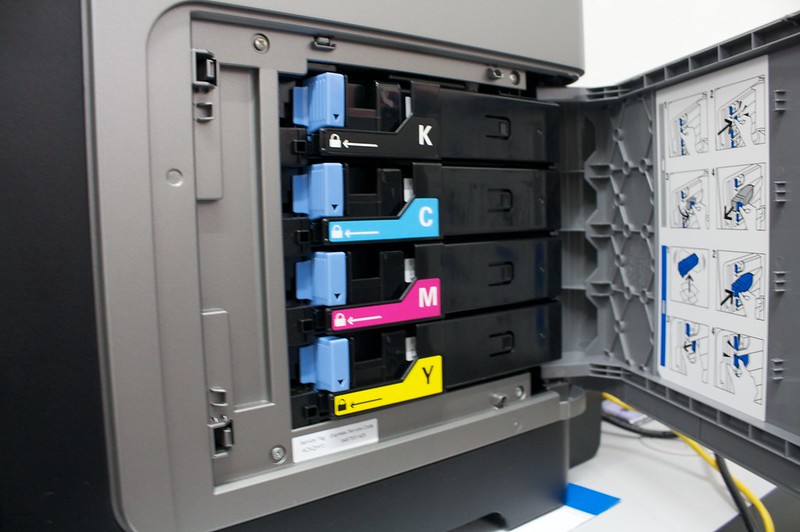
A color copier machine in Palm Beach typically leases for $150 to $400 per month for a mid-volume office multifunction unit, with entry-level desktop models near $50 to $90 and production systems starting around $450. On top of the base payment you pay click charges of roughly $0.01 to $0.015 per black-and-white page and $0.06 to $0.12 per color page. Buying outright runs $3,000 to $15,000 or more, and most Palm Beach businesses still lease because service, toner, and parts get bundled into one predictable bill.
Start Here
Why Palm Beach Offices Keep Rethinking Their Color Copier
Color output stopped being a luxury a long time ago. A law office in West Palm Beach needs sharp exhibit copies. A Boca Raton design studio needs accurate proofs. And a Jupiter property management company needs 200 glossy listing sheets before the 9 a.m. showing. Same machine category, wildly different demands.
Here is the problem. Most offices sign a five-year agreement, forget about it, then discover their color cost per page is triple the market rate. Or the volume they projected in year one bears no resemblance to what they actually print in year four. 1800 Office Solutions sees both scenarios weekly across South Florida.
So this article walks through the numbers rather than the marketing. Pricing ranges, click charges, lease structures, service agreement traps, security exposure, and the specific quirks of running office equipment in a humid coastal county. Read it before you sign anything.
Choosing a color copier machine in Palm Beach comes down to four variables: monthly page volume, color-to-mono ratio, finishing requirements, and how much downtime your operation can absorb. Everything else is negotiation.
Pricing
What a Color Copier Machine Costs in Palm Beach County
Published 2026 market data puts standard office copier leases between $100 and $400 monthly for small and mid-sized businesses. Palm Beach pricing tracks that national range fairly closely, though coastal service territories sometimes carry a small premium for on-site response time.
The table below reflects typical bundled lease pricing. Bundled means the base payment plus a service agreement covering toner, parts, and labor. Note the click charges separately; they are where budgets quietly break.
| Machine Class | Monthly Volume | Typical Lease | Purchase Range | Best Fit |
|---|---|---|---|---|
| Desktop color MFP | Under 1,000 pages | $50 to $90 | $700 to $2,000 | Home office, two-person firm |
| Entry floor-standing color | 1,000 to 5,000 | $120 to $190 | $2,500 to $5,000 | Small professional office |
| Mid-volume color MFP | 5,000 to 15,000 | $150 to $300 | $5,000 to $10,000 | Most Palm Beach businesses |
| High-volume color MFP | 15,000 to 40,000 | $300 to $450 | $10,000 to $18,000 | Law firms, medical groups |
| Light production color | 40,000 plus | $450 and up | $20,000 plus | In-house print shops |
Those figures assume a 36 to 60 month term and reasonable credit. Shorter terms raise the payment. A 24-month lease on a mid-volume unit often lands 30 to 40 percent above the 60-month number for identical equipment.
Want the full national breakdown? Our team maintains a detailed copier lease rates guide and a separate cost to lease a copier analysis by industry.
Industry-standard 2026 color click rate per page. At 8,000 color pages a month, that is $480 to $960 on top of your lease payment.
Cost Per Page
Click Charges Deserve More Scrutiny Than the Lease Payment
Ask most office managers what their copier costs and they quote the monthly payment. Ask what their color click rate is and the room goes quiet. But click charges frequently exceed the equipment payment inside eighteen months.
Current 2026 rates run roughly $0.01 to $0.015 for black-and-white and $0.06 to $0.12 for color. A single full-coverage color page can cost eight times a mono page. Multiply by real volume and the math gets serious fast.
Three click-charge terms worth negotiating
- Included allotment. Many agreements bundle 2,000 to 5,000 mono pages before overages start. Color allotments are usually far smaller or absent entirely.
- Annual escalator. A 5 to 10 percent yearly increase on click rates is common boilerplate. Push for 3 percent or a hard cap.
- Color definition. Some vendors bill any page containing a single colored pixel at the full color rate. Tiered color billing (low, medium, full coverage) saves offices with light color use a meaningful amount.
One Delray Beach client cut their annual print spend by roughly $4,200 simply by moving to tiered color billing. No equipment change. Just a contract amendment.
Lease Versus Buy
Should Your Palm Beach Office Lease or Purchase?
Both paths work. The right answer depends on cash position, expected volume stability, and how long you intend to keep the machine running.
| Factor | Leasing | Buying |
|---|---|---|
| Upfront cash | Little to none | Full purchase price |
| Total 5-year cost | Usually 15 to 30% higher | Lower if the unit lasts |
| Service and toner | Normally bundled | Separate contract or per-incident |
| Technology refresh | Built into the term | You own an aging asset |
| Tax treatment | Operating expense deduction | Section 179 or depreciation |
| Exit flexibility | Locked for the full term | Sell or redeploy anytime |
Honest caveat: leasing costs more over a long horizon. If your volume is stable, your IT staff handles basic maintenance, and you plan to run the same machine for seven years, buying wins on paper.
But most Palm Beach offices do not fit that profile. Volume shifts, staff changes, and a dead fuser on a Friday afternoon becomes an emergency without a service agreement. Leasing converts an unpredictable expense into a fixed line item, which is why it remains the default for professional service firms across the county.
Watch the lease type too. A fair market value lease keeps payments lower and returns the equipment at term end. A dollar buyout lease costs more monthly but you own the machine afterward. Neither is inherently better; they solve different problems.
Sizing
Matching the Machine to Your Actual Print Volume
Oversizing is the most expensive mistake in this category. Undersizing is the most frustrating. Both happen constantly.
Pull twelve months of page counts before shopping. Every copier tracks this internally, and any current vendor can export it. Then look at the color-to-mono split, because a 90 percent mono office needs a very different configuration from a 40 percent color office.
Practical sizing signals
- Duty cycle versus recommended volume. Manufacturers publish a maximum duty cycle and a recommended monthly volume. Buy against the recommended number, not the maximum, or you will replace parts constantly.
- Pages per minute. A 25 ppm unit frustrates a busy front desk. A 60 ppm unit sits idle in a four-person office.
- Paper capacity. Two 500-sheet trays sound fine until someone reloads three times a day.
- Finishing. Stapling, hole punch, and booklet making add real cost. Skip what you will not use monthly.
- Scanning throughput. Many offices now scan more than they print. A single-pass duplex feeder matters more than print speed for those teams.
Our copiers and printers catalog lists specifications by class, and the team runs a free assessment on request.
Brands
Which Manufacturers Do Palm Beach Offices Actually Run?
Brand loyalty in this industry runs deep, sometimes past the point of usefulness. Here is a balanced read on the major players.
- Ricoh. Strong mid-volume color, excellent scan workflows, widely serviced across South Florida. A common default for professional offices.
- Canon. Best-in-class color accuracy for marketing and design output. Slightly higher consumable costs on some models.
- Xerox. Deep software ecosystem and strong security features. Parts availability varies by model age.
- Kyocera. Long-life components and low cost per page. Color output is competent rather than exceptional.
- Konica Minolta. Very good production color and finishing options. Better suited to higher volumes.
- HP. Broad range from desktop to enterprise MFP, familiar driver environment, easy fleet management.
Local service coverage matters more than the badge. A slightly less prestigious brand with a technician twenty minutes away beats a premium machine waiting on a part from out of state. Ask any prospective vendor for their average on-site response time in your specific city, and ask for it in writing.
Service Agreements
What to Check Before You Sign the Service Contract
The service agreement, not the equipment, determines whether your next five years go smoothly. Read it carefully.
- Response time commitment. Four business hours is a reasonable Palm Beach standard. Get it stated, not implied.
- What toner is included. Full coverage usually includes toner but excludes staples and paper. Confirm whether waste toner containers are covered.
- Loaner policy. If a repair exceeds 48 hours, does a replacement unit arrive?
- Auto-renewal language. Evergreen clauses roll many agreements into another full term unless you cancel inside a narrow notice window. Calendar that date the day you sign.
- End-of-lease return terms. Return freight, packaging, and refurbishment charges surprise a lot of offices. Ask for the maximum exposure figure up front.
- Meter reading method. Automatic reporting beats manual submission, which leads to estimated bills and disputes.
A short caution on evergreen renewals. They are legal, they are common, and they have trapped plenty of Florida businesses into a sixth and seventh year on equipment they wanted to replace. Read that paragraph twice.
Share of organizations reporting a print-related data breach in the past year, per Quocirca’s Global Print Security Report. Average cost of those incidents rose 38% year over year.
Security
Your Color Copier Is a Networked Computer
Modern multifunction devices store documents, hold credentials, connect to email, and run their own operating systems. Attackers know this. Most office managers do not.
Rapid7 researchers disclosed eight vulnerabilities affecting 748 multifunction printer models across five manufacturers, including an authentication bypass flaw. Meanwhile, a global study of more than 800 IT and security decision makers found only 36 percent applied printer firmware updates promptly. So the exposure window stays open for months at many organizations.
Baseline hardening steps
- Change every default administrator credential before the device joins your network.
- Disable unused protocols and services (FTP, Telnet, legacy print services).
- Enable encrypted transmission and hard drive encryption where supported.
- Turn on user authentication so print jobs release only at the device.
- Wipe or physically destroy the internal drive at end of lease.
- Patch firmware on a scheduled cadence rather than reactively.
The NIST Cybersecurity Framework treats networked imaging devices as in-scope assets, and CISA’s Known Exploited Vulnerabilities catalog is a practical place to check whether your model has an active exploit. For Palm Beach offices handling protected health information or client financial records, copier security belongs in your compliance documentation.
Managed Print
Where Managed Print Services Change the Math
Managed print services means a provider monitors your fleet, ships toner automatically, dispatches service proactively, and reports on usage by department or user.
Published industry data suggests businesses reduce print costs by 20 to 30 percent under managed programs, with some studies reporting 30 to 50 percent for previously unmanaged environments. Treat the higher figures cautiously; the savings depend heavily on how disorganized the starting point was. An office already running a single well-negotiated device will not find 40 percent.
Savings typically come from four places: consolidating redundant desktop printers, eliminating emergency toner purchases at retail prices, enforcing default duplex and mono printing, and catching devices printing far above their cost-effective range.
Our managed print services analysis breaks down how the assessment works. Fair warning: the biggest wins usually come from behavior change, not equipment swaps.
Local Factors
Running Office Equipment in South Florida
Palm Beach County adds a few wrinkles national guides skip entirely.
Humidity and paper handling
Coastal humidity swells paper fibers, and swollen paper jams. Offices near the Intracoastal see this more than inland locations in Wellington or Royal Palm Beach. Store reams sealed, keep them off concrete floors, and load only what you need for the day. A dehumidifier in the copier room pays for itself in avoided service calls.
Hurricane season and power quality
June through November brings surges and outages. A surge protector rated for the machine’s draw is the minimum. Better: a line-interactive UPS with power conditioning, which prevents the brownout damage that kills controller boards. Ask your vendor whether storm damage falls under the service agreement, because it frequently does not.
Seasonal volume swings
Plenty of Palm Beach firms run heavy from January through April and quiet through summer. A flat annual click allotment penalizes that pattern. Negotiate an annualized volume commitment rather than a strict monthly one, and the peaks stop generating overage bills.
Service territory reality
Palm Beach County stretches from Boca Raton to Belle Glade. Response time in Boca looks nothing like response time out west. Confirm your actual address falls inside the vendor’s primary territory before you sign.
Our Approach
How 1800 Office Solutions Helps Palm Beach Businesses
Volume Assessment
We pull twelve months of real page counts and size the machine against actual behavior, not a sales estimate.
Contract Review
Existing agreement in hand? We flag escalators, evergreen clauses, and return exposure before renewal.
Device Hardening
Credential changes, protocol lockdown, encryption, and end-of-lease drive wiping as standard practice.
Supply Automation
Toner ships before you run out. No retail emergency purchases at triple the contract rate.
Managed IT
Copier fleets rarely live alone. We support the network, endpoints, and security around them.
1800 Office Solutions has served Florida businesses. Ask for the assessment first; the equipment conversation goes better once the numbers are on the table.
Red Flags
Warning Signs During the Sales Process
A few patterns show up repeatedly in agreements our team later reviews. None of them are illegal. All of them cost Palm Beach businesses money.
- A quote with no click rates listed. If the proposal shows only a monthly payment, the click charges are somewhere else. Ask for them in writing.
- Pressure tied to a month-end deadline. Equipment pricing does move with quarters, sure. But a genuine deal survives a 48-hour review by your attorney.
- Vague trade-in credit for your current machine. Some vendors roll the remaining balance of an old lease into a new one without disclosing it clearly. Your payment goes up, the term restarts, and the old obligation never actually disappeared.
- Refusal to name the leasing company. The dealer sells the machine; a third-party finance company holds the paper. You need both names before signing.
- Service promises delivered verbally. Response times, loaner units, and included supplies belong in the document.
None of this means the salesperson is acting in bad faith. Standard industry paperwork simply favors the vendor, and reading it closely is the only defense. 1800 Office Solutions reviews competitor agreements at no charge, even for businesses who ultimately stay where they are.
Common Questions
Color Copier Machine in Palm Beach: Frequently Asked Questions
How much does a color copier lease cost in Palm Beach?
Most Palm Beach offices pay $150 to $300 monthly for a mid-volume color multifunction copier on a 60-month bundled lease. Entry-level desktop units run $50 to $90, and high-volume machines reach $300 to $450. Click charges apply separately and often add $100 to $900 monthly depending on color volume.
Is leasing or buying a color copier better for a small business?
Leasing suits most small businesses because it bundles service, toner, and parts into one predictable payment with no upfront capital. Buying costs less over a long horizon if your volume stays stable and you keep the machine beyond five years. Buying also leaves you responsible for repairs and supplies.
What is a typical color cost per page in 2026?
Industry-standard rates run $0.06 to $0.12 per color page and $0.01 to $0.015 per black-and-white page. Rates vary with contracted volume, coverage tiers, and machine class. Higher committed volume generally earns a lower per-page rate.
How long is a standard copier lease term?
Terms of 36, 48, and 60 months dominate the market. Sixty months produces the lowest monthly payment but locks you to aging technology longest. Shorter terms cost more per month while preserving flexibility.
What happens at the end of a copier lease?
You typically return the equipment, renew, or purchase it at fair market value depending on your lease type. Return usually involves freight and possible refurbishment charges. Check the notice window carefully, because auto-renewal clauses can extend the agreement if you miss the cancellation deadline.
Do copier leases include toner and service?
Bundled agreements normally include toner, parts, labor, and preventive maintenance. Paper and staples are usually excluded. Some agreements also exclude waste toner containers, so confirm the specifics in writing before signing.
Are office copiers a cybersecurity risk?
Yes. Multifunction devices store documents, hold network credentials, and run firmware needing regular patching. Quocirca research found 67 percent of organizations experienced a print-related data breach in a single year. Default passwords and unpatched firmware are the most common weaknesses.
Can I lease a color copier for a short-term project?
Short-term rentals of one to twelve months exist and suit trade shows, seasonal offices, and construction trailers. Monthly cost runs higher than a long lease, though you avoid a multi-year commitment. Availability of specific models varies by season in Palm Beach.
What print volume justifies a floor-standing copier?
Roughly 3,000 pages a month is the practical crossover point. Below that, a desktop multifunction unit usually costs less overall. Above it, desktop consumables and slower speeds start eroding the savings quickly.
How fast should copier service arrive in Palm Beach County?
Four business hours is a reasonable expectation inside primary service territories such as West Palm Beach, Boca Raton, and Delray Beach. Western communities including Belle Glade may carry longer commitments. Always get the response time written into the agreement rather than promised verbally.
Does humidity really affect copier performance in South Florida?
It does. Coastal humidity causes paper to absorb moisture, which produces jams, curling, and misfeeds. Sealed storage, off-floor stacking, and a climate-controlled copier area reduce service calls noticeably.
Can managed print services genuinely cut costs by 30 percent?
Sometimes. Published data reports 20 to 30 percent typical savings, with larger figures for offices coming from a completely unmanaged fleet of desktop printers. An office already running one well-negotiated device should expect far more modest gains, often in the 5 to 15 percent range.
What questions should I ask before signing a copier agreement?
Ask for the color and mono click rates, the annual escalator percentage, the included page allotment, the response time commitment, the auto-renewal notice window, and the maximum end-of-lease return charges. Get every answer in the written agreement. Verbal assurances vanish when staff turns over.
Get a Straight Quote on a Color Copier in Palm Beach
Free volume assessment, transparent click rates, and local service across Palm Beach County.
GET A FREE CONSULTATION
(888) 574-5120
Your One Source For Everything Office