
Office Equipment Guide
The smart business owner’s guide to cutting costs on office printer decisions in South Florida
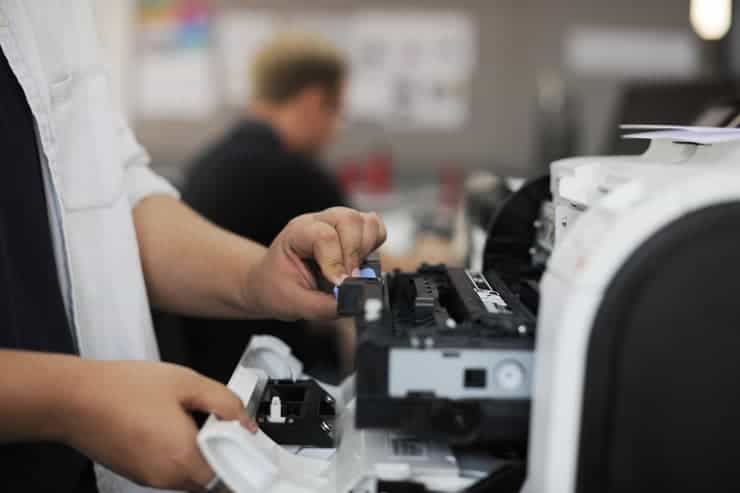
Repairing a printer is worth it when the repair cost is less than 50% of a new printer’s price, the device is under five years old, and parts are still available. For South Florida businesses printing high volumes, a managed print or leasing agreement often beats both options by bundling service into a predictable monthly cost.
The Big Picture
Why the Repair vs. Replace Decision Matters More Than You Think
A printer stops working. Do you call a technician, or do you start shopping for a new model? Your split-second reaction can cost your business hundreds of dollars in the wrong direction. And if you run multiple devices across a busy Miami office, the stakes multiply fast.
This isn’t just about saving money on a single repair. It’s about understanding the total cost of ownership, forecasting your print budget, and making sure downtime never derails an important deadline. The right call depends on the printer’s age, the type of fault, your daily print volume, and what a replacement would actually run you.
So let’s walk through this clearly. By the end, you’ll know exactly when to repair, when to replace, and when a smarter third option makes more sense for a South Florida business like yours.
Decision Framework
5 Key Factors That Determine Whether to Repair or Replace
No single rule fits every situation. But these five factors, taken together, give you a reliable framework for making the call.
1. Age of the Printer
Inkjet printers typically last 3 to 5 years. Laser printers and multifunction copier-printers, which are far more common in business settings, average 5 to 10 years with proper care. If a device is within this window and the problem is isolated, repair often makes sense. Past it? You’re likely fighting a losing battle against aging components.
2. Cost of the Repair vs. Cost of Replacement
Use the 50% rule as your starting point: if the repair quote exceeds half of what an equivalent new printer costs, replacement is the stronger financial move. Average national repair costs run from $60 to $200 for standard issues, but complex jobs on commercial laser printers can reach $600 or more. Get a written estimate before deciding.
3. Frequency of Breakdowns
A printer breaking down once every two years is a candidate for repair. Any device needing a technician every other month is draining your budget through parts, labor, and lost productivity. Track your service history. Three or more repair calls in twelve months is a strong signal to replace.
4. Parts and Support Availability
Older printer models eventually lose manufacturer support. When replacement parts become scarce, repair costs climb. If your technician is sourcing parts from third-party suppliers with long lead times, factor the delay cost into your decision. Extended downtime in a busy office isn’t free.
5. Technology Gap
Modern printers offer wireless connectivity, cloud printing, automatic duplex, and better energy efficiency. If your current device lacks those features and your team works in a hybrid environment, a new printer may pay for itself through workflow improvements alone.
Repair First
When Repairing a Printer Is the Right Move
Repair wins in more situations than most people expect. Here are the scenarios where calling a technician is the smarter call.
- Your device is under 4 years old and is experiencing a single mechanical fault, such as a worn pickup roller, a jammed paper path, or a faulty fuser unit.
- Repair costs are under $150 while a comparable new printer runs $400 or more. Simple arithmetic favors the fix.
- Specialized output is required, such as wide-format printing, label stock, or thick card stock, where replacement would mean retraining staff and reconfiguring workflows.
- Parts are readily available and the technician quotes a turnaround of one to two business days. Minimal downtime means minimal disruption.
- You have a service contract covering parts and labor. In many cases, the repair costs you nothing out of pocket.
- Environmental considerations matter to your business. Choosing repair over replacement reduces electronic waste, which matters to clients and employees who care about corporate sustainability.
Time to Upgrade
When Replacing a Printer Makes More Sense
Sometimes the right answer is a new device. Here’s when replacement wins.
- The printer is more than 7 years old and has already received multiple repairs. At this stage, the cumulative cost often exceeds the price of a new device.
- The repair estimate tops 50% of replacement cost. A $350 repair on a $600 printer doesn’t add up, especially if the device is aging.
- You’re printing more than 5,000 pages per month on a device rated for a fraction of its rated volume. Overworking a printer beyond its duty cycle shortens its life fast.
- Security vulnerabilities exist in the printer’s firmware with no manufacturer patches forthcoming. Unpatched printers are a real network security risk.
- The device constantly causes workflow bottlenecks, with frequent paper jams, misfeeds, or print quality failures frustrating your team and slowing output.
- Your business needs have changed. If you’ve grown from a team of five to fifty, a device designed for low volume simply can’t keep up.
By the Numbers
Printer Repair vs. Replacement: A Cost Comparison
Numbers cut through the noise. Here’s a side-by-side look at typical costs so you can make a clear-eyed comparison for your South Florida office.
| Scenario | Repair Option | Replace Option | Best Choice |
|---|---|---|---|
| 3-year-old laser printer, paper jam | $75 to $150 service call | $400 to $700 new device | Repair |
| 7-year-old inkjet, fuser failure | $200 to $350 parts + labor | $250 to $400 comparable new | Replace |
| 5-year-old MFP, drum replacement | $120 to $200 drum + install | $600 to $1,200 new MFP | Repair |
| 8-year-old copier, recurring jams | $300 + ongoing service calls | Lease from $79/month | Replace or Lease |
| High-volume laser, worn rollers | $100 maintenance kit | $800 to $2,000 new device | Repair |
| 2-year-old device, firmware issue | Free update or $50 tech visit | N/A | Repair |
Labor rates vary by location. In Miami and South Florida, onsite technician visits typically run $65 to $100 per hour, with many shops quoting a flat service fee plus parts. Always get a written estimate before authorizing any work.
The Third Option
Why Leasing or Managed Print Services May Beat Both Choices
Here’s the conversation most repair-vs-replace guides skip entirely. For many South Florida businesses, neither repair nor outright purchase is the optimal path. Leasing a printer or enrolling in a managed print program often delivers better value than either.
With a managed print agreement, you pay a predictable monthly fee covering equipment, toner, maintenance, and repairs. You’re never stuck with a surprise $400 service bill. When a device fails, a replacement unit comes to you. And at the end of the term, you upgrade to current technology automatically.
For businesses printing more than 2,000 pages per month, the cost-per-page model used in managed print often undercuts the combined cost of owning and maintaining equipment independently. 1800 Office Solutions has offered this model to South Florida businesses, serving clients from Miami to Fort Lauderdale and across Broward and Palm Beach counties.
Some businesses assume leasing is only for copiers, but modern managed print agreements cover desktop laser printers, multifunction devices, wide-format printers, and production equipment. Ask about options before you commit to a repair or a purchase.
The right managed print program also reduces waste. Usage analytics show which devices are underutilized, which are overworked, and where consolidation can cut costs without reducing capacity. For a growing Miami business, this visibility alone can justify making the switch from ownership to a managed model. See our guide on copier maintenance costs for a detailed breakdown of ownership versus lease expenses.
Your Local Partner
How 1800 Office Solutions Helps Miami Businesses Decide
You shouldn’t have to figure this out alone. 1800 Office Solutions has been helping South Florida businesses navigate these decisions. Here’s what we bring to the table.
Free Device Assessment
We evaluate your current equipment’s age, condition, and cost-per-page to give you an honest repair vs. replace recommendation.
Managed Print Programs
All-inclusive monthly agreements covering equipment, toner, service, and support at a flat, predictable cost per page.
South Florida Coverage
We serve Miami-Dade, Broward, Palm Beach, and surrounding counties.
Eco-Friendly Disposal
When replacement is the right call, we handle responsible recycling of your old equipment so it doesn’t end up in a landfill.
Flexible Lease Options
Upgrade equipment without capital expenditure. Our lease programs include full service and scale with your business needs.
Know Your Device
Printer Type Changes the Repair vs. Replace Math
Not all printers age the same way. The type of device you own is one of the biggest variables in the decision.
Inkjet Printers
These are common in home offices and small business settings. They typically cost $80 to $300 to replace and last 3 to 5 years. Because replacement is cheap, repair rarely makes financial sense unless the device is nearly new or is a high-end photo printer worth $500 or more.
Laser Printers
Built for business use, laser printers run $200 to $1,500 and last 5 to 10 years when properly maintained. Their higher value makes repair a more viable option, especially for drum replacements, roller kits, and fuser assemblies, which are predictable maintenance items rather than failure events.
Multifunction Devices (MFDs)
These combine printing, copying, scanning, and faxing. They range from $400 to $5,000+. Because of their complexity and cost, repair is usually justified unless the device is very old or has a major board-level failure. Service contracts are especially valuable for MFDs.
Wide-Format Printers
Used for posters, blueprints, banners, and signage, wide-format devices cost $800 to $10,000 or more. Repair is almost always preferred given the high replacement cost, provided parts are still available for your model. Learn more about wide-format printer benefits for your business.
Prevention
7 Ways to Extend Your Printer’s Life and Avoid the Decision Altogether
The best repair is the one you never need. Regular care dramatically reduces the frequency of breakdowns and pushes replacement further into the future. South Florida’s heat and humidity also add stress to printers left in poorly ventilated spaces, so environmental care matters more here than in cooler climates.
- Run monthly cleaning cycles. Most laser printers have a built-in cleaning mode. Use it once a month to clear toner dust and debris from the paper path.
- Use quality, compatible paper. Cheap or humid paper causes more jams and roller wear than almost any other factor. Store paper in a dry location and use the weight specified by your printer.
- Replace consumables on schedule. Don’t wait for warning messages to swap drums, rollers, and fusers. Proactive replacement costs less than emergency repairs.
- Keep firmware updated. Printer manufacturers release firmware patches improving performance and fixing known bugs. Skipping updates can cause errors mimicking hardware failures.
- Schedule annual professional maintenance. A technician can catch wear patterns before they become failures. Annual service calls typically run $75 to $150 and extend device life significantly.
- Control print volume. If your printer is consistently running at or above its rated monthly duty cycle, you’re shortening its lifespan fast. Redistribute print jobs or add a second device.
- Keep it clean and ventilated. Dust clogs ventilation slots and causes overheating, one of the leading causes of premature printer failure. A quick wipe-down every few weeks makes a difference.
Security Consideration
Old Printers Pose a Real Cybersecurity Risk
This is the angle most repair-vs-replace conversations completely miss. And for businesses in regulated industries, it can be the most important factor of all. An aging printer isn’t just a mechanical liability. It’s a potential security vulnerability.
Printers connect to your network. They store scanned documents, receive files from employee workstations, and often hold cached copies of recent print jobs in internal memory. Manufacturers typically support printer firmware with security patches for 5 to 7 years after release. Past this window, your device may be running unpatched vulnerabilities exploitable by bad actors on your network.
In Florida, businesses handling sensitive client data under HIPAA, PCI-DSS, or state privacy regulations need to take this seriously. Medical offices, law firms, financial advisors, and insurance agencies in Miami often overlook their printers during security audits, only to discover they’re the weakest link in an otherwise hardened network. Any unpatched printer is a compliance risk, not just an operational inconvenience. If cybersecurity is a concern for your South Florida business, get a free consultation with our security team to assess your full network posture, printers included.
According to CISA (Cybersecurity and Infrastructure Security Agency), networked printers and multifunction devices are among the most commonly overlooked endpoints in small business security assessments.
Common Questions
Frequently Asked Questions: Printer Repair vs. Replacement
Is it worth repairing a printer that is 5 years old?
It depends on the type of printer and the nature of the repair. A 5-year-old laser printer in good condition with a simple mechanical fix is generally worth repairing. An inkjet printer at 5 years, near the end of its typical lifespan, may not be. Use the 50% rule: if the repair costs less than half of a comparable new printer, it usually makes sense to fix it.
What is the average cost to repair a printer?
For most standard repairs, national averages run from $60 to $200. Simple issues like roller replacements or paper path cleaning tend to sit at the lower end. More complex repairs involving fuser assemblies, mainboard components, or laser units can run $200 to $600 or more for commercial devices.
How long do office printers typically last?
Inkjet printers average 3 to 5 years under normal business use. Laser printers and multifunction devices are built for longer service, typically 5 to 10 years with proper maintenance. High-volume environments will shorten overall lifespan if print volumes consistently exceed the device’s rated monthly duty cycle.
What is the 50% rule for printer repair?
The 50% rule is a widely used guideline: if the repair cost exceeds 50% of the price of a new printer with equivalent capabilities, replacement is typically the better investment. For example, spending $300 to fix a printer replaceable for $400 is rarely justified, especially if the device is aging.
Is printer leasing better than buying or repairing?
For many South Florida businesses, leasing offers significant advantages over both. A managed print or lease agreement provides a predictable monthly cost, includes service and supplies, and eliminates surprise repair bills. For businesses printing more than 2,000 pages monthly, the cost-per-page model often undercuts ownership costs, and equipment is upgraded at the end of the term.
How do I know if my printer is too old to repair?
Key signals include: the manufacturer no longer provides firmware updates, replacement parts require sourcing from third-party suppliers with long lead times, repair costs are approaching or exceeding replacement cost, or the device has required three or more service calls in the past twelve months. Any one of these is a yellow flag; multiple together usually mean it’s time to move on.
Can an old printer be a cybersecurity risk?
Yes. Networked printers no longer receiving firmware security patches can be exploited as entry points into your business network. This is a real concern for Florida businesses under HIPAA, PCI-DSS, or other compliance frameworks. If your printer’s manufacturer has ended support, it’s worth factoring the security risk into your replacement decision.
What are the most common fixable printer problems?
Paper jams caused by worn rollers, degraded print quality from dirty or low toner, error codes from firmware glitches, and connectivity issues from outdated drivers are all commonly repairable at low cost. These issues typically don’t signal broader hardware failure and are worth addressing through a service call.
Should I repair or replace a printer that has frequent paper jams?
Frequent paper jams are usually caused by worn paper feed rollers or debris in the paper path. These are relatively inexpensive repairs if the printer is otherwise in good condition. A technician can replace rollers and clean the paper path for $75 to $150. But if jams continue after the service call, it may indicate a deeper mechanical issue and replacement becomes the stronger option.
How do managed print services work in Miami?
A managed print agreement bundles your equipment, toner, maintenance, and repairs into one monthly cost. You pay a flat rate per page printed, regardless of how many service calls are needed. Providers like 1800 Office Solutions cover the entire Miami metro area, including Miami-Dade, Broward, and Palm Beach counties.
Does printer brand matter when deciding to repair or replace?
Brand matters primarily through parts availability and service network coverage. Major brands like HP, Canon, Xerox, Kyocera, and Ricoh have robust parts supply chains and wide technician coverage. Lesser-known or discontinued brands may have limited parts availability, which can drive repair costs up sharply and tip the decision toward replacement sooner.
Not Sure Whether to Repair or Replace Your Office Printer?
1800 Office Solutions has been helping Miami businesses make smart equipment decisions. Get a free, no-obligation consultation and find out exactly what your options are, whether it’s repair, replacement, or a managed print plan saving you money every month.
GET A FREE CONSULTATION
Call us: (888) 574-5120
Your One Source For Everything Office • Serving South Florida