



Insights Into Cloud Backup and Its Working Principles

What Is Cloud Backup and How It Functions for Data Protection
Are you facing challenges securing your business data effectively? This article explains what cloud backup is and how it functions for data protection while covering its operation and selecting the right provider. Readers receive clear insights into implementing cloud backup and addressing common concerns efficiently. The content offers practical solutions to safeguard valuable information and improve data security.
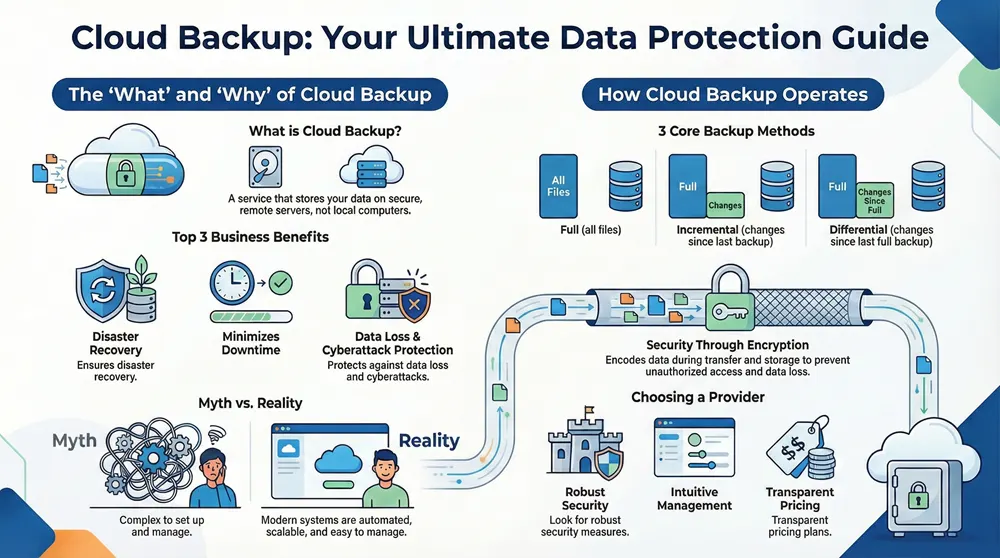
This section defines cloud backup and explains its core components, such as object storage and how a byte is managed efficiently. It outlines the key benefits, including scalability, Acronis backup cloud integrations, and improved cyber resilience, while addressing common misconceptions about cloud backup services.
Defining Cloud Backup and Its Core Components
Cloud backup services refer to the process of storing data on remote servers rather than on a local desktop computer, ensuring that critical information remains secure. Using platforms such as microsoft azure, backup services provide an efficient method to manage data by automatically organizing and managing bytes, which helps simplify the process of setting a password for each data block without sacrificing reliability.
The architecture of cloud backup relies on distributed storage systems that break down data into smaller segments for quick recovery if issues occur. With backup services integrated into microsoft azure, businesses can keep their operations running by ensuring that a weak password or accidental deletion does not lead to lasting data loss, making cloud backup services a practical solution for data protection.
Key Benefits of Utilizing Cloud Backup Solutions
Cloud backup solutions offer significant benefits, such as secure storage that supports disaster recovery plans. Businesses that utilize this technology can streamline their operations by integrating mobile device management, ensuring uninterrupted access across various operating systems, and leveraging software as a service models for efficient performance and unlimited storage capacities.
Organizations experience greater confidence knowing that their critical data remains shielded from potential loss or unauthorized access under high-pressure situations. This proactive approach not only minimizes downtime due to unexpected incidents but also enables quick restoration through disaster recovery protocols, ultimately saving valuable time and resources.
Common Misconceptions About Cloud Backup Services
Many organizations mistakenly believe that backup pc cloud solutions offer limited data management, failing to recognize that these services employ advanced storage systems capable of handling vast volumes of data across multiple devices. Industry experts emphasize that modern cloud backup services streamline data recovery and file organization without compromising the efficiency of the backup pc cloud environment.
Some view cloud backup as a complex system that requires constant manual updates, not realizing that current technology automates the entire process to protect stored data securely. Professionals note that a reliable cloud backup system simplifies the process for every device within an organization, making it easier to ensure data security and quick restoration when needed.
How Cloud Backup Operates for Effective Data Security
Cloud backup employs secure data transfer to safely move each document, using full, incremental backup, and differential backup methods. Systems like rubrik backup, dropbox backup, and c2 backup ensure strong encryption and solid data protection. The following sections offer practical insights on the process, backup types, and encryption protocols for effective security management.
The Process of Data Transfer to the Cloud
The process involves transferring data securely from local systems to the cloud, where an app manages backup office 365 data alongside other crucial files. The system employs replication methods to maintain synchronized copies, ensuring quick recovery and continuous security.
An efficient cloud backup solution automates data transfers to safeguard digital assets and maintain system integrity. The method utilizes secure protocols and replication features to ensure that data uploaded via the app remains consistent and ready for restoration when necessary.
Types of Cloud Backup: Full, Incremental, and Differential
Cloud data backup offers various methods to secure digital assets, with full backup capturing every file at a point in time while incremental backup saves only changes since the last backup, reducing data load efficiently. Professionals working with backup onedrive and file backup solutions often prefer a combination of these approaches to meet diverse recovery requirements and ensure seamless data retrieval using robust software systems.
Differential backup stands as an alternative to incrementals, storing modifications made since the last full backup for quicker restoration. This strategy, alongside services such as acronis backup, provides a balanced mix of efficiency and reliability that addresses the needs of businesses managing sensitive information and seeking streamlined data protection solutions.
Understanding Encryption and Data Protection Protocols
Encryption protocols protect each workstation and mac by encoding information so that data loss does not occur, providing security against unauthorized access. This method also helps businesses quickly recover essential files during system disruptions.
Data protection protocols ensure that sensitive information remains secure on every workstation and mac, allowing firms to prevent data loss efficiently. The system applies state-of-the-art encryption, which simplifies the process to recover files when unexpected issues arise.
Selecting the Right Cloud Backup Provider

This section examines essential features in a cloud backup service, pricing models, and public versus private options. It explains how backups protect data during a natural disaster and the role of tools like rubrik backup service. The discussion offers insight into features supported on android devices and practical tips to explore the right solution for business needs.
Essential Features to Look for in a Cloud Backup Service
The evaluation of a cloud backup provider should include features such as robust security measures and intuitive management capabilities, ensuring critical data remains protected. Providers like backblaze offer reliable backup solutions, while services such as acronis cyberprotect demonstrate efficient integration for seamless data management without excessive fee complications.
The ideal cloud backup service simplifies the process of safeguarding digital assets and supports smooth operation across various devices. Expertise in selecting a provider involves assessing their backup technology and management interface, which can directly benefit businesses by reducing operational downtime and mitigating risks.
Pricing Models and Plans for Cloud Backup Solutions
The pricing models and plans for cloud backup solutions vary by provider, reflecting differences in backup software capabilities and underlying technology. Businesses can select options that protect their data across diverse environments, from on-premise data centers to platforms like amazon s3.
Providers offer flexible packages that cater to the demands of businesses aiming for efficient data protection without overspending. This approach assists companies in choosing backup software that aligns with their operational needs, ensuring data remains secure with reliable technology benefits.
Comparing Cloud Backup Options: Public vs. Private
When comparing public and private cloud backup options, one essential factor is the impact on downtime during critical incidents. Public services, often integrated with providers like salesforce and vmware, provide standardized cloud storage solutions that can swiftly restore operations, while private infrastructures offer customizable environments for clients with specific security needs.
The choice between these options can influence operational efficiency, especially when addressing infrastructure requirements and minimizing downtime. Organizations often find that selecting the right provider involves evaluating how each service integrates with existing cloud storage systems and supports platforms such as salesforce and vmware for comprehensive data protection.
Implementing Cloud Backup in Your Organization
This section provides a step-by-step guide to setting up cloud backup, outlines best practices for maintaining effective cloud data protection, and highlights common errors to avoid when using backup online solutions like idrive. Reviewing recommendations from pcmag enhances understanding and streamlines implementation for businesses seeking robust data protection.
Step-by-Step Guide to Setting Up Cloud Backup
Organizations should first assess their current setup to ensure secure data transfer and prepare for potential ransomware threats, comparing cost-effective options such as google cloud for their robustness. It is recommended that businesses plan the upload process meticulously by establishing clear recovery and backup protocols that offer a secure environment while keeping operational expenses in check.
Next, firms configure the system to automatically transfer critical data to the cloud and set encryption measures to ensure continuous protection against ransomware. Following these steps, the process becomes streamlined, allowing professionals to maintain a secure backup system that operates without affecting daily operations or inflating costs.
Best Practices for Maintaining Effective Cloud Backup
Maintaining a robust cloud backup system involves regular testing of online backup services to ensure swift recovery in any data loss scenario. Professionals advise verifying encryption settings on each computer to secure sensitive files and support smooth restoration during unexpected events.
It is wise to schedule consistent updates and monitor online backup procedures to minimize threats and prevent delays in recovery. Experts recommend using proven online backup tools that seamlessly integrate with computer systems and uphold strict encryption protocols for continuous data protection.
Common Errors to Avoid When Using Cloud Backup
Businesses must avoid neglecting regular monitoring of their cloud computing solutions to ensure that their data backup system remains secure. Overlooking scheduled audits or misconfiguring sharepoint settings can hinder data recovery during disruptions, leaving the internet-facing system vulnerable to failures.
Organizations should not delay updates or ignore user access guidelines when managing cloud backup services. Failing to adhere to strict policies can compromise key components of data recovery, causing delays and increased risks for sensitive data stored within cloud computing environments.
Real-World Applications of Cloud Backup for Data Protection
Real-world applications demonstrate successful cloud backup implementations through case studies and industry-specific use cases. This section reviews examples involving server setups, virtual machine deployments, and regulatory compliance measures. It also presents how cloud backup supports remote work and collaboration, safeguards against a cyberattack, and benefits from integration with amazon web services.
Case Studies of Successful Cloud Backup Implementations
Successful implementations of cloud backup have improved overall data security for numerous organizations. Detailed case studies reveal that companies managing a range of hardware assets effectively minimize disruption and risk by adopting structured cloud backup protocols that secure critical information during system failures.
Real-world examples illustrate that streamlined cloud backup processes significantly bolster data security and enable swift restoration after cyberattacks or hardware malfunctions. Organizations that apply these practices gain clear benefits, including reduced downtime and a more resilient infrastructure capable of supporting ongoing business operations.
Industry-Specific Use Cases for Cloud Backup Solutions
Industries with high data demands, such as healthcare and finance, utilize cloud backup solutions to ensure uninterrupted access to critical records and secure patient or client information. These sectors often implement automated backup routines that simplify data retrieval during outages or regulatory audits, reinforcing operational continuity and compliance.
Manufacturing and retail sectors incorporate cloud backup to manage large volumes of transactional and operational data, thereby reducing recovery time during system interruptions. This practical approach alleviates business owners from manual oversight, offering a streamlined process for maintaining data security and operational consistency.
How Cloud Backup Supports Remote Work and Collaboration
Cloud backup facilitates remote work by ensuring that essential files remain secure and accessible from any location, allowing employees to work seamlessly across different devices. The system supports collaboration by synchronizing data in real-time, enabling teams to update and share documents effortlessly while maintaining robust security protocols.
The process offers operational continuity during disruptions by automating data transfers to remote servers, which minimizes manual intervention and the risk of data loss. This method provides a reliable framework for collaborative workflows, ensuring that multiple users can access accurate and current information regardless of their physical location.
Frequently Asked Questions About Cloud Backup

This section answers key questions by discussing data security, the data handling process during backup, and ease of recovery. It examines how robust encryption protects data, clarifies what occurs during cloud backup transfers, and explains the methods ensuring quick and simple data access in recovery scenarios.
How Secure Is My Data With Cloud Backup?
Data security in cloud backup is ensured through the use of advanced encryption techniques that safeguard sensitive information during data transfer and storage. The system automatically encrypts data before uploading it, making it difficult for unauthorized users to access critical files even if a breach occurs.
Cloud backup systems feature comprehensive security protocols that continuously monitor data integrity and manage safe storage practices. Experts maintain that regularly updated encryption standards and secure authentication processes help keep data secure, giving businesses peace of mind during recovery and regular operations.
What Happens to My Data During a Cloud Backup?
When data is sent for cloud backup, it undergoes secure transfer protocols that encrypt information before it leaves the local system, ensuring all files are protected from unauthorized access during communication. Once transmitted, data is segmented, organized, and stored on remote servers managed by experienced professionals ensuring reliable storage and smooth recovery processes in case of system issues.
The backup process also includes continuous monitoring and automated updates that maintain data consistency across devices. This approach minimizes risks from accidental deletions or system errors, giving businesses confidence that their critical information remains safeguarded under best-practice data handling methods.
Can I Access My Data Easily in Case of a Recovery?
Accessing data following a recovery process remains straightforward with cloud backup solutions, as systems automatically organize and secure files to allow quick retrieval. The professional approach in managing data protection processes ensures that recovery procedures are efficient and user-friendly for business owners.
Data recovery operations utilize advanced security protocols that protect stored information while facilitating smooth access when needed. This reliable system minimizes operational disruptions and provides businesses with a clear path to retrieve essential files during critical recovery scenarios.
Conclusion
Cloud backup plays a critical role in securing and managing essential business data by automating data transfer and protection. It simplifies recovery processes during disruptions and ensures that sensitive information remains well-guarded against unauthorized access. Businesses can benefit from streamlined operations and reduced downtime by integrating these advanced backup protocols into their systems. The technology demonstrates a practical and reliable approach to maintaining data integrity and continuous operational support.