Cloud Workload Security: Best Practices for 2025

AI Overview:
This blog explains why securing cloud workloads—VMs, containers, serverless functions, APIs, and data—is essential for businesses in 2025 as cyber threats grow and cloud environments become more dynamic. It outlines the Shared Responsibility Model, key risks like misconfigurations and insecure APIs, and modern protection tools such as CSPM, CWP, CNAPP, and Zero Trust. The guide provides best practices for hardening access, managing vulnerabilities, and enabling continuous monitoring. Overall, it shows how strong cloud workload security protects data, prevents breaches, and supports business agility in a multi-cloud world.
Why Cloud Workload Security is Critical for Your Business in 2025
As businesses increasingly rely on cloud infrastructure, protecting your cloud security workload has become a critical priority. Cyber threats are evolving, and with operations moving to dynamic, distributed cloud environments, the need for robust security has never been greater.
Key components of cloud workload security:
- Virtual machines (VMs) – Protecting server instances and their operating systems
- Containers – Securing lightweight, portable application environments
- Serverless functions – Safeguarding event-driven code execution
- APIs and integrations – Controlling access points between services
- Data in transit and at rest – Encrypting sensitive information
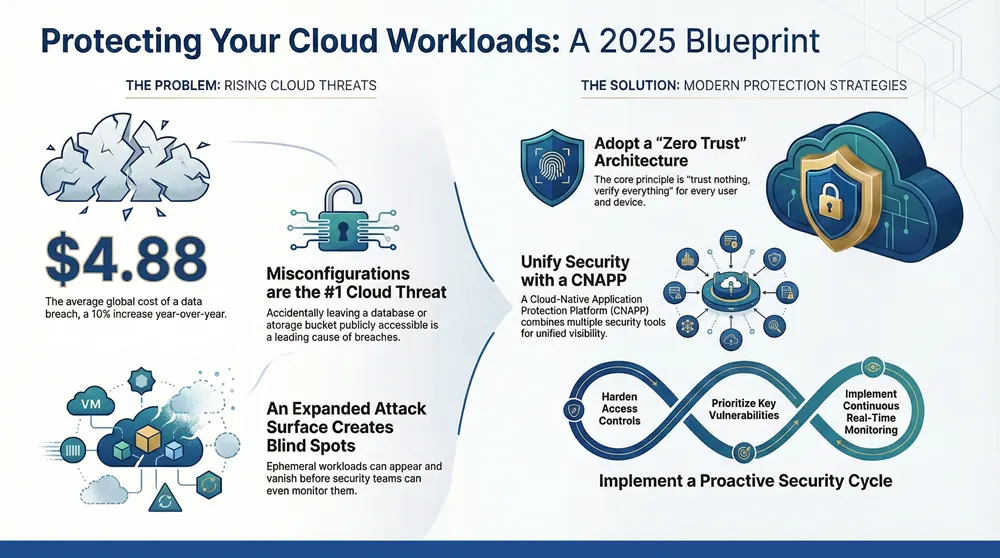
The stakes are high. According to IBM’s Cost of a Data Breach Report 2024, the global average cost of a data breach has reached $4.88 million, a 10% increase from the previous year.
While cloud adoption offers agility and scalability, it also expands the attack surface. Unlike traditional on-premises setups, cloud workloads are dynamic and distributed, creating complex security challenges. The core question is: How do you protect applications and data that are constantly changing and moving across different cloud environments?
This guide provides essential best practices for securing your cloud workloads in 2025, from understanding the shared responsibility model to implementing advanced threat detection, helping you protect your business without sacrificing speed.
Simple guide to cloud security workload terms:
Understanding the Fundamentals of Cloud Workload Security
A cloud security workload refers to the specific tasks, applications, and services that run on your cloud infrastructure. These are the engines of your business, enabling everything from customer transactions to internal operations. Key examples include:
- Virtual Machines (VMs): Digital servers running your operating systems and applications.
- Containers: Lightweight packages that bundle an application with all its dependencies.
- Serverless Functions: Small, event-driven pieces of code that execute on demand.
Securing these workloads is vital for maintaining business agility, protecting data, and ensuring Business Continuity in the Cloud. A breach can halt operations and damage your reputation.
Your cloud environment will use one or more deployment models, each with unique security needs:
- Public Cloud: Scalable resources from major providers, shared with other organizations.
- Private Cloud: Dedicated resources offering greater control but higher complexity.
- Hybrid Cloud: A mix of public and private clouds. Learn more about What is: Hybrid Cloud Solutions.
- Multi-Cloud: Using services from multiple cloud providers.
Your service model—IaaS, PaaS, or SaaS—also defines your security duties. Understanding these fundamentals is the first step toward building an effective security strategy.
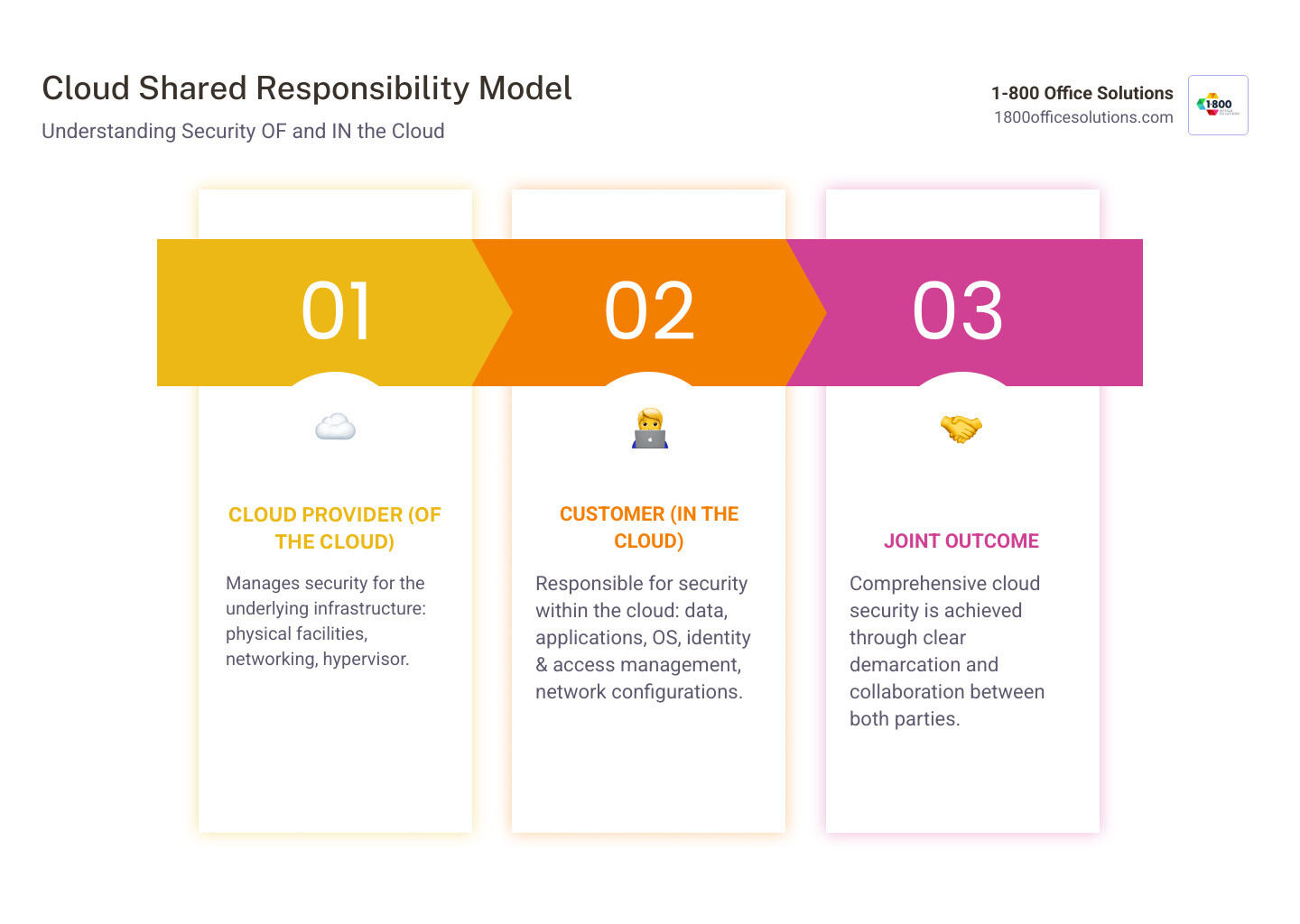
Cloud security operates on a Shared Responsibility Model, a partnership between you and your cloud provider. Each party has distinct security obligations.
Your provider is responsible for security of the cloud. This includes the physical data centers, networking, servers, and the virtualization layer (hypervisor). They manage the foundational infrastructure.
You are responsible for security in the cloud. This covers everything you place on that infrastructure: your guest operating systems, applications, data, network configurations (firewalls, access controls), and, most importantly, Identity and Access Management. You cannot assume the cloud is secure by default; you must actively manage and protect your own assets.
This model shifts your security focus from physical perimeters to configurations, identities, and data flows. Understanding this division, as detailed by providers like AWS, is crucial for preventing security gaps.
Common Threats and Challenges in Your Cloud Security Workload
Moving to the cloud introduces unique threats and challenges for your cloud security workload. Understanding these is the first step toward building effective defenses.

The primary challenge is an expanded attack surface. Every new application, API, or service creates a potential entry point for attackers. This is compounded by visibility gaps, as the dynamic and ephemeral nature of cloud resources makes them difficult to track. A container might spin up and disappear before your security team even knows it existed, making it impossible to detect and respond to threats in real time.
Other key challenges include:
- Performance Impact: Poorly optimized security tools can slow down applications, negating the cloud’s performance benefits.
- Compliance Management: Maintaining compliance with regulations like HIPAA or GDPR is complex in a constantly changing environment.
Specific threats targeting your cloud security workload include:
- Misconfigurations: The leading cause of cloud breaches, such as accidentally leaving a database publicly accessible.
- Insecure APIs: Poorly secured APIs can provide attackers with direct access to your data and systems.
- Data Breaches: Often the result of misconfigurations or compromised credentials.
- Ransomware: Modern ransomware is designed to spread across cloud services and encrypt backups.
- Supply Chain Attacks: Targeting third-party software components your applications depend on.
Why is securing your cloud security workload so challenging?
The very features that make the cloud powerful also complicate security.
Ephemeral workloads, which may exist for only minutes, defy traditional security models that assume resources are long-lived. The speed of DevOps can also create friction, as security reviews struggle to keep pace with rapid deployment cycles. This can lead to security being bypassed in the rush to innovate.
Finally, tool complexity and a lack of centralized visibility across multi-cloud and hybrid environments make it difficult to get a unified view of your security posture. Without a bird’s-eye view, identifying attack patterns and responding effectively is nearly impossible.
The Log4J software vulnerability was a stark reminder of these challenges. This flaw in a common logging library created widespread risk across thousands of cloud applications, highlighting how a single vulnerability in the software supply chain can have a massive, immediate impact.
Core Components of a Modern Cloud Workload Protection Strategy
A modern cloud security workload protection strategy requires a suite of specialized tools designed for dynamic environments.

Key platforms and concepts include:
- Cloud-Native Application Protection Platform (CNAPP): A unified platform that combines multiple security capabilities (like CSPM and CWP) into a single solution for better visibility and less complexity.
- Extended Detection and Response (XDR): Correlates security data from across your entire IT ecosystem (endpoints, network, cloud) to provide a complete view of an attack.
- Cloud Security Posture Management (CSPM): Continuously scans your cloud environment for misconfigurations and compliance violations, acting as an automated security auditor.
- Cloud Workload Protection (CWP): Focuses specifically on protecting the applications and services running in your cloud, such as VMs, containers, and serverless functions.
The underlying philosophy for these tools is a Zero Trust architecture, which operates on the principle of “trust nothing, verify everything.” Every user and device must be authenticated and authorized before accessing any resource. This approach is rapidly replacing traditional VPNs, with Gartner predicting that by 2023, 60% of enterprises will adopt Zero Trust Network Access (ZTNA). Microsegmentation complements this by creating small, isolated security zones around individual workloads, containing breaches if they occur.
Understanding the Role of a Cloud Workload Protection Platform (CWPP)
A CWPP is specialized security for your cloud security workload. It understands the unique challenges of protecting dynamic and ephemeral cloud resources. Key capabilities include:
- Broad Workload Support: Protects all types of workloads, from VMs to containers and serverless functions.
- Integration into CI/CD Pipelines: Embeds security checks directly into development workflows to catch vulnerabilities early.
- Vulnerability Scanning and Management: Identifies and prioritizes vulnerabilities based on business context and real-world risk.
- Runtime Protection: Monitors live workloads for suspicious activity and provides immediate defense against active threats.
- Compliance Monitoring: Automates the process of verifying and documenting compliance with regulatory standards like HIPAA and PCI DSS.
Key Differences: CWP, CSPM, and Your Cloud Security Workload
Understanding the roles of CWP, CSPM, and Endpoint Detection and Response (EDR) is key to a layered defense strategy for your cloud security workload.
| Feature | Cloud Workload Protection (CWP) | Cloud Security Posture Management (CSPM) | Endpoint Detection and Response (EDR) |
|---|---|---|---|
| Primary Focus | Securing the workloads themselves (VMs, containers, serverless functions) | Identifying and remediating misconfigurations and compliance violations in cloud infrastructure | Detecting and responding to threats on traditional endpoints (laptops, servers, VMs) |
| Use Case | Runtime protection, vulnerability management, malware scanning, application control, microsegmentation for workloads | Continuous compliance checks, misconfiguration detection, security posture visibility across cloud accounts | Real-time threat detection, investigation, and response on managed devices/VMs |
| Function | Protects the contents and execution of cloud applications and services | Ensures the environment where workloads run is securely configured and compliant | Monitors and protects individual endpoints from malicious activity |
| Example | Preventing an unauthorized process from running inside a container, isolating a compromised VM | Alerting if an S3 bucket is publicly accessible, identifying IAM policies with excessive permissions | Detecting ransomware attempting to encrypt files on a virtual machine, tracing a malicious process on a server |
In short, CWP protects what’s running inside your applications, CSPM secures the environment around them, and EDR protects the individual systems they run on. Together, they provide comprehensive protection.
Best Practices for Securing Cloud Workloads in 2025
Securing your cloud security workload requires a proactive mindset, not a reactive one. The most successful organizations foster a DevSecOps culture, where security is a shared responsibility integrated into every stage of the development lifecycle. This approach, combined with continuous improvement through regular assessments and training, is essential for staying ahead of evolving threats.

For a deeper look at enterprise strategies, see our guide on How to: Cloud Security for Enterprise.
Harden Access and Entitlements
Think of access controls as the locks on your digital doors. Strengthening them is a critical first step.
- Secure Management Consoles: These are the keys to your cloud kingdom. Implement the strictest possible controls, including robust monitoring and auditing.
- Enforce Multi-Factor Authentication (MFA): MFA is an essential, non-negotiable layer of security that can stop credential theft attacks in their tracks.
- Implement Role-Based Access Control (RBAC): Grant permissions based on job roles to ensure users only have access to what they need.
- Practice Least Privilege Access: Go a step further than RBAC by regularly reviewing and refining permissions to remove any that are no longer necessary.
- Manage API Keys and Secrets Securely: Use dedicated vault solutions to encrypt and tightly control access to these powerful credentials.
Prioritize and Remediate Vulnerabilities
Not all vulnerabilities are created equal. Adopt a risk-based approach to focus your efforts where they matter most.
- Contextualize Vulnerabilities: Look beyond severity scores to understand the real-world impact. Consider factors like network exposure and the data a system can access.
- Correlate Findings with Business Impact: Prioritize vulnerabilities based on the potential harm to your business, such as revenue loss, customer impact, or regulatory fines.
- Automate Vulnerability Scanning: Continuously scan all workloads (VMs, containers, serverless) to keep pace with rapid cloud deployments.
- Integrate Remediation into DevOps Workflows: Feed security findings directly into existing tools like Jira or ServiceNow to ensure they are addressed with the same urgency as other development tasks.
Implement Continuous Monitoring and Threat Detection
Cloud environments are dynamic, so security must be continuous.
- Gain Deep Visibility: Implement comprehensive logging and monitoring across your entire cloud infrastructure to know what’s happening, where, and by whom.
- Monitor for Anomalous Activity: Use behavioral analytics to spot unusual patterns—like a user accessing systems at odd hours—that could indicate a compromise.
- Detect and Respond to Threats in Real Time: Cloud attacks move fast. Your security systems must be able to detect and respond to threats in real time to minimize damage.
- Use SIEM Tools: Aggregate logs and events in a Security Information and Event Management (SIEM) tool to get a centralized view for coordinating responses.
- Automate Response Actions: For common threats, automate responses like isolating a compromised workload or blocking a malicious IP to buy your team valuable time.
Frequently Asked Questions about Cloud Workload Security
Here are answers to common questions about protecting your cloud security workload.
What is the difference between cloud security and cloud workload security?
Think of cloud security as the broad strategy for protecting your entire cloud environment—the infrastructure, networks, and data storage. It's the security of the whole digital property.
Cloud workload security is a focused subset of cloud security. It deals specifically with protecting the applications, services, and processes running within that environment, such as your virtual machines, containers, and serverless functions. It secures the activity inside the property.
How does cloud workload security apply to serverless computing?
With serverless computing, you don't manage the underlying server, so traditional host-based security is irrelevant. Instead, cloud security workload protection for serverless focuses on:
Securing the code: Scanning for vulnerabilities in the function and its dependencies.
Managing permissions: Applying least-privilege principles to the function's access rights and triggers.
Monitoring execution: Watching for anomalous behavior or signs of compromise during runtime.
Security shifts from the server to the code and its configuration.
What is the first step to improving cloud workload security?
The critical first step is to gain complete visibility into all your cloud workloads. You cannot protect what you cannot see.
Start by creating a comprehensive inventory of all your virtual machines, containers, and serverless functions across all cloud environments. This findy process will reveal your entire digital footprint, including any unmonitored "shadow IT" deployments. Once you have this complete picture, you can begin to apply controls, monitor for threats, and prioritize remediation based on actual risk, not guesswork.
Conclusion
As we move through 2025, securing your cloud security workload is no longer just a technical task—it’s a core business strategy. By embracing a proactive and integrated approach with tools like CNAPPs and a Zero Trust mindset, you can turn security into a business enabler, not a roadblock.
When your cloud workloads are secure, your teams can innovate faster, your customers can trust you with their data, and your business can pursue growth with confidence. However, the complexity of modern multi-cloud environments requires specialized expertise that many organizations lack in-house.
This is where the importance of a trusted technology partner becomes clear. A partner who understands both the technical details of cloud security and your business goals can make all the difference. At 1-800 Office Solutions, we help organizations across the nation, from Orlando to Philadelphia, align their cloud security workload strategy with their business objectives.
Our approach combines deep technical expertise with practical business sense, ensuring your security investments drive real value. Ready to transform your cloud security from an expense into a competitive advantage?
Explore our comprehensive cloud security solutions to protect your business assets.
 Protect Your Business with Backup and Disaster Recovery Systems, Gposts, Office & IT Solutions 2025: Cybersecurity, Managed Print & More