How to Fix a Clogged Print Head for Good

AI Overview:
This blog explains how clogged print heads cause streaks, missing colors, and poor print quality—and how to correctly diagnose the issue before attempting fixes. It covers the main causes (inactivity, low-quality ink, dust, humidity, and improper shutdown), then outlines the safest ways to clear clogs using built-in cleaning cycles or manual cleaning methods. Readers also get preventative tips—like printing weekly and using quality ink—and guidance on when to call a professional or replace the printer to avoid costly downtime.
A clogged print head is a primary cause of poor print quality, leading to streaky lines, missing colors, and frustratingly blank pages. This common issue occurs when dried ink, dust, or air bubbles obstruct the microscopic nozzles responsible for spraying ink onto paper. Understanding how to correctly diagnose and resolve this problem is crucial for maintaining business productivity and ensuring your documents always look professional. This guide provides expert, actionable steps to fix a clogged print head and prevent it from recurring.
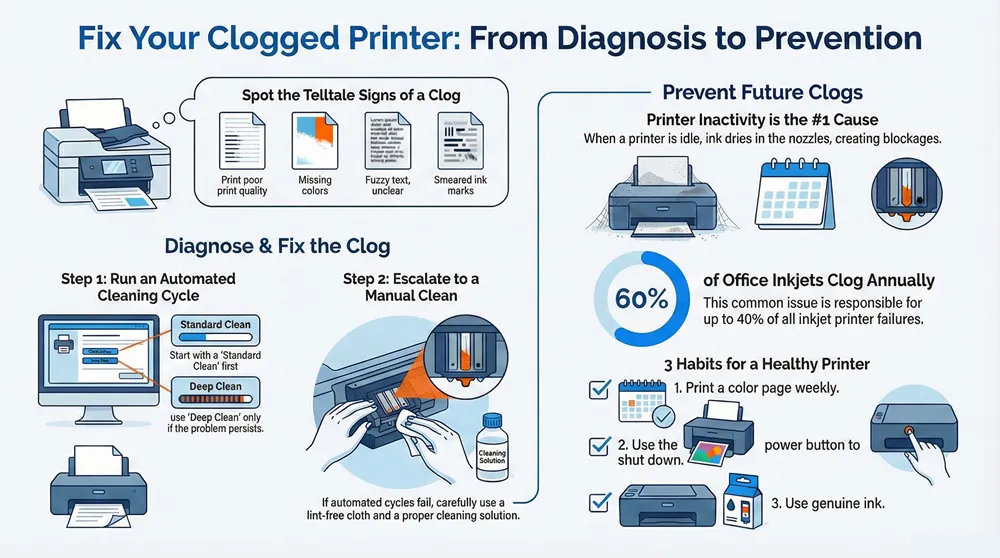
Is Your Print Head Really Clogged?
Streaky lines, faded text, and incorrect colors are significant operational issues, but they don’t automatically confirm a clogged print head. Correctly identifying the problem from the outset saves valuable time and prevents you from attempting ineffective solutions.
The most definitive sign is when your printer produces pages with distinct white lines running through text or images. This is a clear indicator that one or more nozzles are completely blocked, preventing ink from reaching the page. In more severe cases, entire colors may be missing from your prints, compromising the quality of important business documents.\
Subtle Symptoms to Watch For
Beyond the most obvious signs, a clog can manifest in subtle ways that are easily misdiagnosed. For a business, these minor imperfections can negatively impact brand perception and professional communications.
- Incorrect Color Reproduction: Your company logo might print in a slightly different shade, or marketing photos could appear dull. This often points to a partial clog in one of the color nozzles, affecting color accuracy.
- Fuzzy or Blurry Text: When characters lack sharp, clean edges, it could be caused by nozzles spraying ink unevenly rather than in a precise line.
- Ink Smearing: Often blamed on paper or settings, a partially clogged head can spray ink erratically, causing small smudges or spots across the page.
Key Takeaway: A clogged print head is more than a technical glitch; it’s a productivity bottleneck. Accurately diagnosing the issue, whether it’s faint lines on a financial report or a discolored logo on a proposal, is the first step toward a reliable fix.
Differentiating Clogs from Other Issues
Sometimes, what appears to be a clogged print head is actually a different problem. For instance, completely blank pages could result from an empty ink cartridge or a software communication error between the computer and the printer.
Before initiating any cleaning procedures, it is wise to check for these other potential causes. For specific guidance on the blank page issue, refer to our detailed article on why your printer is printing blank pages.
Industry reports confirm that nozzle clogging is responsible for up to 40% of all inkjet printer failures, making it a significant maintenance concern. Furthermore, research indicates that nearly 60% of office inkjet printers experience at least one clogging incident annually. It is a common, frustrating, but often fixable problem.
The Real Reasons Your Print Heads Clog
To prevent a problem from recurring, it is essential to understand its root cause. Identifying why a print head becomes clogged is key to establishing a more reliable printing workflow and avoiding the frustration of poor-quality documents at critical moments.
The most frequent culprit behind a clog is printer inactivity. When an inkjet printer remains idle, the liquid ink in its microscopic nozzles is exposed to air and begins to dry. This process leaves behind hardened pigment and sediment, creating a stubborn blockage that prevents fresh ink from passing through.
In a business context, this is common with printers located in conference rooms or secondary offices that do not see daily use. Even a week of inactivity can be sufficient to initiate the drying process.
Ink Quality and Composition Matter
The type of ink used is another critical factor. While it may be tempting to reduce costs with third-party or refilled cartridges, their quality can be inconsistent. The chemical formulas often differ from genuine manufacturer’s ink and may contain particles or sediments more prone to clumping and causing a clogged print head.
Using lower-quality ink is analogous to using substandard fuel in a high-performance engine—it may function, but you risk long-term damage. Similarly, inferior ink can gradually build up residue inside the print head’s delicate channels, eventually leading to streaky prints or missing colors. This is particularly true for high-resolution photo printers that rely on precise ink droplet placement.
Our analysis shows that approximately 30% of clogging issues in office environments can be traced to incompatible or low-quality third-party ink cartridges. The initial savings are often negated by long-term costs from downtime and potential hardware damage.
Environmental and Operational Factors
The office environment plays a more significant role than many realize. Dust, airborne debris, and paper fibers can be drawn into the printer’s internal mechanics and physically block the nozzles if they settle on the print head.
Consider these environmental contributors as well:
- Low Humidity: Dry air accelerates the evaporation of the ink’s liquid components, causing it to thicken and dry out inside the nozzles.
- High Temperatures: A warm environment can speed up ink drying, especially when the printer is not in operation.
- Improper Shutdown: Always use the printer’s power button to turn it off. This action initiates a shutdown sequence that “parks” the print head in a capped station, sealing the nozzles from air exposure. Unplugging the printer directly or using a power strip leaves the head exposed and vulnerable to drying.
Using Your Printer’s Built-In Cleaning Tools
Before attempting any manual intervention for a clogged print head, the most prudent first step is to utilize the printer’s built-in maintenance routines. Nearly all modern inkjet printers are equipped with automated cleaning cycles designed specifically to clear minor clogs. These software-driven functions are your first line of defense—they are safe, straightforward, and often highly effective.
A cleaning cycle can typically be initiated from your computer’s printer settings or directly from the printer’s control panel, usually under a “Maintenance,” “Tools,” or “Quality” menu. During this process, the printer forces a small amount of ink through the nozzles at high pressure, which is often sufficient to dissolve and flush out the dried ink particles causing the blockage.
Standard Clean vs. Deep Clean
Your printer will likely offer multiple cleaning options. Understanding the difference can save significant ink and time.
- Standard Cleaning: This is the appropriate choice for minor issues, such as faint streaks or slightly faded colors. It uses a minimal amount of ink to restore proper ink flow.
- Deep Cleaning: Also known as “Power Cleaning,” this is a more intensive option. It uses a much larger volume of ink and should be reserved for stubborn clogs that a standard cleaning cycle cannot resolve.
Always begin with a standard cleaning cycle. If the problem persists, you can then proceed to a deep clean. Directly opting for a deep clean is wasteful, as these cycles can consume a substantial amount of ink—sometimes up to 10% of a new cartridge.
Pro Tip: Print a nozzle check pattern before and after every cleaning cycle. This is a critical diagnostic step. The pattern provides a clear visual representation of which nozzles are blocked and confirms whether the cleaning was successful. Without it, you are working without essential feedback.
Knowing When to Stop
Automated cycles have limitations. Repeatedly running them is counterproductive, as it depletes ink cartridges rapidly and fills the printer’s internal maintenance box (or waste ink pad), which will eventually require replacement.
A reliable rule of thumb is to stop if you see zero improvement after running two standard cycles and one deep cleaning cycle.
At this stage, the clog is likely too severe for the automated process to handle. Further attempts will only waste ink without fixing the clogged print head. This is the signal to transition to manual cleaning methods for a more direct approach.
A Practical Guide to Cleaning the Print Head Manually
When automated cleaning cycles fail to resolve poor print quality, a hands-on approach is necessary to fix a clogged print head. Manual cleaning allows you to directly address stubborn blockages that software-driven purges cannot clear. With patience and the right technique, you can often restore your printer to optimal performance.
First, gather the appropriate tools. Using incorrect supplies can damage the print head, so it is crucial to be prepared.
- Lint-Free Swabs or Cloth: This is essential. Standard cotton swabs or paper towels leave behind fibers that can create new clogs.
- Print Head Cleaning Solution: A professionally formulated solution is ideal. Alternatively, a 50/50 mixture of distilled water and isopropyl alcohol can be effective. Do not use tap water, as its mineral content can cause further blockages.
- Shallow Dish: Necessary for soaking a removable print head.
- Gloves: Disposable gloves will protect your hands from ink stains.
The infographic below provides a visual overview of the process, from initial diagnosis to final verification.
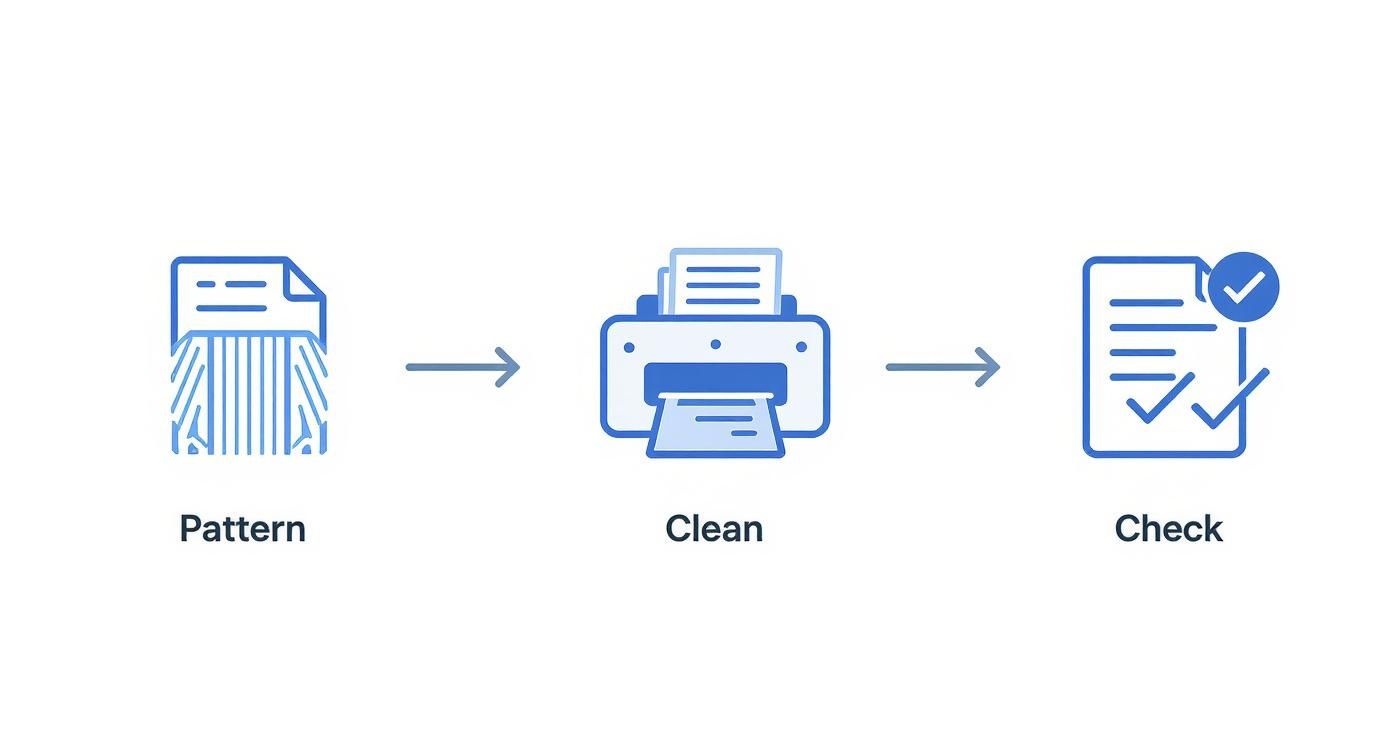
The workflow is cyclical: diagnose the problem, perform the cleaning, and test the results. Always print a new test pattern to confirm if your efforts were successful.
Cleaning a Removable Print Head
Many printers from manufacturers like Canon and certain HP models feature removable print heads, which simplifies the cleaning process. Begin by turning off and unplugging the printer.
Open the printer, remove all ink cartridges, and locate the latch or lever securing the print head assembly. Carefully release it and lift the unit out.
Pour a small amount of cleaning solution into the shallow dish and submerge only the nozzle area of the print head. Allow it to soak for approximately 10 minutes to dissolve the dried ink. Afterward, gently blot the nozzle plate dry with a lint-free cloth. Do not wipe or scrub the nozzle plate.
Let the print head air dry completely before reinstalling it, reinserting the cartridges, and running a test print.
Important: Do not touch the gold or copper electronic contacts on the print head. Oils from your skin can interfere with the electrical connection, leading to errors or permanent damage.
Cleaning a Fixed Print Head
Many printers, particularly those from Epson, have a fixed print head that cannot be removed. This presents a greater challenge, but cleaning is still possible by working inside the machine.
Turn the printer on and wait for the print carriage to begin moving. Once it reaches the middle of its track, unplug the power cord. This positions the carriage for easy access to the print head underneath.
Fold a piece of lint-free cloth, dampen it with cleaning solution, and carefully slide it under the print head carriage. Gently move the carriage back and forth over the wet cloth several times, allowing the solution to penetrate the nozzles from below.
After a few minutes, remove the cloth, plug the printer back in, and run a nozzle check to determine if the blockage has been cleared.
A clogged print head has financial and environmental implications. Industry data reveals that clogging leads to the disposal of an estimated 15 million ink cartridges and 2.5 million printheads globally each year. In North America, these issues drive nearly 30% of all ink cartridge sales, creating a market valued at approximately $450 million annually. An industrial inkjet printhead market analysis provides further details. Proper maintenance not only saves money but also reduces e-waste.
To help you choose the best approach, the following table compares different cleaning methods.
Comparing Print Head Cleaning Methods
This table outlines the advantages and disadvantages of each cleaning technique.
| Cleaning Method | Best For | Ink Consumption | Risk Level | Time Required |
|---|---|---|---|---|
| Automated Cleaning Cycle | Minor clogs, routine maintenance | High | Very Low | 1-2 minutes |
| Manual Soak (Removable Head) | Stubborn or dried-on clogs | Very Low | Medium | 15-30 minutes (plus dry time) |
| Manual Wipe (Fixed Head) | Moderate clogs, hard-to-reach heads | None | Medium-High | 10-15 minutes |
| Professional Servicing | Severe clogs, multiple failed attempts | None | Very Low | Days |
Each method serves a specific purpose. Begin with the automated cycle due to its ease and low risk. If it proves ineffective after a few attempts, proceed to manual cleaning, which is often the only way to salvage a severely clogged print head.
Proactive Habits to Prevent Future Clogs
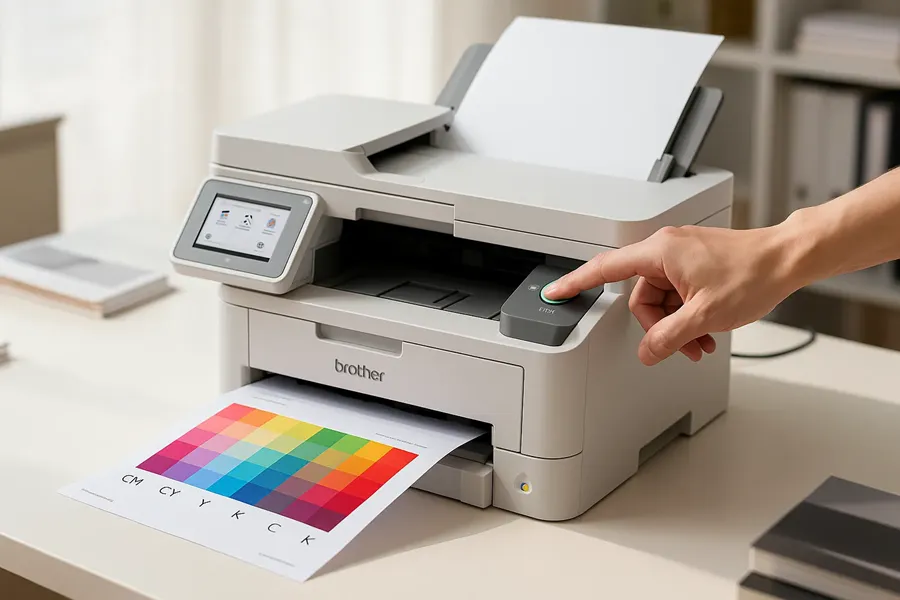
While fixing a clogged print head is a valuable skill, preventing the issue from recurring is the ultimate goal. Adopting a few simple, proactive habits can significantly reduce downtime caused by blockages and extend the life of your printer, ensuring it is always ready for business-critical tasks.
The single most important habit is consistent use. Inkjet printers are designed for regular operation, and prolonged inactivity is the leading cause of clogs. Printing a single color page just once a week is typically sufficient to keep ink flowing and prevent it from drying in the nozzles.
Essential Prevention Checklist
Another crucial and often overlooked practice is the shutdown procedure. Always use the printer’s dedicated power button rather than a power strip switch. This allows the printer to complete its shutdown sequence, which properly parks and caps the print head. This cap creates a seal that protects the nozzles from air and dust, the primary causes of dried ink.
Incorporate these key practices into your routine:
- Print Something Weekly: Set a recurring reminder to print a simple color test page. This small action keeps ink moving through all nozzles, preventing it from hardening.
- Use Quality Ink: While cost-saving is tempting, always use the genuine manufacturer’s ink cartridges. Third-party inks may have formulas with different viscosities or particulates that increase the risk of clogging a print head.
- Monitor Humidity: In dry office environments, especially during winter, consider using a small humidifier near the printer. A stable, moderately humid atmosphere can significantly slow ink evaporation.
A consistent maintenance schedule is the cornerstone of printer reliability. A few minutes of preventative care each week can save hours of troubleshooting and hundreds of dollars in repairs or replacement costs.
Developing a comprehensive maintenance strategy for all office equipment can yield significant benefits. For insights on larger machines, see our guide on preventative maintenance for copiers.
When to Call a Professional or Replace the Printer
You have run automated cleaning cycles and even attempted a manual cleaning, yet your prints remain streaky and unusable. At this point, continued DIY efforts can do more harm than good. Persisting with a deeply clogged print head can waste significant time and expensive ink and even risk permanent damage to the printer.
It is important to recognize when to seek professional help. If multiple deep cleanings and a careful manual clean have yielded no improvement, the blockage is likely too severe for home remedies. Another clear indicator is the appearance of cryptic error codes that a simple restart does not resolve, as these often point to a failing component.
Evaluating the Cost of Repair vs Replacement
Before contacting a technician, take a moment to weigh your options. Printer downtime can severely impact business operations. For detailed market data, inkjet printhead market reports offer valuable insights. For many budget-friendly office printers, the cost of a new print head can approach or exceed the price of a new, more efficient model.
A practical rule of thumb: if the estimated repair cost is more than 50% of the price of a comparable new printer, replacement is almost always the more financially sound long-term decision.
When professional repair is the logical choice, finding a trustworthy service provider is paramount. Our guide to finding a qualified printer repair shop near you can help. An experienced technician can quickly diagnose whether the issue is a stubborn clog or a symptom of a more serious electrical or mechanical failure.
If replacement is the best path forward, do not simply discard the old unit. You can often recycle your old electronics for money, which provides a small rebate toward your new machine and is an environmentally responsible choice.
Got Questions About Clogged Print Heads? We’ve Got Answers
To conclude, here are answers to some of the most common questions our technicians receive regarding print head issues.
How Often Should I Use My Printer to Keep It from Clogging?
Consistency is key. To prevent ink from drying and hardening in the nozzles, you should print at least one full-color page every week. This simple habit is the single most effective method for preventing a clogged print head, particularly for printers that are used infrequently.
Is It a Good Idea to Clean a Print Head with Alcohol?
The answer requires caution. While isopropyl alcohol can dissolve dried ink, it must be used correctly.
Never use pure, undiluted alcohol. It is too harsh and can dry out the delicate plastic and rubber components within the print head, leading to cracks and permanent damage. If you choose to use it, a diluted solution—typically a 50/50 mix of isopropyl alcohol and distilled water—is a much safer option for manual cleaning.
It is a common misconception that any rubbing alcohol is suitable. Using the wrong type or an improper concentration can ruin your printer. For the best and safest results, use a properly diluted isopropyl solution or a cleaning fluid specifically formulated for print heads.
Does Using Third-Party Ink Automatically Cause Clogs?
Not necessarily, but it significantly increases the risk. The quality and composition of third-party inks vary widely.
While some aftermarket inks perform adequately, many contain thicker viscosities or sediment that can lead to blockages. To protect your investment and ensure long-term printer reliability, using the genuine manufacturer's ink is always the safest choice.
At 1-800 Office Solutions, we understand that printer downtime disrupts your business. If you are tired of dealing with a clogged print head and require a reliable printing solution, it may be time to consider our managed print services. We provide professional maintenance, top-tier equipment, and comprehensive support to keep your office productive.