
Managed IT Services Cost: What Businesses Actually Pay in 2026
Managed IT services run between $125 and $300 per user per month for most small and mid-sized businesses. The exact number depends on your headcount, how complex your network is, what compliance rules apply, and how much cybersecurity coverage you actually need. A 25-person company in South Florida typically pays $3,750 to $6,250 a month for full-stack managed IT.
What Does Managed IT Services Cost in 2026?
Straight talk. The managed IT services market hit roughly $363 billion globally this year. Companies are pouring money into outsourced IT because the math works. Hiring a full-time systems administrator in Miami runs $85,000 to $110,000 a year before benefits. A security engineer? $120,000 plus. And you still only have one person. They take vacations. They get sick. They cannot be awake at 2 AM when your firewall throws an alert.
An MSP gives you an entire team. Network engineers, security analysts, helpdesk technicians, cloud architects. All for a flat monthly fee. No overtime. No hiring headaches. No surprise invoices when a server fails on a Saturday.
But what does “flat monthly fee” actually look like on paper? It depends on three things: how the provider prices their packages, how many users or devices you have, and what level of service you select. We will break down each one.
Global managed IT services market size in 2026. Businesses of every size are shifting from break-fix to proactive IT management.
Three Ways MSPs Charge for Their Services
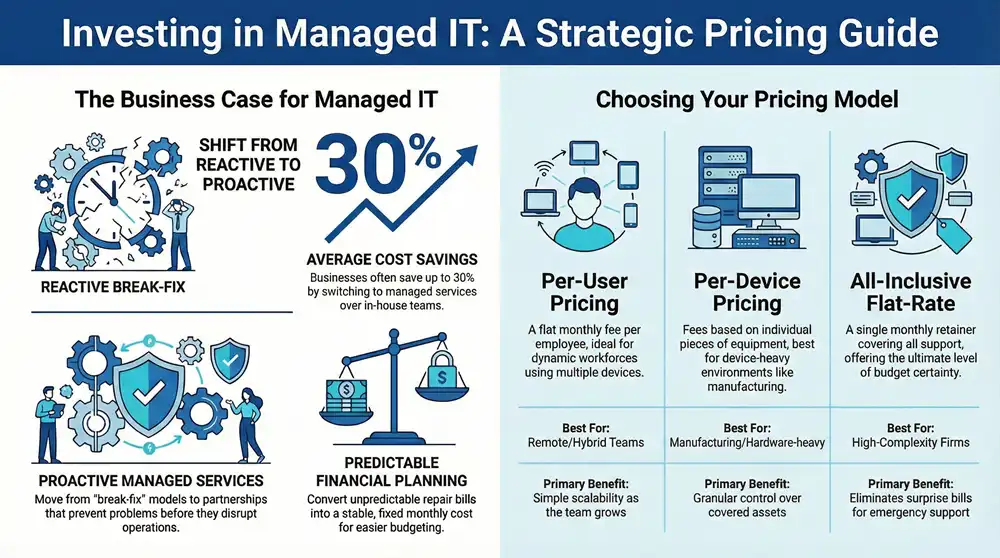
Every managed service provider bills differently. Some charge by the person. Others count devices. A few bundle everything into one price regardless of headcount. Understanding these models is the difference between a predictable IT budget and one full of surprises.
Per-User Pricing
The most common model. You pay a fixed rate for each employee, and every device they use is covered under the same fee. One person with a laptop, a phone, and a desktop? Still one user fee. This works well for companies where employees use multiple devices. It keeps the billing clean.
Typical range: $125 to $250 per user per month. Where you land depends on the service tier. Basic monitoring and helpdesk sits at the low end. Add cybersecurity, compliance support, and 24/7 coverage, and you are closer to $200 or above.
Per-Device Pricing
You pay for each piece of hardware the MSP manages. Servers, workstations, firewalls, switches, access points. This model makes sense when your device count is high relative to headcount (think manufacturing floors, warehouses, or multi-location retail).
Expect to pay $50 to $100 per workstation, $100 to $400 per server, and $30 to $75 per network device each month. It adds up fast if your environment is device-heavy.
All-Inclusive Flat Rate
One monthly number. Everything included. Helpdesk, monitoring, patching, backup, security, on-site visits, project labor. This is the premium option, and it eliminates budget uncertainty entirely. Flat-rate agreements typically run $200 to $400 per user per month. Companies with strict compliance requirements or high security needs often prefer this model because nothing falls through the cracks.
Managed IT Services Pricing Comparison
| Pricing Model | Typical Range | Best For | Watch Out For |
|---|---|---|---|
| Per User | $125 – $250/user/mo | Offices where staff use multiple devices | Users with unusual device counts can inflate costs |
| Per Device | $50 – $400/device/mo | Manufacturing, warehouses, multi-location retail | Costs spike as infrastructure grows |
| All-Inclusive | $200 – $400/user/mo | Compliance-heavy industries (healthcare, finance, legal) | Higher upfront cost, but fewer surprise bills |
| Monitoring Only | $30 – $50/user/mo | Companies with internal IT staff who just need eyes on the network | Does not include support or remediation |
| Break-Fix (Hourly) | $150 – $300/hour | One-off projects or small environments | Completely unpredictable costs, no preventive care |
Here is a pattern we see constantly with new clients. A company starts on a monitoring-only plan because the monthly bill looks attractive. Then something breaks. The hourly repair bill for a single incident exceeds two months of what a full managed plan would have cost. It happens more often than you would think.
Six Factors That Shape Your Managed IT Quote
Two businesses with 30 employees can receive wildly different quotes. A law firm with HIPAA obligations and a construction company with a basic network are not the same engagement. Here is what moves the needle.
1. Company Size and Headcount
More users means a higher total bill, but per-user costs actually drop. A 10-person company might pay $200 per user. Scale to 75 users and per-user pricing can fall to $140 or below. Volume discounts are real in this industry.
2. Infrastructure Complexity
A single office with a cloud-based setup is straightforward. Multiple locations, on-premise servers, hybrid cloud environments, VPN tunnels between offices? Each layer of complexity adds cost. We have seen quotes jump 30% just from adding a second physical location with its own network gear.
3. Cybersecurity Requirements
Basic antivirus and firewall management sits at one end of the spectrum. On the other end: 24/7 SOC monitoring, endpoint detection and response (EDR), dark web scanning, phishing simulations, and incident response planning. Global cybersecurity spending by SMBs is projected to reach $109 billion by the end of this year. The threat landscape is the main reason prices have climbed since 2023.
4. Compliance Obligations
HIPAA, PCI-DSS, FTC Safeguards, CMMC, SOC 2. If your industry has a compliance framework, your managed IT cost goes up. Providers who offer compliance-aligned services build in audit logging, encryption, access controls, documentation, and regular assessments. Expect a 20% to 30% premium over standard packages.
5. Service Level Agreements
Business-hours support (8 AM to 6 PM weekdays) costs less. Move to 24/7 coverage and the price increases. Guaranteed 15-minute response times for critical issues? Also costs more. But consider this: if your point-of-sale system crashes on a Friday night and your MSP does not answer until Monday morning, what does the weekend of lost revenue cost you?
6. On-Site vs. Remote Support
Remote-only plans are cheaper. They work fine for most day-to-day issues. But some problems require hands on a keyboard. Printer jams, network cable runs, server hardware replacements. Plans with unlimited on-site visits cost more, but they eliminate the “that will be an extra $200 per visit” surprise.
Average cost of a single hour of IT downtime for small businesses. Proactive managed IT prevents the outages that create these bills.
What Managed IT Actually Costs by Company Size
Enough with the ranges. Let us put real numbers on the table for South Florida businesses.
| Company Size | Monthly Cost Range | Annual Cost Range | What is Included |
|---|---|---|---|
| 1-10 users | $1,250 – $2,500 | $15,000 – $30,000 | Helpdesk, monitoring, patching, basic security, cloud backup |
| 11-25 users | $2,750 – $5,000 | $33,000 – $60,000 | Everything above plus EDR, email filtering, compliance basics |
| 26-50 users | $4,500 – $10,000 | $54,000 – $120,000 | Full stack: 24/7 SOC, incident response, on-site support, vCIO |
| 51-100 users | $7,500 – $20,000 | $90,000 – $240,000 | Enterprise-grade: multi-site, full compliance, dedicated engineer |
Compare those numbers to hiring in-house. One full-time IT generalist in Miami costs about $95,000 with benefits. They cover maybe 30 users effectively. They do not work nights. They take two weeks of vacation. And they cannot be an expert in networking, security, cloud, and helpdesk all at once. The MSP model spreads expertise across your entire environment for less money. That is the math driving the industry’s growth.
Hidden Costs of In-House IT vs. Managed Services
Companies considering managed IT often benchmark against the salary of an internal hire. That comparison misses about 40% of the true cost.
- Recruitment and onboarding: Finding a qualified IT professional in Florida takes 45 to 90 days on average. Recruitment fees run $8,000 to $15,000.
- Training and certifications: Microsoft, Cisco, CompTIA, and security certifications cost $2,000 to $5,000 per year per technician. And they expire.
- Software licensing: RMM tools, ticketing systems, security platforms, backup software. An internal team still needs these. Budget $500 to $1,200 per month.
- Coverage gaps: One person cannot provide 24/7 coverage. Two people can barely do it. Three gets expensive. An MSP has a full team on rotation.
- Turnover risk: Your entire IT knowledge walks out the door when your single IT person leaves. MSPs document everything. Knowledge stays.
- Opportunity cost: Time your employees spend troubleshooting their own tech issues is time they are not spending on revenue-generating work.
Calculating the Real ROI of Managed IT
Cost matters. But so does what you get back. Here is where managed IT generates measurable return.
Downtime Prevention
Small businesses lose an average of $25,620 per hour of IT downtime. A single four-hour outage can wipe out your IT budget for the quarter. Proactive monitoring catches 85% of issues before they become outages. The math is simple.
Breach Avoidance
The average data breach costs a small business $108,000 to $164,000 (not counting the reputational damage). And 43% of cyberattacks target small businesses specifically. A managed cybersecurity program running at $50 per user per month costs a 30-person firm $18,000 a year. One prevented breach pays for years of coverage.
Productivity Gains
Employees lose an average of 22 minutes per day dealing with IT problems. Across a 30-person office, that is 11 hours of lost productivity every single day. At an average billing rate of $75 per hour, you are losing $825 daily. Responsive helpdesk support cuts the wasted time in half or more.
Predictable Budgeting
No surprise invoices. No emergency vendor calls at premium rates. No scrambling to find budget for a failed server. A flat monthly fee turns IT from a volatile expense into a predictable line item. Finance teams love it. So do business owners who have been burned by unexpected five-figure repair bills.
of all cyberattacks target small businesses. Managed cybersecurity is no longer optional.
How to Pick the Right Provider Without Overpaying
Not all MSPs deliver the same value for the same price. Here is what to look for and what to ask before signing anything.
- Ask for a line-item proposal: If a provider quotes you a single lump number with no breakdown, keep looking. You deserve to see exactly what each dollar covers.
- Clarify what is NOT included: Project work, new equipment setup, cabling, after-hours support. These are common exclusions. Ask about each one.
- Check their response time SLAs: Get the guaranteed response time in writing. “We usually respond within an hour” is not the same as a contractual 15-minute SLA for critical tickets.
- Ask about their security stack: A provider still using just antivirus in 2026 is behind the curve. Look for EDR, SIEM, MFA enforcement, email filtering, and security awareness training at minimum.
- Demand references from your industry: An MSP managing dental offices has different expertise than one managing logistics companies. Industry experience matters.
- Understand the contract length: Month-to-month agreements give you flexibility. Multi-year deals sometimes come with discounts. Know what you are committing to.
One red flag we see constantly: providers quoting below $100 per user with “everything included.” That price point does not support a real security stack, 24/7 monitoring, and qualified engineers. Something is being left out, or the service will not be what you expect.
How 1800 Office Solutions Structures IT Pricing
We have been doing this across South Florida. Our approach is transparent and straightforward because we have seen what happens when it is not. Here is how we work.
Free Network Assessment
We audit your entire environment before quoting. No guessing. You see exactly what you have and what you need.
Transparent Line-Item Pricing
Every service is broken out. You know what you are paying for security, backup, and management separately.
Security-First Packages
EDR, email filtering, dark web monitoring, and phishing simulations are built into every plan. Not add-ons.
On-Site Support Included
Our plans include on-site visits when remote troubleshooting is not enough. No per-visit surcharges.
Compliance Built In
HIPAA, PCI-DSS, FTC Safeguards. We build compliance controls directly into your IT environment from day one.
Managed IT Services Cost FAQ
Most businesses pay between $125 and $300 per user per month. A 25-person company typically spends $3,750 to $6,250 monthly for comprehensive managed IT. The exact price depends on your security requirements, compliance obligations, and service level.
Almost always, yes. A single IT employee in South Florida costs $85,000 to $110,000 per year in salary and benefits. An MSP provides an entire team (helpdesk, security, engineering) for a comparable or lower annual cost, with 24/7 coverage the single hire cannot deliver.
Standard plans include 24/7 network monitoring, helpdesk support, patch management, antivirus and endpoint protection, cloud backup, and basic cybersecurity. Premium tiers add EDR, compliance support, on-site visits, vCIO strategic planning, and advanced threat detection.
Scope of service is the biggest variable. A $100 per user quote typically covers basic monitoring and helpdesk. A $250 per user quote usually includes full cybersecurity, compliance, backup, on-site support, and strategic IT planning. Compare what is included, not just the monthly number.
Some providers charge extra for project work, new employee setups, after-hours support, or on-site visits. Ask for a complete list of exclusions before signing. A good MSP will spell out every potential additional charge in the contract.
Response times vary by provider and severity level. Critical issues (server down, security breach) typically have 15 to 30 minute guaranteed response times. Standard tickets (a single user cannot print) are usually addressed within 1 to 4 hours. Get these numbers in writing.
Yes. Co-managed IT is a common arrangement. Your internal person handles day-to-day user support and projects, while the MSP provides 24/7 monitoring, cybersecurity, escalation support, and specialized expertise your internal person does not have. Co-managed plans are typically cheaper than full outsource.
Contract lengths range from month-to-month to three years. One-year agreements are the most common. Longer commitments sometimes come with lower per-user rates. Always check the early termination clause before signing a multi-year deal.
Basic cybersecurity (antivirus, firewall management, patching) is included in most plans. Advanced security (EDR, SOC monitoring, incident response, phishing simulations) is usually a separate tier or add-on. Given that 43% of cyberattacks target small businesses, we include security in every package at 1800 Office Solutions.
Get a Transparent IT Quote
No pressure. No hidden fees. Just a clear breakdown of what your business needs and what it will cost.
GET YOUR FREE ASSESSMENT
Call us: 1-888-574-5120 | Trusted by businesses