
Your antivirus software just blocked a suspicious file. Your team breathes a sigh of relief. But here’s what keeps me up at night after 15+ years advising SMBs: that blocked file might’ve been the *decoy*. The real attack was already happening somewhere else on your network—quietly, patiently—waiting for you to slip up.
This is exactly the gap that Endpoint Detection and Response (EDR) was built to fill. And it’s no longer just for enterprises with six-figure security budgets.
What Is EDR, Really?

EDR is a security approach that continuously monitors endpoints—laptops, desktops, servers—to detect suspicious behavior and respond to threats in near-real-time. It’s proactive hunting combined with automated response, and it’s fundamentally different from traditional antivirus.
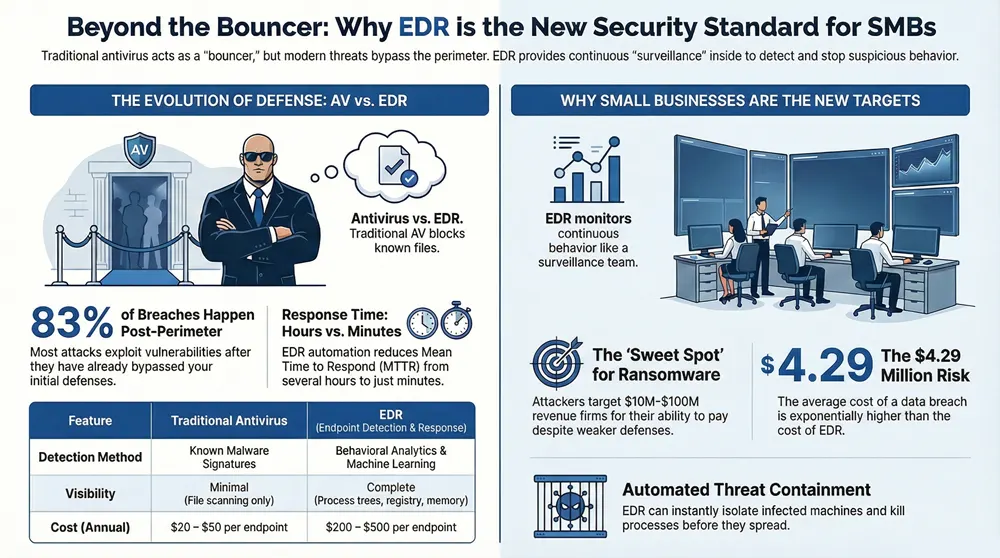
Traditional antivirus is like a bouncer checking IDs at the door. EDR is like a security team with surveillance cameras throughout the club, watching for suspicious behavior even after someone’s already inside.
Here’s the thing: We’ve worked with a 340-employee logistics firm that got ransomware *past* their antivirus. EDR caught the lateral movement within 90 seconds. That early warning bought them time to isolate infected machines before the entire file share encrypted.
How EDR Actually Works
The Collection Phase
EDR deploys a lightweight agent on each endpoint. That agent isn’t slowing down your machines—it’s typically 30-50 MB and uses minimal CPU. What it does is collect data on every process running, every file executed, every network connection, and every registry change. Gigabytes of it per day per machine.
This data streams to a centralized console (usually cloud-based) where it’s indexed and searchable. In our experience, most organizations don’t realize they’ve been sitting on forensic gold this whole time.
The Detection Phase
Here’s where it gets smart. EDR doesn’t just look for known malware signatures (that’s old-school antivirus thinking). It looks for *behaviors* that don’t make sense:
- A user’s laptop spawning a PowerShell process that connects to an IP in Russia
- Excel suddenly executing code in the background
- A service account accessing files it’s never touched before at 3 AM
- Unusual registry modifications tied to persistence techniques
Detection relies on a mix of signature-based rules, behavioral analytics, and machine learning. Vendors like CrowdStrike, SentinelOne, and Microsoft Defender for Endpoint each have their own magic sauce, but the principle’s the same: catch what’s weird.
The Response Phase
This is where EDR separates itself from detection-only tools. When a threat is spotted, EDR can respond automatically or help your team respond faster. Automated actions might include:
- Isolating the affected machine from the network (instant containment)
- Killing suspicious processes before they spread
- Quarantining files
- Rolling back registry changes
Let’s be real—automated response can be a double-edged sword. We’ve seen overaggressive rules tank productivity (unintentionally blocking legitimate software updates). The sweet spot is automated response for high-confidence threats, with instant alerting for the rest so your team can make the call.
EDR vs. Antivirus: What’s the Real Difference?
| Feature | Traditional Antivirus | EDR |
|---|---|---|
| Detection Method | Signature-based (known malware) | Behavior + behavioral analytics + ML |
| Visibility | Minimal—just file scanning | Complete—process trees, network, registry, memory |
| Investigation Tools | Minimal | Deep forensics, timeline reconstruction |
| Response | Quarantine detected files | Isolate machines, kill processes, reverse changes |
| Cost per Endpoint | $20–50/year | $200–500/year (but stops more attacks) |
Bottom line? Antivirus is necessary but insufficient. It’s like having a lock on your door—good, but it doesn’t stop someone who’s already inside.
Key Stat: According to the 2024 Verizon Data Breach Investigations Report, 83% of breaches exploited vulnerabilities or weak credentials—things that happen *after* the perimeter. EDR catches these post-breach behaviors.
Why EDR Matters for SMBs Right Now

You’re Being Targeted
Ransomware operators don’t discriminate anymore. They’ve moved away from spray-and-pray campaigns to targeted attacks against companies with $10M–$100M revenue. Why? You’re big enough to afford a ransom but small enough to lack enterprise-grade defenses.
Compliance Doesn’t Wait
If you’re in healthcare, finance, or government contracting, regulators increasingly expect EDR as baseline security. HIPAA, PCI-DSS, and NIST frameworks don’t mandate EDR by name, but their requirements for threat detection and rapid response basically point to it.
Your Team Is Overwhelmed
Most SMBs have one or two IT people managing security alongside everything else. EDR automation takes the burden off. Instead of chasing alerts all day, your team focuses on high-value threats. We’ve seen organizations reduce mean time to respond (MTTR) from hours to minutes.
What to Look for in an EDR Solution
Agent Lightweight & Compatibility
The agent needs to run on Windows, Mac, and Linux without tanking performance. Test it on your heaviest-used machines first—sales laptops and development workstations.
Forensic Depth
You need to be able to reconstruct what happened *after* a breach. Can you see the full process chain? Network connections? File modifications? If the console is slow or clunky when you’re doing incident response, it’ll cost you time.
Integration Capabilities
EDR works better as part of a broader stack. Look for solutions that talk to your SIEM, your email gateway, and your identity platform. CrowdStrike, SentinelOne, and Microsoft Defender for Endpoint all integrate well with modern security stacks.
Support & Onboarding
Vendor support matters. You’ll need guidance on tuning rules to avoid false positives and on setting up response playbooks. Check whether they offer managed services or if you’re flying solo.
The Bigger Picture: EDR & Your Security Stack
EDR is powerful on its own, but it’s not silver bullet. Think of it as one layer in a defense-in-depth approach. You still need:
- Email security (because phishing remains the top attack vector)
- Identity & access management (MFA, conditional access)
- Network segmentation (so breaches don’t spread across the entire environment)
- A SOC or managed detection service (someone needs to actually watch the alerts)
If you’re thinking about XDR (Extended Detection & Response), that’s EDR plus detection across email, network, cloud, and identity. For most SMBs, EDR + a solid email gateway gets you 80% of the way there at a fraction of the cost.
The Reality Check
EDR requires investment—not just in licensing but in people and process. You can’t deploy it and forget it. Someone needs to understand your environment well enough to tune out false positives, build playbooks for common attacks, and stay on top of threat intelligence.
But here’s what we’ve learned: the cost of *not* having EDR when you get breached is exponentially higher. According to the IBM Cost of a Data Breach Report, the average breach costs $4.29 million. Tack on regulatory fines, downtime, and reputation damage, and you’re looking at business impact that’ll haunt you for years.
EDR doesn’t prevent all breaches. But it cuts your dwell time from months to hours. It turns “we had a security incident” into “we contained a security incident.” That difference is everything.
Ready to Protect Your Endpoints?
Whether you’re just starting with endpoint security or upgrading from antivirus, we’ll help you find the right solution and get it deployed properly. No fluff—just practical, honest advice from people who’ve been doing this for decades.
© 2026 1800 Office Solutions. All rights reserved.