
Unlock Printer Secrets What Does 'Collate' REALLY Mean
Unlock Printer Secrets What Does “Collate” REALLY Mean?If you’ve ever stared at the word “Collate” in your print settings and wondered what it actually does...
Certain terms and phrases are used that may not be familiar to everyone. One such term is collate. But what does collate mean in printing? Simply put, to collate is to gather, arrange, and assemble printed materials in a specific order. This function is particularly useful when printing multiple copies of a document or a set of documents. It saves you the time and effort of manually arranging each page, especially for large print jobs.
What Is Collating in Printing?
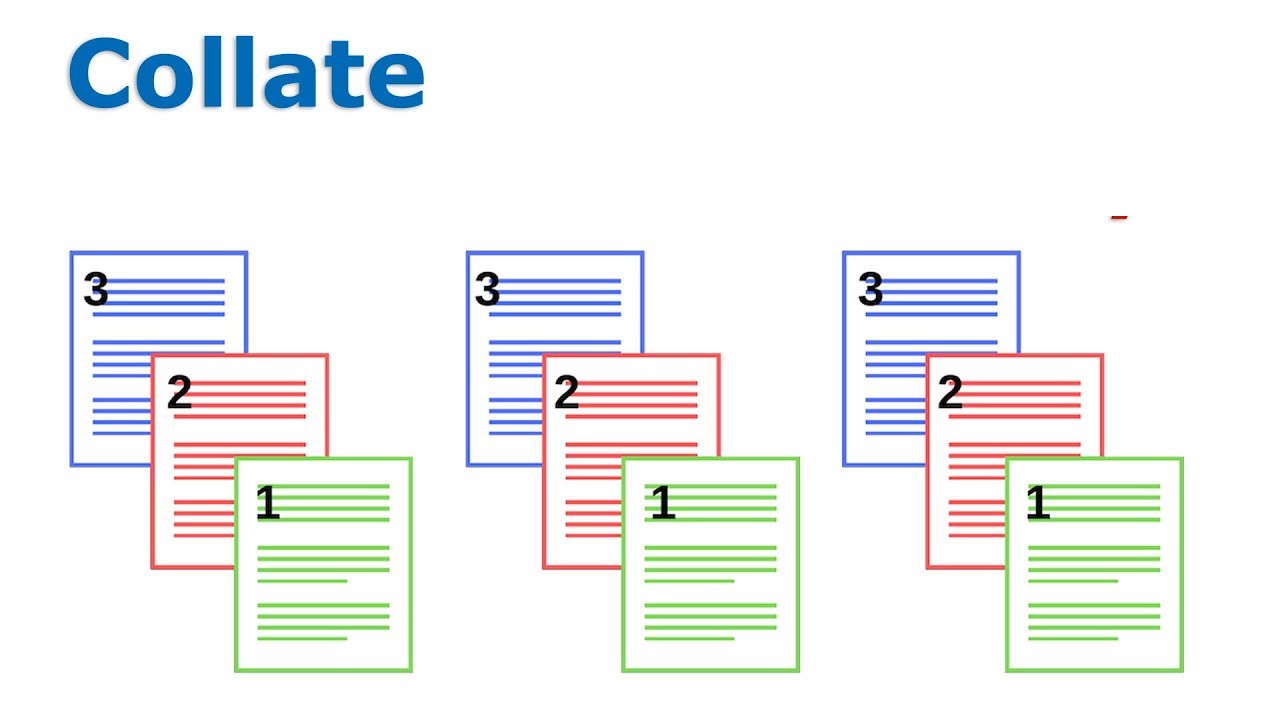
Collating refers to the process of arranging multiple copies of a multi-page document so that each set contains all pages in the correct order. For example, if you’re printing three copies of a five-page report, selecting the collate option will produce three complete sets of the report, each containing pages 1 through 5 in sequence. Without collating, the printer would print all copies of page 1 together, then all copies of page 2, and so on, requiring manual assembly afterward.
How Does Collation Work in Your Printer?
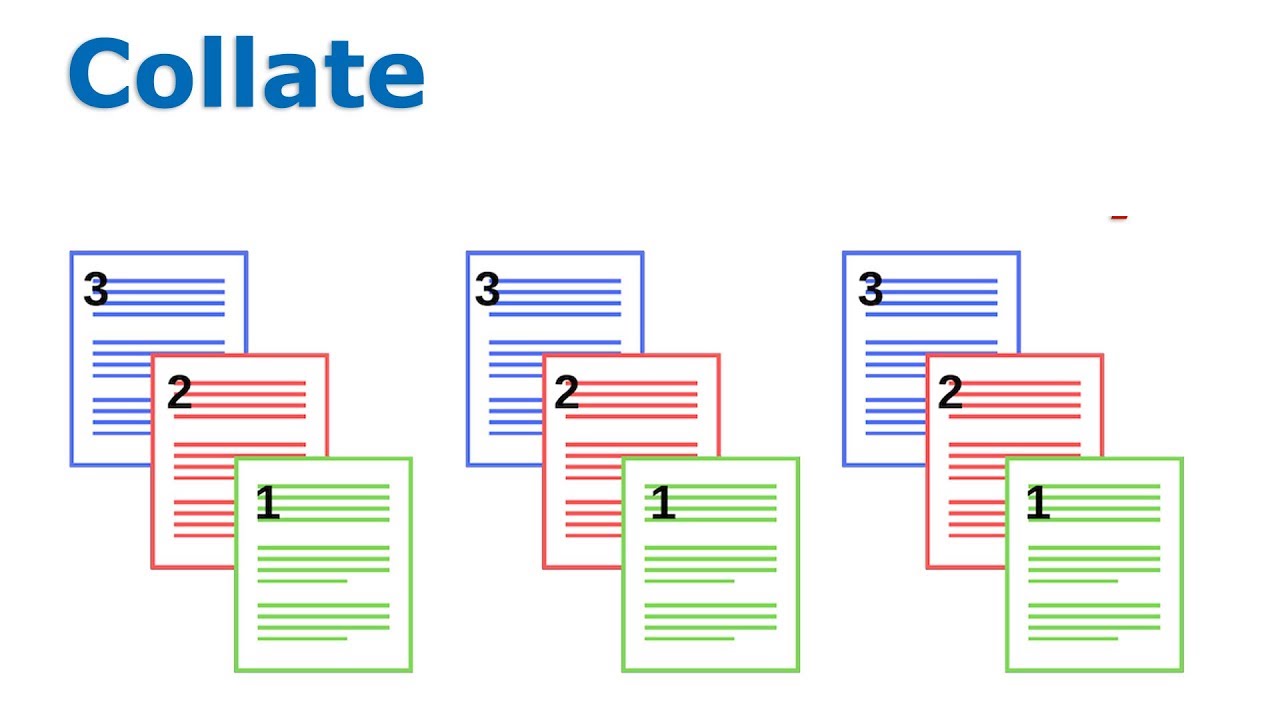
The term “collation” aptly encapsulates this procedure. When engaged in collate printing, the printer is set to produce each set of documents or pages in sequential order.
Let’s consider a practical example: suppose you have a document consisting of five pages and you need ten copies. If the collate option is not activated, the printer will print ten copies of the first page, followed by ten copies of the second page, and so on, resulting in a batch of uncollated pages. On the flip side, selecting the ‘collate’ setting instructs the printer to print the entire five-page document in one go, proceeding to repeat this cycle for the total number of copies required. The outcome is ten neatly organized sets of your document, each set arranged in the proper sequential order. This functionality is particularly crucial when dealing with multi-page documents, ensuring each copy is complete and correctly ordered, thereby streamlining the printing process and enhancing efficiency.
The difference between collated and uncollated printing lies in the order in which the pages are printed. As mentioned earlier, collated printing involves printing complete sets of a document in the correct order. Uncollated printing, on the other hand, involves printing multiple copies of each page separately, without any specific order. This means that if you’re printing a five-page document and you need ten copies, the printer will print page 1 ten times, then page 2 ten times, and so on if you choose not to collate.
The role of printer memory in collation.
The printer’s memory is crucial for the collation process, especially when printing multiple copies of a document. It stores the document’s data, enabling the printer to organize and print each page in the correct sequence. For example, when collating a 20-page report, the printer memory holds the order of pages, allowing it to print the entire report in sequence for each copy. This function is particularly valuable for large or complex print jobs, as a printer with substantial memory can handle these tasks more efficiently, ensuring every set is printed accurately and in the right order.
Benefits of Collated Printing
1.Time-Saving:
Automatically organizing pages reduces the need for manual sorting, streamlining the distribution process.
Using the collate function when printing multiple copies brings significant efficiency and time-saving benefits. It streamlines the printing process by automatically arranging pages in the correct order, eliminating the manual effort of sorting each page. This is especially helpful for large print jobs, where collating can drastically reduce the time spent assembling documents. In essence, collation ensures that every copy is complete and in sequence, making it an indispensable tool for anyone looking to print multiple copies quickly and accurately.
2.Convenience: Documents are ready for immediate use or distribution straight from the printer.
The collate function is essential for maintaining accuracy and order in multi-page documents. When printing multiple copies, collation ensures that each page is printed in the correct sequence, preserving the intended structure and flow of the document. This is particularly crucial for complex reports, manuals, or booklets, where the correct order is key to the document’s readability and functionality. By automating the sequencing of pages, the collate feature minimizes human error, ensuring each copy is an accurate reflection of the original document.
3.Accuracy: Ensures that each set of documents is complete and in the correct order, minimizing the risk of misplacement or duplication.
Guarantees that every printed set contains all the pages in the correct sequence, eliminating the risk of missing or duplicated pages. This not only reduces errors but also ensures a polished, professional presentation—especially important for client-facing materials or business reports.
Collated vs. Uncollated: What’s the Difference?
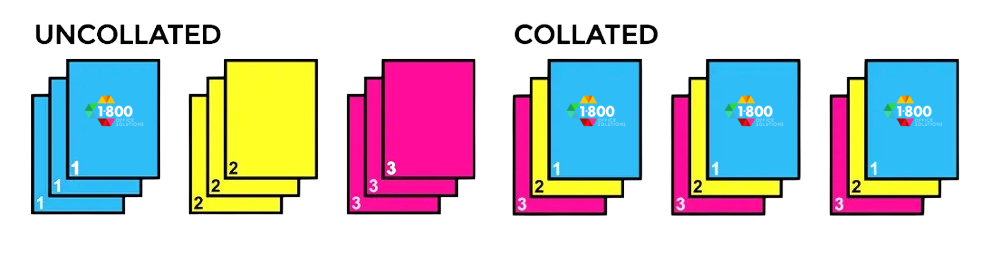
Difference between collated and uncollated
Collated and uncollated printing refers to two different methods of organizing printed pages. In collated printing, the pages are printed in their correct, sequential order for each copy of the document. For instance, if you’re printing three copies of a document with pages labeled 1, 2, and 3, collated printing produces three sets in the order of 1-2-3, 1-2-3, 1-2-3. This method is ideal for multi-page documents like reports or booklets, where order is crucial.
In contrast, uncollated printing produces all copies of each page before moving on to the next page. Using the same example, uncollated printing would result in the order of 1-1-1, 2-2-2, 3-3-3. This approach might be useful in scenarios like workshops or seminars, where the same page is distributed to multiple participants. The key difference lies in the order of output: collated printing assembles the document in its complete form, while uncollated printing groups identical pages together.
Common Use Cases for Collated Printing
Collating isn’t just a button on your printer—it’s a time-saving solution that brings order and clarity to multi-page print jobs. Below are some of the most common and practical applications of collated printing in business, education, and daily office workflows:
🗂️ Reports and Business Presentations
Whether you’re preparing sales reports, project proposals, or client presentations, collated printing ensures each recipient gets a fully assembled packet—page by page, in the correct order. This eliminates the need for manual sorting and reflects a higher level of professionalism and preparedness.
🧰 Instruction Manuals and Technical Guides
In industries such as manufacturing, IT, or healthcare, instruction manuals often contain step-by-step procedures that must be followed in order. Collating preserves the correct sequence of information, reducing confusion and errors for the end user. A well-collated guide is critical for both training and compliance documentation.
📚 Educational Materials and Student Handouts
Teachers and administrators frequently print multi-page test booklets, worksheets, or parent packets. Collated printing simplifies distribution—ensuring every student or parent receives a complete and properly ordered document set. This helps educators stay organized and ensures no important pages are left out.
📝 Training Documents and Onboarding Kits
For HR departments or team leads welcoming new hires, collated printing is ideal for producing employee handbooks, onboarding forms, and training checklists. It keeps all materials together in one neat bundle, which improves the onboarding experience and reduces the chance of missed paperwork.
📦 Marketing Packets and Promotional Bundles
If you’re handing out brochures, spec sheets, and case studies at a trade show or sales meeting, collated printing ensures each packet includes all your marketing assets in a consistent order. This strengthens your brand image and makes a lasting impression on prospects.
How to Enable or Disable Collated Printing
Whether you’re printing from a home office or a high-volume commercial printer, enabling or disabling the collate function is a simple process that can make a big difference in your workflow. Here’s how to do it, step by step:
🖨️ Step-by-Step: Adjusting Collate Settings
1. Open Print Settings
Begin by navigating to the Print dialog window in the program you’re using (such as Microsoft Word, Adobe Acrobat, or Google Docs). You can usually do this by pressing Ctrl + P (Windows) or Command + P (Mac).
2. Find the Collate Option
In the print settings panel, look for the “Collate” checkbox or dropdown menu. This setting may appear under “Copies”, “Finishing Options”, or “Print Preferences”, depending on your printer model and driver.
3. Choose Your Collating Preference
• ✅ Enable Collating:
Select or check this option if you want your printer to produce complete document sets—for example, pages 1–5 printed in order for each copy. Ideal for booklets, handouts, and presentations.
• 🚫 Disable Collating:
Uncheck this option if you prefer the printer to group all copies of each page together—such as all copies of page 1, then all of page 2, and so on. This might be useful if you’re planning to bind or organize the pages manually later.
⚙️ Pro Tip:
Some advanced multifunction printers allow you to set collating as a default preference within their internal control panel or admin interface. This can save time if collated printing is part of your regular workflow.
Uncollated Copying on AltaLink, QDoxs
Collate means to collect and assemble printed sheets of paper in a specific, predetermined order—often used when printing multi-page documents.
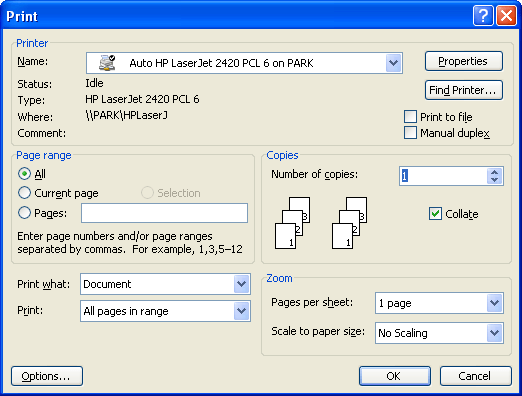
Example of An Print Dialog Box: Selecting the Collate Pages Option
Step-by-step guide on how to select collate in different printer models.
Navigating the print dialog box to select the collate option can vary slightly depending on the printer model, but the general steps are usually similar. Here’s a step-by-step guide:
1. Access the Print Dialog Box:
When you’re ready to print your document, click ‘Print’ in your document editor or viewer. This action opens the print dialog box, which is the control panel for all print settings.
2. Locate the Collate Option:
In the print dialog box, look for an option labeled ‘Collate’. This could be a checkbox, a toggle, or part of a dropdown menu. The location of this option might differ slightly; it’s typically found under ‘Page Setup’, ‘Printer Properties’, or directly in the main dialog box.
3. Select Collate:
If the collate function is a checkbox, simply check it to activate. If it’s a dropdown menu, you might need to select ‘Collated’ from the list of options.
4. Adjust Other Print Settings:
While you’re in the dialog box, set any other necessary print options, like the number of copies, color preferences, or paper size.
5. Preview and Print:
Many print dialog boxes offer a preview feature. Use it to verify that your document appears as expected with pages in the correct order. Once satisfied, proceed to click the ‘Print’ button to start your print job with collation enabled.
For specific printer models, consult the printer’s manual or help resources, as the interface and steps may have slight variations. By following these general steps, you can easily enable the collate option, ensuring your multi-page documents are printed in the correct sequence.
Tips on print settings for optimal results.
Optimizing your print settings is key to achieving the best results. Here are some tips to consider when adjusting your print settings for optimal performance:
1. Select the Right Paper Type:
Ensure your printer settings match the type of paper you’re using. Different paper types, like glossy, matte, or standard, require specific settings for optimal print quality.
2. Adjust Print Quality:
For high-quality documents, like reports or presentations, select a higher print quality setting. For everyday printing, a standard or draft quality can save ink and is usually sufficient.
3. Orientation and Size:
Make sure your paper size and orientation (portrait or landscape) in the print settings match your document layout. Incorrect settings can lead to formatting issues.
4. Color Settings:
If you’re printing a color document, ensure the color settings are correctly chosen. For black and white documents, selecting the grayscale option can save color ink.
5. Double-Sided Printing:
For documents like booklets or multi-page reports, use the double-sided (duplex) printing option to save paper. Ensure your printer supports this feature and set it up accordingly.
6. Margins and Layout:
Check the margins and layout settings to ensure your content is properly aligned and spaced. This is crucial for professional-looking documents.
7. Preview Before Printing:
Always use the print preview function to check the final look of your document. This step helps catch any formatting issues before printing.
8. Test Print:
If you’re using new settings or printing an important document, do a test print first. This can help you catch any errors and avoid wasting materials.
By adjusting these settings to suit your specific document needs, you can enhance the quality of your printed materials and ensure they meet your expectations.
How to do Collation in Booklet and Book Printing: A Crucial Step

Collation in booklet and book printing represents a crucial step, ensuring the integrity and readability of the final product. In these specific contexts, collation refers to the process of assembling printed pages or sections in a precise, predetermined order, which is essential for the logical flow and coherence of the content.
During the production of books and booklets, each page or section often contains distinct pieces of information that must follow a numerical sequence. The collation function ensures that these pages are printed and bound in the correct order. This is especially critical when dealing with multi-chapter books or multi-section booklets, where the continuity of information is key.
For instance, in book printing, collation refers to the process of arranging the pages so that, when the book is bound and cut, the pages appear in the correct sequence. This often involves printing the pages in a specific order that may not be immediately intuitive but becomes clear once the book is assembled. The printing software or the printing press’s collation system automatically organizes these pages during printing, ensuring that each copy of the book is complete and in the correct order.
In booklet printing, collation plays a similar role. Whether creating program booklets for events, informational pamphlets, or small catalogs, collating pages during printing is vital. It ensures that when the booklet is folded and stapled, the pages turn in a logical sequence, allowing the reader to follow the content smoothly.
Enabling the collation option in these scenarios is more than a convenience; it’s a necessity. Without proper collation, the resulting product would be a jumble of unorganized pages, undermining its purpose and usability. Thus, collation is not just a step in the printing process; it’s a critical component that determines the success and professionalism of the final printed book or booklet.
Manual vs. Automatic Collation: Understanding the Options
Exploring manual collation and its challenges.

Manual vs. automatic collation presents a significant choice in the printing process, each with its own set of advantages and challenges.
Manual collation refers to the hands-on process of gathering and arranging printed pages in order. This method can be labor-intensive and time-consuming, especially for large documents. Imagine a scenario where you have 20 pages that need to be assembled in a specific sequence. Manual collation would require a person to physically gather these pages and arrange them in the correct order, a task that becomes more challenging with an increase in the number of copies or pages. This process is prone to human error and can be particularly tedious when dealing with complex documents or when precise organization is critical.
In contrast, automatic collation, as the name suggests, automates this process. When printing, automatic collation means the printer or printing software takes over the task of arranging the pages in the correct sequence. This is especially beneficial for collated printing, where each set of documents needs to be in a specific order. For instance, if you want your pages to be arranged in a booklet format or in a sequential report, automatic collation ensures that each set is correctly ordered without the need for manual intervention.
The use cases for automatic collation are vast, ranging from simple document printing to complex book production. It becomes indispensable in scenarios where documents contain multiple pieces within, such as chapters or sections, that must be in a particular order. Automatic collation also proves highly effective in scenarios where consistency and accuracy are paramount, eliminating the risk of human error inherent in manual collation.
In conclusion, while manual collation offers a hands-on approach, it can be laborious and error-prone, particularly for large-scale or intricate printing tasks. Automatic collation, on the other hand, streamlines the process, ensuring pages are in order and efficiently assembled, making it the preferred choice for most professional and high-volume printing needs. If you’re unsure about which option suits your project best, don’t hesitate to send us an email for personalized advice.
Troubleshooting Common Collation Issues
Addressing common problems encountered with collation.
Troubleshooting common collation issues involves identifying and addressing the typical problems that can arise during the collation process. These issues, if not resolved, can lead to disordered or incomplete sets of documents, impacting the overall quality of the print job. Here are some common collation challenges and ways to address them:
1. Incorrect Page Sequence:
One of the most frequent issues in collation is pages being printed out of order. This can often be due to incorrect document setup or printer settings. To address this, double-check your document’s page order before printing and ensure the collate option is correctly enabled in your printer settings.
2. Printer Memory Limitations:
Printers with limited memory might struggle with large collation tasks, leading to errors or incomplete jobs. For large documents or multiple sets, consider breaking the print job into smaller segments or using a printer with a higher memory capacity.
3. Software and Driver Issues:
Sometimes, outdated or corrupted printer drivers and software can cause collation problems. Make sure your printer’s software is up-to-date and compatible with your operating system. Reinstalling or updating printer drivers can often resolve these issues.
4. Hardware Malfunctions:
Printers experiencing hardware issues may not collate properly. Regular maintenance and checks can prevent these problems. If you suspect a hardware issue, consult the printer’s manual or contact technical support.
5. Misfeeds and Paper Jams:
Misfeeds or paper jams can disrupt the collation process. Ensure you’re using the correct paper type and size, and that it’s properly aligned in the tray. Keep the printer clean and free of debris to minimize these issues.
6. Output Tray Capacity:
Overloading the printer’s output tray can lead to collated pages getting mixed up. Regularly remove completed sets from the output tray, especially during large print jobs.
By being aware of these common collation issues and knowing how to troubleshoot them, you can ensure a smoother, more efficient printing process. Remember, careful setup and regular printer maintenance are key to avoiding many of these problems.
Tips and tricks for efficient collation.
Efficient collation in printing can significantly streamline your workflow and ensure error-free documents. Here are some useful tips and tricks:
Pre-Check Document Order: Before printing, review your document to ensure all pages are in the correct order. This simple step can prevent a lot of issues in collation.
Utilize Printer Preview: Always use the print preview feature. It gives you a visual confirmation of how your document will be printed and collated.
Select Appropriate Printer Settings: Double-check to ensure the collate option is enabled in your printer settings. Also, adjust other settings like paper size and quality according to your document’s requirements.
Optimize Printer Memory Usage: For large printing tasks, consider splitting the job into smaller batches if your printer has limited memory. This can prevent errors during the collation process.
Regularly Update Printer Drivers and Software: Keep your printer’s drivers and software up to date to avoid compatibility issues that can affect collation.
Use High-Quality Paper: Poor quality paper can cause jams and misfeeds, disrupting the collation process. Invest in good quality paper that’s suitable for your printer.
Monitor Paper Alignment and Feed: Ensure that paper is properly aligned in the tray and the feed mechanism is working correctly to avoid misfeeds that can mess up the order of collated pages.
Keep the Printer Maintained: Regular maintenance of your printer is crucial. Clean it frequently and check for any wear and tear that might affect its functionality, especially if you print and collate documents often.
Understand Your Printer’s Capabilities: Familiarize yourself with your printer’s collation capabilities and limitations, especially if you handle complex or large-volume print jobs.
Sort Manually When Necessary: In cases where automatic collation isn’t reliable or available, sorting the pages manually might be more efficient. It’s useful for small jobs or when precise ordering is critical.
By incorporating these tips into your printing routine, you can enhance the efficiency and accuracy of the collation process, ensuring your multi-page documents are printed and organized as intended.
FAQ’s
What does 'collate' mean in printing?
Collate in printing refers to the process of collecting and assembling printed sheets of paper in a predetermined order or sequence. When printing more than one copy of a multi-page document, the pages are printed in the correct order from the first page to the last page.
What is the difference between collated and uncollated printing?
Collated printing refers to the process where multiple copies of a document are printed in a sequence from the first page to the last. On the other hand, uncollated printing refers to the process where each page is printed separately in its entirety before moving on to the next page.
When should I use 'collate' in printing?
The 'collate' function should be used when you're printing more than one copy of a multi-page document and you want each copy to be in the correct order from the first page to the last.
What is the benefit of collated printing?
Collated printing saves time and effort as it organizes the pages in the correct order. This is especially useful for large documents or when multiple copies are needed.
What does 'collate copies' mean?
'Collate copies' means that instead of printing individual papers, the printer organizes and prints the pages in a specific order to form complete document sets.
How does collated printing work?
In collated printing, all the pages in the document will print once. Once complete, the machine will repeat the process by printing a second set. This continues until the requested number of document sets is complete.
What is an example of collated printing?
An example of collated printing is when you're printing a 5-page document and you need 3 copies. With the 'collate' function turned on, the printer will print pages 1 through 5 in order, then repeat this process two more times, giving you three complete sets of the document in the correct order.
What does 'uncollated' mean when printing?
When printing is set to 'uncollated', the printer will print all copies of the first page, then all copies of the second page, and so on, until all pages have been printed.
Can I collate when printing double-sided?
Yes, you can use the 'collate' function when printing double-sided. The printer will print all pages in the correct order for each copy of the document, whether it's single-sided or double-sided.
How does 'collate' affect the organization of printed material?
The 'collate' function affects the organization of printed material by ensuring that the pages are in the correct order. This is particularly useful when printing multiple copies of a multi-page document, as it ensures each copy is a complete set in the correct sequence
Not sure what kind of printer you should buy for your business? Read on to learn about how to choose the best printers for small business.When it comes to printing out important documents for your…
document, collation, bookbinding, brochure, business card, duplex printing, sequence, productivity, faq, sorting, comic book, printer driver, paper size, machine, lamination, collate printing, direct mail, collated printing, spiral, large format, print job, usability, operating system, graphic design, paperback, risk, button, coil binding, printing press, customer, envelope, workflow, ink, brand, dialog box, readability, page layout, color printing, newsletter, ring binder, publishing, knowledge, marketing strategy, yearbook, recycling, troubleshooting, bound, color copies, saddle stitch booklets, perfect bound books, book printing, lingo, saddle stitch, brochures, default, concept, client, invoice, what is collate in printing, automation, collating in printing, large, what does collate mean when printing, toner, email address, punctuation, what does collate mean in printing, offset printing, pantone, dots per inch, ultraviolet, cyan, coat, uv coating, metal, adhesive, lithography, prepress, halftone, plastic, varnish, imposition, grayscale, graphics, substrate, wire, inch, photograph, file format, spot color, textile, gloss, illustration, opacity, laser, dot gain, digital printing, fiber, coated paper, laser printing, acronym, density, pulp, computer file, measurement, foil, full color, primary color, watermark, flexography, pamphlet, coil bind, overprint, manufacturing, flood, typography, digital image, die cutting, postcard, isbn, linen, comb, petroleum, unit of measurement, comb binding, typeface, drill, dust jacket, cylinder, wood, subtractive color, paperboard, image file format, postscript, solution, bindery, screen printing, stationery, photographic paper, angle, liquid, contrast, powder, grain, pigment, negative, tiff, transparency, stamping, relief, graphic arts, steel, color space, papermaking, color balance, creep, desktop publishing, environmentally friendly, photography, weight, rotogravure, lines per inch, knockout, letterpress printing, pagination, continuous tone, cotton, deckle edge, additive color
Frequently Asked Questions
What does collate mean in printing?
In printing, collate means assembling multiple printed pages in a specific order for each copy of a document. It ensures that pages are arranged sequentially, avoiding duplicates or mixed-up pages in multiple copies. This process streamlines printing tasks and maintains document order and organization.
What is collate when printing?
Collating when printing refers to gathering and assembling pages in a specific order. It ensures that multiple copies of a document are printed in sequence, maintaining the document's structure and readability. Collation is crucial for accurate and organized document production.
What does collated mean for printing?
Collated printing organizes and assembles printed pages in the correct order for each copy of a document. It ensures that multi-page documents are printed sequentially, preserving structure and readability, making it ideal for professional documents like reports and booklets.
What does collate mean in print options?
Collate in print options means assembling multiple copies of a document in the correct order, ensuring each set is complete and sequentially arranged for efficient printing and readability during large-scale projects or multi-page document production.
What is collate for printing?
Collation in printing refers to assembling printed pages in a specific order. When activated, the printer organizes and prints each page in sequence for multiple copies, ensuring correctness and efficiency in producing multi-page documents. Collate prevents unorganized and repetitive printing, particularly beneficial for professional reports or booklets.
What does collate mean in terms of printing?
In the context of printing, collate means assembling printed pages in the correct sequence for each copy, ensuring documents are complete and orderly. Collation arranges pages sequentially, essential for accurate and professional-looking print jobs.
What does collate for printing mean?
Collating for printing means arranging and assembling printed materials in a specific order, ensuring multiple copies are complete and in sequence. This process streamlines printing tasks, particularly for multi-page documents, enhancing efficiency and accuracy in producing organized sets of pages.
What does collate mean in print?
Collate in print means to organize and assemble printed materials in the correct order. When enabled, the printer will print multi-page documents in sequence for each copy, ensuring accuracy and efficiency.
What does the collate option in printing mean?
The collate option in printing gathers and arranges printed materials in the correct order. It ensures documents are printed sequentially for each copy, ideal for multi-page documents and multiple sets. Collation is essential for orderly and efficient printing processes.
What is collate in printing?
Collating in printing refers to assembling and arranging printed materials in the correct sequence. It ensures that multiple copies of a document are produced with pages in the intended order, offering efficiency and accuracy in large-scale printing tasks.
What does collate on printing mean?
Collating in printing refers to assembling printed materials in a specific order. It ensures multiple sets of a document are organized correctly, enhancing efficiency by printing complete and accurately ordered copies. Enabling collation in the printer settings automates this process, eliminating the need for manual sorting.
What does collate in printing mean?
Collating in printing means organizing multiple copies of a document in the correct order, ensuring each set is complete and sequential for easy readability and professionalism. It helps to streamline the printing process and eliminate errors in document assembly.
What does collate mean on print settings?
Collate on print settings means assembling printed pages in the correct sequence for each copy of the document, ensuring orderly and complete sets of the material. This feature is vital for multi-page documents where the right order is essential for readability and professionalism.
What is collate means in printing?
Collate in printing means gathering, arranging, and assembling printed materials in a specific order. It ensures the correct sequence of pages in multi-page documents for each copy, optimizing efficiency and accuracy in printing tasks.
What does collate mean when printing something off?
Collating when printing means arranging and assembling printed materials in the correct order. It ensures multiple copies of a document are printed sequentially, maintaining the intended structure and facilitating readability. Collation is essential for organizing multi-page documents accurately during the printing process.
What is collate printing means?
Collate printing assembles printed pages in the correct order for each copy of a document, ensuring completeness and sequence. It's essential for multi-page materials like reports, booklets, and manuals, enabling efficient and accurate printing of multiple copies.
What is collation in printing?
Collation in printing refers to assembling printed materials in the correct order. It ensures that each copy of a multi-page document is complete and organized, maintaining the intended structure and flow of the content. Collation can be automated or manual, depending on the printing needs and preferences.
What does collate do in printing?
Collating in printing organizes and assembles multiple copies of a document in the correct sequential order, ensuring each copy is complete and in the intended arrangement. This feature streamlines printing tasks, particularly for multi-page documents, enhancing efficiency and accuracy in producing multiple sets.
What does collate means when printing?
Collate in printing means arranging and assembling printed materials in a specific order, ensuring that each copy contains the complete set of pages in the correct sequence. It streamlines printing efficiency by organizing multi-page documents accurately for every print job.
What does collate mean when you print multiple copies?
When you print multiple copies, collate means producing each copy with all pages in the correct sequence. This ensures every set is complete and orderly, essential for readability and professionalism, especially in reports, booklets, and manuals.
What is collate when printing PDF?
Collating when printing a PDF involves arranging the pages of the document in the correct order for each copy. This ensures that multiple copies are printed with the pages in sequence, aiding readability and organization.
What is print collate?
Print collate is the process of arranging and assembling printed materials in a specific order. Collated printing ensures that multiple copies of a document are printed in the correct sequence, essential for readability and professionalism in various printing tasks. The collate function is crucial for organizing and printing multi-page documents efficiently and accurately.
What is collated and uncollated printing?
Collated printing arranges pages in order for each copy, ensuring document completeness and sequence. In contrast, uncollated printing repeats the same page before moving to the next, useful for distributing identical copies to multiple recipients.
What does collate print mean?
Collate printing gathers and arranges multiple copies of a document in the correct order, creating complete and sequential sets for efficient distribution and readability. It is essential for maintaining the intended document structure and professional presentation.
What is collate print?
Collate print is the process of gathering and arranging printed materials in a specific order for multi-page documents. Selecting the 'collate' option ensures each copy is complete and in the correct sequence, streamlining the printing process and enhancing efficiency.
What is collate printing?
Collate printing organizes printed materials in the correct order for each copy. It ensures that multi-page documents are assembled sequentially, improving efficiency and professionalism in printing tasks. To enable collation, select the 'Collate' option in the print dialog box before printing.
What does collate mean when you print?
Collate in printing organizes pages in sequential order for multi-copy printing, ensuring each set is complete and in the intended structure. It enhances efficiency by assembling documents correctly, streamlining the printing process.
What is collate in terms of printing?
Collate in printing means gathering and arranging printed materials in a specific order. It ensures each copy is complete and in sequence, essential for multi-page documents. Collating automates this process efficiently for professional and high-volume printing needs.
What does collated printing mean?
Collated printing means assembling printed pages in correct order for each copy. It's crucial for organized, sequential documents, ensuring each set is complete and professionally presented. Automatic collation streamlines the process, especially in large-scale tasks, maintaining order and efficiency.
What is collate in relation to printing?
Collate in printing organizes multiple copies of a document in sequential order, ensuring each set is complete and in the intended sequence. This streamlines the printing process, enhancing efficiency for complex or multi-page documents requiring accurate page arrangement.
What does collate mean for printing?
Collating in printing arranges pages in the correct order for each copy, crucial for multi-page documents like reports or booklets. It ensures every copy is complete and orderly, streamlining the printing process for efficiency and accuracy.
What does collate mean on the print screen?
Collate on the print screen refers to arranging printed materials in the correct sequence automatically. It ensures each copy of multi-page documents is printed complete and in order, streamlining the printing process for efficiency and accuracy.
What is collated and not collated when printing?
When printing collated pages, each document copy is in correct sequence, ideal for reports or manuals. In contrast, uncollated printing produces batches of individual pages, beneficial for distributing multiple identical sheets.
What does a printed collate mean?
A printed collate means that the document's pages are arranged in the correct sequence for each copy, ensuring the complete and orderly assembly of multiple sets. This process is crucial for maintaining the document's intended structure and flow.
What does collate mean when you are printing?
Collating when printing means assembling multiple copies of a document in the correct order. It ensures each copy contains all pages in sequence, crucial for reports, manuals, or booklets. Additionally, collation enhances efficiency by automating the organization of printed materials.
What does collated mean printing?
Collated printing organizes printed materials in a specific order for multiple copies, ensuring each copy contains the complete set of pages in the correct sequence. This process streamlines printing efficiency and maintains the document's intended structure.
What is collate while printing?
Collate in printing refers to assembling printed materials in a specific order. Without the collate option, printers repeat pages in batches, resulting in unorganized copies. Collation ensures accurate sequencing of pages for each printed set, ideal for multi-page documents and efficient printing.
What is collate option in printing?
The collate option in printing organizes multiple copies of a document to print in sequential order, ensuring each copy contains the full set of pages in the correct sequence. It streamlines printing tasks by automating the assembly process for multi-page documents.
What is collating in printing?
Collating in printing is the process of gathering and arranging printed materials in the correct sequential order, ensuring each copy of a document is complete and in the intended structure. It involves assembling pages in a logical sequence for professional and organized document sets.
What does collate means in printing?
Collate in printing means gathering, arranging, and assembling printed materials in a specific order. It ensures that multiple copies of a document are printed in the correct sequence, making it essential for maintaining document order and flow.
What does collate mean in printing copies?
Collate in printing means assembling multiple copies of a document in sequential order for each set. It ensures the correct arrangement of pages in every copy produced, making it essential for organized and coherent printing tasks.
What does print collate mean?
Print collate means arranging and assembling printed materials in a specific order. Collating enables printing multi-page documents in sequence for each copy, ensuring accuracy and efficiency. It gathers pages correctly for professional-looking results, vital for booklets, reports, or manual printing.
What is collation printing?
Collation printing assembles multiple copies of a document in the correct order, ensuring each set is complete and in sequence. This is vital for professional and efficient printing, especially for multi-page documents like reports or booklets where page order is crucial.
What is meant by collate in printing?
Collating in printing organizes multiple copies of a document in the correct order, ensuring each set is complete and sequentially arranged for efficient printing and readability. It's crucial for assembling multi-page documents like reports, booklets, or manuals accurately.
What is collated in printing?
Collated printing organizes pages in sequence for each document copy. It ensures complete, orderly sets essential for reports, booklets, or training materials. Collation automates the process, saving time and ensuring accuracy in high-volume printing projects.
What does collated mean when printing?
Collated printing means assembling printed pages in the correct sequential order for each copy of the document. It ensures that every set is complete and in the right sequence, vital for professional and organized document output.
What does collate mean when printing PDF?
Collating in printing a PDF means arranging the document pages in sequential order. This ensures each printed copy contains all pages in the correct sequence, optimizing efficiency and organization in multi-page document printing.
What does collate mean print?
Collate in printing means arranging multiple copies of a document in the correct order. Enabling the collate option ensures each page is printed sequentially for every copy, essential for maintaining document coherence and organization.
What does collate do printing?
Collate in printing organizes multiple copies of a document in the correct sequence. It ensures pages are printed in order for each copy, enhancing document readability and efficiency.
What does it mean to collate when printing?
Collating when printing means arranging printed materials in a specific order. It ensures that multi-page documents are printed in the correct sequence for each copy, streamlining the printing process and enhancing efficiency. Collated printing produces complete sets, while uncollated printing groups identical pages together.
Should I collate when printing?
Yes, you should collate when printing multi-page documents to ensure each copy is complete and in the correct sequence, maintaining document integrity and professionalism. Collation streamlines the printing process and reduces errors, especially for complex reports or booklets.
What is collate mean in printing?
Collate in printing means arranging printed materials in a specific order. When enabled, it ensures that each page of a multi-page document is printed in the correct sequence for every copy, enhancing efficiency and preserving document structure.
What does collate mean when printing double sided?
When printing double-sided, collate ensures that each set of pages is sequentially ordered front and back, allowing the document to be read in the intended sequence. It arranges pages for duplex printing in the correct order for each copy.
What is collating printing?
Collating printing is the process of assembling multiple printed pages in the correct order for each copy of a document. It ensures that each set of pages is complete and in the intended sequence, critical for professional and organized document distribution, such as reports, booklets, or manuals.
What is collated printing mean?
Collated printing refers to assembling documents in the correct order during the printing process. It ensures each copy contains all pages in sequence, vital for professional documents like reports, booklets, and manuals.Automating this process streamlines large-scale printing tasks and enhances efficiency.
What does collate mean print options?
Collate in print options ensures multiple copies are printed in correct order, preserving document structure and readability. It gathers and arranges pages sequentially for each copy, streamlining printing efficiency and accuracy.
What is collated and uncollated in printing?
Collated printing arranges pages in the correct sequence for each copy, ensuring orderly documents. Uncollated printing repeats pages in batches without a specific order, suitable for distributing identical pages to multiple recipients. Each method offers unique benefits based on printing requirements.
What does collate mean in printing options?
Collate in printing refers to assembling pages in the correct order during printing, ensuring each copy is complete and organized. This feature is vital for multi-page documents, maintaining the intended sequence and enhancing efficiency in printing tasks.
What does collate mean on print options?
Collating in print options means assembling printed materials in a specific order. When selected, the printer organizes and prints the entire document in sequence for each copy, ensuring the correct page order is maintained. It's essential for multi-page documents to be accurately arranged for readability and efficiency.
What is collate PDF printing?
Collate PDF printing is the process of organizing and assembling multiple pages of a PDF document in a specific order for efficient and accurate printing. It ensures that each copy of the document is complete, sequential, and in the intended order for optimal readability and professionalism.
What does collate pages mean in printing?
Collating pages in printing is the process of arranging multiple copies of a document in the correct order. It ensures each printed set contains all pages sequentially, vital for organized and coherent printed materials like booklets or reports.
What does collate mean when printing multiple copies?
Collate in printing means assembling multiple copies of a document in the correct order, ensuring each set of pages is complete and arranged sequentially. This process streamlines printing efficiency, ensuring organized and easy-to-read documents.
What collate means in printing?
Collating in printing means organizing and assembling printed materials in a specific sequence. It ensures each copy contains all pages in the correct order, optimizing efficiency and accuracy in multi-page document printing. The collate option simplifies the process, saving time and avoiding errors in large print jobs.
What is collate PDF print?
Collate PDF print is the process of arranging and assembling pages in the correct sequential order when printing multiple copies of a PDF document. This ensures that each printed set is complete and follows the intended structure, enhancing efficiency and readability.
What is collate on print?
Collate on print is a function that organizes printed pages in a specific order for each copy. It ensures documents are printed in correct sequence, making multiple copies easier to read and manage.
What does collated mean in printing?
In printing, collated means assembling printed materials in the correct sequence for each copy, allowing for orderly and complete document sets. The collate option organizes pages to ensure the final printed copies are in the intended order, enhancing efficiency and readability of multi-page documents.
What is collated printing?
Collated printing organizes printed pages in sequence for each copy of a document. This ensures proper order and completeness, helpful for reports, booklets, and manuals. Switch on the collate option in the print dialog box to activate this feature.
What does collate mean when printing something?
Collating when printing means to assemble and arrange printed pages in the correct order, ensuring each copy is complete and in sequence. It's essential for multi-page documents to print accurately and efficiently.
What is collate print option?
The collate print option arranges printed materials in the correct order for each copy, streamlining document organization and enhancing efficiency. It ensures multi-page documents are printed complete and in sequence, maintaining the document's structure and readability.
What does collate mean while printing?
Collate in printing means arranging printed materials in a specific order so that each copy is complete and in sequence. It ensures that multi-page documents are printed correctly, streamlining the process and enhancing efficiency. Collation is crucial for maintaining document readability and functionality, especially in professional printing operations.
What is collated printing option?
Collated printing organizes printed pages in proper sequence for each copy of a document, while uncollated printing repeats the same pages before moving to the next set. It ensures documents are complete and orderly, ideal for reports, booklets, or training materials.
What does collate on print mean?
Collate on print means arranging printed materials in a specific order so that multi-page documents are printed sequentially in complete sets, ensuring accurate and orderly copies for efficient printing. Selecting the collate option ensures pages are organized correctly, a crucial step for professional and error-free print jobs.
What is collated in Word printing?
Collated in Word printing refers to the process of assembling printed materials in the correct sequence for each copy. When collated, pages are printed in order for each set of copies, ensuring complete and organized documents. It’s crucial for maintaining document flow and readability.
What does collate mean on print?
Collate on print means arranging multiple copies of a document in the correct order, crucial for maintaining document sequence and structure. Collation ensures each copy is complete and orderly, streamlining the printing process.
What does collate mean when I print something?
Collating when printing means arranging multiple copies of a document in the correct order. It ensures each page prints sequentially, essential for booklets, reports, or manuals. This feature streamlines printing, ensuring all copies are accurate and in order.
What is collating when printing?
Collating when printing refers to assembling printed materials in the correct order. It ensures each copy is complete and in sequence. Collation is crucial for multi-page documents, maintaining order and efficiency in the printing process.
What is Excel print collated?
In Excel, print collated means that each set of printed copies will have the pages in the correct order. Collated printing ensures that multiple copies of a document are organized sequentially for easy reading and distribution.
What does collate mean printing Google Docs?
Collating in printing Google Docs means organizing multiple copies of a document in the correct sequential order. This feature ensures each page is printed in the right sequence, vital for professional and orderly document sets.
What is meant print collate?
Printing collate means arranging pages in the correct sequence for each copy, ensuring complete and orderly document sets are produced. It enhances efficiency and readability, critical for multi-page documents with multiple copies needed. Proper collation streamlines the printing process and eliminates manual page sorting.
What is collated when printing?
Collated printing involves assembling printed pages in the correct order for each copy of a document, ensuring complete sets in sequence. This process is crucial for multi-page documents like reports, manuals, and booklets to maintain readability and professionalism.
What does collate mean on printing?
Collate in printing means organizing and assembling printed materials in the correct order, ensuring each copy contains all pages in the intended sequence for efficient and accurate document reproduction. It's a crucial feature for multi-page documents to maintain structure and readability.
What does collate mean when printing?
Collating when printing means arranging and assembling printed materials in the correct order. This ensures each copy contains the complete set of pages in the intended sequence, essential for organized and efficient document production..
What does collate mean when printing copies?
Collating when printing copies means arranging and assembling printed materials in the correct order for each copy. It ensures that multi-page documents are printed sequentially for every set, maintaining the document's intended structure and readability.
What is collated printing Mac?
Collated printing on a Mac refers to the process of printing multiple copies of a document with pages arranged in the correct sequential order. By enabling the collate option in the print dialog box on a Mac, the printer will assemble the pages in the intended sequence for each copy, ensuring accuracy and completeness.
What is collate printing Mac?
Collate printing on Mac systems involves assembling printed pages in a specific order. Mac users can select the collate option in the print dialog box to ensure multiple copies are sequentially arranged for each document, enhancing organization and efficiency in printing tasks.
What is collated print?
Collated printing organizes and assembles printed materials in sequential order for each copy of a document. It ensures that each set is complete and in the correct sequence, vital for multi-page documents like reports, manuals, and booklets.
What does collate mean to print?
Collating to print organizes pages in the correct order for multiple copies, ensuring each is complete and sequentially aligned. It streamlines printing processes for efficiency and maintains document coherence.
What does collate mean in print settings?
Collate in print settings refers to arranging, assembling, and printing pages in a specific order. Enabling collation ensures multi-page documents are printed in sequence for each copy, streamlining printing tasks and enhancing efficiency.
What does collate do when printing?
Collating when printing organizes multiple copies of a document in the correct page order, ensuring each set is complete and in sequence for easy reading and professionalism. This feature is crucial for efficient handling of multi-page documents, streamlining the printing process.
What does collate mean with printing?
Collate in printing means gathering and organizing printed materials in the correct order. It ensures that multiple copies of a document are printed sequentially, maintaining the original document's structure and readability. This process streamlines printing tasks, especially for multi-page documents, enhancing efficiency and accuracy.
What is a collated print?
A collated print gathers and arranges multiple copies of a document in the correct sequence, ensuring each set is complete and in order. Printers with sufficient memory automate this process, improving efficiency for large or complex printing tasks.
What does collate means on printing?
Collate in printing means gathering, arranging, and assembling printed materials in a specific order, ensuring each copy is complete and correctly ordered for efficient printing of multi-page documents. Collation avoids unorganized or incomplete sets by printing pages in the intended sequence.
What is not collate printing?
Uncollated printing involves printing multiple copies of each page separately without specific order. For instance, if you print a five-page document and need ten copies, the printer prints page 1 ten times, followed by page 2 ten times, and so on.
What does collate mean printing?
Collate in printing means assembling and arranging printed materials in a specific order. It ensures each copy of a multi-page document is complete and in sequence, optimizing efficiency and accuracy in printing tasks.
What does collate mean printing PDF?
Collate in printing PDF means arranging pages in the correct order for each copy printed, ensuring the document's sequence is maintained. It organizes pages sequentially to streamline the printing process efficiently.
What is collate in print?
Collate in printing involves organizing multiple copies of a document in their correct order, ensuring each set is complete and sequential for efficient printing and readability. It's a crucial function for document consistency and accuracy in large or complex print jobs.
What is collate in printing copies?
Collating in printing copies means assembling multiple pages in the correct order for each copy, ensuring the pages are arranged sequentially. This feature is vital for multi-page documents to maintain their intended structure and readability.
What does collate pages mean when printing?
Collating pages when printing means assembling the printed materials in a specific order, ensuring each copy is complete and correctly ordered. It organizes the pages in sequence for each set of copies, streamlining the printing process and enhancing efficiency.
None?
None.
what collate means in printing, collated printer meaning, collate during printing, staple and collate, collated vs uncollated, printer colate, collate printe, collate meaning in printing, collating def, printer what does collate mean, printer collate option, collate copies printing, what is collated printing mean, how to print collated, what is collate printing option, printing collate meaning, what does it mean to collate copies, collating in printing, what is collate in print, how does a printer print on both sides, printer collated meaning, collates meaning, collate in print option, print collation, what is collated paper, what does collate me, define collated printing, what does collate mean when printing double-sided, do i want collate on or off, collate vs group, definition of collated, collate option in printer means, collated vs not collated, uncollated vs collated, printer leasing companies near me, not collated, what is collate option in printing, collated meaning, collate yes or no, collate meaninf, meaning collate printing, what does collate copies mean, collated printer setting, print colate, what does collate mean printing, collated paper, collated definition, collate option printing, what is collate print, what is collated and uncollated in printing, collate printer setting meaning, collate meaning, function of a collating machine, what is collate on printer, do printers have memory of what was printed, paper collation, hp printer collate option, what does collate sheets mean, what is collate pages, what is collating, collated pages, collate vs non collate, collate vs uncollated, collate option, meaning of collate in printer, what does collate mean when printing, what does printing collated mean, what is collation in printing, collate defintion, collate on printer, what is collated in printing, collate means, collation in printer, what does collate mean in printing, how to collate, what does collate mean when printing double sided, collate definition printing, define collated, collate print option, collation printer, collated copies, what does colate mean, printer collate setting, collated microsoft word, collate printer meaning, collate and uncollated, what does collate mean while printing, collated copy, collated meaning printer, whats collate printing, collate while printing, collation meaning in printing, what does collat mean in printing, what is collate sheets in printing, collate on printer meaning, collate printing example, what is collate when printing, copies collate meaning, collation printing, what does coalate mean, printer collating, collate printing setting, collate pages meaning, when printing what does collate mean, what does collation mean in printing, print collated means, what does it mean to print collated, collate setting, collated printing definition, meaning of collate printing, collate document, what is meant by collate, what does collate mean in print, what does collate mean when you print, collate prin, collate printing meaning, what does collated mean printer, what does collate sheets mean when printing, meaning of collated, definition of collated printing, collate means in printing, collate vs uncollated printing, printing what is collate, printer collate, when printing multiple copies of a document which option groups consecutive pages together, collate sheets printer meaning, collate printer setting, printing what does collate mean, what does it mean to collate in printing, definition collate, printer collate vs uncollated, collated sets, collate definition, what is printing collated, collate printers, collated on printer, uncollated printing, collatre, collate printer option, collate example, what does collate mean when printing copies, print collate, collect and collate meaning, collate 打印, what does it mean to collate when printing, printer collate meaning, what is collate printer, print option collate meaning, meaning of collate in printing, what is a collated copy, whats collate, collate sheets meaning printer, collate def, word print collated, collate on printing, collated meaning print, definition collating, collate when printing, what is collate sheets, collated uncollated, what is printer collate, define collate, collate copier, what is collate on printing, collate printing means, what does collated on a printer mean, collate vs. uncollated, collated uncollated printing, collate prints, what does collate in printing mean, collate in printer means, collate in printing meaning, collate def printing, collate in printing, collate page meaning, collate option on printer, collate vs not collate, how to collate print, what does collate printing mean, collate sheets printer, collate pages means, collation meaning printer, print copies collate meaning, collate adalah, does collate mean double sided, what does.collate mean, collate option in print, colating, collated and uncollated in printing, collate sheets mean, what is collated copies, whats collate when printing, what does collate mean on the printer, printer what is collate, what does uncollated mean, printer collated, uncollated printing meaning, what does double sided printing mean, what does collated mean for printing, collate meanjng, collating papers, collated print meaning, what does collated in printing mean, collate pronting, what is meant by collate in printing, collate or not, collated meaning in printing, what does collate mean on my printer, collate definition in printing, hp printer collate, printing collated meaning, printing mean, what does the collate button do, double sided printing meaning, what does collate mean on printer settings, double sided printing example, what does collate on printer mean, collated papers, what is colate, collate papers, what does it mean to collate sheets, what does colate mean in printing, collated and stapled, reverse collate, collated meaning on printer, collate paper, what does collate mean printer, what is collated when printing, what does collate print mean, definition of collate, collate sheets, what is collated, collate printin, collate mean in printing, collated copy meaning, what is collate printing, collate copies printer meaning, collated in printing meaning, uncollated definition, what does collate mean on print, collate on a printer, collate meaning while printing, colate printing, should i collate when printing, collating documents, collating meaning, collated pages meaning, collate on print, collate defined, collate sheets meaning, definition of collating, collate in printer, collated definition printing, collate print adalah, staple and collate meaning, what is collated printing, collating definition, collate definition printer, what does collate, not collated meaning, collate meaning for printer, what is collating in printing, what is printing collate mean, what does collated and uncollated mean, what does collate mean when printing 2 copies, collate pritning, collate or not collate printing, what collate means in printer, meaning of collated in printing, collate data meaning, collated document, collate function in printer, collate on printer settings, print collate option, collate double sided printing, print collated vs uncollated, collate when printing meaning, what does collated mean on a printer, collating reports meaning, what does collated mean, what is print collate, collated paper meaning, what means collate when printing, print collated meaning, what is to collate when printing, what does collation mean, collate print means, collate mean, what does in print mean, meaning of collate, what does collating do, what does it mean to print, is collate printing double sided, what does collate do when printing, collate on copier, collate vs group printing, does collated mean double sided, define collate printing, collated document meaning, collate sheets printing, collate me, what does collat emean, collated vs uncollated printing, collate on printer mean, what does collated mean on printer, collated versus uncollated, what does collated printing mean, cotejando significado, collate on or off, what does printer collate mean, collated printing example, collate meaning printing, does collate mean print on both sides, collated in printing, what does collate mean for a printer, what is collate, collate when printing multiple copies, what does printing collate mean, what is collate for printing, collate in print settings, collate vs no collate, collate setting on printer, what dies collate mean, what does collate mean on printing, collated means, apa itu collate print, whats collate mean, what does collated print mean, collated printing meaning, colate printer, collate meaning on printer, what does collate do on printer, collate copies, what does collate pages mean, what does collate for printing mean, what does collate mean print, collated meaning in printer, collated or uncollated, whats collate in printing, what is the collate option in printing, print setting collate, collated meaning printing, print collate meaning, what does collate mean in printer, how to print collated pages in pdf, define collate printer, what does it mean to collate on a printer, collate printing option, what does collate mean in printer settings, collate meaning when printing, collating copy machine, uncollated meaning, collate printer settings, what is the meaning of collate in printing, what does collate mean on printer, print collated, collate meaning in print, collate print definition, collate printing, collate printing definition, what is uncollated, collated and uncollated printing, what does collate do printing, what is collate mean in printing, copies collate, collated print adalah, what does the collate print option mean, collate in printing means, what does the collate option in printing setting do, what is collating printing, colate print, collate meaning printer, collate copies meaning, what does collate meaning printing, printing collate, collate mean printing, pdf print collate meaning, what does collated mean in printing, what is collate in printing, what does collate data mean, collate on printing meaning, collate print setting, collated print, what do you mean by collate in printing, collate printing mean, what does collate do, how to turn off collate on printer, print what does collate mean, colated, what does it mean to collate, what do you mean by collate, coallate, what does print collate mean, meaning of collating, collate printer, collates definition, collate button printing, what does collated mean when printing, collated definition printer, collate pages, collate or uncollate, collate print, collate print meaning, do i want to collate when printing, collate vs uncollate, what does collate mean on a printer, collating printer, what does collate on a printer mean, collate printer definition, is collated double sided, collating printing, collated printer, what does collate mean for printing, collate sheet, collate paper printing, printer option collate, collate documents, printing collated, collate betekenis printen, what is collated print, collated define, what is collate on a printer, collating data meaning, collating paper, what does collate paper mean, printing collated vs uncollated, collate meaning in printer, define collate for printing, collate printing option meaning, collate sheet meaning, collate in print, printer collation, collate mean when printing, collate printing คือ, collate for printing, collate bs, what does collate means in printing, what does collated mean printing, meaning collation, print collate means, collate meaning print, what is collate in printer, collate mean on printer, collate betekenis, what does collate mean in print settings, colate in printing, collate option in printing, what does collate do in printing, collate in printer meaning, meaning collate, collated menaing, is collated means print on both sides, what does it mean collate when printing, double side meaning, what does staple and collate mean, print what is collate, what does collate mean in printing terms, collate copies means, back to back print meaning, what is to collate, what does collates mean, cotejes, printed back to back meaning, collate in print means, collate priting, what do collate mean, collate option printer, print or type meaning, copy collate, what does collated on printer mean, double sided meaning, collate it, what does print on both sides mean, collate option in printer, what does collating mean, what is printing collate, define collate print, what dies collated mean, collated in printer, colate sheets, collated meaning word, meaning of collate when printing, what collate mean when printing, collated documents, what does collate on print mean, apa itu collate, what means collate in printing, definition of collate in printing, what does collate mean with printing, what doe collate mean, collate in print meaning, intercalar al imprimir, in what two situations is a virtual printer used, collate copy meaning, collate printing meaning in hindi, what does collated, coalate, what does collated mean in printer settings, collate打印, collate meaning for printing, whats collate mean when printing, definition of collation, collaye, collated vs uncollated print, what collate, what is collate mean, collate documents meaning, collated for printing, print settings collate, what is meaning of collate in printing, collating machine advantages, collate and staple, que significa collate para imprimir, define collating, collate on, collate meanin, what does collate mena, collate print mean, copier collate, collated mean, what does it mean to collate pages, print copies collate, collated meaning when printing, printer settings collate, c o l l a t e, colllate, collated vs non collated, collated together, what is collate in printing pdf, colate meaning, what does colate mean when printing, print 5 uncollated copies of this document, collate copy, printer setting collate, function of collating machine, coallated, collatemeaning, collating printing meaning, what does collate means, collated and uncollated, collate for printing meaning, stapled and collated, collate pages printing, what does double sided mean when printing, what is collated vs uncollated, collate papers meaning, collating pages, what does collate mean, collated betekenis, double-sided meaning, what does collate mean in print options, what does single sided printing mean, what us collate, collate meaning in printer in hindi, print back to back meaning, print mean, what does collate sheet mean, meaning of collate in print, collate itu apa, what does collate option mean in printing, what does collate mean for printer, what is collate option in printer, what does collated mean while printing, colalted, does collate mean, what is collate copies, define collate when printing, what do the symbols on a printer mean, printed out meaning, collate print settings, what does collate mean when printing something, collate means in printer, collate mean printer, wat betekent collate bij printen, print out meaning, coalating, collated printing in word, to collate or not to collate, non collated meaning, collate define, printing option collate meaning, collated def, collate reports meaning, colate copies, what does collate man, what does collate copies mean when printing, define collate in printing, colate definition, collate meaning on printing, uncollated print, collation of documents, does collate mean staple, what are collated copies, single sided paper meaning, meaning of collate while printing, define collate on printer, collated in word, collatee, collate printen, what are collated pages, collate or not collate, what does print mean, collate what does it mean, collate on a printer meaning, collate print option meaning, collate page, what does print collated mean, collate pdf meaning, what is uncollated printing, what does collate when printing mean, collate meanig, collated in printing means, collated information, printer not collating, collate business systems, correlate printing, collated word, what does collate printer mean, cotejadas, collated and uncollated meaning, rent printer near me, collated data meaning, collate paper meaning, collation meaning, definition for collate, collate function on printer, waht does collate mean, non collated, collating machine meaning, how to collate pages when printing, what does colalte mean, def collate, group vs collate, what collate means, collate impression, collated printing, collate artinya, collate results meaning, collate data, what does collate on printing mean, apa arti collate di printer, collate meaning in hindi, how to set collate printer settings, collate or no, define duplex printing, collation of documents meaning, what does collate on the printer mean, what does collate mean when printing multiple copies, collat definition, arti collate, collate print artinya, print panel meaning, printing meaning, preting meaning, define collate sheets, collating define, coallates, collated when printing, uncollate, collating information meaning, collat meaning, auto collate, collate m, collated meaning for printing, collate copies que significa, what collated means, collate significado impresora, what does it mean to collate information, what does collat mean, 1-sided to 2-sided copy meaning, print collate mean, what does the word collate mean, what does print, print option collate, collating reports, in print meaning, intercalar en impresora, what does it mean to print collate, what does to collate mean, wat is collate, staple and group vs staple and collate, paper handling collate sheets, do not collate meaning, what is collate in printer settings, collated report meaning, cohesive menaing, colate, duplex printing definition, define colate, difference between collate and uncollated, collated sheets, collated file meaning, apa itu collate dalam print, intercalar impresion, coallate meaning, betekenis collate, define collation, wht does collate mean, collate the documents, what is the meaning of collate, to collate definition, what does collated copies mean, what does reverse collate mean, meaning of printing, collated or uncollated printing, print on both side meaning, what does collate mean when copying, collate meaning copier, uncollated meaning in printing, collated artinya, collate define printing, should i collate, does collate mean group, collate vs not, do not collate, collate means what, difference between collate and group, collate setting printer, collated vs, what do you mean by collate option in print dialogue box, printer collate sheets meaning, double-sided printing example, collate vs collect, what does uncollated mean when printing, collate with printing, what is collated mean, collated vs not collated printing, collate vs not collated, what does collate copy mean, collate vs non, collating documents meaning, collated adalah, print in full meaning, icollate meaning, what does collate mean in a printer, collated vs grouped, difference between collate and group printing, what is collate sheet, to collate meaning, coolate, colladed, printer collate definition, what is collate in printing settings, collate deutsch drucker, what does collate mean on a copier, whats collate on printer, collatew, staple collate vs staple group, collate machine, coalated, que es collate en impresora, collate reports, maksud collate, what is collating mean, what is collate on print, duplex print meaning, collated di print, collate definition when printing, uncollated means, is collated the same as double sided, printer collate sheets, colatted, collate definition for printing, what is collate in print option, collate and contrast, what is colated, collated word print, defintion of collate, how to make printer print front and back, staple + collate, document collation, collation examples, what does colate do, what does collate m, wat betekent collate, what does collate mean when pronting, colatd, whats collated, collate or group printing, maksud collate print, what is an example of collated, definition collated, staple and collate vs staple and group, grouped vs collated, collate or no collate, def of collate, collated vs black and white, def printer, collate maening, collated., what does collat, collate maksud, what does not collated mean, what does collate mea, what does collated and uncollated mean in printing, collated file, colate or collate, collate print job, collated vs. uncollated, collation define, collate vs reverse, collate definiton, when printing what is collate, define collates, collate a list meaning, apa maksud collate, collate option when printing, print collate คือ, what is collate while printing, what is a collate, collate uncollate, meaning of collates, is collate front and back, printing collate option, collate arti, collate vs not collate printing, colloted