
Cloud Vulnerability: As More Organizations Move to the Cloud, There’s an Increased Need for Robust Security Measures
As the world continues to become increasingly digitized, more organizations are shifting to cloud-based systems. While the cloud offers a number of advantages, it also presents a unique set of security challenges. As Chief Information Security Officer, it is my duty to ensure our cloud systems remain secure and protected against potential vulnerabilities.
Cloud vulnerabilities can come in a wide variety of forms and can be extremely difficult to detect. Without a proper defense system in place, organizations can be exposed to malicious actors. This is why it is essential to have robust security measures in place to protect data stored in the cloud from potential attacks. We must be vigilant and constantly update our security protocols in order to keep up with the ever-evolving threat landscape.

Overview of Cloud Vulnerability
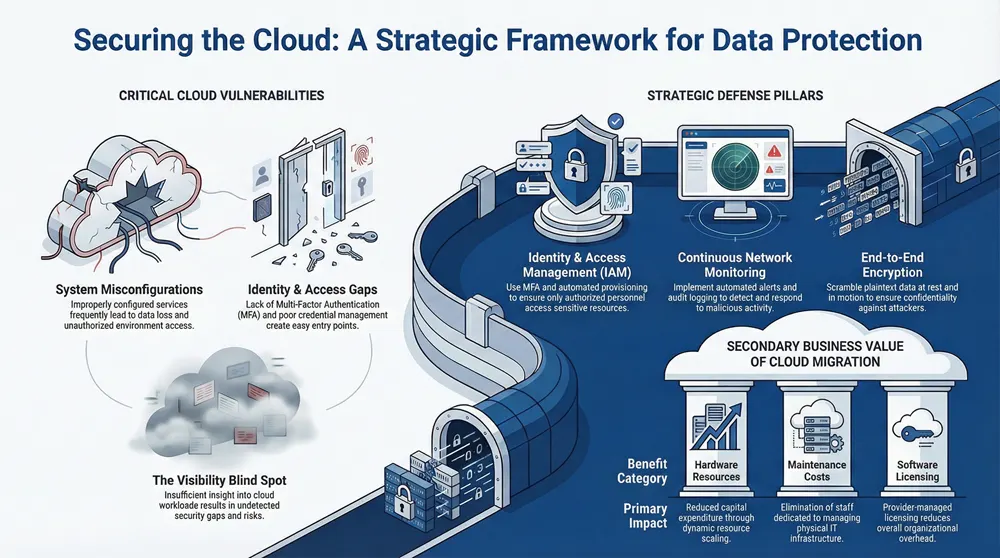
Cloud Vulnerability is the potential for an adversary to gain access to cloud-based systems and cause data breach, data loss, or unauthorized access. Cloud Computing Vulnerabilities include misconfigurations, lack of Multi Factor Authentication, lack of visibility, and poor access management. Common Cloud Vulnerabilities are malicious actors exploiting weaknesses in cloud APIs, environments, platforms, and resources. Cloud Security Threats include data theft, data manipulation, malicious code injection, and unauthorized access.
The Challenges of Securing the Cloud include lack of knowledge of cloud computing, cloud misconfigurations, lack of visibility, and security gaps.
What Is Cloud Vulnerability?
Transitioning from the previous section, this section overviews cloud vulnerability, which is the potential for an attack on cloud-based systems, networks, and applications. Cloud vulnerability is a major concern for organizations that use cloud computing services, as it can lead to data breaches, unauthorized access, and data loss. Cloud vulnerabilities include misconfigurations, lack of Multi-Factor Authentication (MFA), lack of visibility, poor access management, and more.
Organizations must understand what cloud vulnerabilities are and how to identify, remediate, and mitigate them. Cloud vulnerabilities are identified through security scans, vulnerability assessments, and risk assessments. Security scans are conducted to detect malicious activity, unauthorized access, misconfigurations, and other types of vulnerabilities. Vulnerability assessments are used to identify and prioritize potential cloud security vulnerabilities. Risk assessments are conducted to determine the probability of a data breach or other type of cloud attack.
Organizations must also be aware of the different types of cloud security threats, which include threat actors, malicious actors, and zero-day exploits. Threat actors are malicious individuals who use various methods to gain access to cloud accounts and data. Malicious actors are malicious users who exploit vulnerabilities in cloud applications and infrastructure.
Types of Cloud Security Threats
Having discussed what cloud vulnerability is, let us now delve into the various types of cloud security threats that exist. It is important to be aware of the various threats and to take preventive measures against them. Cloud security threats can be broadly classified into three main categories: malicious threats, misconfigurations, and lack of visibility.
- Malicious Threats
- Attackers exploiting weak authentication methods and gaining unauthorized access to cloud resources.
- Malicious actors exploiting vulnerabilities in cloud APIs or services to gain access to cloud systems, data, and other resources.
- Data breaches resulting from malicious attack vectors such as phishing, malware, and ransomware.
- Misconfigurations
- Misconfigured cloud services and applications leading to data loss or unauthorized access.
- Lack of multifactor authentication (MFA) in cloud environments, potentially exposing sensitive data and systems.
- Poor access management for cloud resources, resulting in unauthorized access to cloud applications and data.
- Lack of Visibility
- Lack of visibility into cloud systems, applications, and data, leading to security gaps and vulnerabilities.
- Lack of a comprehensive security strategy for cloud adoption, resulting in a lack of understanding of the risk of cloud environments.
Challenges of Securing the Cloud
Having discussed the various types of cloud security threats, it is also important to consider the challenges associated with securing the cloud. Cloud security involves a myriad of elements and factors, from authentication and access management to data security and monitoring for malicious activities. Ensuring the security of your cloud environment can be a complicated task with a number of unique challenges.
The following are some of the potential challenges of cloud security:
- Lack of Visibility: Without the proper knowledge of cloud computing and security, organizations may lack the visibility to properly assess their cloud environment and identify potential security risks.
- Poor Access Management: Without monitoring and effective access management, attackers or malicious actors may gain access to sensitive data stored in the cloud or use cloud services to launch attacks.
- Lack of MFA: The lack of multi-factor authentication (MFA) can potentially be a critical vulnerability, as attackers can use stolen credentials to gain access to cloud services.
- Misconfigurations: Misconfigurations within the cloud environment can lead to data breaches, data loss, and unauthorized access to cloud resources.
- Vulnerability Management: Vulnerability management in the cloud is essential for identifying and mitigating any security threats and vulnerabilities in the cloud.
Benefits of Cloud Computing
Cloud computing provides several benefits, including cost-efficiency, scalability, and improved collaboration. By leveraging cloud technology, organizations can reduce their total cost of ownership. As the cloud can be accessed from any device, scalability is an advantage of cloud computing. This allows users to quickly scale up or down as their computing needs change.
Moreover, cloud computing enables users to collaborate more effectively from anywhere in the world. It allows users to quickly share data and collaborate with other users with secure access management. For instance, APIs and best practices can be used to mitigate malicious actors and scan for data breaches or unauthorized misconfigurations of cloud resources.
Cost Efficiency
Transitioning from an overview of cloud vulnerability, let us consider the cost efficiency benefits that cloud computing brings. Cloud computing offers organizations the opportunity to reduce their costs significantly when compared to traditional IT infrastructure. Due to its ability to dynamically scale resources and services, businesses can better manage their financial investments while maintaining control over their IT operations.
The cost savings of using cloud computing are based on three main areas:
- Hardware Resources: Cloud-based services require fewer hardware resources, which can lead to a reduction in capital expenditure. Businesses can scale their cloud-based services up or down depending on their needs, leading to a reduced need for physical hardware and significant cost savings.
- Maintenance Costs: Cloud services are maintained and managed by the cloud service provider, which eliminates the need to hire staff members dedicated to managing IT infrastructure. This can lead to significant cost savings, as businesses no longer need to invest in training and personnel to manage their hardware and software.
- Software Licensing Costs: Cloud services require fewer software licenses, as the cloud service provider is responsible for managing the software. This can lead to a reduction in software license costs for businesses that use cloud services.
The cost savings associated with cloud computing are considerable.
Scalability
As the digital revolution continues, organizations are increasingly turning to cloud computing to meet their needs. In particular, the scalability of cloud computing provides organizations with the unprecedented ability to quickly and efficiently grow or shrink their operations as needed. This scalability comes with several benefits that are worth exploring in greater detail.
The scalability of cloud computing allows organizations to easily adjust the size of their cloud environment as their needs change. This allows organizations to quickly add or remove resources and services as needed, without expensive or time-consuming processes. Additionally, with scalability, organizations can have access to the most up-to-date technology, as well as the latest cloud services and applications.
The scalability of cloud computing also allows organizations to quickly and efficiently manage their data and resources. This includes the ability to:
- Securely store data: Organizations can store their data in the cloud and access it easily from any location, with the reassurance that their data is always secure.
- Organize data: Organizations can use the scalability of cloud computing to organize their data efficiently, so that they can quickly access the information they need.
Improved Collaboration
Having an effective security strategy is essential for any organization that leverages cloud services. Improved collaboration is one of the main benefits of cloud computing, as it allows organizations to easily share data and collaborate on documents. With cloud computing, teams can communicate and collaborate more efficiently, without worrying about data security.
In order to take full advantage of this improved collaboration, it is important for organizations to have the right cloud security measures in place. This includes access management, authentication, and the use of APIs to securely connect applications and services. Additionally, organizations should consider the use of best practices for cloud security, such as using multi-factor authentication (MFA) to reduce the risk of malicious access. It is also important to have visibility into the cloud environment, and to scan for vulnerabilities and threats.
Organizations should also be aware of the common cloud vulnerabilities, such as misconfigurations, data breaches, lack of visibility, and poor access management. These vulnerabilities can lead to unauthorized access, data loss, and attackers gaining access to cloud resources. To mitigate these risks, organizations should use a cloud security management solution, vulnerability scanning, and security assessments.
Additionally, organizations should use security policies and groups to control access to cloud systems, and use a security strategy to ensure maximum security.
Data Protection Strategies

Data protection strategies require the use of several tools to create a secure environment. Encryption is an important tool for protecting data at rest, guarding against unauthorized access and data loss. Access controls are also necessary to ensure that only authorized personnel can access sensitive data. Multi-factor authentication (MFA) is a powerful security measure that requires two or more factors to authenticate a user’s identity. MFA can be used to prevent unauthorized access and data loss due to lack of MFA.
Cloud security is an important factor in data protection strategies, as cloud services can introduce vulnerabilities and potential threats to data.
Encryption
Transitioning from the benefits of cloud computing to data protection strategies, the most critical aspect is encryption. Encryption is the process of transforming plaintext data into an unreadable format, making it difficult for attackers to gain access to confidential information. Encryption is one of the most effective ways to protect data stored in the cloud and is essential for keeping data safe from malicious parties.
Cloud encryption is an integral part of cloud security and needs to be managed effectively to ensure the security of cloud resources. The process of encryption involves using algorithms to scramble plaintext data into ciphertext, which can then be decrypted back into plaintext only with the correct encryption key. It is important to understand the different types of encryption available and the best practices for protecting cloud data.
When it comes to encrypting data stored in the cloud, there are a few different approaches to take. The most secure method is to use end-to-end encryption, which means that the encryption is applied at the origin of the data before it is stored in the cloud and is only decrypted when it reaches the end user. This ensures that only the intended user can access the data. Another approach is to use encryption at rest, which means that the data is encrypted while it is stored in the cloud.
Access Controls
Having discussed the benefits of cloud computing, it is important to consider how to protect data in the cloud. Access controls are a critical component of cloud data security, and the chief information security officer is responsible for ensuring that they are properly implemented. Access controls provide a way to restrict the access of users to sensitive data stored in the cloud. These controls are designed to prevent unauthorized access and malicious activities, as well as mitigate the risks of data breach and data loss.
To ensure maximum security, access management solutions should be used to grant, monitor and enforce access to cloud resources. Common access controls include authentication, such as multi-factor authentication, and authorization, in which users are granted access to certain cloud apps or services based on their identity. Access controls should also be used to protect APIs and cloud services, as attackers may use them to gain access to cloud accounts.
Additionally, regular security assessments should be conducted to identify any possible security gaps, threats, and vulnerabilities associated with the use of the cloud. Vulnerability scans should be regularly performed to detect any misconfigurations or mismanaged cloud resources that may be exploited by attackers. Furthermore, the use of a cloud vulnerability database and vulnerability management solutions can help identify and remediate any new vulnerabilities that may arise.
Multi-Factor Authentication
To ensure data security in the cloud, organizations must take the proper steps to protect their data. One of the most crucial elements for cloud security is multi-factor authentication (MFA). MFA is an access management procedure that requires two or more authentication methods from different categories in order to gain access. It is a valuable tool in protecting cloud-based resources from unauthorized access and data breaches.
MFA adds an extra layer of security by requiring users to provide two distinct types of credentials instead of just one. This helps to reduce the risk of malicious actors gaining access to the cloud platform and attempting to exploit a potentially critical vulnerability.
MFA can be used to secure cloud accounts, applications, and resources. By integrating MFA into the cloud access management system, the organization can ensure that only authorized personnel can access the cloud environment. Here are some of the benefits of implementing MFA into the cloud security strategy:
- It helps to protect against data loss through unauthorized access
- It increases the security of cloud-based accounts and data
- It reduces the risk of malicious actors exploiting common cloud vulnerabilities
- It provides additional visibility into cloud resources and services
MFA is a powerful security tool that can help organizations to protect their data in the cloud.
Network Monitoring
Network monitoring is the process of continuously examining and tracking activity within a given network for the purpose of identifying and mitigating potential security threats. To ensure the highest level of security, organizations must employ continuous monitoring, automated alerts, and audit logging.
Vulnerability scanning and constant monitoring of cloud resources are essential in identifying and remediating potential security threats. Automated alerts can be set up to notify security teams of any suspicious activity and new vulnerabilities. Audit logging provides an extensive audit trail of user activity, which can be used to detect malicious activity, access management issues, and misconfigurations.
Continuous Monitoring
The dangers of cloud computing are real, and it is essential to understand the need for continuous monitoring of your cloud environment. With regular monitoring, organizations can detect vulnerabilities and security threats before they become a reality, preventing a data breach or other malicious activity. Let’s explore the best practices for continuous monitoring in the cloud.
Continuous monitoring enables organizations to keep a track of their cloud environment and monitor for malicious or unauthorized activity. This can be accomplished through automated alerts, audit logging, and other security measures.
Automated Alerts
- Regularly scheduled scans to detect misconfigurations.
- Alerts for changes in user permissions.
Audit Logging
- Logging of authentication attempts.
- Tracking of API calls.
Continuous monitoring requires a high level of visibility into the cloud environment. Organizations must have a thorough understanding of the cloud resources they are using, including cloud platforms, cloud services, cloud applications, cloud accounts, and cloud workloads.
Automated Alerts
The network monitoring process is only as effective as the automated alerts put in place to identify and report threats. Automated alerts are the ultimate security measure in ensuring the safety of network systems and data, and they are crucial in identifying and mitigating potential malicious activity. It is vital for any organization to understand the three components of automated alerts: continuous monitoring, audit logging, and automated alerting.
Continuous monitoring is an active, automated approach to identifying and responding to security threats. This type of monitoring scans for vulnerabilities, potential data breaches, and unauthorized access attempts. The goal is to identify malicious activity before it can be exploited.
Audit logging captures and stores activity logs for each user. It records all user activity, including logins, attempts to access unauthorized data, and attempts to change security settings. Audit logging helps organizations track user activity and identify potential threats.
Automated alerting sends notifications to administrators or other personnel when a security threat is detected. This allows organizations to respond quickly to potential threats and take the necessary steps to mitigate them.
Audit Logging
Having an effective data protection strategy in place is only part of the equation when it comes to keeping your network secure. It is also important to implement a robust network monitoring system that can detect potential threats and help protect your data from unauthorized access and malicious threats. Network monitoring can involve the use of continuous monitoring, automated alerts, and audit logging. In this section, we will take a closer look at audit logging and how it can help to keep your network secure.
Audit logging is essential for ensuring the security of any network. It creates an audit trail that records all activities that occur on the network, including user-initiated events, system configuration changes, and system-generated alerts. This audit trail can then be used to detect any suspicious activities or suspicious users that may be attempting to breach the network. Additionally, it can provide a valuable source of evidence for any investigations that may be conducted in the event of a data breach or other security incident.
Application Security
As a Chief Information Security Officer, it is essential to ensure that applications are secure. To achieve this, regular security updates, secure coding practices, and vulnerability assessments need to be implemented. By regularly updating security protocols, organizations can mitigate malicious threats and unauthorized access. Secure coding practices can help to reduce potential data breaches and data loss, while vulnerability assessments can detect any misconfigurations, lack of MFA, and other security gaps.
Additionally, a vulnerability management system should be implemented to detect new vulnerabilities and scan for common cloud-based vulnerabilities. Best practices for cloud security should be followed, including authentication, access management, and threat actors.
Regular Security Updates
As we move from network monitoring to application security, regular security updates are essential for any organization working in the cloud. Secure coding practices that adhere to industry best practices, coupled with vulnerability assessments, are key to identifying, managing, and mitigating risks from malicious attackers. By ensuring cloud service providers and cloud infrastructure are secure, organizations can protect themselves from data breaches, unauthorized access, and data loss due to misconfigurations.
The foundation of cloud security starts with a secure cloud environment. This includes implementing best practices for cloud access management, authentication, and API security in order to protect cloud resources from threat actors. Additionally, having a comprehensive vulnerability management program and security assessment are also important for any organization utilizing a cloud platform.
The following are some of the common cloud-based vulnerabilities organizations should be aware of and take steps to mitigate:
- Vulnerability Scanning: Regularly scanning for vulnerabilities is important to ensure cloud systems are secure and data is protected from malicious attackers. Utilizing a vulnerability database and vulnerability scanner can help detect and identify any new vulnerabilities or threats.
- Common Cloud Vulnerabilities: Common cloud vulnerabilities include lack of visibility, poor access management, lack of MFA, and cloud misconfiguration.
Secure Coding Practices
As we transition to our next area of focus, application security, it’s important to understand the importance of secure coding practices to protect against malicious attackers and data breaches. The use of secure coding practices can help mitigate common cloud-based vulnerabilities, reduce the risk of data loss, and protect the cloud infrastructure from unauthorized access.
To ensure cloud security, organizations must be aware of the common cloud vulnerabilities and use best practices for cloud computing. This includes understanding the types of vulnerabilities, performing risk assessments, and using vulnerability scanning and management tools to identify and remediate security gaps.
Organizations should also consider using a hybrid cloud and ensure that security measures are implemented in the cloud environment. This could include using access management solutions, authentication protocols, and security policies to prevent malicious attackers from gaining access to cloud resources. Additionally, organizations should monitor for misconfigurations and use multi-factor authentication to secure cloud accounts.
Organizations should also use vulnerability databases and threat actors to identify and address new vulnerabilities in the cloud. Here are some effective security solutions and practices to consider:
Vulnerability Assessments
Now that we have discussed the importance of network monitoring, let’s take a closer look at how to protect applications and data from security threats. A well-planned security strategy must include regular security updates, secure coding practices, and vulnerability assessments. In this section, we will focus on vulnerability assessments.
Vulnerability assessments are an essential part of any security strategy. They involve scanning and analyzing the network and its components to identify any potential security risks or misconfigurations. Security teams use vulnerability assessments to detect and mitigate malicious threats, unauthorized access, and data breaches.
In order to effectively assess the security of cloud-based systems, organizations must have an in-depth understanding of cloud security and be aware of the common cloud vulnerabilities. The following are some of the key elements of cloud vulnerability assessment:
- Data Security: Assess the security of the data stored in the cloud, including authentication, access management, data loss prevention, and encryption.
- Cloud Infrastructure: Evaluate the security of the cloud infrastructure, the cloud platform, and the cloud service provider.
- API Security: Scan for any misconfigurations in the APIs and cloud services that could potentially be exploited by attackers to gain access to cloud resources.
User Education and Awareness
User Education and Awareness is the key to mitigating security vulnerabilities and threats in the cloud. As Chief Information Security Officer, I understand the need to educate users on best practices for cloud security, implementing security policies, and creating a secure culture.
Vulnerability management is paramount to the safety of our cloud environment and cloud service providers. To ensure maximum security, security vulnerabilities within the cloud must be identified and mitigated. Additionally, authentication, access management, and data security must be enforced.
To prevent malicious actors from exploiting common cloud-based vulnerabilities, I have implemented the use of security measures such as security groups, security settings, and security policies.
Educating Employees
The previous section discussed the importance of application security, and now it is time to transition into how user education and awareness can help to further protect your organization from cyber threats. Educating employees is a critical component in creating a secure culture.
By teaching employees about the risks and potential vulnerabilities that exist in the cloud environment, they can be better equipped to identify and mitigate malicious actors, scan for common cloud vulnerabilities, and access management APIs to gain access to cloud resources. Furthermore, it is important for employees to be taught about the importance of authentication, data security, and cloud infrastructure management solutions.
To ensure the protection of cloud systems, organizations must have the knowledge of cloud computing, use of cloud services, and features of cloud vulnerability management. It is also essential to have a cloud security strategy in place that covers the risk assessment, vulnerability scanning, and security policies.
The following lists contain best practices for educating employees on cloud security:
- Educate Employees on Common Cloud Vulnerabilities:
- Provide resources and training about the common cloud-based vulnerabilities, such as lack of MFA, poor access management, and lack of visibility.
- Educate employees on the types of vulnerabilities, common vulnerabilities, and new vulnerabilities.
Implementing Security Policies
As technology advances, the need for implementing effective security policies to ensure the safety of company and customer data becomes increasingly more important. Companies that use cloud services must understand the best practices for cloud security and the potential vulnerabilities in the cloud environment. This includes developing a comprehensive strategy to mitigate malicious threats and data breaches that can occur due to misconfigurations and unauthorized access.
To ensure that cloud resources are secure, organizations should implement the following security policies:
- Access Management: Companies should use access management solutions such as authentication, authorization, and Multi-Factor Authentication (MFA) to control access to cloud services and data. Access management solutions should also provide visibility into who is accessing the cloud platform and what actions they are taking.
- API Security: APIs are the main entry point into cloud systems and applications, making them a potential target for attackers. Companies should use best practices for cloud security such as using secure APIs, access control, and API authentication to protect against unauthorized access and data loss.
- Cloud Infrastructure Management: Organizations should use cloud infrastructure management solutions to scan for vulnerabilities in the cloud environment and keep track of cloud assets. Companies should also use a cloud security solution to monitor for new vulnerabilities and threats, as well as provide visibility into the cloud platform.
Creating a Secure Culture
As the old adage goes, prevention is better than cure, and this rings especially true when it comes to cloud security. To ensure that a cloud environment is safeguarded against malicious attackers, organizations must go beyond technical security measures and create a culture of security. Implementing security policies and educating employees are both key steps in this process.
Creating a secure culture begins with a comprehensive understanding of cloud security and the associated risks. Organizations should be aware of the common cloud-based vulnerabilities and threats, such as lack of visibility, poor access management, and the lack of MFA, and the best practices for mitigating these risks. To ensure the highest level of security, organizations should conduct regular security assessments and utilize cloud-based vulnerability management tools.
To successfully create a secure culture, organizations should:
- Educate employees on the importance of cloud security and the best practices for cloud usage:
- Provide training materials and seminars to raise employees’ understanding of cloud security
- Encourage employees to familiarize themselves with the organization’s security policies
- Encourage employees to use secure access methods and authentication mechanisms
Cloud Service Provider Security
As a Chief Information Security Officer, cloud service provider security is of utmost importance. To ensure the highest levels of security, Service Level Agreements, Vendor Risk Assessments, and Third-Party Audits should be conducted.
Service Level Agreements are essential for cloud service providers, as it outlines expectations for security, availability, and performance. It also outlines who is responsible for security and how any risks should be mitigated.
Vendor Risk Assessments are important to identify any malicious behavior or unauthorized access attempts. It also helps to identify any potential security gaps or misconfigurations in the cloud environment.
Service Level Agreements
Transitioning from user education and awareness to Cloud Service Provider Security, Service Level Agreements (SLAs) are critical in mitigating the risk of cloud services and cloud computing. With SLAs, organizations can hold cloud service providers accountable for the delivery of services and mitigate potential risks associated with cloud adoption. The primary objective of an SLA is to establish a framework of expectations between the organization and the cloud service provider, which includes:
- Ensuring Performance:
- Defining the performance requirements
- Establishing agreed-upon metrics
- Establishing service monitoring and logging
- Managing Security:
- Setting security standards
- Establishing access controls
- Establishing authentication requirements
- Establishing Availability:
- Ensuring system availability
- Setting outage notification requirements
- Establishing disaster recovery protocols
At the core of any SLA is the agreement between the organization and the cloud service provider. This agreement should be specific and provide explicit details on the performance, security, and availability requirements of the cloud service. The SLA should also include details on the scope of service, responsibilities of both parties, and the process for resolving disputes.
Vendor Risk Assessments
Transitioning to the next section, cloud service provider security, requires a comprehensive approach that includes Service Level Agreements (SLAs), Vendor Risk Assessments, and Third-Party Audits. This section will focus on the various elements of Vendor Risk Assessments.
Vendor Risk Assessments are an integral part of any cloud security strategy. By evaluating the security posture of cloud service providers, organizations can identify and mitigate potential vulnerabilities in the cloud environment. The assessment should include:
- Evaluating cloud security policies and procedures:
- Reviewing the security policies and procedures of the cloud service provider to ensure they are in line with the organization’s security policies.
- Examining the cloud service provider’s access management system to detect any potential malicious or unauthorized users.
- Assessing the cloud platform:
- Performing scans and assessments to identify misconfigurations and data breaches in the cloud environment.
- Evaluating the authentication, authorization, and access control systems of the cloud service provider.
- Reviewing the cloud infrastructure:
- Analyzing the common cloud vulnerabilities and threat actors that may be used to gain access to cloud resources.
Third-Party Audits
Having completed a thorough education and awareness program for users, cloud service providers must also take proactive measures to ensure that their security is up-to-date. One of the most important steps in this process is to complete third-party audits. These audits can provide an objective assessment of the cloud security environment and identify vulnerabilities and areas for improvement.
Third-party audits are an important component of any cloud security strategy, as they provide a comprehensive assessment of the cloud environment and identify any misconfigurations or security gaps. Such audits can assist with detecting and mitigating malicious threats, and verify that access management protocols, authentication practices, and security policies and settings are up-to-date and secure.
The following are some key components of third-party audits:
- Vulnerability Scanning and Remediation:
- A vulnerability scan is a method of assessing security systems for potential weaknesses and identifying any malicious threats.
- Vulnerability remediation involves the implementation of measures to mitigate identified vulnerabilities and reduce the risk of a data breach or unauthorized access.
- Data Security and Access Management:
- Third-party audits can also assess the security of cloud data and access management protocols, such as Multi-Factor Authentication (MFA).
Cloud Security Tools
Cloud security tools are essential in protecting cloud environments from malicious attacks and data breaches. Firewalls are a key component of cloud security and are used to monitor and control incoming and outgoing traffic. Intrusion detection systems scan for, detect, and respond to suspicious activities, while data loss prevention solutions are used to protect data from unauthorized access.
Cloud security tools also help to mitigate cloud vulnerabilities, such as misconfigurations or lack of multi-factor authentication (MFA). Best practices for cloud security include access management, authentication, and API security. Security solutions should be tailored to a company’s specific cloud infrastructure, cloud platform, and cloud service provider.
Firewalls
As we move into our discussion of cloud security tools, one of the most essential elements that must be considered is the firewall. Firewalls are an integral part of any cloud security solution, providing a strong layer of defense against malicious actors, unauthorized access, and data breaches. Firewalls can be implemented within a cloud environment, either on the cloud service provider’s side, or on the cloud user’s side, to protect the cloud platform and resources.
The use of firewalls in cloud security is incredibly important, as they can help to mitigate a variety of threats that may exist in the cloud, such as:
- Gaining Access: Firewalls help to prevent attackers from gaining access to cloud resources or accounts through authentication protocols and security measures, such as MFA, which can be a potentially critical vulnerability.
- Data Breach: Firewalls work to protect user data stored in the cloud from any potential breaches, as well as to protect the cloud infrastructure itself.
- Misconfigurations: Firewalls can help to identify and correct any misconfigurations in cloud systems, which can be a major security risk.
Intrusion Detection
Transitioning from Cloud Service Provider Security, cloud security tools are a necessary component of any security strategy. Intrusion detection plays a vital role in the detection and prevention of malicious actors. Intrusion detection technology offers visibility into suspicious activity and provides early detection of attackers who are attempting to gain access to cloud infrastructure.
By implementing intrusion detection solutions, organizations can effectively detect malicious actors that put cloud resources at risk. Intrusion detection solutions can identify potential threats, such as:
- CrowdStrike Cloud: a cloud-based security platform that provides visibility into malicious activity and potential security threats.
- Security Groups: Security groups are used to control access to cloud resources and can be configured to prevent unauthorized access.
- Vulnerability Scanning: Vulnerability scanning is a process of scanning cloud resources for potential vulnerabilities that can be exploited by attackers.
Organizations can also use intrusion detection solutions to mitigate cloud vulnerabilities, such as:
- Authentication: Authentication is used to ensure that only authorized users have access to cloud resources and sensitive data.
- Data Loss Prevention (DLP): DLP solutions can be used to detect and prevent data loss from malicious actors.
- Threat Actors:
Data Loss Prevention
Transitioning from the discussion of Cloud Service Provider Security, Cloud Security Tools play an integral role in protecting cloud resources and preventing data loss. When it comes to Data Loss Prevention, there are a few key measures that should be taken to ensure the safety of cloud data:
- Authentication:
- Implement Multi-Factor Authentication (MFA) to reduce the risk of unauthorized access.
- Use strong password policies and require regular password changes to reduce the risk of credential theft.
- Monitor suspicious login attempts and implement measures to restrict access to cloud resources.
- Security Measures:
- Regularly scan for vulnerabilities in the cloud environment and patch any security gaps.
- Use security groups to define access rights for users and restrict access to cloud resources.
- Implement security policies and best practices for cloud security.
- Data Security:
- Protect data stored in the cloud with encryption and other security measures.
- Monitor for unauthorized access to cloud resources and identify potential data breaches.
- Use APIs to gain visibility into cloud misconfigurations and detect any malicious activity.
Data Loss Prevention is an important aspect of cloud security and requires a comprehensive security strategy to ensure maximum security.
Disaster Recovery Plan
A well-rounded Disaster Recovery Plan must include backup and redundancy measures, testing and training, and automation and orchestration. Regular backups should be taken of all cloud assets to ensure data integrity and availability, and should be stored with a third-party provider. Redundancy measures should be implemented to ensure data is accessible from different regions in the event of a disaster. Testing and training should be conducted regularly to ensure the Disaster Recovery Plan is up to date and all personnel understand their roles and responsibilities. Automation and orchestration processes should also be built into the plan, to ensure swift and efficient recovery operations.
Backups & Redundancy
The potential for data loss and unauthorized access is the greatest when it comes to cloud security. As such, it is essential for organizations to have a robust backups and redundancy program in place to protect their cloud environment from malicious actors. This program should include the following strategies to ensure maximum protection:
- Backups:
- Regularly backup cloud data and resources.
- Store backups in a secure and isolated environment
- Redundancy:
- Implement redundant systems to minimize the risk of data loss.
- Enable automated processes to replicate data across multiple cloud platforms.
Organizations must take the appropriate measures to protect their cloud environment from malicious threats and vulnerabilities. Backing up data and resources, and creating redundant systems to minimize the risk of data loss are essential strategies for organizations to consider when it comes to mitigating cloud vulnerabilities.
Testing & Training
Having the right security tools in place is one thing, but having a robust disaster recovery plan is another. Testing and training are essential components of a comprehensive disaster recovery plan to ensure that the organization is prepared in the event of a data breach or other cyber attack.
To help guard against malicious threats, organizations must invest in the following:
- Testing:
- Penetration testing can identify common cloud vulnerabilities and help organizations understand what attackers can do with their cloud environment if they gain access.
- Vulnerability scanning should be done regularly to detect cloud misconfigurations, identify weaknesses, and highlight areas that need improvement.
- Security assessments can be used to identify areas of risk and determine the best solutions for mitigating cloud vulnerabilities.
- Training:
- Organizations should provide training on best practices for cloud security, including access management, authentication, and API security.
- All employees should be aware of the common cloud-based vulnerabilities and threats, and the steps that can be taken to mitigate them.
- Organizations should also educate their employees on the importance of data security and the steps that can be taken to ensure that data stored in the cloud remains secure.
Automation & Orchestration
The safety of cloud computing systems and environments depends heavily on automation and orchestration. Automation and orchestration are important cloud security practices that allow organizations to securely deploy and manage cloud resources as well as quickly respond to security threats. Automation and orchestration tools help cloud resources to be quickly and securely deployed, managed, and monitored.
The following are the benefits of using automation and orchestration tools for cloud security:
- Automation:
- Time Savings: Automation of cloud security processes can reduce the amount of time spent manually managing security policies, patching systems, and responding to security incidents.
- Security: Automation can help ensure that security policies are consistently enforced and that cloud resources are patched and updated on a regular basis.
- Visibility: Automated tools can provide visibility into cloud resources and provide insight into potential security issues.
- Orchestration:
- Reduced Risk: Orchestration tools can help reduce the risk of data breaches and other security incidents by allowing organizations to quickly and effectively respond to threats in real-time.
User Access Management
User Access Management requires an understanding of User Access Controls, Identity and Access Management, Automated Provisioning and De-Provisioning. User Access Controls ensures that only authorized users can access the systems and resources. Identity and Access Management provides employees with the necessary credentials to access the systems and that they are tracked and monitored.
Automated Provisioning and De-Provisioning streamlines the onboarding and offboarding process of users, ensuring that users have the right access to the right resources, and that their access is revoked when they leave the organization.
User Access Controls
In order to ensure data security, user access controls are a must. User access controls create an additional layer of protection within the cloud computing environment, allowing organizations to restrict access to and from cloud-based resources. This can be done by establishing authentication protocols, security policies, and security groups that limit user access to sensitive resources. Furthermore, mitigating cloud vulnerabilities through the use of Multi-Factor Authentication (MFA) is a potentially critical vulnerability to secure against attackers and unauthorized access.
Implementing user access controls can be achieved through the following methods:
- Identity and Access Management:
- Establishing authentication protocols
- Setting up security policies
- Creating security groups
- Implementing MFA
- Automated Provisioning and De-Provisioning:
- Utilizing cloud APIs
- Leveraging best practices for cloud security
- Developing a cloud security strategy
- Analyzing cloud workloads
By enforcing user access controls, organizations are better equipped to protect their cloud assets from malicious actors, data breaches, and unauthorized access. It is also important to regularly scan for misconfigurations and vulnerabilities that may exist in the cloud environment and to develop a cloud-based vulnerability management program to mitigate these risks.
Identity and Access Management
To properly manage user access and maintain the integrity of our data, identity and access management (IAM) must be a prominent part of our disaster recovery plan. The IAM process involves a series of best practices that are employed to ensure the secure management of our cloud resources. To ensure the security of our cloud environment, the following techniques are used to manage user access:
- Authentication:
- Utilizing Multi-Factor Authentication (MFA) to verify user identity
- Implementing strong password policies
- Utilizing security questions
- Enabling session timeouts
- Authorization:
- Applying role-based access control and identity-based access control
- Utilizing access control lists and security groups
- Restricting the use of privileged accounts
- Monitoring:
- Monitoring user activity
- Analyzing user activity logs
- Utilizing security analytics
- Utilizing API security to detect malicious activity
It is important to note that the security of our cloud environment is only as strong as our IAM processes.
Automated Provisioning and De-Provisioning
The previous section focused on disaster recovery plans, but the security of a business also relies heavily on user access management. Automated provisioning and de-provisioning are essential components of this process, and the following implementation best practices should be taken into consideration:
- Provisioning:
- Establishing a secure authentication mechanism: A strong authentication system should be put in place that requires strong passwords, two-factor authentication, or other secure authentication methods.
- Implementing automated provisioning processes: Automatically provisioning cloud resources is an effective way to reduce manual errors. APIs can be used to create and delete users, apply security policies, and track access rights in the cloud.
- Leveraging best practices for cloud security: Best practices including using secure communication protocols, applying the principle of least privilege, and utilizing the security features offered by your cloud service provider should be employed to ensure the highest levels of security.
- De-provisioning:
- Revoking access rights: All access rights granted to users should be revoked when they are no longer needed.
- Deleting users: All user accounts should be deleted once the user no longer requires access.
Conclusion
Organizations must understand the security challenges of cloud computing and take steps to reduce the risk of vulnerabilities. Cloud service providers must ensure the security of their services by implementing robust security measures such as network monitoring, user access management, application security, and data protection strategies. They must also provide users with user education and awareness to ensure that their data and systems remain secure.
Additionally, organizations must have a comprehensive disaster recovery plan in place to be prepared for any unforeseen security issues. With the right security measures and procedures in place, organizations can reduce the risk of cloud vulnerability and protect their critical assets.