

Creative Photo Collage Design Tips for Beginners
Creating a photo collage is a fun way to tell a story, preserve memories, or build eye-catching visuals for social media, blogs, or personal projects. If you’re new to collage design, it can feel a bit overwhelming at first, with so many photos, layouts, colors, and tools to choose from. The good news? You don’t need to be a professional designer to create something that looks polished and intentional. With a few creative principles and practical tips, anyone can design stunning collages that truly stand out.
Today, beginners have access to intuitive tools, including any reliable collage maker online, which removes technical barriers and lets you focus on creativity. But tools alone aren’t enough; understanding design basics is what turns a random collection of images into a visually appealing composition. Let’s break it down step by step in a way that’s simple, practical, and easy to apply.
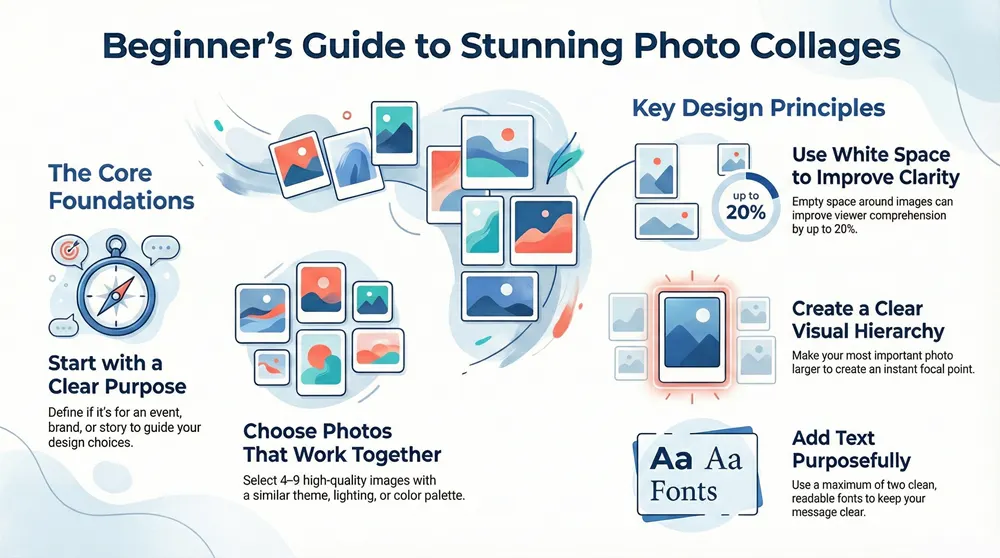
Start with a Clear Purpose
Before you even pick your photos, pause and ask yourself one question: What is the purpose of this collage?
Is it meant to:
- Highlight a special event like a birthday or wedding?
- Promote a product or brand?
- Share a story on social media?
- Capture a mood or aesthetic?
Your purpose influences every design choice you make, from image selection to layout and color palette. For example, a travel collage might focus on vibrant colors and wide shots, while a minimalist lifestyle collage might use neutral tones and negative space. According to design psychology research, visuals with a clear focal point are processed up to 60% faster by the human brain than cluttered designs, so clarity really matters.
Choose Photos That Work Well Together

One of the most common beginner mistakes is using too many unrelated photos. While variety can be fun, cohesion is key.
Tips for selecting photos:
- Stick to a theme: Similar lighting, colors, or subject matter create harmony.
- Use high-quality images: Blurry or pixelated photos instantly lower the perceived quality.
- Limit the number of images: More photos don’t always mean better results. Often, 4–9 images are enough
Think of your collage like a playlist, each photo should belong there and add value to the overall vibe.
Understand Basic Layout Principles
Layout is the backbone of any great collage. Even with templates, knowing a few fundamentals can dramatically improve your results.
Popular beginner-friendly layouts:
- Grid layouts: Clean, balanced, and perfect for uniform photos.
- Asymmetrical layouts: More dynamic and creative, great for storytelling.
- Central focus layouts: One large image supported by smaller ones
Eye-tracking studies show that viewers naturally scan visuals in a “Z” or “F” pattern. Place your most important image where the eye naturally lands first, usually at the top or center, to guide attention effectively.
Use White Space to Your Advantage
White space (also called negative space) is the empty area around images. Beginners often try to fill every inch of the canvas, but that can make a collage feel crowded and chaotic.
Benefits of white space:
- Makes your design easier to read and understand
- Highlights important images
- Creates a more professional, modern look
Design experts agree that white space can improve comprehension by up to 20%. Sometimes, what you leave out matters just as much as what you include.
Create a Consistent Color Palette
Color plays a huge role in how your collage feels emotionally. Random colors can feel messy, while a controlled palette feels intentional.
How to manage color effectively:
- Pick 2–4 main colors and stick to them
- Use photo filters to create consistency
- Match background colors with dominant tones in your images
For example, warm colors (reds, oranges, yellows) evoke energy and excitement, while cool colors (blues, greens) feel calm and relaxed. Decide what emotion you want to convey, then choose colors accordingly.
Add Text Carefully and Purposefully
Text can enhance a collage, but only if used sparingly and thoughtfully.
Beginner-friendly text tips:
- Use no more than two fonts
- Stick to clean, readable typefaces
- Ensure a strong contrast between text and background
- Keep messages short and impactful
According to typography studies, sans-serif fonts improve readability on digital screens by up to 30%. If your collage is meant for online use, simple fonts often work best.
Use Visual Hierarchy to Guide the Eye
Visual hierarchy means arranging elements so viewers naturally know where to look first, second, and third.
You can create a hierarchy by:
- Varying image sizes
- Using bold colors for focal points
- Placing key images in dominant positions
For example, make your main photo larger than the rest, or frame it with whitespace. This approach helps tell a story rather than presenting everything at once.
Experiment, But Don’t Overdo Effects
Filters, shadows, borders, and overlays can enhance a collage, but too many effects can distract from the content.
Best practices for effects:
- Apply the same filter across all photos
- Use subtle shadows for depth
- Avoid excessive stickers or graphics
A good rule of thumb: if an effect doesn’t serve a purpose, remove it. Clean designs tend to perform better, especially on social media, where attention spans are short, often under 3 seconds.
Learn by Analyzing Other Colleges
One of the fastest ways to improve is by studying designs you admire. Look at collages on social platforms, design blogs, or digital galleries.
Ask yourself:
- Why does this layout work?
- How are colors used?
- Where does my eye go first?
Over time, you’ll start noticing patterns and design choices that you can apply to your own work.
Practice and Iterate Often
Like any creative skill, collage design improves with practice. Your first few attempts might feel awkward, and that’s completely normal.
Try this simple growth process:
- Create a collage
- Step away for a few hours
- Review it with fresh eyes
- Make small improvements
Design research shows that iterative design leads to higher-quality outcomes than trying to get everything perfect on the first try. Progress beats perfection every time.
Conclusion
Photo collage design doesn’t have to be complicated or intimidating. By starting with a clear purpose, choosing cohesive images, understanding layout basics, and using color and space wisely, beginners can create collages that look thoughtful and engaging. Remember, great design is less about fancy tools and more about intentional choices. With practice, experimentation, and a bit of creative confidence, your collages will evolve from simple collections of photos into meaningful visual stories that truly connect with viewers.