Crafting a Bulletproof Disaster Recovery Plan for Your Small Business

AI Overview:
This blog explains why a disaster recovery plan (DRP) is essential for small business survival—not just an IT document, but a practical playbook for restoring operations after disruptions like cyberattacks, outages, human error, or natural disasters. It outlines how to identify mission-critical operations through a business impact analysis, assess real-world risks, and set clear recovery goals using RTO and RPO. The guide also covers choosing the right recovery strategy, assigning response roles, building resilient communication plans, and regularly testing and updating the plan. The core message: preparation, testing, and the right technology—often cloud-based—turn potential business-ending events into manageable interruptions.
A disaster recovery plan is more than a formal document to be filed away; it is the essential survival guide for your small business. This playbook activates when an unexpected event—from a cyberattack to a natural disaster—threatens your operations. This guide provides a clear, actionable framework for creating a plan that goes beyond simple data backups, detailing the precise procedures needed to restore operations quickly, protect your reputation, and minimize financial losses.
Why a Disaster Recovery Plan is a Non-Negotiable Asset
Delaying your disaster recovery planning is a high-stakes gamble many small businesses cannot afford to take. The reality is that disruptions are a matter of when, not if. Ignoring the wide range of threats that can paralyze a company is a direct risk to its survival.
A disaster recovery plan (DRP) is the backbone of your business continuity strategy, serving as a detailed roadmap that guides your team from the initial chaos of a crisis back to normal operations. Viewed this way, a DRP ceases to be a burdensome expense and becomes what it truly is: a fundamental investment in your company’s long-term viability.

The Real-World Threats to Your Operations
Disruptions manifest in various forms, each with the potential to bring your business to a grinding halt. A robust plan requires thinking beyond obvious catastrophes to address the full spectrum of risks.
To help you identify the specific threats your business faces, here is a breakdown of common disruptions and their tangible impact.
Common Disruptions and Their Real-World Business Impact
| Type of Disruption | Example Scenarios | Primary Business Impact |
|---|---|---|
| Cyberattacks | Ransomware encrypts all company files; a data breach exposes sensitive customer information. | Complete operational shutdown, severe loss of customer trust, and potential regulatory fines. |
| Hardware Failure | The main server crashes without warning; a critical network switch fails. | Inability to access data, process orders, or communicate with customers, leading to direct revenue loss. |
| Human Error | An employee accidentally deletes a crucial database; a system is misconfigured during an update. | Significant data loss, service interruptions, and costly downtime while the error is remediated. |
| Utility Outages | A regional power grid failure; the local internet service provider experiences a major outage. | Complete work stoppage, inability to serve online customers, and potential data corruption. |
| Natural Disasters | Flooding damages your office and equipment; a wildfire forces a mandatory evacuation. | Physical destruction of assets, prolonged business closure, and employee displacement. |
Each of these scenarios can create a ripple effect, transforming a single problem into a multi-faceted crisis that impacts every area of your business.
Let’s examine a few of these threats more closely:
- Cyberattacks: Ransomware can encrypt every critical file you own, instantly halting sales, payroll, and customer service. Our firm has extensive experience helping businesses protect your data from specific threats like WannaCry.
- Hardware Failure: When a key server or network component fails, your entire operation can go dark for hours, if not days, translating directly into lost revenue and customer frustration.
- Human Error: An accidental data deletion or a botched system update can cause just as much chaos as a malicious attack, underscoring the need for clear, repeatable procedures.
- Utility Outages: Power grids and internet services are more fragile than many assume. Knowing how to mitigate these common risks is vital, which is why preparing for a power outage is a non-negotiable part of any sound recovery strategy.
The Stark Reality of Inaction
The consequences of being unprepared are severe and, for many businesses, permanent. Most small companies lack the financial cushion to survive a prolonged shutdown, making a rapid recovery an absolute necessity for survival.
The statistics paint a sobering picture. For small businesses operating without a formal recovery plan, a significant disruption often becomes an extinction-level event. Lacking a clear path back to business, the financial and reputational damage quickly becomes insurmountable.
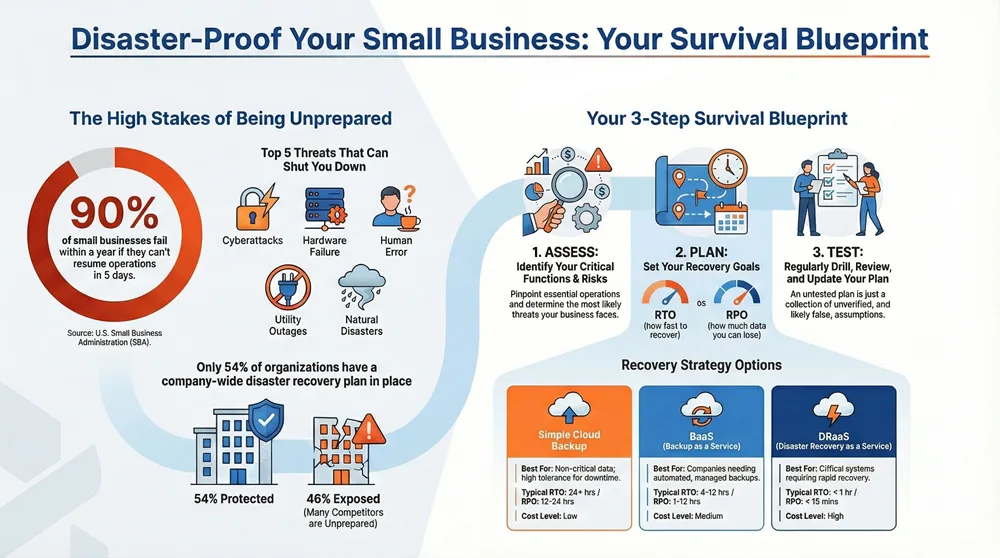
This is a well-documented business reality. According to the U.S. Small Business Administration (SBA), a staggering 90% of small businesses fail within a year if they cannot resume operations within five days following a disaster. This single statistic highlights the vulnerability of small companies and the devastating economic impact of being unprepared.
Pinpointing Your Critical Operations and Risks
To build an effective plan, you must first gain a crystal-clear picture of what you are protecting and the specific threats you face. This process involves two foundational exercises: a Business Impact Analysis (BIA) and a Risk Assessment.
A Business Impact Analysis identifies the absolute, mission-critical functions of your business—the core processes that, if interrupted, would bring your entire operation to a standstill.
Identifying Your Mission-Critical Functions
First, you need to map out the daily activities that generate revenue and maintain customer satisfaction.
- Customer-Facing Operations: This includes your point-of-sale system, e-commerce platform, CRM software, and VoIP phone system. How do you take orders, process payments, and communicate with clients?
- Internal Processes: Consider your behind-the-scenes essentials, such as accounting software, payroll systems, and project management tools that your team relies on daily.
- Production and Supply Chain: For businesses that manufacture or sell physical products, this includes your inventory management system, key production equipment, and relationships with primary suppliers.
For each function, ask a simple question: “How long can we survive without this?” Your answers will immediately establish a priority list for your disaster recovery plan.
Conducting a Practical Risk Assessment
Once you know what is most important, it’s time to identify what could realistically go wrong. A risk assessment is not about imagining every doomsday scenario; it’s about focusing on the threats most relevant to your business in your location.
For example, a floral business in Florida must prioritize hurricane preparedness. In contrast, a tech startup in a downtown high-rise may be more concerned with cybersecurity threats or a major power grid failure. Shockingly, one survey found that only 54% of organizations have a company-wide disaster recovery plan in place, indicating many businesses skip this vital step.
The infographic below illustrates how a threat can escalate into a full-blown business shutdown without adequate preparation.
As you can see, a threat only becomes a disaster when a business is unprepared, leading directly to an operational shutdown.
To organize your assessment, sort potential risks by their likelihood and the severity of their potential damage. This transforms a daunting list of worries into an actionable roadmap.
Key Takeaway: A proper risk assessment is about focus, not fear. By prioritizing threats based on probability and financial impact, you can allocate your resources effectively and build a plan that addresses your most significant vulnerabilities first.
As you identify your vital assets and potential threats, a structured approach is a game-changer. Using a comprehensive disaster recovery planning checklist can guide you through the process, ensuring no critical element is missed. It is also wise to learn from the mistakes of others; reviewing what companies get wrong about business continuity helps you sidestep common pitfalls. By combining a thorough BIA with a realistic risk assessment, you build the solid foundation needed for a disaster recovery plan that will actually work.
Setting Realistic Recovery Goals and Strategies

After mapping your most important operations and the dangers they face, it is time to define what a successful recovery looks like for your business. This requires setting clear, measurable goals that will shape every other part of your disaster recovery plan.
This process centers on two key metrics: your Recovery Time Objective (RTO) and your Recovery Point Objective (RPO). These terms answer two simple but critical questions: How fast do we need to be back up and running, and how much data can we afford to lose?
Defining Your Recovery Time Objective (RTO)
Your RTO is a deadline. It represents the maximum acceptable amount of time a business function can be offline before the consequences—financial, reputational, or operational—become unacceptable.
For example, an e-commerce store that processes orders 24/7 might set an RTO of less than one hour for its website, as every minute of downtime equates to lost sales. In contrast, a small marketing agency might determine a four-hour RTO for its internal project server is acceptable, as the team can continue client communication while the server is restored.
To determine your RTOs, revisit your business impact analysis and ask these critical questions for each system:
- Financial Impact: At what point does this downtime begin to cause significant financial harm?
- Reputational Damage: How long until our customers start to lose confidence in our services?
- Operational Standstill: When does this system’s failure prevent other employees from performing their jobs?
Answering these questions will help you establish realistic recovery timelines to build your plan around.
Understanding Your Recovery Point Objective (RPO)
While RTO is about time, RPO is about data. Your RPO defines the maximum amount of data loss your business can tolerate, measured in time. In practice, this metric dictates how frequently you need to perform backups.
Returning to our e-commerce store example, if they back up website data every hour, their RPO is one hour. If the server crashes at 2:50 PM and the last backup was at 2:00 PM, 50 minutes of order data is lost. To mitigate this, they might aim for a much shorter RPO of 15 minutes, requiring backups four times an hour.
The marketing agency, however, might only back up its project files nightly, resulting in a 24-hour RPO. While losing a day’s work would be frustrating, it would likely not be a business-ending event.
The easiest way to remember the difference: RTO is about downtime, and RPO is about data loss. Your RTO drives your overall recovery strategy, while your RPO determines your backup frequency.
Choosing the Right Recovery Strategy
Once you have established your RTO and RPO targets, you can select a recovery strategy that aligns with your business needs and budget. Not every small business requires an expensive, instant-failover system; the goal is to find the right fit.
This decision is critical. According to FEMA, 90% of small companies that cannot resume business within five days of a disaster will fail within a year. This statistic underscores that setting an RTO is a core survival decision. You can learn more about the challenges small businesses face after a disaster.
So, what are your options? Let’s break down some common strategies.
Selecting the right backup and recovery solution involves balancing cost against your required recovery speed and data loss tolerance. This table provides a clear comparison to help you determine where your business fits.
Choosing the Right Backup and Recovery Strategy
| Strategy | Best For | Typical RTO/RPO | Cost Level |
|---|---|---|---|
| Simple Cloud Backup | Businesses with non-critical data and a high tolerance for downtime. Ideal for archiving and basic data protection. | RTO: 24+ hours RPO: 12-24 hours | Low |
| Backup as a Service (BaaS) | Companies needing automated, managed backups stored off-site with professional support for restoration. | RTO: 4-12 hours RPO: 1-12 hours | Medium |
| Disaster Recovery as a Service (DRaaS) | Organizations with critical systems that require rapid recovery of both data and IT infrastructure to a cloud environment. | RTO: Under 1 hour RPO: Under 15 minutes | High |
| High Availability (HA) | Businesses with zero tolerance for downtime, such as e-commerce or financial services, requiring instant failover. | RTO: Near-zero RPO: Near-zero | Very High |
By matching your RTO and RPO goals to one of these strategies, you ensure you are not overpaying for unnecessary protection or, far worse, underfunding a plan that will leave you stranded.
Assembling Your Response Team and Communication Plan
A disaster recovery plan is only as effective as the people who execute it. The most advanced technology and backups are rendered useless if your team does not know what to do during a crisis. A coordinated human response is what ultimately dictates the speed and success of your recovery.
This is where your plan transitions from a document to an actionable strategy. You must define who is responsible for what and, just as importantly, establish how everyone will communicate when standard channels like email and office phones are unavailable.
Defining Key Roles and Responsibilities
Your response team must be decisive. Every member needs to understand their exact responsibilities and the authority they have to execute them. Ambiguity is the enemy of an effective response.
Start by assigning these core roles:
- Recovery Lead: This individual is the ultimate decision-maker, empowered to officially declare a disaster, approve emergency spending, and give the final authorization to activate the recovery plan. This is typically the business owner or a senior executive.
- Technical Lead: This person is responsible for all IT-related recovery tasks, including restoring systems from backups, coordinating with technology vendors, and verifying that critical infrastructure is back online and secure.
- Communications Lead: This individual serves as the company’s voice during the crisis, managing the flow of information to employees, customers, and key partners using pre-approved messages and backup communication channels.
- Operations Lead: This role manages the non-technical aspects of recovery, such as securing a temporary office space, addressing supply chain disruptions, or coordinating employee logistics.
Critically, you must designate a backup for every role. What happens if your primary Technical Lead is unavailable when a disaster strikes? Someone else must be empowered to step in immediately. Building this redundancy is an essential part of a resilient disaster recovery plan for a small business.
Building a Bulletproof Communication Strategy
When a disaster occurs, standard communication tools are often the first casualties. Your plan must assume that email servers, VoIP phones, and office messaging apps will be offline and provide multiple, layered alternatives.
A robust communication strategy includes:
- A Master Contact List: This is more than a simple employee directory. It must contain multiple contact numbers (mobile, home) and personal email addresses for every employee, key vendor, critical supplier, and major client. This list should be stored in multiple formats and locations—in the cloud, on encrypted USB drives, and as a physical hard copy kept off-site.
- Pre-Written Templates: You will not have time to craft the perfect message in the middle of a crisis. Prepare templates in advance for various scenarios, such as an initial “work from home” alert for staff, a status update for customers, or an official announcement for your website.
- Alternative Communication Channels: Determine how you will communicate when primary systems fail. This could be a mass SMS service, a private social media group, or a simple phone tree where managers call their direct reports.
Expert Tip: Establish a designated out-of-state phone number as a central check-in line. During a local disaster like a hurricane or power grid failure, local phone circuits can become jammed, while long-distance lines often remain open.
A Real-World Scenario in Action
Imagine a water pipe bursts in your accounting firm’s office over a weekend, destroying your on-site server. Without a plan, Monday morning is chaos. Employees arrive to a flooded, locked office. Clients call a phone that no one can answer. All your critical tax season data is gone.
Now, consider the same event with a response plan.
The building manager alerts the Recovery Lead (the firm’s owner), who immediately declares a disaster. The Communications Lead sends a message via the mass SMS service, instructing all employees to work from home and check their personal email for login instructions.
Simultaneously, the Technical Lead contacts the managed IT provider, authorizing a failover to their DRaaS (Disaster Recovery as a Service) cloud environment.
Within two hours, every employee is logged into a virtual desktop from home, with full access to client files and accounting software. The Operations Lead coordinates with a data recovery service for the damaged server, while the Communications Lead posts a prepared statement on the company website, assuring clients that operations are secure and uninterrupted.
What could have been a business-ending catastrophe becomes a manageable problem, handled with professionalism and control. That is the power of a plan.
How to Test and Maintain Your Recovery Plan
Creating a disaster recovery plan is a critical first step, but the work does not end there. A plan that is not regularly tested, reviewed, and updated is merely a collection of untested assumptions. To be effective, your DRP must be a living document that evolves with your business.
Think of it like a pilot spending countless hours in a flight simulator. Testing your DRP is your simulator—a safe, controlled environment where you can identify and fix flaws without the immense pressure and financial consequences of a real disaster.
Different Ways to Test Your Plan
Testing does not have to be a massive, business-halting event. There are various types of tests, each with its own level of intensity. The key is to start with simpler exercises and gradually progress to more complex drills.
Here are a few common ways to test a disaster recovery plan for a small business:
- Plan Review: The response team gathers to read through the entire plan, page by page, to identify outdated contact information, incorrect technical steps, or missing procedures. It is a low-effort, high-impact first step.
- Tabletop Exercise: This is a guided walkthrough where the team discusses its response to a simulated disaster, such as a ransomware attack. Each person explains their actions based on their assigned role, quickly revealing gaps in communication or logic.
- Walkthrough Test: In this drill, team members perform some of the actual recovery tasks outlined in the plan, such as verifying backup media or logging into a cloud recovery portal to confirm access.
- Failover Test: This is an advanced test where you actively switch a critical system to its backup environment, such as failing over your primary database to its replica to ensure the process is smooth and meets your RTO.
An untested plan is simply a collection of unverified assumptions. Regular drills are the only way to transform those assumptions into proven capabilities, ensuring your team is ready to act decisively when it matters most.
Creating a Practical Testing and Maintenance Schedule
Consistency is essential. A one-time test is insufficient. You need a predictable schedule for reviewing and drilling your plan to ensure it remains relevant as your technology, staff, and business processes evolve.
A structured maintenance schedule is a core component of any effective backup and recovery strategy plan.
Here is a sample schedule you can adapt for your business:
| Frequency | Task | Purpose |
|---|---|---|
| Quarterly | Plan Review & Contact List Update | Ensures all contact information for employees, vendors, and clients is current and the plan itself remains accurate. |
| Semi-Annually | Tabletop Exercise | Drills the team on a specific disaster scenario, improving communication and familiarity with recovery steps. |
| Annually | Failover or Walkthrough Test | Provides hands-on proof that critical systems can be recovered and that technical procedures are correct. |
| As Needed | Full Plan Update | Triggered by major changes like a new office, new critical software, or changes in key personnel. |
This structured approach integrates plan maintenance into your routine business operations.
Learning from Every Test
The purpose of testing is not to achieve a perfect score but to identify weaknesses. Every gap discovered during a drill is one less vulnerability during a real disaster. After each test, your team should conduct a post-mortem review.
Ask these critical questions:
- What Went Well? Acknowledge what worked to reinforce good procedures and build confidence.
- What Went Wrong? Be brutally honest. Did a backup fail to restore? Was a key person unreachable? Were instructions unclear?
- What Did We Learn? Pinpoint the core lessons, whether they relate to a technical glitch, a communication breakdown, or a process bottleneck.
- How Will We Improve? Assign specific, actionable tasks to team members to update the plan, fix technical issues, or arrange additional training.
By documenting these findings and following through on action items, you create a powerful feedback loop. This cycle of testing, learning, and improving is what transforms a good DRP into a great one—one you can truly count on.
Common Questions About Disaster Recovery
Even with a detailed guide, practical questions often arise when building a disaster recovery plan. Here are answers to some of the most common inquiries from small business owners.
How Much Should a Small Business Budget for Disaster Recovery?
There is no single magic number; the cost depends on your business’s complexity and your established RTO and RPO goals. A basic plan focused on simple cloud data backups might only cost a few hundred dollars per year.
However, a more comprehensive strategy involving Disaster Recovery as a Service (DRaaS) could range from several hundred to over a thousand dollars per month. The best way to frame the expense is to return to your Business Impact Analysis. Calculate the cost of a single day of downtime in lost revenue and reputational damage. This figure will quickly put the investment into perspective.
Key Takeaway: You do not have to protect everything at once. Begin by focusing your budget on safeguarding the most critical systems identified in your BIA. You can expand your protections as your budget allows. This tiered approach makes disaster recovery affordable for any business.
What Is the Biggest Mistake Small Businesses Make?
The most common mistake is creating a plan and then filing it away indefinitely. An untested disaster recovery plan is a document filled with assumptions waiting to be proven wrong at the worst possible time. It is during a real crisis that businesses discover their backups are corrupted, key contact information is outdated, or recovery steps are ineffective.
Regular testing is non-negotiable. You should conduct drills at least annually and after any major change to your IT environment. Even a simple tabletop exercise, where your team talks through a simulated disaster, can expose significant gaps in your strategy. The goal is to find flaws in a controlled environment so you can fix them before a real crisis.
Can My Business Use the Cloud for Its Entire Strategy?
Absolutely. For a growing number of small businesses, a cloud-first strategy is the most effective path to true resilience. Leveraging the cloud for Backup as a Service (BaaS) and Disaster Recovery as a Service (DRaaS) offers significant advantages.
First, it enables automatic off-site data backups and allows you to replicate your entire IT infrastructure in a secure, remote location, providing critical geographic diversity. If your office becomes inaccessible due to a local disaster, you can “failover” to the cloud, allowing your team to continue working from anywhere with an internet connection.
A cloud-first approach also eliminates the need to purchase and maintain expensive secondary hardware, reducing capital expenditures. Just ensure your plan includes a strategy for how employees will access these cloud systems if local internet service is disrupted, such as using mobile hotspots or relocating to an alternate site. This forethought makes a cloud-based plan truly robust.
A resilient business is a prepared business. At 1-800 Office Solutions, we provide the managed IT and backup services that form the backbone of a strong disaster recovery plan. Protect your operations and secure your future by exploring our comprehensive IT solutions.