


A Guide to Managed IT Services for Small Business

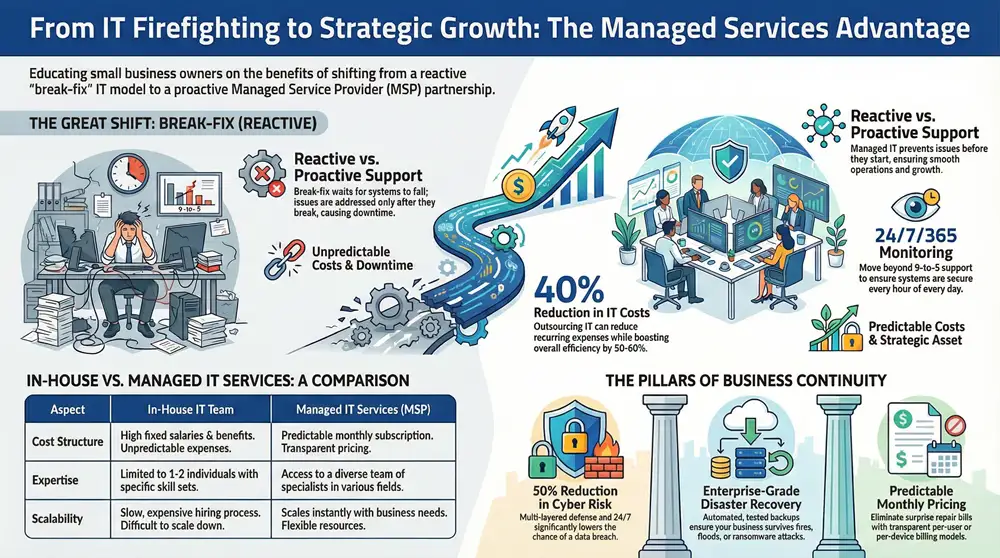
Partnering with a Managed Service Provider (MSP) allows you to outsource your technology management to a team of dedicated experts. Instead of reacting to problems after they occur, an MSP works proactively to ensure your IT systems—from cybersecurity and data backups to daily help desk support—operate smoothly and securely for a predictable monthly fee. This guide explains how managed IT services provide small businesses with enterprise-level technology support without the cost of an in-house IT department.
Why Smart Businesses Outsource Their IT

For most small businesses, managing technology is a constant juggle between achieving strategic goals and operating with a lean team. While technology is intended to simplify operations, it often becomes a source of frustration and unexpected expenses.
Every minute your team spends troubleshooting a printer or worrying about a potential ransomware attack is a minute not spent on core business functions like serving customers and driving growth. This is where partnering with a Managed Service Provider (MSP) offers a transformative solution. An MSP acts as your dedicated, off-site IT department, shifting from the outdated “break-fix” model—where you pay for repairs after a failure—to a proactive partnership designed to prevent issues before they start. This ensures your systems remain secure, updated, and perform optimally.
From Reactive Firefighting To Proactive Strategy
The most significant advantage of managed IT is the shift from reactive problem-solving to proactive prevention. An MSP doesn’t wait for a server crash or security breach; they continuously monitor your network, apply security patches, back up critical data, and provide ongoing support to your employees. This proactive approach significantly reduces costly downtime and maintains business continuity.
For a small business, this strategy unlocks several key benefits:
- Access to Expertise: You gain immediate access to a team of specialists in cybersecurity, cloud computing, and network management—expertise that is often too costly to hire in-house.
- Predictable Costs: A flat monthly fee eliminates surprise repair bills, allowing you to budget for IT with confidence.
- Enhanced Security: MSPs implement enterprise-grade security tools and strategies that are typically beyond the reach of smaller companies.
Real-World Example: Consider an accounting firm during tax season. A server outage could halt operations for hours, leading to missed deadlines and client dissatisfaction. A proactive MSP would have monitored server health, identified the risk of failure in advance, and performed maintenance overnight to prevent any disruption. This is the difference between crisis management and strategic IT.
This strategic approach is becoming the standard for good reason. Nearly 90% of small and medium-sized businesses are already using or considering an MSP for their IT needs.
To see how this partnership fuels real growth, check out our guide on how managed IT services add business value.
Comparing In-House IT vs Managed IT Services
Making the transition from an internal IT resource to an MSP can feel like a significant change. This table breaks down the key differences to help you understand why so many businesses are making the move.
| Aspect | In-House IT Team | Managed IT Services (MSP) |
|---|---|---|
| Cost Structure | High fixed costs (salaries, benefits, training, tools). | Predictable monthly subscription fee. |
| Expertise | Limited to the knowledge of 1–2 individuals. | Access to a diverse team of specialists (cybersecurity, cloud, etc.). |
| Availability | Typically 9-to-5, with gaps for vacation, sick days, and holidays. | 24/7/365 monitoring and support. |
| Focus | Often reactive, fixing problems as they arise. | Proactive management to prevent issues and optimize systems. |
| Scalability | Scaling requires a slow and expensive hiring process. | Easily scales up or down based on your business needs. |
| Tools & Tech | Limited budget for enterprise-grade software and security tools. | Leverages best-in-class tools across all clients, making them affordable. |
| Strategic Input | Focused on daily operations and troubleshooting. | Provides strategic guidance and long-term technology planning. |
Ultimately, the choice comes down to focus. An in-house team spends its time maintaining operations, while an MSP works to optimize those operations, freeing up your internal resources to focus on core business goals.
Understanding Core Managed IT Services
Managed IT is not a single product but a comprehensive service suite. Think of it like a general contractor for your technology. A contractor brings in specialized plumbers, electricians, and framers to build a house; similarly, a managed IT provider brings in experts for every component of your technology stack.
This approach ensures every aspect of your IT environment is handled by a professional, from the devices your team uses daily to the complex security measures protecting your data. Let’s examine the essential services included in a managed IT package for a small business.
The diagram below illustrates how this partnership transforms common small business challenges, like budget constraints and technical issues, into opportunities for growth and efficiency.
Ultimately, the goal of working with a managed service provider (MSP) is to transform these operational burdens into a competitive advantage, allowing you to focus on what you do best.
Proactive Infrastructure Management
Your IT infrastructure—servers, computers, routers, and Wi-Fi network—is the central nervous system of your business. Proactive management means your MSP actively monitors the health of these systems to resolve potential issues before they can cause disruptions.
This is analogous to routine vehicle maintenance. You get regular oil changes to keep the engine running smoothly, not wait for it to seize. An MSP handles critical tasks like installing software patches, monitoring server performance, and ensuring your network remains fast and reliable.
Responsive Help Desk Support
When an employee cannot log in or a critical application crashes, productivity stops. A quality help desk provides your team with immediate access to technical experts who can resolve issues quickly, minimizing both downtime and frustration.
This service functions as your on-demand IT department. Instead of an employee wasting valuable time trying to fix a problem, they can submit a ticket and receive prompt support, allowing them to return to their primary responsibilities.
A responsive help desk is one of the most visible benefits of managed IT services. It directly translates to less downtime and a more efficient workforce, turning technology from a roadblock into a reliable tool.
Robust Backup and Disaster Recovery
What would happen if a fire, flood, or ransomware attack destroyed your business data tomorrow? For most small businesses, such an event would be catastrophic. A comprehensive Backup and Disaster Recovery (BDR) plan is your company’s essential insurance policy.
This service involves more than just backing up files. It creates a complete, restorable image of your entire system and establishes a clear, tested plan to restore operations quickly after a disaster. A recent survey found that a staggering 68% of small businesses lack a formal disaster recovery plan, leaving them vulnerable to permanent data loss.
Advanced Cybersecurity Services
Cybersecurity is no longer an optional add-on; it is a fundamental business requirement. Any managed IT service for a small business must include robust security measures to protect against threats like phishing, malware, and data breaches.
This protection is not a single tool but a multi-layered defense strategy, including:
- Firewall Management: The first line of defense, controlling traffic in and out of your network.
- Antivirus and Anti-Malware: Protects individual computers and servers from malicious software.
- Email Security: Filters phishing scams and spam before they reach your team’s inboxes.
Many providers also offer advanced protections. You can learn more about the benefits of managed security services to understand how a dedicated security focus strengthens your defenses. Part of this also involves understanding what identity management is and how it works to control access to sensitive information.
The Real-World ROI of Managed IT Services

It is a common mistake to view IT as a mere operational expense. Managed IT services should be considered an investment that delivers a tangible return by transforming your technology from a liability into a strategic asset.
For a small business, this shift is critical. Instead of managing unpredictable IT costs and frustrating downtime, you gain a value-driven partnership that directly strengthens your bottom line.
The financial benefit is immediately apparent. Hiring a single, experienced in-house IT technician can easily cost six figures annually when salary, benefits, and training are considered. With a managed service provider (MSP), you gain access to an entire team of specialists for a flat monthly fee that is a fraction of that cost.
Boosting Productivity and Preventing Costly Downtime
Unplanned downtime is a silent threat to small businesses. Every minute your systems are offline translates to idle employees, missed sales opportunities, and customer dissatisfaction—a significant drain on profitability.
Proactive maintenance, the core of managed services, addresses this threat. Your MSP continuously monitors your network, applies security patches, and optimizes performance to prevent problems before they occur. The result is a reliable technology environment where your team can focus on their jobs without battling slow computers or network glitches, leading to higher productivity.
Consider these immediate operational improvements:
- Less Employee Frustration: A quick call to the help desk resolves problems in minutes, not hours.
- Smoother Workflows: A well-maintained IT environment ensures software runs faster and daily processes are more efficient.
- Higher Output: Reliable systems empower your team to accomplish more without technical roadblocks.
We dive deeper into this topic in our article explaining how proactive managed IT services help businesses. This shift from reactive fixes to preventative care is what truly maximizes your return.
Turning Cybersecurity Into a Financial Shield
For any small business, a data breach is not just a technical issue—it is a potential business-ending event. The costs associated with regulatory fines, legal fees, and reputational damage can be devastating. Viewing cybersecurity as an expense is a dangerous oversight; it is a critical investment in your company’s survival.
A quality MSP acts as your security partner, building a robust defense around your operations to significantly reduce risk. They deploy and manage enterprise-level security tools that are typically too expensive and complex for a small business to handle independently.
When you outsource your IT, you aren’t just buying tech support. You’re investing in business continuity, operational efficiency, and a powerful defense against the financial ruin that follows a cyberattack.
The data supports this. For small businesses, partnering with an MSP can reduce recurring in-house IT costs by up to 40% and boost overall efficiency by 50-60%. This is not just about saving money; it is about reallocating that budget toward growth while also achieving a 50% reduction in cyber risks through round-the-clock monitoring. You can explore more of these managed services market findings on The Business Research Company.
How Managed Services Pricing Models Work
Understanding how a Managed Service Provider (MSP) bills for its services is crucial for making a sound financial decision. The objective is not merely to find the lowest price but to secure the best value—a pricing structure that aligns with your budget, business operations, and growth plans. Most providers use a few common models that are easy to understand.
Choosing the right model leads to predictable IT spending, ending the surprise invoices common with break-fix IT support. This financial clarity allows you to budget for technology as a planned investment rather than an unpredictable expense. Let’s examine the most common MSP pricing models.
Per-User or Per-Device Model
This is one of the most popular and straightforward pricing models, particularly for small businesses. You pay a flat monthly fee for each employee (per-user) or for each piece of equipment (per-device) that the MSP manages. For example, if you have 15 employees, you might pay a set rate per person that covers their desktop, laptop, and company phone.
This model is easy to scale. As your team grows, you add another user to your plan. If you downsize, you remove one. Its greatest strength is predictability; your monthly IT costs are tied directly to your headcount or hardware, simplifying expense forecasting.
Tiered Service Model
This model is similar to a subscription service with different levels, such as Bronze, Silver, and Gold. Each tier bundles a progressively larger set of services. A basic Bronze package might cover remote monitoring and help desk support, while a premium Gold tier could include on-site support, advanced cybersecurity, and strategic planning.
This approach is ideal for businesses that want to align their service level with their specific needs and budget. A small startup can begin with a basic package and upgrade as its operations become more complex. The key is to carefully review what is included in each tier to avoid paying for unnecessary services or missing a critical one available only in a higher-priced package.
The best pricing model gives you financial predictability and aligns perfectly with how your business operates. It’s not just about the monthly bill, but the value and peace of mind you get from knowing your tech is completely covered.
A La Carte Model
For businesses with highly specific or unique needs, the a la carte model offers the most flexibility. Instead of a pre-set package, you select and pay for only the individual services you require. For example, if you have an in-house resource for daily support but need an expert to manage cybersecurity and data backups, you can purchase just those two services.
While this provides total control, it can lead to less predictable costs and potential gaps in IT coverage if not managed carefully. It works best for companies that already have some internal IT staff and a clear understanding of their needs. To better evaluate these costs, it can be helpful to review a comprehensive pricing guide and cost breakdown to compare different service plans.
Comparing Common MSP Pricing Models
To clarify these options, here is a quick breakdown of the common pricing structures. Use this table to determine which approach might be the best fit for your company’s budget and technical requirements.
| Pricing Model | How It Works | Best For | Potential Downside |
|---|---|---|---|
| Per-User/Device | A flat monthly fee for each employee or piece of managed equipment. | Businesses wanting simple, predictable costs that scale directly with team size. | Can become expensive for companies with many part-time users or a high device count per user. |
| Tiered Service | Services are bundled into packages (e.g., Bronze, Silver, Gold) at different price points. | Businesses that want to match service levels to their budget and upgrade as they grow. | You might pay for services you don’t use or find that a critical service is only in a higher tier. |
| A La Carte | You select and pay for individual services one by one, creating a custom plan. | Companies with some in-house IT expertise who need to fill specific gaps. | Costs can be unpredictable, and it’s easy to create unintentional gaps in coverage. |
Ultimately, the right pricing model makes your IT costs a stable, forecastable part of your budget. It should feel like a partnership that supports your business, not a confusing bill that arrives every month.
Choosing the Right Managed IT Partner
Selecting a provider for managed IT services is not like purchasing office supplies. You are not just hiring a vendor; you are engaging a long-term strategic partner who will manage your entire technology infrastructure. The right choice can accelerate growth, while the wrong one can lead to constant frustration and risk.
To make a confident decision, look beyond the sales pitch and examine the details that truly matter. This involves asking sharp, specific questions about a provider’s capabilities, reliability, and commitment to client success. A great partner not only resolves technical issues but also understands your business goals and develops a technology plan to help you achieve them.
Key Questions to Ask Potential Providers
Before signing a contract, it is essential to conduct thorough due diligence. The goal is to find a provider who is not only technically proficient but also aligns with your company culture and understands the unique challenges of your industry.
Here are the essential questions every small business owner should ask:
- What is your experience with businesses of my size and in my industry? A provider familiar with the specific software, compliance requirements, and workflows of your industry will be far more effective. Ask for case studies or references from businesses similar to yours.
- What do your Service Level Agreements (SLAs) guarantee? The SLA is a contract that defines the level of service you can expect. It should clearly outline guaranteed response times for critical, high, and low-priority issues. This is your assurance of how quickly help will arrive when a problem occurs.
- Can you describe your cybersecurity protocols and your incident response plan? Vague answers are a major red flag. A top-tier provider should be able to detail their multi-layered security strategy, including firewall management, endpoint protection, and proactive threat hunting. Most importantly, ask them to describe, step-by-step, what they would do in the event of a security breach.
A provider’s real value is measured not just by how well they keep things running, but by how they react when the pressure is on. Their incident response plan tells you everything you need to know about their professionalism and preparedness.
Verifying Expertise and Building Trust
After the initial questioning, verify their claims and assess their reputation. A provider worthy of your business will be transparent and willing to provide proof of their track record.
Look for Social Proof
Real-world feedback is your most reliable tool for evaluating a provider’s quality. Do not just take their word for it—seek independent verification.
- Client Testimonials: Read reviews on their website, but also check third-party sites like Google, Clutch, or the Better Business Bureau for a complete picture.
- Case Studies: A good case study should detail a client’s initial problem, the provider’s solution, and the measurable results that followed.
- Direct References: Ask to speak with one or two of their current clients. A brief, honest conversation can provide more insight into their responsiveness and partnership quality than any marketing material.
By combining direct questions with independent research, you can move beyond a surface-level sales pitch. This thorough process will help you find a managed IT services partner who will not just protect your small business but become a key driver of its long-term growth and success.
Your Step-by-Step Onboarding Guide
Transitioning your IT management to a third party can feel like a significant step, but a professional Managed Service Provider (MSP) follows a structured and transparent process. The onboarding is designed to be a well-managed project, not a chaotic takeover, with the goal of minimizing disruption to your daily operations.
This process is not just about setup; it is about building a solid foundation for a long-term partnership. By methodically documenting your existing infrastructure and strategically deploying their tools, the MSP ensures they are ready to support your business effectively from day one.
This logical progression keeps you informed and confident at every stage. Let’s review the typical phases you should expect when onboarding with a new managed services partner.
Phase 1: Discovery and Assessment
First, your new MSP needs to understand your current technology environment. This phase is a comprehensive audit to document every piece of your infrastructure, how it is connected, and where potential vulnerabilities exist.
During this phase, the provider will:
- Map Your Network Infrastructure: This includes servers, workstations, routers, switches, and Wi-Fi access points.
- Inventory Software and Licenses: They will create a list of all business applications to check for compliance and identify outdated software.
- Review Security Protocols: Your current cybersecurity measures, such as firewalls and antivirus software, will be closely inspected.
- Understand Business Workflows: They will meet with your team to understand how you use technology in your daily operations.
This initial deep dive is the most critical step, as it creates the blueprint for a support and security strategy tailored to your business.
Phase 2: Strategic Onboarding and Deployment
Once the assessment is complete, the MSP begins deploying its management tools and integrating its systems with yours. This is where the proactive side of managed IT services for small business comes to life.
A key part of this is installing remote monitoring and management (RMM) agents on your computers and servers. This lightweight software allows the MSP to monitor system health, apply updates, and resolve issues remotely, often before you are aware of them. They will also configure secure data backups and ensure your team knows how to access the help desk.
This phase is all about getting on the same page. The MSP will work with you to set up communication channels, confirm what’s in the service-level agreement (SLA), and ensure your team knows exactly who to call when they need help.
Phase 3: System Stabilization and Optimization
With the core tools in place, the focus shifts to bringing your systems up to a high standard of performance and security. The MSP will address any urgent issues identified during the discovery phase, such as resolving network problems, patching security vulnerabilities, or updating critical software.
This period, typically lasting 30 to 90 days, is dedicated to creating a stable and reliable IT environment. During this time, the monitoring tools gather data that helps technicians fine-tune your systems for optimal performance. By the end of this phase, you are left with a secure and efficient IT infrastructure, setting the stage for a strategic partnership focused on your business growth.
Frequently Asked Questions About Managed IT
Transitioning to managed IT is a significant decision, and it is natural to have questions. Here are clear, direct answers to the most common concerns we hear from small business owners to help you feel confident in your next steps.
Will I Lose Control Over My IT by Hiring an MSP?
This is a common concern, but it is a misconception. A quality Managed Service Provider (MSP) works for you, not in place of you. You retain ownership of your data, set the overall strategy, and determine the direction of your business.
Think of an MSP as your expert technology department. You communicate your objectives—such as improved security, reduced downtime, or support for new software—and they handle the technical implementation. They provide detailed reports on all activities, often giving you more insight and control over your technology than before.
Is My Business Too Small for Managed IT Services?
No business that relies on technology to operate is too small. Managed IT is often more critical for smaller companies that lack the budget for a full-time, in-house IT expert but would be devastated by a data breach or server failure.
MSPs offer scalable plans that fit your size. Whether you are a solo entrepreneur or have a team of 50, there is a service model that aligns with your needs. It is about providing you access to the same level of security and support as larger corporations at a price that makes sense for your budget.
The question isn't whether your business is too small for managed IT. It's whether you can afford to risk a catastrophic cyberattack or system failure without an expert team watching your back.
What Are the Hidden Costs I Should Watch Out For?
A trustworthy MSP will be transparent about costs. The goal is a predictable monthly fee, but you should always inquire about what is not covered.
Before signing an agreement, clarify potential extra charges, which often include:
Large Projects: Major initiatives like an office move, a complete network overhaul, or a complex cloud migration are typically quoted as separate projects.
On-Site Visits: Some basic plans focus on remote support. Confirm whether on-site technician visits are included or billed at an hourly rate.
New Hardware/Software: Your monthly fee covers the management of your technology, not the cost of new laptops, servers, or software licenses.
Any reputable provider will outline these details in their Service Level Agreement (SLA). Read it carefully to protect yourself from unexpected bills.
How Long Does It Take to Onboard with a New MSP?
The onboarding process typically takes between 30 and 90 days for most small businesses, depending on the complexity of your current IT setup. A professional MSP treats this as a managed project to ensure a smooth transition.
The process begins with a discovery phase to map your technology, followed by the deployment of management and security tools. Finally, a stabilization period ensures all systems are running smoothly and any initial issues are resolved with minimal disruption to your team.
Ready to stop worrying about IT and start focusing on growth? The team at 1-800 Office Solutions has over 40 years of experience providing reliable, scalable, and secure managed IT services for small businesses across the nation. Contact us today for a personalized quote and discover how a true technology partner can transform your business.