10 Help Desk Best Practices to Elevate Your IT Support

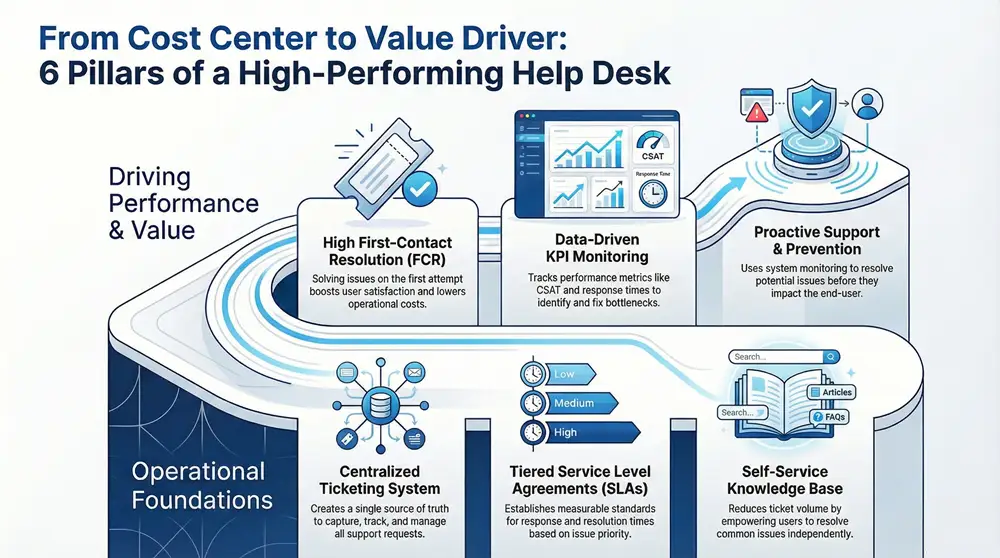
An inefficient help desk frustrates users and drains business resources, hindering productivity and eroding trust. Many businesses struggle with disorganized support queues, inconsistent service levels, and recurring technical issues that lack a permanent fix. This common problem turns the support function into a reactive cost center instead of a proactive value driver that enhances operational efficiency.
This article provides a clear, actionable roadmap to overcome these challenges. We will explore 10 proven help desk best practices, detailing the specific processes, metrics, and steps needed to build a high-performing IT support operation. By implementing these strategies, you can streamline critical workflows, empower your support team, and deliver consistently excellent service that boosts user satisfaction and contributes to tangible business growth.
By focusing on these core principles, you can transform your help desk’s role within the organization. Implementing these foundational practices is a critical step, but they are most effective when paired with a customer-centric mindset. To truly transform your support from a cost center to a value driver, explore a broader range of actionable customer service best practices that can drive significant growth and improve loyalty across every touchpoint. Let’s begin building a help desk that actively contributes to your bottom line.
1. Implement a Centralized Ticketing System
Moving from scattered emails and sticky notes to a centralized ticketing system is the foundational step in establishing a professional help desk. A ticketing system is a software platform that captures, organizes, tracks, and manages all support requests, from initial submission to final resolution. This structured workflow creates a single source of truth, ensuring no request is lost and every issue receives appropriate, timely attention.
This approach organizes chaos into a manageable process. Each incoming request, whether from an email, phone call, or customer portal, is converted into a unique, trackable ticket containing all relevant details, communication history, and assigned ownership. This provides complete visibility for support staff and management, enabling them to prioritize tasks, monitor progress against Service Level Agreements (SLAs), and identify recurring issues. For businesses managing multiple locations, a ticketing system is non-negotiable for maintaining service quality.

How to Implement a Ticketing System
Successful deployment requires a strategic approach beyond simply choosing software.
- Define Ticket Categories: Create a logical structure for ticket categories (e.g., Hardware > Printer, Software > CRM Access) to improve routing and simplify reporting.
- Establish Priority-Based SLAs: Set realistic response and resolution time targets based on ticket priority levels (e.g., Low, Medium, High, Urgent).
- Automate Communications: Use the system to automate routine acknowledgments. An immediate, automated email confirming receipt of a ticket assures the user their request has been logged.
- Train Your Team Thoroughly: Ensure every help desk agent understands the system’s features, from ticket creation and assignment to escalation workflows and closing procedures.
2. Establish Clear Service Level Agreements (SLAs)
Defining clear Service Level Agreements (SLAs) transforms your help desk from a reactive support center into a proactive, accountable service provider. An SLA is a formal commitment that outlines specific, measurable standards for service delivery, such as response times and resolution targets for different ticket priorities. This documentation sets clear expectations for end-users and provides a transparent framework for measuring help desk performance.
SLAs provide the structure needed to prioritize tasks effectively and allocate resources where they are most needed. By creating different service tiers based on issue severity, you ensure that critical problems like a server outage are addressed with greater urgency than a minor software glitch. This approach not only improves customer satisfaction by managing expectations but also drives internal accountability. When SLAs are clearly defined and consistently tracked, they become powerful tools for identifying bottlenecks and demonstrating the value of your IT support function.
How to Implement Service Level Agreements
Implementing effective SLAs requires a data-driven strategy and clear communication.
- Analyze Historical Performance: Base your SLA targets on real data. Review past ticket resolution times to set achievable yet challenging goals.
- Create Tiered Service Levels: Develop distinct SLAs for different priority levels (e.g., Urgent, High, Medium, Low). For example, an Urgent ticket might have a 15-minute response SLA, while a Low-priority ticket could have a 24-hour response time.
- Communicate SLAs Clearly: Publish your SLAs in a customer-facing knowledge base or service catalog to ensure every user understands what to expect when they submit a ticket.
- Monitor and Report on Compliance: Continuously track your team’s performance against SLA targets. Use your ticketing system to generate reports that identify trends and areas for improvement. You can learn more about how ticketing systems impact SLA compliance to optimize this process.
3. Develop a Comprehensive Knowledge Base
Empowering users to find their own answers is one of the most effective help desk best practices for reducing ticket volume and improving efficiency. A comprehensive knowledge base is a centralized, self-service library of information, including FAQs, how-to guides, and troubleshooting steps. By providing this resource, you enable users to resolve common issues independently, freeing up your support team to focus on more complex problems.
This repository of institutional knowledge acts as the first line of defense in your support strategy. When users can quickly find a solution to a printer jam or a password reset question, it creates a positive experience and builds their confidence. For the help desk, this translates into fewer repetitive tickets and more time for proactive maintenance. A real-world example is how many SaaS companies use platforms like Confluence or Notion to build extensive, user-friendly knowledge bases that deflect thousands of tickets monthly.
How to Develop a Knowledge Base
Building an effective knowledge base is an ongoing process that requires a strategic, user-centric approach.
- Start with High-Frequency Issues: Analyze your ticketing system data to identify the top 10-20 most common support requests. These are your initial article targets, as they will deliver the greatest immediate impact.
- Use User-Friendly Language: Write articles from the user’s perspective. Avoid technical jargon and use clear, simple terms.
- Incorporate Visual Aids: Enhance articles with screenshots, GIFs, or short video tutorials. Step-by-step visual instructions are often more effective than long blocks of text.
- Establish a Review Cycle: Implement a mandatory review schedule (e.g., quarterly) to ensure all articles are accurate and relevant. Link articles to resolved tickets to prompt agents to verify or update the information.
4. Prioritize and Categorize Tickets Effectively
Not all support requests are created equal. A systematic approach to classifying incoming tickets by urgency, impact, and type is essential for optimizing resource allocation and maintaining service quality. This process ensures that critical, business-impacting issues receive immediate attention while routine requests are handled in an orderly fashion, transforming a reactive support queue into a strategic, proactive service function.
This structured method prevents minor issues from overshadowing major incidents. For instance, a system-wide outage affecting all users should immediately take precedence over a single user’s request for a new mouse. By categorizing tickets (e.g., Hardware, Software, Access Request) and assigning a priority level based on predefined criteria, you create a clear, logical workflow. This allows your team to focus their efforts where they are needed most, improving resolution times for critical problems.
How to Prioritize and Categorize Tickets
A successful strategy relies on clear, consistently applied rules rather than subjective judgment.
- Define a Priority Matrix: Create a clear matrix that defines levels like Urgent, High, Medium, and Low based on impact (number of users affected) and urgency (business criticality).
- Automate Initial Triage: Use your ticketing system’s automation rules to automatically assign categories and initial priorities based on keywords, user groups, or the affected asset.
- Establish Clear Escalation Paths: Document the process for escalating a ticket if its priority is disputed or if it breaches its Service Level Agreement (SLA).
- Train Your Team for Consistency: Ensure every agent understands the criteria for each category and priority level. Regular training and reviewing tickets together helps calibrate the team’s judgment.
5. Implement Multi-Channel Support
Customers expect to receive support through their preferred method of communication. Implementing multi-channel support means meeting users where they are, whether via traditional phone calls, email, live chat, social media, or a dedicated support portal. This approach makes your help desk more accessible and user-friendly, directly improving satisfaction by reducing the effort required to get help. Integrating these various streams into a unified system is a core tenet of modern help desk best practices.
The key to success is centralizing these channels into a cohesive workflow, often managed within your ticketing system. This prevents information silos and ensures a consistent service experience regardless of how a user initiates contact. An agent can see a user’s previous email conversation while assisting them on a live chat, providing context that leads to faster, more effective resolutions. This strategy empowers your team to manage inquiries efficiently and gives your organization a complete view of all customer interactions.
How to Implement Multi-Channel Support
Rolling out multiple support channels requires a thoughtful strategy to avoid overwhelming your team.
- Start with Key Channels: Begin by launching the 2-3 channels your customers use most. Survey your users or analyze existing contact points to determine if they prefer email, live chat, or phone support.
- Create Channel-Specific Guidelines: The communication style for a social media message is different from a formal email. Develop clear guidelines for tone and response time for each channel.
- Unify Your Inbox: Use a tool like Zendesk or Freshdesk to pull all incoming requests into your central ticketing system. This ensures every message becomes a trackable ticket.
- Integrate Modern Messaging: Consider adding platforms like WhatsApp for a more direct and convenient support option. You can learn more about using WhatsApp for your business to see how it can enhance customer communication.
6. Foster First-Contact Resolution (FCR)
One of the most impactful help desk best practices is to resolve user issues during the very first interaction. First-Contact Resolution (FCR) measures the percentage of support requests that are fully resolved on the first attempt, eliminating the need for follow-up communications. A high FCR rate directly correlates with increased customer satisfaction, reduced operational costs, and improved agent morale, as it demonstrates efficiency and expertise.
Achieving a high FCR rate transforms the help desk from a simple logging center into a powerful problem-solving unit. When agents are equipped with the knowledge, tools, and authority to resolve issues immediately, it prevents user frustration from escalating. For example, a large telecommunications company increased its FCR by 18% through targeted training and process improvements, significantly boosting customer loyalty and reducing operational costs by minimizing repeat calls.
How to Improve First-Contact Resolution
Boosting your FCR rate requires a deliberate investment in your people, processes, and technology.
- Empower Your Agents: Grant front-line staff the necessary permissions and authority to handle common requests, like password resets or software access approvals, without managerial sign-off.
- Provide Comprehensive Training: Equip agents with deep knowledge of your systems, products, and common issues. Regular training should cover both technical skills and effective communication.
- Build a Robust Knowledge Base: A centralized, up-to-date knowledge base with detailed troubleshooting guides gives agents instant access to the information they need to solve problems on the spot.
- Conduct Root Cause Analysis: When a ticket is not resolved on the first contact, investigate why. Analyze these instances to identify knowledge gaps, process inefficiencies, or areas where agents need better tools.
7. Provide Continuous Training and Development
Technology and customer expectations are constantly changing, making a “one-and-done” training approach obsolete for help desk teams. Continuous training and development is a strategic commitment to regularly upskilling agents in technical expertise, product knowledge, and crucial soft skills. This ongoing education ensures your team remains agile, motivated, and equipped to handle new challenges, which is why it is a fundamental pillar of help desk best practices.
A well-trained team is a confident team. By creating a culture of continuous learning, businesses empower their agents to move beyond scripted responses and provide truly effective, empathetic support. This involves a structured program that covers everything from new software updates to advanced troubleshooting and de-escalation techniques. For example, a leading tech company provides constant updates and learning modules for its support staff to keep them masters of an ever-evolving product ecosystem, ensuring a consistently high level of service.
How to Implement Continuous Training and Development
A successful training program is integrated into the operational rhythm of the help desk, not treated as an occasional disruption.
- Create a Blended Learning Program: Combine different formats like self-paced online modules and in-person workshops for interactive soft skills training like active listening and empathy.
- Leverage Ticket Data for Content: Analyze your ticketing system for recurring issues or knowledge gaps. If a specific problem generates many escalated tickets, create a targeted training module to address it.
- Establish a Mentorship System: Pair new hires with experienced senior staff. This peer-to-peer learning fosters team cohesion and provides a safe channel for gaining practical insights.
- Develop Career Pathways: Show agents a clear path for advancement through training. Create certification levels that unlock new responsibilities and higher pay, motivating staff to invest in their own development.
8. Monitor Performance Metrics and KPIs
What gets measured gets managed. Systematically tracking and analyzing key performance indicators (KPIs) separates a reactive help desk from a proactive, strategic business asset. This data-driven approach moves your team beyond anecdotal evidence, providing clear, objective insights into operational efficiency, agent performance, and customer satisfaction. Monitoring performance is an indispensable part of any list of help desk best practices.
This practice involves using dashboards to monitor critical metrics like First Contact Resolution (FCR), Average Response Time, and Customer Satisfaction (CSAT) scores. By analyzing this data, managers can identify bottlenecks, spot trends in support requests, and recognize top-performing agents. For example, a major e-commerce company uses real-time metrics to manage its support infrastructure, ensuring service levels are met consistently and allowing for rapid adjustments during peak periods.
How to Monitor Performance Metrics and KPIs
Effective monitoring is about focusing on the right data and making it actionable, not just collecting numbers.
- Select Core Metrics: Avoid “analysis paralysis” by focusing on 5-7 key metrics that directly align with your business goals, such as FCR, resolution time, ticket volume, and agent productivity.
- Balance Speed and Quality: Pair efficiency metrics (like response time) with quality metrics (like CSAT). This ensures agents are not just closing tickets quickly but are also providing effective resolutions.
- Establish Baselines and Targets: Measure your current performance to establish a baseline. From there, set realistic, incremental improvement targets that challenge your team.
- Make Data Visible: Create a shared dashboard that is reviewed daily by the team. Transparency fosters accountability and helps agents understand how their individual performance contributes to the team’s success.
9. Create a Positive and Supportive Help Desk Culture
A high-performing help desk is built on more than just technology; it’s founded on a positive and supportive culture. Creating an environment that prioritizes empathy, collaboration, and professional growth is essential for retaining top talent and delivering consistently excellent service. This people-first approach directly combats the high-stress nature of support roles, reducing agent burnout and improving job satisfaction, which translates into better customer interactions.
This focus on culture treats employee well-being as a direct driver of customer happiness. When help desk agents feel valued, respected, and empowered, they are more motivated to solve complex problems and provide empathetic support. This fosters a proactive, rather than reactive, service mentality. A positive culture encourages knowledge sharing among team members, turning individual challenges into collective learning opportunities and strengthening the team’s overall capability.
How to Foster a Positive Help Desk Culture
Building a great culture requires intentional effort and consistent reinforcement from leadership.
- Recognize and Reward Achievements: Publicly acknowledge both individual and team successes. Whether it’s a great CSAT score or solving a difficult ticket, recognition validates hard work.
- Invest in Professional Development: Provide clear paths for career growth, including training for new technologies, certifications, or soft skills like conflict resolution.
- Promote Open Communication: Conduct regular one-on-one meetings to listen to agent feedback, concerns, and ideas. Actively implementing their suggestions demonstrates that their voices are valued.
- Encourage Team Collaboration: Create opportunities for agents to connect outside of tickets, such as team-building events or a dedicated chat channel for social interaction.
10. Implement Proactive Support and Prevention
Shifting from a reactive, problem-fixing model to a proactive, problem-preventing one is a hallmark of an advanced help desk. Proactive support involves anticipating and resolving potential issues before they impact users. This forward-thinking strategy uses system monitoring, trend analysis, and strategic communication to address the root cause of problems, significantly reducing ticket volume and improving the overall customer experience.
This method transforms the help desk from a cost center focused on firefighting into a value-add department that enhances system stability. Instead of waiting for a server to go down and generate dozens of tickets, proactive monitoring tools alert the team to performance degradation, allowing them to intervene before an outage occurs. Similarly, analyzing ticket data to spot a recurring software glitch can lead to a permanent fix, preventing future support requests from ever being created.
How to Implement Proactive Support
Moving to a proactive model requires a change in mindset, supported by the right processes and tools.
- Implement Monitoring Tools: Deploy software to actively monitor critical infrastructure like servers and networks. Configure alerts to notify your team of potential issues before they cause downtime.
- Analyze Ticket Data for Patterns: Regularly review ticket categories to identify recurring problems. If multiple users report the same issue, it signals a deeper problem that needs a permanent solution.
- Communicate Proactively: When you identify a potential issue or schedule maintenance, inform users in advance. A simple notification prevents a flood of tickets and manages expectations.
- Schedule Preventive Maintenance: Establish a schedule for routine tasks like patching systems and updating software during off-peak hours to prevent predictable failures.
Elevate Your Support with Proven Help Desk Practices

Implementing these ten foundational help desk best practices transforms your support function from a reactive cost center into a strategic business asset. By establishing order with a robust ticketing system, setting clear expectations with SLAs, and empowering users with a comprehensive knowledge base, you build a framework for efficiency and scalability.
The most successful help desks drive business value by focusing on both process and people. Prioritizing First-Contact Resolution (FCR), providing multi-channel support, and investing in continuous training are powerful drivers of customer satisfaction and loyalty. These outcomes are amplified by a positive, supportive culture where agents feel valued and empowered. Finally, a data-driven approach through consistent KPI monitoring allows you to shift toward proactive support, preventing issues before they impact the organization.
Ready to build a more resilient, efficient, and secure IT support operation? Implementing and managing these best practices requires expertise and resources. 1-800 Office Solutions provides comprehensive managed IT and cybersecurity services that can accelerate your journey to service excellence, allowing your team to focus on core business goals.
Contact us today to learn how our experts can help you implement these help desk best practices and optimize your support infrastructure.
 Cloud Security & Disaster Recovery Solutions for Your Business, Managed IT Services, Security, Web & Cloud