How to Organize Digital Files: A Practical Guide for Businesses

A disorganized digital filing system drains productivity and introduces significant business risks. While the immediate impulse is to create new folders, a lasting solution begins with a strategic plan, not reactive file shuffling. Before you can build an efficient system, you must first understand the scope of the problem: what types of files you have, where they are stored, and who needs access to them.
This guide provides a proven framework for organizing your digital files. By following these steps, you will transform your scattered documents into a streamlined, secure, and highly efficient company asset, directly boosting your team’s productivity and strengthening your operational foundation.
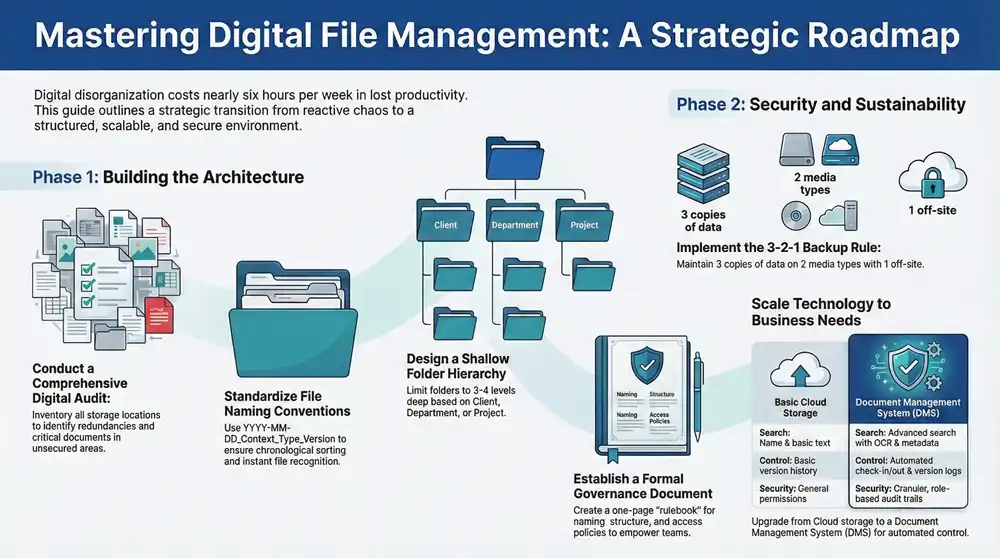
Start with a Comprehensive Digital File Audit

A digital file audit is a systematic review of all your organization’s stored information. Its primary purpose is to create a complete inventory of your digital assets, a process that invariably uncovers redundant files, outdated information, and critical documents in unsecured locations. This diagnostic step is essential for building an effective organization system.
For many businesses, this audit also highlights the need to integrate physical documents. Services for bulk document scanning are invaluable here, converting paper records into searchable, organized digital files and ensuring your new system is truly comprehensive from its inception.
To keep the audit manageable, begin with a single department or server.
- Identify Storage Locations: Compile a list of every location where files are stored, including shared network drives, local computers, cloud platforms like Google Drive or Dropbox, and email inboxes.
- Categorize File Types: Group documents by their function, such as contracts, invoices, marketing materials, project plans, or client records.
- Analyze File Age and Usage: Use the “last modified” date to quickly identify obsolete files that can be archived or securely deleted.
A common mistake is skipping the audit and jumping straight to creating folders. This is like building a house without a blueprint. The system may appear organized initially but will fail under daily operational stress because it was not designed around your team’s actual workflows.
Define Clear and Measurable Goals
With a clear inventory of your digital assets, the next step is to define what success looks like. Vague goals like “get organized” are not actionable. You must set specific, measurable objectives that align with tangible business outcomes. This transforms file organization from an administrative task into a strategic initiative that directly improves efficiency, security, and compliance.
Digital File Organization Quick Start Framework
This table provides a high-level overview of the principles and actions needed to kickstart your file organization project effectively.
| Principle | Actionable Step | Business Benefit |
|---|---|---|
| Understand Your Assets | Conduct a thorough audit of all digital files and storage locations. | Identify redundancies, security risks, and opportunities for consolidation. |
| Set Specific Targets | Define measurable goals, such as reducing file search time by a certain percentage. | Provides a clear benchmark for success and keeps the project focused. |
| Classify Information | Categorize files by their business value, sensitivity, and usage frequency. | Enhances security, improves access control, and simplifies compliance. |
| Digitize Physical Records | Convert essential paper documents into searchable digital formats. | Creates a single, comprehensive source of truth for all company information. |
By following this framework, you are not just tidying up—you are building a more resilient and efficient operational foundation.
Examples of Actionable Organization Goals
Here are examples of strong, benefit-driven goals to guide your organization efforts:
- Reduce Search Time: Aim to decrease the average time an employee spends looking for a document by 50% within three months, directly boosting productivity.
- Improve Version Control: Implement a system to eliminate duplicate and outdated file versions, ensuring teams always work from the most current document.
- Strengthen Security and Compliance: Classify sensitive data and establish access controls to protect confidential information and comply with regulations like HIPAA or GDPR.
The cost of disorganization is often hidden in wasted time. A recent Panopto study revealed that employees spend nearly six hours per week searching for information they need to do their jobs. Learning how to organize digital files is less about tidiness and more about reclaiming your team’s most valuable resource—time.
Crafting a Scalable Folder Structure and Naming Convention
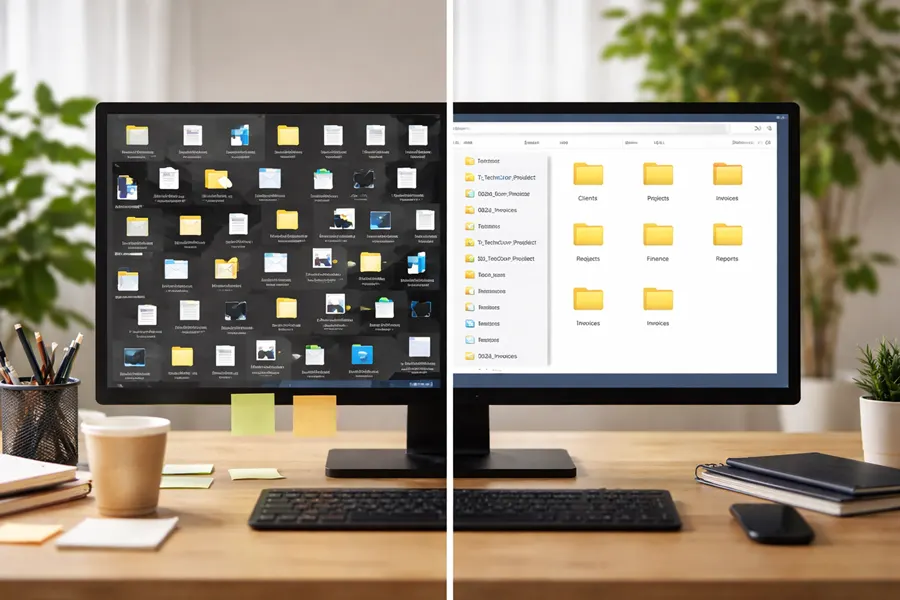
A well-defined folder structure serves as the blueprint for your digital filing system, creating a logical and intuitive path to every document. When implemented correctly, it eliminates the guesswork and frantic searching that undermine productivity. The objective is to build a proactive hierarchy that mirrors your business operations and can scale with your company’s growth.
Choosing Your Core Folder Hierarchy
There is no universal solution for folder structure; the optimal system is the one that aligns with your company’s operational model. Most effective structures follow one of these common patterns:
- Client-Based: Ideal for service-oriented businesses such as marketing agencies or law firms. The structure is straightforward:
Clients > Client Name > Projects > Year. This approach neatly contains all work associated with a specific client. - Department-Based: A suitable choice for companies with distinct internal teams. A typical structure might be
Departments > Marketing > Campaigns > Q3_2024, organizing files by the responsible team. - Project-Based: For industries like construction or software development, where work is project-centric. A common hierarchy is
Projects > Project Name > Phase (e.g., Design, Execution) > Deliverables.
Once you select a top-level logic, consistency is paramount. Every new client, project, or campaign must follow the established folder template without exception.
From experience, the most effective folder structures are simple and shallow, typically no more than three or four levels deep. A deeper hierarchy often indicates a flawed core logic and complicates file retrieval.
Creating a Standardized File Naming Convention
While the folder structure indicates a file’s location, a standardized naming convention reveals its content without needing to open it. This simple discipline is one of the most powerful tools for maintaining digital order. A strong naming convention provides context, chronology, and clarity at a glance. The key is to separate elements with underscores or hyphens and avoid spaces, which can cause issues with some software.
This practice is also fundamental to keeping your business documents polished and professional, as consistency projects reliability.
Here is a template that has proven effective across numerous industries:
YYYY-MM-DD_ClientOrProject_DocumentType_Version.ext
This format is highly effective for several reasons:
YYYY-MM-DD: Placing the date first ensures files are sorted chronologically by default.ClientOrProject: This element connects the file to its primary context, such as a client name or project code.DocumentType: A brief, clear description (e.g., Invoice, Contract, Proposal) eliminates guesswork.Version: Essential for collaborative work. Using identifiers likev01,v02,DRAFT, orFINALprevents teams from working on outdated files.
Real-World Examples of Naming Conventions
Consider these examples. A marketing agency might name a file 2024-10-28_AcmeCorp_SocialMediaReport_v02.pdf. A construction firm could use 2024-11-15_WestwoodPlaza_ArchitecturalPlans_FINAL.dwg.
This system allows any team member, new or experienced, to instantly understand a file’s content, context, and status. This is how you transform a chaotic shared drive into a predictable and efficient company asset.
Implementing a Robust Backup and Retention Strategy
An organized digital filing system improves efficiency but does not protect against data loss from hardware failure, ransomware attacks, or accidental deletion. A robust backup and retention strategy is your digital insurance policy. This strategy involves not only recovering from disasters but also managing the complete data lifecycle, from creation to secure disposal.
The 3-2-1 Rule for Modern Business Backups
The 3-2-1 Rule is the industry standard for a comprehensive backup plan. It is a time-tested framework that eliminates single points of failure and significantly increases the likelihood of a successful recovery.
The rule is as follows:
- Maintain three copies of any important data (the original file plus two backups).
- Store these copies on two different types of media (e.g., a local network drive and a cloud server).
- Keep one copy off-site to protect against localized disasters like fire, flood, or theft.
In practice, your primary files might reside on a central company server. The first backup could be an automated daily sync to an on-site Network Attached Storage (NAS) device, while the second off-site copy syncs continuously to a secure cloud backup service. For more details, consult our guide on creating a backup and recovery strategy plan.
Creating a Formal Data Retention Policy
Beyond backups, a formal data retention policy dictates how long specific types of documents are kept and when they should be securely destroyed. This is not merely digital housekeeping; it is a critical component of legal and regulatory compliance. Without a policy, organizations often hoard data, which increases storage costs and expands the attack surface for potential data breaches.
Begin by classifying your files to build your policy:
- Financial Records: Tax documents and invoices often have legally mandated retention periods of up to seven years.
- Contracts and Legal Documents: These should be kept for the duration of the business relationship, plus several years after.
- Project Files: Typically archived one to two years after project completion and then deleted according to policy.
- Employee Records: These are subject to specific regulations that vary by location and document type.
A visual hierarchy helps in applying retention rules systematically.
With a structure like this, it becomes simple to apply rules, such as automatically purging all project files from a specific year in accordance with your policy.
It is important to remember that most businesses operate in a hybrid environment. According to AIIM research, many organizations still manage both paper and digital documents. Therefore, your retention policy must be comprehensive, covering all information assets from the server room to the filing cabinet.
Key Takeaway: A data retention policy is a strategic business practice that mitigates legal risk, reduces storage costs, and strengthens your overall data security posture by minimizing the amount of sensitive information you hold.
Choosing the Right Technology for File Management
A perfect folder structure and naming convention are ineffective if not consistently followed. Technology is crucial for integrating these rules into your team’s daily workflow, making organization automatic rather than manual. The right tools can range from standard cloud storage to a comprehensive Document Management System (DMS), depending on your company’s complexity and objectives.
The Starting Point: Cloud Storage Platforms
For most small to medium-sized businesses, platforms like Google Drive, Dropbox Business, or Microsoft OneDrive are an excellent starting point. They provide centralized access, simple sharing capabilities, and basic version history. These platforms are intuitive, affordable, and integrate well with other business software.
However, their primary strength—simplicity—can also be a limitation. Enforcing a logical folder structure depends entirely on team discipline, as these platforms lack built-in controls to prevent inconsistent naming or disorganized folder creation.
When to Upgrade to a Document Management System (DMS)
A Document Management System (DMS) is a specialized platform designed for control, security, and automation. It functions as an intelligent information hub rather than just a digital filing cabinet. A DMS is the logical next step when your file management challenges outgrow the capabilities of standard cloud storage.
Consider upgrading to a DMS if you observe the following signs:
- Version control is unmanageable: If team members frequently overwrite each other’s work or rely on email to find the latest file version, a DMS can restore order with features like file check-in/check-out.
- You have stringent compliance or security requirements: For industries like healthcare, finance, or legal, a DMS is essential. It provides advanced security, detailed audit trails, and granular access controls needed to meet regulatory mandates.
- Information retrieval is inefficient: Many DMS platforms feature Optical Character Recognition (OCR), which makes the text within scanned documents and PDFs fully searchable, eliminating the need to manually hunt for specific information.
The moment “finding things” becomes a noticeable drag on productivity, it’s time to seriously look at a DMS. If your team spends more time searching for information than actually using it, the efficiency boost from a DMS will pay for itself in no time.
The market for these tools is expanding rapidly, with projections showing it will reach over $10 billion. As noted in document management trends on tiny.cloud, businesses are increasingly adopting these systems to drive efficiency, moving beyond simple storage toward intelligent information management.
Feature Comparison: Cloud Storage vs. Document Management System (DMS)
This table highlights the key differences between standard cloud storage and a purpose-built DMS, clarifying the value proposition for a growing business.
| Feature | Basic Cloud Storage (e.g., Google Drive) | Document Management System (DMS) |
|---|---|---|
| Search Capability | Searches file names and basic text content. | Advanced search with OCR, metadata tags, and custom filters. |
| Version Control | Basic version history, often manual. | Automated check-in/check-out, detailed version logs. |
| Access Permissions | General permissions (view, edit) at the file or folder level. | Granular, role-based permissions down to the individual document. |
| Workflow Automation | Limited to third-party integrations. | Built-in tools for document review, approval, and routing. |
| Compliance & Audit | Basic activity logs. | Detailed audit trails tracking every user action for compliance. |
Ultimately, the choice of technology should align with your business reality. A startup can operate effectively with a well-organized cloud storage account, but as a company scales, a DMS becomes essential for maintaining security, compliance, and control.
Ensuring Long-Term Success with Governance and Training
A well-designed digital filing system will ultimately fail without consistent user adoption. Technology and structure are only part of the solution; the human element is critical. Long-term success depends on establishing clear governance and providing ongoing training to foster a culture of digital discipline.
Establish a Simple Governance Document
A governance document serves as the official rulebook for handling digital files. It should be a concise, easily scannable guide, not a lengthy manual. This document centralizes all decisions regarding folder structures, naming conventions, and access policies, eliminating guesswork and empowering your team to follow best practices.
Your governance document should clearly outline:
- Folder Structure Logic: A simple diagram showing the approved hierarchy (e.g.,
Clients > Project Name > Deliverables). - File Naming Convention: The exact formula to use, with clear examples (e.g.,
YYYY-MM-DD_ClientName_DocumentType_v01.pdf). - Version Control Rules: Guidelines for labeling drafts versus final versions (
_DRAFTvs._FINAL). - Data Security and Access: A summary of who can access specific information and rules for handling sensitive data.
The most effective governance guides are one to two pages long and stored in a highly visible, shared location, such as a company intranet or a pinned folder. This ensures no one can claim ignorance of the rules.
Implement Practical and Ongoing Team Training
With a rulebook in place, the next step is to train your team. Training is an ongoing process that reinforces good habits and adapts as the organization evolves. The goal is to make the correct filing method feel more intuitive and efficient than previous, disorganized practices.
Key Components of an Effective Training Program
A successful program is built on clarity, repetition, and support, ensuring every employee understands their role in maintaining digital order.
- Kick-Off Onboarding Session: Conduct a mandatory, hands-on workshop for the entire team. Demonstrate the new system live and have employees practice naming and saving files according to the new protocol.
- Quick Reference Guides: Create a one-page “cheat sheet” summarizing the most important rules. This can be saved as a desktop background or posted in a common area for constant reinforcement.
- Incorporate into New Hire Training: Make digital file organization a standard component of your onboarding process. This ensures new employees adopt correct habits from day one.
- Appoint “Champions” or Super-Users: Designate a tech-savvy individual in each department to serve as the go-to resource for questions. These champions provide peer-to-peer support and can correct mistakes before they become widespread.
By investing in clear governance and consistent training, you empower your team to become active participants in the solution, ensuring you conquer digital chaos for good.
Questions We Hear All the Time About Organizing Digital Files
Even with a solid plan, questions inevitably arise when implementing a new digital filing system. Changing ingrained habits requires clear guidance and support. Here are answers to some of the most common questions we receive from businesses embarking on this journey.
What’s the Best Folder Structure for a Small Business?
There is no single “best” structure; the most effective systems are simple, logical, and reflect how your business operates. For most small companies, organizing by department or function provides a clear and intuitive starting point.
A typical structure might look like this:
01_Finance02_Marketing03_Operations04_Human_Resources05_Clients
Within these top-level folders, you can create subfolders for specific projects or date ranges (e.g., 02_Marketing > Social_Media > Q3_Campaigns). The key is to choose a logic that feels natural to your team and apply it consistently.
A frequent mistake is over-complicating the folder structure with too many nested levels. As a rule of thumb, limit your hierarchy to three or four levels deep. If you need to go deeper, your top-level categories may need refinement.
How Often Should We Clean Out and Archive Old Files?
Regular maintenance is essential to prevent a newly organized system from reverting to chaos. A quarterly or semi-annual review is a practical cadence for most businesses. This process involves identifying files that are no longer in active use but must be retained for compliance or historical purposes.
These files should be moved to a clearly marked, top-level “Archive” folder. This simple action keeps your active workspace clean and streamlines the search for current documents. This process should be guided by your formal data retention policy, which dictates what to keep, what to archive, and what to securely delete.
How Do We Get Our Team to Actually Follow the New System?
Team adoption hinges on three key elements: clarity, training, and accountability. Simply announcing a new system is not enough; you must actively lead your team through the transition.
First, ensure clarity by documenting all rules—naming conventions, folder structures—in a simple, one-page guide that serves as a quick reference.
Next, provide hands-on training. Conduct a session to walk everyone through the new setup, demonstrate proper procedures, and answer questions. This builds confidence and clarifies any confusion.
Finally, establish accountability. Make department heads or team leads responsible for gently enforcing the new standards. By making the process easy and providing consistent support, you can achieve the team-wide buy-in necessary for long-term success.
At 1-800 Office Solutions, we understand that true business efficiency extends beyond file organization. From managed IT and cybersecurity to secure document management systems, we provide integrated solutions that help your business operate smoothly and securely. Modernize your operations with our comprehensive business services.