
Your CFO just walked into your office asking why the IT budget doubled this year. Your VP of Operations is frustrated because the network went down for three hours last week, costing you an entire afternoon of productivity. And your HR director? She’s terrified about data breaches because she saw a ransomware story on the news.
Sound familiar? Here’s the thing: most small and mid-sized businesses aren’t equipped to handle IT the way they used to. You can’t just hire a guy in the closet anymore.
That’s where managed IT services come in. And I’m not going to sell you on it with buzzwords. Instead, I’ll walk you through what it actually is, how much it costs, what you really get, and most importantly — how to know if it’s right for your business.
What Managed IT Services Actually Are (Not the Brochure Version)

Managed IT services mean you outsource your entire IT operation — or at least the parts that don’t require a specialist — to an external provider. That provider becomes an extension of your team. They monitor your systems 24/7, patch your software, manage your security, handle user support, and plan for your growth.
But here’s what separates good MSPs from bad ones: it’s not reactive fire-fighting. A real managed service provider is proactive. They catch problems before your people even know something’s wrong.
Break-Fix vs. Managed IT: The Real Differences
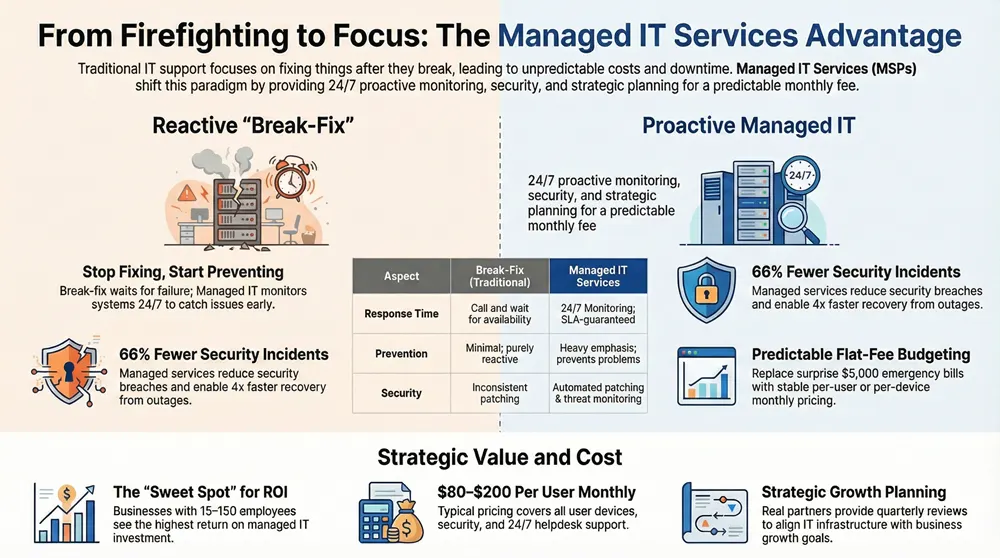
Let me break down how these two models actually work in practice:
| Aspect | Break-Fix (Traditional) | Managed IT Services |
|---|---|---|
| Cost Model | Pay per incident; hourly rates | Fixed monthly per-device or per-user fee |
| Response Time | Call in, wait for availability | 24/7 monitoring; SLA-guaranteed response |
| Predictability | Unpredictable bills; budget surprises | Flat budget; costs don’t spike |
| Prevention | Minimal; mostly reactive | Heavy emphasis; prevents problems |
| Planning | Ad-hoc upgrades when necessary | Quarterly reviews; strategic roadmap |
| Security | Patches applied slowly, inconsistently | Automated patching; threat monitoring included |
Bottom line? Break-fix is like paying for each trip to the mechanic. Managed IT is like having a mechanic on staff who keeps your car from breaking down.
What’s Actually Included in Managed IT Services
This varies by provider, but here’s what you should expect in a solid managed IT package:
Monitoring and Alerting
Your MSP installs remote monitoring and management (RMM) software on all your devices. This watches CPU usage, memory, disk space, network traffic, and application performance 24/7/365. When something’s off — a server hitting capacity, unusual network activity, a backup that failed — the system alerts your MSP immediately. Not hours later. Not when someone finally calls complaining.
Patch Management
Windows, Office, browsers, firmware, third-party apps — everything gets updated. Your MSP tests patches in a controlled environment first, then deploys them on a schedule that minimizes disruption. Most companies do this monthly, on a designated day. You’re not sitting around waiting for critical vulnerabilities to be exploited.
User Support (Helpdesk)
Password resets, printer issues, software questions, hardware problems — someone picks up the phone or responds to a ticket. Real people. Not an AI chatbot that makes you repeat yourself five times.
Backup and Disaster Recovery
Your data gets backed up automatically. Multiple copies. Off-site. And most importantly, tested regularly to make sure it actually restores when you need it. A backup that doesn’t restore is just expensive storage.
Security (Basic to Advanced)
This is where things get granular. All MSPs should include antivirus, firewalls, and email filtering. Better ones add endpoint detection and response (EDR), network segmentation, and threat intelligence. Some integrate SIEM tools for advanced monitoring. If your industry handles sensitive data (healthcare, finance, legal), you’ll need serious security. We’ve written more about this in our SIEM guide, but for now: know that better MSPs have this conversation with you upfront.
Infrastructure Management
Servers, storage, virtualization, firewalls, switches — your MSP keeps all of this running. They monitor performance, manage licensing, plan capacity, and recommend upgrades before you hit a wall.
Strategic Planning
A real partner sits down quarterly (at minimum) and asks: Where do you want to grow? What’s slowing you down? What should we upgrade or consolidate? They’re thinking five steps ahead, not just putting out today’s fire.
Key Stat: According to Datto’s 2024 MSP benchmark report, businesses using managed IT services experience 66% fewer security incidents and recover from outages 4x faster than those using break-fix support.
How Much Does Managed IT Cost?
Let’s talk numbers, because this is usually the first question and the biggest sticking point.
Most MSPs charge one of two ways:
- Per-device pricing: Typically $50–$150 per device per month, depending on the device type and service level.
- Per-user pricing: Usually $80–$200 per user per month, which covers all their devices (laptop, phone, monitor, etc.).
A small 20-person company with standard workstations, printers, and a server might pay $2,500–$4,500 per month. A 50-person firm could run $6,000–$12,000 monthly. The variation depends on how much security you need, what servers you’re running, and what service level you want.
Is that expensive? Only if you compare it to a single break-fix call. When you look at what you’re avoiding — downtime, emergency charges, security breaches, lost productivity — most companies find they’re actually paying less than before.
Pro tip: Don’t base your decision purely on price. A $40-per-month MSP and a $120-per-month MSP aren’t the same. The cheap one’s cutting corners somewhere. You want to know where.
How to Choose the Right Managed IT Provider
Look for the Right Certifications
CompTIA certified technicians. Microsoft Gold Partners. Cisco expertise. These aren’t just badge-collecting exercises. They mean the team has proven competency. Ask what certifications their team holds and verify them.
Request Specific References
Not generic testimonials. Ask to talk to a company similar to yours — same size, same industry, same complexity. Ask them: “Has your vendor ever let you down? How do they handle disagreements? Would you leave?” Listen more than you talk.
Understand Their SLA (Service Level Agreement)
This is the legal promise they make. How fast do they respond to critical issues? 1 hour? 4 hours? What about non-critical? What happens if they miss their SLA? Do you get a credit? Know this before you sign.
Test Their Communication
How responsive were they during the sales process? Do they explain things in plain English or hide behind jargon? Did they ask good questions about your business, or just try to upsell you? The way they act before you sign is usually how they’ll act after.
Ask About Their Security Practices
How do they authenticate to your systems? Do they encrypt data in transit? Are their team members background checked? Where do they store your backups? If they get hazy on these questions, keep looking.
Negotiate the Contract Carefully
Most MSPs want 12-month or 24-month agreements. Try to negotiate a 30-day exit clause for material breach. Know what “material breach” means. Know what happens to your data if the relationship ends. And never let them lock you into outdated pricing — ask for annual reviews.
Red Flags to Watch For

- They won’t commit to an SLA or keep it vague.
- They can’t explain what’s included in their service; it’s “customized” but never defined.
- They pressure you to sign a 3-year contract immediately.
- They don’t ask many questions about your business or current setup.
- References are hard to come by or seem rehearsed.
- They use scare tactics (“You’re at risk of a breach!”) to close the sale.
- Their pricing is significantly lower than everyone else — without explaining why.
Is Managed IT Right for Your Business?
Not every company needs it. Let’s be honest.
If you’re a solo operation with no servers, everything in the cloud, and you can tolerate a few hours of downtime? Maybe managed IT isn’t for you. You might be fine with a break-fix vendor or even DIY.
But if any of these describe you, managed IT’s probably the right move:
- You have 10+ employees and growing.
- You handle customer data, financial information, or proprietary details.
- Your IT budget is unpredictable because of emergency calls.
- You’re using multiple cloud services (Office 365, Salesforce, etc.) and they need to be managed as a whole.
- You can’t afford even a few hours of downtime.
- Compliance matters (HIPAA, PCI-DSS, SOC 2).
- Your IT person is overwhelmed or you don’t have one.
In our experience, the sweet spot for managed IT adoption is 15–150 employees. That’s where the ROI really clicks. You’ve got enough complexity that you need professional management, but you’re not so big that you need a full internal IT team.
Making the Transition
The switch from break-fix to managed IT doesn’t have to be painful. Most MSPs do this dozens of times a year.
Expect a discovery phase where your new MSP documents your existing systems, identifies any security gaps, and develops a transition plan. This usually takes 2–4 weeks. Then comes onboarding: RMM software gets deployed, backups get configured, monitoring gets set up. You’ll probably notice an uptick in tickets initially — people finding issues they’d been living with quietly — but that’s actually healthy. You’re seeing the full picture of your infrastructure for the first time.
By month two, things settle down. By month three, you’ll start noticing fewer outages and more stability. That’s when the real value becomes obvious.
The Bottom Line
Managed IT services shift you from paying for problems to paying for stability. It’s a fundamentally different business model. You’ll spend more upfront, but you’ll save on emergency repairs, reduce downtime, improve security, and get strategic advice. Your people focus on running the business instead of fighting fires.
The right partner isn’t the cheapest one. It’s the one who understands your business, sets realistic expectations, communicates clearly, and treats your infrastructure like it matters. Because it does.
Ready to Stop Worrying About IT?
Get an honest assessment of your current IT setup and find out if managed services make sense for you. No pitch. Just straightforward advice.
© 2026 1800 Office Solutions. All rights reserved.