



Boost Remote Learning with High-Quality Office Solutions

AI Overview:
Remote learning has expanded access to education worldwide, but success depends heavily on the quality of a student’s workspace and tools. This blog explains how ergonomic furniture, reliable technology, proper lighting, and smart organization directly improve focus, health, and academic performance. It highlights the role of digital platforms like LMS, collaboration tools, and interactive apps while addressing common challenges such as distractions, technical issues, and motivation.
The key takeaway: investing in a well-designed learning environment is essential for productivity today and for future-ready online education powered by AI and immersive technologies.
The Evolution of Remote Learning
From its humble beginnings as an alternative form of education, remote learning has become a mainstream approach, particularly accelerated by the COVID-19 pandemic. Platforms like Zoom, Google Meet, and Microsoft Teams now host everything from lectures to group projects. But what ensures long-term success in this setup? A reliable, comfortable, and organized learning environment is just as crucial as the software used.
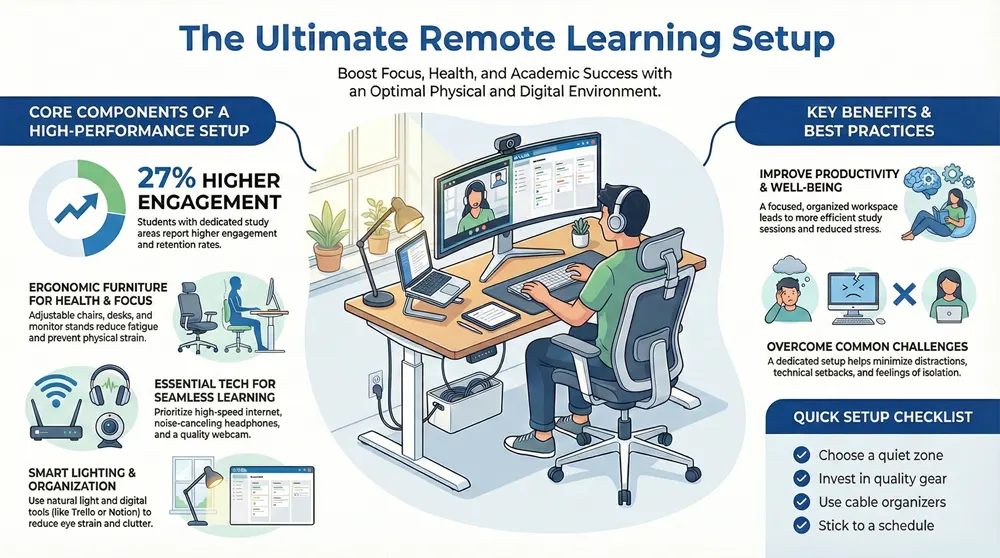
Case in point: a 2021 report by Educause revealed that students who had designated study areas with ergonomic furniture and dependable technology reported 27% higher engagement and retention rates compared to peers who didn’t. Experience clearly shows that your environment can directly impact your academic performance.
Core Components of a Remote Learning Setup
Let’s explore the physical and digital essentials that enhance remote learning.
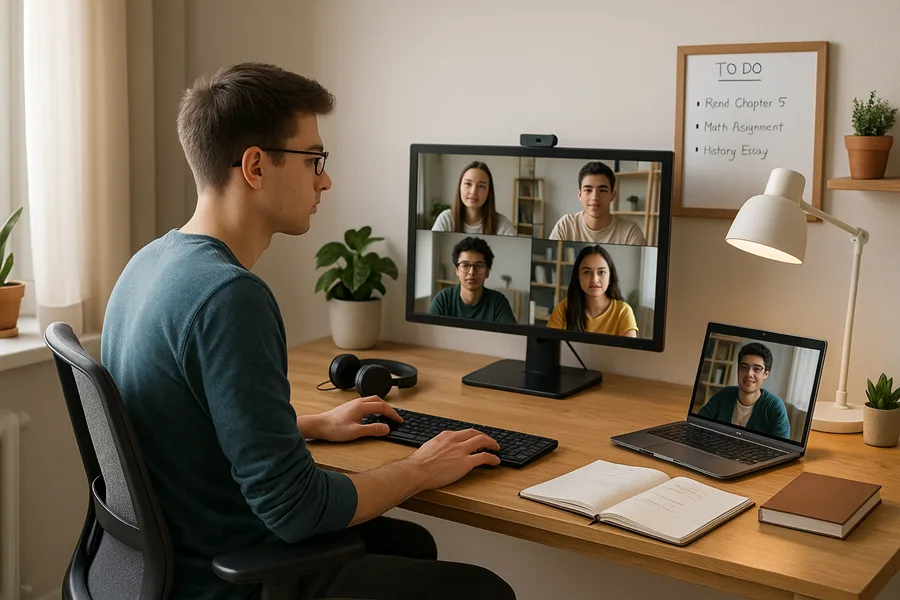
1. Ergonomic Furniture
- Adjustable Chairs and Desks: Supports posture, reduces fatigue, and boosts focus during long sessions.
- Footrests and Monitor Stands: Encourage proper alignment to prevent musculoskeletal issues.
Investing in ergonomic furniture is not a luxury but a necessity. It improves health and enhances your ability to stay focused during extended study hours.
2. Reliable Technology
- High-Speed Internet: A stable connection is the foundation of successful online learning.
- Noise-Canceling Headphones: Help students concentrate in busy home environments.
- HD Webcam and Microphone: Improve communication in virtual classrooms and presentations.
3. Smart Lighting
- Natural Lighting: Reduces eye strain and improves mood.
- LED Desk Lamps: Provide adjustable, glare-free light perfect for evening study sessions.
4. Organization Tools
- Digital Tools: Apps like Notion, Trello, or Asana help manage tasks and collaborate.
- Cloud Storage: Platforms like Google Drive and Dropbox ensure seamless access to documents across devices.
- Physical Aids: Whiteboards and planners help track deadlines and goals visually.
Technology’s Role in Online Education
Digital learning tools play a pivotal role in transforming how students and teachers interact.
Learning Management Systems (LMS)
Systems like Moodle, Canvas, and Blackboard centralize communication, grading, and assignments in one place, reducing confusion and improving course management.
Collaboration and Communication Tools
Slack and Microsoft Teams enhance real-time discussions, file sharing, and group work—mirroring the dynamics of physical classrooms.
Interactive Learning Apps
- Kahoot: Game-based learning that increases engagement.
- Mentimeter: Real-time polling to encourage student participation.
Creative Tools
- Canva: Simplifies the creation of visually appealing presentations.
- Adobe Creative Cloud: Offers professional-grade tools for multimedia assignments.
Overcoming Common Remote Learning Challenges
Remote learners often face difficulties such as distractions, motivation dips, and technical glitches. Quality office solutions help counter these issues effectively.
1. Distractions at Home
Establishing a dedicated workspace—preferably in a quiet room with minimal interruptions—can significantly enhance concentration and productivity.
2. Technical Setbacks
Students should use updated software and ensure routine maintenance of their devices. Investing in a backup power source or battery backup can prevent disruptions.
3. Social Isolation
Encouraging participation in forums, breakout rooms, and study groups fosters community, reducing the sense of isolation common in remote learning.
4. Motivation and Time Management
Using tools like the Pomodoro timer, setting clear daily goals, and even accountability apps like Focusmate can boost discipline and performance.

Benefits of Quality Office Solutions
- Higher Productivity: Focused workspaces translate to faster, more efficient study sessions.
- Improved Health: Ergonomics reduces physical strain while proper lighting eases eye fatigue.
- Better Mental Well-being: An organized environment reduces stress and fosters clarity.
- Flexibility: Students can balance coursework with other responsibilities more easily.
Best Practices for Setting Up Your Remote Learning Space
Take these practical steps to transform your learning experience:
- Choose a distraction-free zone with good lighting and airflow.
- Invest in high-quality ergonomic chairs and desks suited to your body type and height.
- Use cable organizers and storage bins to reduce clutter and create mental clarity.
- Stick to a consistent schedule using calendar apps or time-blocking methods.
- Regularly evaluate your setup and adjust based on feedback or new needs.
Looking Ahead: The Future of Online Education
The future promises even more immersive experiences with the rise of Virtual Reality (VR) classrooms, AI-based tutoring, and personalized learning analytics. These innovations will further underscore the need for high-performance office solutions to keep pace with technological advancements.
For example, VR classrooms require larger physical spaces and high-end computer specs, while AI tutors work best with systems that support rapid data processing. Staying ahead in remote learning requires proactive investment in both hardware and your environment.
Final Thoughts
High-quality office solutions are no longer optional—they’re essential for anyone engaged in online education. From posture-supporting chairs to project-managing software, every detail matters. By taking a user-first approach to remote learning environments, students can unlock their full academic potential.
Ready to upgrade your learning space? Explore our curated list of ergonomic furniture, digital productivity tools, and home office bundles designed specifically for students. Empower your education with the right tools—because where you learn matters just as much as what you learn.