


Service Desk Best Practices to Elevate Your IT Support

AI Overview:
This blog outlines 10 proven service desk best practices that help organizations transform IT support from a reactive cost center into a proactive, strategic business asset. It covers practical strategies such as tiered support, SLAs, centralized ticketing, knowledge bases, prioritization, proactive monitoring, self-service portals, first contact resolution, user feedback programs, and continuous training. Together, these practices improve efficiency, user satisfaction, and business alignment while reducing downtime, costs, and recurring issues.
An underperforming service desk doesn’t just frustrate users—it drains resources, stalls productivity, and puts business continuity at risk. Without a structured approach, IT support often becomes a chaotic cycle of reactive firefighting, leading to slow resolutions, repeat issues, and a growing perception of IT as a bottleneck rather than a business enabler. This reactive model is inefficient and expensive, creating friction between employees and the technology they depend on to perform their jobs effectively.
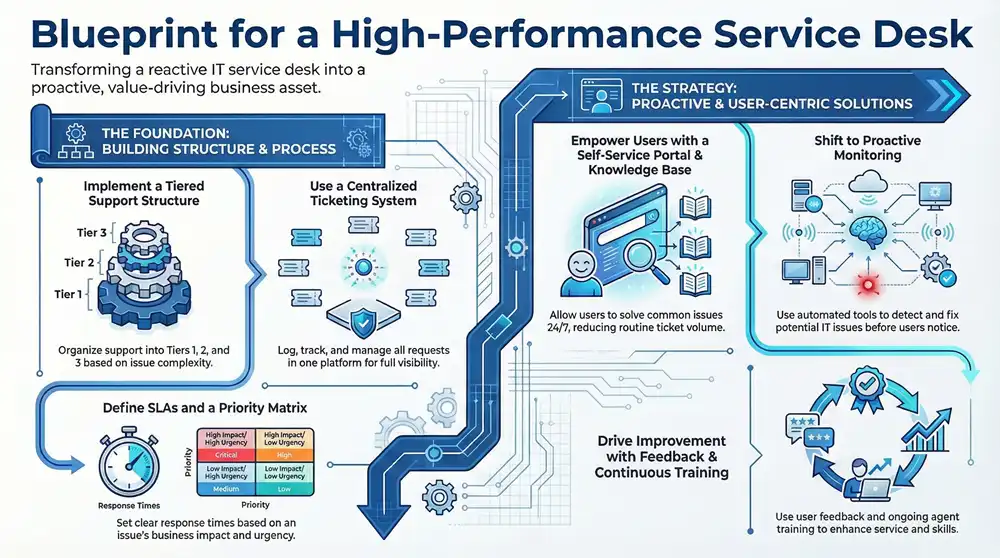
This article provides a comprehensive blueprint to break that cycle. We will detail 10 actionable service desk best practices designed to transform your support function from a reactive cost center into a proactive, strategic business asset. By implementing these proven strategies, you can streamline operations, enhance user satisfaction, and align IT support with core business objectives for measurable value. This guide moves beyond theory to provide the practical steps needed to build a service desk that actively contributes to your organization’s success.
1. Implement a Tiered Support Structure
One of the most foundational service desk best practices is organizing your support team into a tiered structure. This model segments support responsibilities into distinct levels, typically Tier 1, Tier 2, and Tier 3, based on the complexity of an issue and the expertise required to solve it. This approach ensures that simpler, high-volume issues are resolved quickly at the first point of contact, preventing highly skilled engineers from being bogged down by routine requests.
This structure, popularized by the ITIL framework, creates a clear and efficient escalation path. For example, a global logistics company might route all initial printer and software login issues to Tier 1, while network performance problems are automatically escalated to Tier 2, and server architecture failures are handled by the expert Tier 3 team.
How a Tiered Structure Works
The system routes incoming tickets to the most appropriate level, optimizing resource allocation and improving resolution times.
- Tier 1: This is the front line of your service desk. Agents handle basic incidents and service requests, such as password resets, software installations, and answering common “how-to” questions. Their goal is a high first-contact resolution (FCR) rate, using scripts and a robust knowledge base.
- Tier 2: When an issue is too complex for Tier 1, it’s escalated. Tier 2 technicians have more in-depth technical knowledge to address issues like network connectivity problems, application bugs, or hardware malfunctions.
- Tier 3: This level consists of specialized experts, often senior engineers or developers, who tackle the most challenging problems. They handle critical infrastructure issues, complex server problems, and deep-level software analysis that requires specialized skills.
Actionable Implementation Tips
To successfully implement a tiered support model, define clear escalation triggers and service level agreements (SLAs) for each level. Automate ticket routing based on issue category or keywords to direct requests to the correct tier from the start.
Key Insight: A successful tiered system relies on more than just escalation. Promote knowledge sharing between tiers. Tier 2 and 3 experts should regularly document solutions for recurring complex issues, empowering Tier 1 agents to resolve more problems independently over time.
Finally, regularly conduct cross-tier training sessions. This not only improves the skills of your front-line staff but also fosters a collaborative environment, which is crucial for maintaining an efficient and effective service desk.
2. Establish a Service Level Agreement (SLA)
A critical component of service desk best practices is establishing a clear Service Level Agreement (SLA). An SLA is a documented commitment between your service provider (the service desk) and the end-user, defining the level of service expected. It sets measurable targets for key metrics like response times, resolution times, and system availability, creating accountability and transparent performance standards.
This practice, standardized by frameworks like ITIL and ISO/IEC 20000, moves support from a reactive effort to a proactive, results-driven function. For example, a financial services firm’s SLA might mandate a 15-minute response time for a trading platform outage (P1), versus a four-hour response time for a printer issue (P4), ensuring resources are aligned with business priorities.
How an SLA Works
An SLA translates business objectives into tangible support goals, ensuring IT efforts are aligned with organizational priorities. It provides a framework for managing user expectations and measuring service desk performance effectively.
- Priority Levels: SLAs differentiate between issues based on their business impact. A critical system-wide outage (P1) will have a much shorter response and resolution time than a minor user inconvenience (P4).
- Response Time: This metric defines how quickly the service desk must acknowledge a new ticket and begin working on it.
- Resolution Time: This sets the target for how long it should take to fully resolve an issue after it has been acknowledged. This is the ultimate measure of the service desk’s efficiency.
- Escalation Triggers: SLAs contain built-in rules that automatically escalate a ticket if it breaches the defined response or resolution times, ensuring no issue is forgotten.
Actionable Implementation Tips
To create an effective SLA, start by engaging with business stakeholders to understand their priorities and define realistic targets. Your goals should be achievable and reflect the actual capabilities of your support team and tools.
Key Insight: Your SLA is a living document, not a static rulebook. Regularly review SLA performance reports with both your IT team and business leaders. This allows you to identify bottlenecks, adjust unrealistic targets, and adapt the agreement to evolving business needs.
Finally, ensure your SLAs are clearly communicated to everyone. All support staff should understand the targets for each priority level, and end-users should know what to expect when they submit a request. This transparency builds trust and reinforces the value of the service desk.
3. Utilize a Centralized Ticketing System
Another cornerstone of service desk best practices is implementing a centralized ticketing system. This unified platform acts as the single source of truth where all service requests, incidents, and user inquiries are logged, tracked, and managed from initiation to resolution. Adopting this system provides complete operational visibility, prevents duplicate work, and ensures that no request falls through the cracks.
This centralized approach, championed by platforms like ServiceNow and Jira Service Management, is essential for maintaining order in a busy IT environment. It transforms chaotic email inboxes and verbal requests into a structured workflow, enabling teams to prioritize tasks effectively and report on performance with data-driven accuracy.
How a Centralized System Works
Instead of managing requests through disparate channels like emails or phone calls, all interactions are funneled into a single system. Each request becomes a “ticket” with a unique ID, owner, status, and priority.
- Submission & Logging: Users submit requests through a dedicated portal, email, or chatbot, which automatically creates a ticket in the system.
- Tracking & Visibility: Every action, update, and communication related to the ticket is recorded, creating a complete audit trail. Technicians and end-users can check the status at any time.
- Assignment & Resolution: Tickets are assigned to the appropriate technicians or groups, either manually or through automated routing rules, who then work to resolve the issue according to defined SLAs.
Actionable Implementation Tips
To get the most out of your ticketing system, establish clear data entry standards and create templates for common issue types like new user onboarding or hardware requests. This standardizes the process and speeds up ticket creation. Use the system’s automation capabilities to route tickets based on category or urgency to reduce manual triage.
Key Insight: A ticketing system’s value extends beyond just logging issues; it’s a powerful data analytics tool. Regularly analyze ticket data to identify recurring problems, pinpoint training opportunities for staff, and justify resource allocation for high-impact areas.
Finally, ensure comprehensive training for all users, including both technicians and end-users. Proper training maximizes adoption and ensures everyone understands how to use the system effectively, which is critical for maintaining data quality and operational efficiency.
4. Build and Maintain a Knowledge Base
Another crucial service desk best practice is the creation of a centralized knowledge base. This is a searchable repository of solutions, procedures, troubleshooting guides, and FAQs that empowers both support staff and end-users to find answers quickly. A well-maintained knowledge base is the backbone of efficient service, reducing ticket volume, decreasing resolution times, and preserving vital institutional knowledge.
This strategy shifts the focus from reactive problem-solving to proactive information sharing. For example, a company might notice a high volume of tickets related to setting up a new VPN client. By creating a detailed, step-by-step guide with screenshots and publishing it in the knowledge base, they can deflect future tickets and empower users to solve the issue instantly.
How a Knowledge Base Works
A knowledge base acts as a single source of truth, centralizing information that would otherwise be siloed in emails, chat logs, or individual employee notes. It supports two primary functions: self-service for end-users and a powerful reference tool for service desk agents.
- For End-Users: It provides an immediate, 24/7 self-service portal. Users can find answers to common questions about software usage, device setup, or company policies without needing to submit a ticket, leading to faster problem resolution and greater satisfaction.
- For Support Staff: It equips agents with consistent, accurate information to resolve issues faster. New hires can onboard more quickly, and even seasoned technicians can reference complex procedures, ensuring a high standard of support across the team.
Actionable Implementation Tips
To get started, establish clear ownership for content creation and maintenance. Use your ticketing system to identify recurring issues and create articles that address them directly. For a deeper dive, explore how to build and leverage internal knowledge for modern workplaces.
Key Insight: Your knowledge base should be a living system, not a static library. Actively monitor search queries within the knowledge base to identify content gaps. If users are searching for “VPN setup on Mac” and finding no results, that’s a clear signal for your next article.
Finally, integrate the knowledge base directly into your ticketing process. Encourage staff to link relevant articles when resolving tickets and make contributing new solutions a part of their regular workflow. This ensures the content remains current, practical, and directly tied to the real-world problems your team is solving.
5. Implement a Ticket Prioritization System
A critical component of effective service desk management is establishing a clear methodology for ticket prioritization. This practice involves systematically categorizing incoming tickets based on their business impact and urgency, ensuring that the most critical issues receive immediate attention. A formal prioritization system prevents high-impact problems from getting lost in the queue and aligns your support team’s efforts directly with business objectives.
This approach, a cornerstone of the ITIL framework, is essential for managing resources efficiently. For instance, a single user being unable to print has a low impact, while the entire sales team being unable to access the CRM system has a critical impact. A prioritization matrix ensures the CRM issue is addressed immediately, preserving business continuity.
How a Prioritization System Works
A priority matrix is the most common tool used to implement this system. It assigns a priority level to a ticket by cross-referencing its impact (how many users or services are affected) with its urgency (how quickly it needs to be resolved).
- Impact: Defines the extent of the issue’s effect on the business. A server outage affecting an entire department has a high impact, while a single user’s printer issue has a low impact.
- Urgency: Reflects the time-sensitivity of the resolution. A complete inability to process customer orders is highly urgent, whereas a minor display glitch is not.
- Priority Level: The intersection of impact and urgency determines the final priority (e.g., Critical, High, Medium, Low). A high-impact, high-urgency ticket becomes a “P1” or critical priority, requiring an immediate response.
Actionable Implementation Tips
To deploy a successful prioritization system, first involve business stakeholders to define what constitutes high impact and urgency for your organization. Use automated rules within your service desk software to assign an initial priority based on the ticket’s source, category, or keywords. This initial step is one of the most vital service desk best practices for maintaining order.
Key Insight: A ticket’s priority is not static. Train your team to regularly review and adjust priorities as new information emerges. An issue initially classified as low-priority could escalate if its business impact grows, and your system must be flexible enough to adapt.
Finally, document your priority definitions clearly and train all support staff on their consistent application. This documentation ensures everyone from a Tier 1 agent to a department head understands why one ticket is being worked on before another, which is key to managing expectations and demonstrating the value of IT.
6. Establish Proactive Monitoring and Alerting
One of the most transformative service desk best practices is shifting from a reactive “break-fix” model to proactive operations. This is achieved by implementing automated monitoring systems that detect and flag potential issues before they impact users. This forward-thinking approach significantly reduces mean time to detection (MTTD), enables faster resolution, and prevents widespread service degradation.
This practice empowers the service desk to solve problems before users even know they exist. For example, a monitoring tool can alert technicians that a server’s storage is 90% full, allowing them to add capacity hours or days before it fills up and causes a system-wide crash. This prevents downtime and avoids a flood of user-generated tickets.
How Proactive Monitoring Works
The system uses specialized tools to continuously track the health and performance of critical IT infrastructure, applications, and network devices. When a metric deviates from a pre-defined healthy threshold, an automated alert is sent to the service desk.
- Detection: Monitoring tools collect data on key performance indicators (KPIs) like CPU usage, network latency, application error rates, and disk space.
- Alerting: If a metric crosses a critical threshold (e.g., CPU usage exceeds 95% for five consecutive minutes), the system generates an alert and sends it to the appropriate team via email, SMS, or a collaboration tool like Slack or Microsoft Teams.
- Response: The service desk receives the alert, often with contextual data, and can begin diagnostics and resolution using a predefined runbook or troubleshooting guide.
Actionable Implementation Tips
To effectively implement proactive monitoring, start by identifying your most critical business systems and gradually expand your coverage. Establish meaningful alert thresholds to avoid “alert fatigue” from false positives. You can find detailed strategies for this in our guide to network monitoring best practices.
Key Insight: Proactive monitoring is not just about technology; it’s a cultural shift. The goal is to move the service desk from being a team that only reacts to reported incidents to a strategic unit that actively ensures service availability and performance.
Finally, create clear runbooks for common alert scenarios to guide technicians on the exact steps to take. Regularly review and tune your alerting rules based on feedback and incident history to ensure they remain accurate and relevant.
7. Implement a Self-Service Portal
Empowering users to find their own solutions is one of the most impactful service desk best practices for improving efficiency. A self-service portal is a user-friendly, web-based platform where employees can independently resolve common IT issues, submit requests, track ticket progress, and access a centralized knowledge base without needing to contact a service agent directly. This approach significantly reduces the volume of routine tickets, freeing up your support team to focus on more complex, high-value tasks.
Platforms like ServiceNow and Zendesk have popularized this model by showing how a well-designed portal can improve user satisfaction by providing instant, 24/7 support. Instead of waiting for an agent, a user can reset their own password or find an article on setting up a VPN at any time, leading to faster resolutions and a greater sense of autonomy.
How a Self-Service Portal Works
The portal acts as the digital front door to the IT department, centralizing resources and request management into one accessible location. It’s designed to deflect common tickets and streamline service delivery.
- Knowledge Base Integration: The portal’s core is a searchable knowledge base filled with how-to guides, FAQs, and troubleshooting articles. Users can type in their problem and receive immediate, documented solutions.
- Automated Service Requests: Users can fill out standardized forms for common requests like software installation or hardware procurement. These forms can trigger automated approval and fulfillment workflows in the backend.
- Ticket Management: Employees can submit new tickets, add comments, and check the real-time status of their existing requests, providing transparency and reducing follow-up inquiries.
Actionable Implementation Tips
To launch a successful self-service portal, prioritize the user experience. Start with a simple, clean design focused on the most common user needs, like password resets and access requests. Use analytics to identify which knowledge base articles are most viewed and which service requests are most frequent, then make those options highly visible on the portal’s homepage.
Key Insight: The success of a self-service portal hinges on adoption. Actively promote the portal through internal communications, email signatures, and agent recommendations. Frame it as the fastest way to get help, not just an alternative channel.
Finally, ensure the portal is mobile-friendly and that it provides a clear, easy-to-find option to contact a live agent if a user cannot find a solution. Regularly gather user feedback through surveys to continuously identify pain points and opportunities for improvement.
8. Establish First Contact Resolution (FCR) Focus
A cornerstone of effective service desk best practices is a dedicated focus on First Contact Resolution (FCR). This key performance indicator (KPI) measures the percentage of user issues resolved during the initial interaction, eliminating the need for follow-ups or escalations. A high FCR rate is a powerful driver of both customer satisfaction and operational efficiency, directly reducing ticket handling costs and freeing up support staff for more complex challenges.
This metric is central to customer-centric service models. Imagine a user calls because they can’t access a specific shared drive. An FCR-focused agent won’t just log the ticket; they will use their knowledge and tools to diagnose the permissions issue, correct it, and confirm with the user that access is restored, all on the first call. This transforms the service desk from a simple ticketing system into a powerful problem-solving engine.
How a Focus on FCR Works
An FCR-centric strategy equips front-line agents with the tools, knowledge, and authority to resolve issues immediately. Instead of simply logging a ticket and escalating it, the agent takes ownership and aims to provide a complete solution during the first conversation, email exchange, or chat session.
- Empowerment: Agents are given the authority to make decisions, such as issuing credits, resetting security credentials, or authorizing software installs, within predefined limits. This removes bureaucratic hurdles that often prevent immediate resolution.
- Knowledge Access: Staff have instant access to a comprehensive and up-to-date knowledge base, diagnostic tools, and user account information, allowing them to quickly identify and solve problems.
- Skill Development: Continuous training ensures Tier 1 agents have the technical and soft skills required to handle a wider variety of common issues without needing to escalate.
Actionable Implementation Tips
To effectively boost your FCR rate, you must invest in your front-line team. Start by providing comprehensive training that goes beyond scripts to include genuine problem-solving skills. Equip them with a robust, easily searchable knowledge management system and the necessary diagnostic tools.
Key Insight: Achieving a high FCR isn’t just about closing tickets faster; it’s about verifying the resolution from the user’s perspective. Implement post-interaction surveys that ask, “Was your issue fully resolved today?” to get accurate FCR data and identify areas for process or training improvement.
Finally, analyze tickets that fail FCR. Use this data to pinpoint knowledge gaps, outdated documentation, or process inefficiencies. By systematically addressing the root causes of escalations, you empower your Tier 1 team to handle more issues at the first point of contact, improving service quality across the board.
9. Implement a Customer Satisfaction and Feedback Program
Beyond resolving tickets, one of the most critical service desk best practices is understanding the user’s perception of your service. Implementing a systematic customer satisfaction and feedback program is the only way to capture this crucial data. This practice involves establishing consistent methods to collect, analyze, and act on user feedback through surveys, ratings, and other direct communication channels.
A robust feedback loop provides invaluable insights into service quality, identifies hidden areas for improvement, and demonstrates a customer-centric focus. For example, if multiple users provide feedback that a new software update is confusing, the service desk can use this data to proactively create a “how-to” guide for the knowledge base or alert the development team to a user experience issue.
How a Feedback Program Works
This system transforms subjective user feelings into actionable data. By consistently gathering feedback, you can pinpoint trends, measure agent performance objectively, and make data-driven decisions to enhance the user experience.
- Data Collection: Immediately after a ticket is resolved, a short, automated survey is sent to the user. This can be a simple one-click rating (e.g., thumbs up/down), a Customer Satisfaction (CSAT) score, or an NPS question.
- Analysis and Reporting: The collected data is aggregated and analyzed to identify patterns. You can segment feedback by agent, team, ticket category, or department to find specific strengths and weaknesses in your service delivery.
- Action and Improvement: The insights gained from analysis are used to create targeted action plans. This could involve coaching an agent, updating a knowledge base article, or improving a specific workflow that is causing user frustration.
Actionable Implementation Tips
To get started, integrate a simple survey tool like SurveyMonkey or use the built-in features of your ticketing system. Keep surveys extremely brief, ideally two to three questions, to maximize response rates. The key is to not just collect data but to act on it transparently.
Key Insight: The most impactful part of a feedback program is closing the loop. When you make a process improvement based on user suggestions, communicate that change back to the users. This shows them their feedback is valued and directly leads to a better service, which builds trust and encourages future participation.
Finally, use feedback as a constructive tool for agent development, not a punitive one. Celebrate positive feedback publicly and use constructive criticism as a foundation for personalized coaching and team-wide training initiatives. Explore how to effectively gather user input with voice of customer solutions to build a truly user-focused service desk.
10. Establish Continuous Training and Development Program
Technology and user needs are constantly evolving, and a service desk that relies on outdated knowledge cannot deliver exceptional support. One of the most critical service desk best practices is establishing a continuous training and development program for all agents. This initiative goes beyond initial onboarding, creating a culture of perpetual learning that keeps staff proficient with new tools, processes, and skills.
This commitment to ongoing education is essential for adapting to change and supporting career growth, which directly impacts employee retention and service quality. A strong program ensures the service desk remains a valuable, strategic asset.
How a Continuous Training Program Works
A structured program ensures that learning is not a one-time event but an integral part of an agent’s role. It blends various learning modules to develop both technical and interpersonal abilities.
- Technical Skills: Training focuses on new software, hardware, and IT infrastructure updates. This includes hands-on labs for troubleshooting complex systems and platform-specific training.
- Soft Skills: Agents receive ongoing coaching in communication, empathy, conflict resolution, and active listening. These skills are vital for improving customer satisfaction (CSAT) scores and de-escalating tense situations.
- Process and Product Knowledge: Regular refresher sessions on internal processes, SLA requirements, and the specific products or services your company offers ensure consistency and accuracy in the support provided.
Actionable Implementation Tips
Start by creating a structured training plan for new hires using a 30-60-90 day framework to build foundational knowledge. For existing staff, allocate a dedicated percentage of work time, typically 5-10%, specifically for learning and development activities.
Key Insight: Tie training achievements directly to career advancement opportunities. When agents see a clear path for growth that is linked to acquiring new skills and certifications, their motivation to participate increases dramatically, creating a positive feedback loop of improvement and engagement.
Encourage and subsidize industry certifications like CompTIA A+ or Security+ to build expertise. Implement a mentorship program pairing senior technicians with newer agents to accelerate knowledge transfer and foster a collaborative team environment. Finally, utilize online learning platforms like Pluralsight or LinkedIn Learning to offer a diverse and accessible library of courses.
Transform Your Service Desk from a Cost Center to a Strategic Asset
Transitioning from a reactive, fire-fighting support model to a strategic, high-performance service desk is a journey of continuous improvement. The ten best practices outlined in this article provide a comprehensive roadmap for that transformation. By implementing a tiered support structure, establishing clear SLAs, and utilizing a centralized ticketing system, you build a foundation of order and accountability. This allows your team to manage workloads effectively and prioritize issues based on true business impact.
From there, the focus shifts from reactive fixes to proactive solutions. A well-maintained knowledge base and an intuitive self-service portal empower users to resolve common issues independently, deflecting a significant volume of tickets. This frees your technicians to concentrate on complex challenges. At the same time, a relentless focus on First Contact Resolution (FCR) and a robust customer feedback program create a virtuous cycle of improvement, boosting user trust and providing the data needed to refine your services continually.

Ultimately, technology and processes are only as effective as the people who manage them. A continuous training and development program is arguably the most vital investment you can make. It ensures your team can adapt to new challenges, master new technologies, and grow their careers within your organization. A well-trained, motivated team is the engine that powers a high-performance service desk, turning well-designed processes into tangible results like reduced downtime, increased productivity, and higher employee satisfaction across the entire organization.
Ready to implement these service desk best practices without the operational overhead? 1-800 Office Solutions provides comprehensive Managed IT Services that build, optimize, and manage high-performance support systems for businesses like yours. Contact us today to learn how our expertise can transform your IT support into a strategic asset.