What is Backward Compatibility?

Understanding Backward Compatibility: What It Means for Technology
What does backward compatibility mean for technology in a practical world? This article covers its definition, some practical examples, and a close look at the challenges it brings. Business owners will find detailed, clear insights that help solve issues with integrating older systems and devices into modern operations. By reading further, readers gain direct knowledge to improve the management of office equipment and IT services.
Key Takeaways
- backward compatibility supports legacy platforms while integrating them with modern systems
- it minimizes operational disruptions and maintains reliable system performance
- compatibility helps preserve investments in established hardware and software
- it enhances data communication and secure information management
- system upgrades preserve user familiarity and ensure efficient business operations
Defining Backward Compatibility and Its Importance for Technology
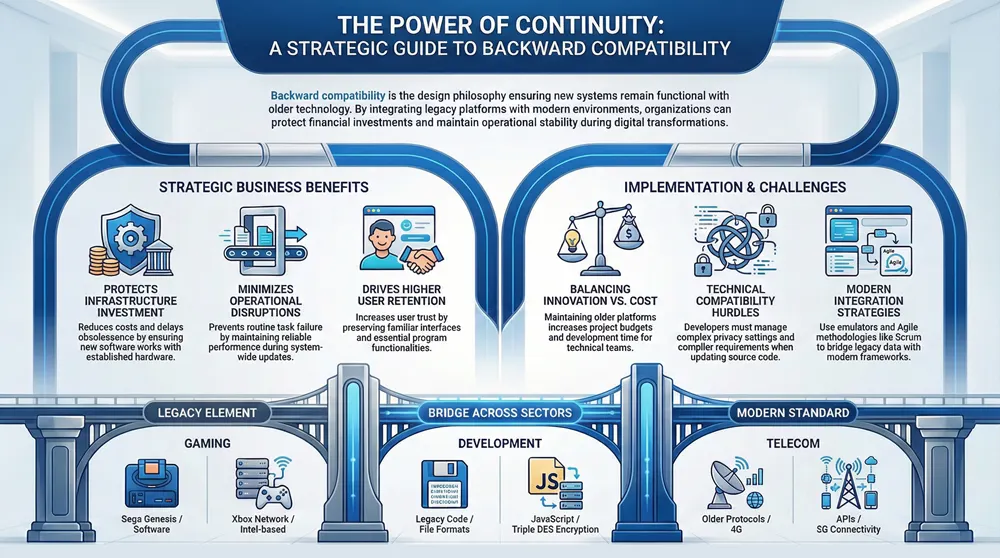
Backward compatibility means designing new systems to work with older technology, which helps reduce cost and delay obsolescence. This approach has influenced tech evolution in areas like video game design and the internet of things, benefiting users by ensuring stability and reliability in their equipment.
Clarifying What Backward Compatibility Means
Backward compatibility in technology ensures that modern systems continue to process data and run programs created for earlier platforms, making it a key aspect of efficient software development. This approach sends a clear signal that continuity in performance is valued, much like how Atari systems set early standards that continue to influence design practices.
Technology experts recognize that maintaining backward compatibility minimizes operational disruptions and enhances user experience through reliable system integration. This principle serves as a cornerstone in software development, as businesses rely on compatibility to preserve investments in earlier hardware and software, underlining its key role in strategic planning.
Recognizing the Role of Backward Compatibility in Tech Evolution
The role of backward compatibility in tech evolution becomes evident when observing its impact on communication methods. This principle supports seamless data communication and multiplexing by allowing new systems to handle information originally designed for older platforms, a concept deeply rooted in computer science.
Industry experts note that maintaining backward compatibility plays a crucial part in system integration and operational efficiency. By ensuring that modern technologies can process legacy data, businesses experience improved communication and troubleshooting, benefitting from continuity in performance while preserving essential information.
Understanding How Backward Compatibility Benefits Users
In technology, backward compatibility improves usability by allowing users to rely on familiar computer program interfaces and operating systems like windows while enjoying modern advancements. This feature supports a seamless transition from older mobile app frameworks to updated versions without increasing overall system complexity.
Backward compatibility offers practical benefits by maintaining support for legacy programs and ensuring that software updates do not disrupt routine tasks. This approach allows businesses to integrate new mobile app features and critical updates without compromising the stability of essential computer program operations, thereby addressing user concerns effectively.
Practical Examples of Backward Compatibility
This section reviews backward compatibility through software applications, gaming consoles, and telecommunications. The analysis includes examining how systems use algorithm-driven compatibility and x86 architecture, assessing Sega’s gaming legacy, and observing data encryption standard implementations. Detailed feedback from each area clarifies benefits and challenges, providing practical insights for technology users and industry experts alike.
Analyzing Backward Compatibility in Software Applications
The analysis of backward compatibility in software applications reveals specific measures in information technology designed to support legacy file format integration. Industry professionals use features such as triple des encryption within the system to enable secure data transfer while ensuring that older programs continue to operate seamlessly.
Software developers apply backward compatibility principles to guarantee that updated systems enable efficient interaction with legacy applications. This approach in information technology supports the integration of different file formats and encryption standards, such as triple des, which streamlines operations for organizations using varied system setups.
Examining Backward Compatibility in Gaming Console Generations
Examination of gaming console generations shows how design function bridges older systems with current technology. Modern consoles, including the xbox one, incorporate an interface that works in tandem with intel-based configurations to support legacy software, satisfying customer requirements:
- Support for earlier software formats
- Efficient integration with current systems
- Maintained performance function
Industry experts point to customer benefits that emerge when new console interfaces accommodate older technologies. Practical application of backward compatibility concepts assures that operations meet the demands of both new configurations and existing technical setups.
Investigating Backward Compatibility in Telecommunications
The telecommunications industry shows clear trends toward maintaining legacy systems while incorporating modern innovations. Organizations integrate elements such as the xbox network and javascript-based solutions to support backward compatibility, ensuring that earlier frameworks like sega genesis continue to operate seamlessly alongside new api integrations.
Companies in telecommunications benefit from this approach by preserving essential functionalities and enabling secure data communication through updated standards and legacy support, as seen in various network configurations:
Evaluating the Advantages of Backward Compatibility
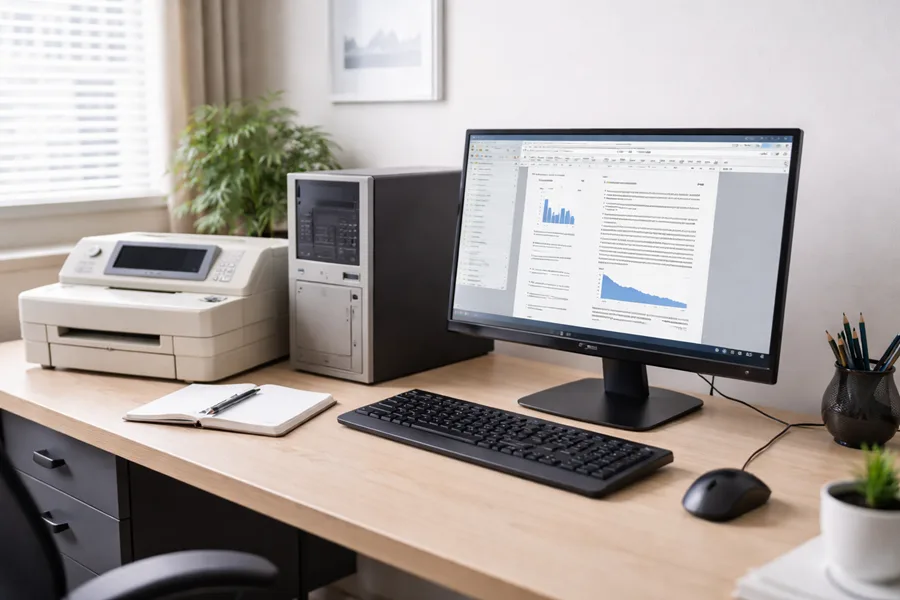
This section details how backward compatibility improves user experience by linking legacy systems like playstation 2 with modern updates. It explains support for systems such as microsoft windows and xbox game pass, ensuring user retention and seamless transitions across innovation in a local area network environment. Practical insights highlight the benefits of smooth upgrades and sustained system reliability.
Enhancing User Experience Through Compatibility
Backward compatibility significantly improves user experience by maintaining support for legacy software and systems; this approach enables seamless interaction with a database, clear definition of system capabilities, accessible document formats, robust broadcasting methods, and alignment with guidelines set by the federal communications commission:
User experience is further enhanced by the consistent performance of new systems integrated with older equipment, offering practical benefits and actionable insights that help businesses manage their existing resources while embracing technological advancements.
Supporting Legacy Systems and User Retention
Maintaining legacy systems is a key strategy for minimizing disruption, and backward compatibility supports this by ensuring that older technologies remain integrated with modern setups. The approach, which sometimes uses methods like block cipher encryption and perl scripting, reinforces public trust and keeps outlets like playstation 3 operational, ultimately driving better user retention.
Organizations experience improved continuity and fewer operational setbacks when legacy support is prioritized. Cryptography measures paired with backward compatibility provide a stable environment, which benefits enterprises that rely on technologies such as playstation 3, heightening user satisfaction while safeguarding crucial data.
Promoting Seamless Upgrades and Transitions
The integration of older systems with new upgrades has been refined to ensure smooth execution in software engineering projects, making sure every bit of legacy data transitions efficiently to modern platforms. The incorporation of forward compatibility measures serves as a solid foundation for maintaining consistent performance, whether through direct server upgrades or enhanced data bit management.
Organizations benefit from this strategy by achieving reliable and efficient changes that do not hinder current operations. When a server undergoes modernization, the principles of software engineering ensure that each bit of functionality is carefully preserved, promoting a stable environment that meets both immediate and future system requirements.
Challenges and Limitations of Backward Compatibility
Backward compatibility challenges involve addressing technical limitations in legacy support, balancing innovation with practical compatibility, and considering cost implications for development. For companies like sony, maintaining legacy computer systems and android integrations—as seen with microsoft office—demands careful planning to reduce setbacks and ensure smooth transitions to modern solutions. This section provides practical insights on these critical issues.
Addressing Technical Limitations in Legacy Support
The challenges in addressing technical limitations in legacy support require a careful balance between management of existing systems and integration with new software. Companies invest in emulator solutions to simulate older system behaviors and optimize central processing unit performance, resulting in a stable user experience:
- Improved emulator configurations
- Efficient software updates
- Robust management strategies
Technical teams apply practical measures when updating legacy environments while preserving compatibility with core applications. The process includes diligent analysis of central processing unit capacities and continuous feedback from system management practices to sustain a positive experience for all users.
Balancing Innovation and Compatibility Needs
The industry faces real challenges when balancing innovation and compatibility needs, as updating the source code with a new language may conflict with existing privacy settings and compiler requirements while incorporating advanced technologies like 5g. Maintaining these systems requires consistent testing to ensure that improvements coexist with legacy support:
Organizations deploy a strategic approach to system upgrades, ensuring that source code modifications do not disrupt privacy settings or the compiler environment. Practical measures, such as rigorous compatibility testing and phased implementations, allow businesses to maintain both legacy functionalities and adopt new technologies like 5g.
Considering Cost Implications for Developers
Developers must consider that integrating backward compatibility often requires extra investment to maintain interoperability between legacy and modern operating systems, which can affect overall project budgets. The need to support wireless features and specialized app behavior in diverse environments adds additional layers of complexity.
This process can lead to increased development time and resource allocation due to maintaining older platforms alongside current innovations; addressing these challenges involves several practical measures:
- Ensuring reliable interoperability between systems
- Maintaining wireless connectivity standards
- Optimizing app performance within varied operating systems
- Monitoring predictable system behavior
The Future Landscape of Backward Compatibility
Current trends in backward compatibility focus on emerging technologies and streamlined workflow, reducing time to market while supporting standards from 4g to advanced systems. Engineers review url data and user expectations to forecast industry standards and potential innovations, ensuring smooth legacy integration and future growth.
Trends Shaping Backward Compatibility in Emerging Technologies
The evolving concept of backward compatibility is influencing the software development process in emerging technologies. Experts observe that integrating legacy systems like those based on the intel 8086 architecture with modern devops practices provides tangible benefits for the client, ensuring that even outdated applications remain functional within new platforms.
Industry specialists emphasize a methodical approach that supports seamless transitions throughout the development cycle. This strategy, rooted in a deep understanding of the software development process, strengthens trust among clients as it caters to ongoing needs while incorporating forward-thinking methods seen in modern devops environments.
Forecasting Industry Standards and User Expectations
Industry experts predict that evolving architecture and improved test automation processes will shape future standards in backward compatibility, aligning with shifting user expectations. This evolution supports legacy systems including those from nintendo and playstation 4, assuring users that new technologies retain fundamental functionalities similar to conventional radio broadcast methods.
Leaders in technology planning stress the significance of sustaining user satisfaction by forecasting standards based on practical experiences and extensive research into system architectures. The approach guarantees that companies effectively integrate cutting-edge test automation techniques while preserving core features from established platforms, thus meeting demands from long-time and new users alike.
Potential Innovations Impacting Compatibility
Innovators in the field of backward compatibility are introducing enhancements that focus on refining the integration between legacy systems and modern frameworks through improvements in device driver functionality, the handling of critical data, and the adjustment of frame rate performance. Agile methodologies such as scrum are being applied to update programming language standards and optimize system processes; these steps create a foundation for reliable operational performance:
- Improved handling of essential data
- Updated device driver support
- Optimized frame rate monitoring
- Agile development using scrum
- Modernized programming language approaches
Advances in this area help legacy platforms work seamlessly with cutting-edge software by incorporating precise device driver modifications and sustaining robust data management protocols. Experts indicate that reengineering programming language frameworks alongside frame rate enhancements offers a clear path for maintaining system reliability and reducing integration challenges.
Resources for Further Understanding of Backward Compatibility
This section reviews recommended literature and publications, discusses relevant online communities and forums, and outlines key industry events and conferences. It provides insights on configuration management, patch methods, remaster processes, xbox series x and series s insights, and software testing practices, offering professionals practical knowledge to reinforce backward compatibility strategies.
Recommended Literature and Publications
Industry professionals recommend literature that offers clear breakdowns of backward compatibility, detailing its role in maintaining legacy systems in environments such as video game design and modern software like microsoft word. Books in this category provide case studies and real-world examples that clarify how technologies like 3g and the internet are integrated into current systems.
Experts advise consulting publications that offer practical insights into backward compatibility, featuring detailed discussions on design protocols and system updates. These resources help business leaders understand the evolution of technology, ensuring that software and hardware sustain compatibility as seen in critical tools like microsoft word and trends in video game design.
Relevant Online Communities and Forums
The industry recognizes that online communities and forums provide a forum for technical discussions about integrating legacy systems with current technology, with many experts sharing their practical experiences using tools like awk to resolve compatibility issues:
Specialized online communities serve as a valuable resource for organizations and developers aiming to implement backward compatibility effectively. They provide actionable insights and real-world examples using awk within technical discussions, ensuring that members can address their project needs with expert advice and shared experiences.
Key Industry Events and Conferences
Industry events and conferences offer a platform for professionals to discuss advancements in backward compatibility and the integration of legacy systems with contemporary technologies. Attendees gain practical knowledge and actionable insights from expert-led sessions and live demonstrations that address real-world compatibility challenges.
These gatherings strengthen the connection between supply-side experts and business leaders by showcasing case studies and success stories from managed IT services and office equipment domains. Participants leave with a deeper understanding of how backward compatibility drives efficiency and supports technological investments.
Frequently Asked Questions
What defines backward compatibility in technology?
Backward compatibility means a technology or system supports previous versions or models, ensuring that upgrades or enhancements do not render older equipment obsolete and allowing integration with established devices or software.
Why is backward compatibility significant for devices?
Backward compatibility ensures that older peripherals work with updated devices, preserving current investments, reducing disruptions, and supporting smooth transitions across managed IT services and office equipment.
Which examples illustrate backward compatibility effectively?
Backward compatibility is shown when business systems integrate current record-keeping software with older digital instruments, while multifunction printer firmware retains support for legacy data protocols, ensuring reliable operations no matter the equipment vintage.
What benefits does backward compatibility provide?
Backward compatibility ensures that new office equipment works with existing systems, reducing costs and extending the useful life of copiers, printers, and managed IT services while supporting seamless cybersecurity operations.
What challenges limit backward compatibility?
Legacy firmware limitations, evolving hardware standards, and updated security protocols restrict backward compatibility. Manufacturers often prioritize advanced features over support for older systems, which may struggle to meet current managed IT service requirements, limiting their integration into office networks.
Conclusion
Backward compatibility supports seamless integration of legacy systems with modern platforms. It minimizes operational disruptions and preserves valuable investments in older technology. Organizations experience greater consistency and reliability in performance through its application. This approach proves fundamental for businesses to sustain efficiency and drive strategic innovation in technology.