
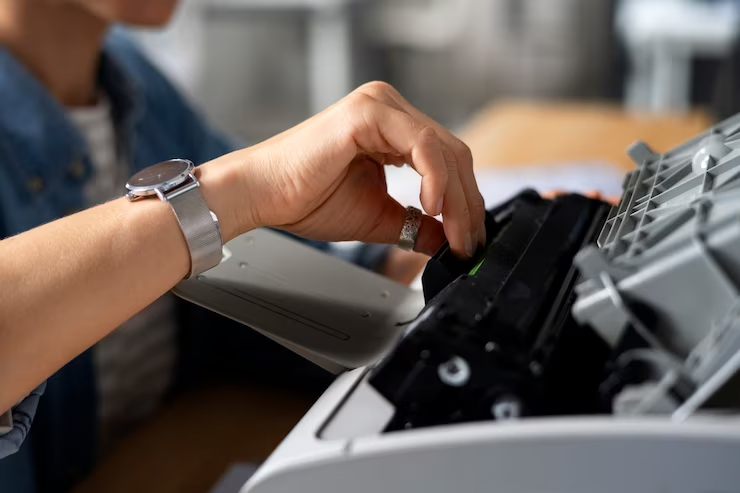
What the waste toner full error really means, how to empty the container safely, and when a replacement beats another cleaning
Quick Answer: When your printer says the waste cartridge is full, a small container inside the machine has collected all the leftover toner it can hold. Power down the printer, slide the container out, empty it into a sealed bag, and wipe the optical sensor window clean before reinstalling. Most waste containers can be emptied three or four times before the plastic degrades and a replacement becomes the smarter call.
Start Here
Printers Waste Cartridge Full: What Your Machine Is Actually Telling You
Your printer stops mid-job. A message appears. Waste toner full. And the office grinds to a halt over a plastic box most people have never seen.
Here is the reality. Every laser printer and copier wastes toner. Not all of the powder loaded onto the drum makes it onto the page. The leftover gets scraped off and funneled into a collection container, sometimes called a waste toner box, a waste tank, or a residual toner bottle. It fills up. Completely normal, fully expected, and designed into the machine.
So the alert is not a failure. It is a maintenance reminder wearing a scary font. And handling it yourself takes about ten minutes.
The team at 1800 Office Solutions has been servicing copier fleets across South Florida since 1999. We see this alert hundreds of times a year. Roughly half the service calls we take on waste toner errors could have been solved by the customer in under fifteen minutes, usually because one small sensor window needed a wipe. This article covers what our technicians actually do on site.
The Component
What the Waste Toner Cartridge Does Inside Your Printer
Laser printing works by charging a drum, coating it with toner, transferring that toner to paper, then fusing it with heat. The transfer step is efficient but not perfect. Somewhere between five and fifteen percent of the toner never reaches the sheet.
A cleaning blade wipes the drum after each rotation. That scraped-off powder has to go somewhere. It gets augered into the waste container, which sits behind a panel on the front, side, or lower bay depending on your model.
What happens without one? The loose powder would coat the drum, the transfer belt, the fuser, and every sensor in the paper path. Print quality collapses within days. So the humble plastic box is doing real work.
Waste Toner Versus Regular Toner
People mix these up constantly. Regular toner is fresh, uniform, electrostatically charged powder sitting in a supply cartridge, ready to print. Waste toner is the same material after it has been through the print cycle. It picks up paper fibers, dust, and residue from the drum. Its charge properties are degraded.
Can you pour waste toner back into a supply cartridge? No. It will clog the developer unit and produce streaked, patchy pages. Some people try. It ends badly, and the repair costs far more than a new cartridge.
| Attribute | Supply Toner Cartridge | Waste Toner Container |
|---|---|---|
| Purpose | Holds fresh powder for printing | Collects residue after transfer |
| Typical cost | $60 to $300 depending on yield | $25 to $65 |
| Refill or reuse | OEM refill or compatible replacement | Empty and reuse 3 to 4 cycles |
| Sensor type | Chip or toner level probe | Optical window, contact, or weight |
| Fails how | Faded print, then stops | Error message, printing locks out |
| Covered by MPS | Almost always | Usually, but confirm it |
Before You Open Anything
Safety Steps for Handling Toner Powder
Toner particles run roughly 5 to 15 microns. Small enough to hang in the air for several minutes after a spill. The World Health Organization classifies toner dust as a Group 2B agent, meaning prolonged heavy exposure warrants caution. In the quantities inside a waste box, the risk to a healthy adult is minimal. Still, take twenty seconds to prepare.
Gather These First
- Disposable nitrile gloves
- A dust mask, or an N95 if you have respiratory sensitivities
- Two large plastic bags, one for the toner and one as backup
- Newspaper or a disposable drop cloth
- A dry, lint-free microfiber cloth
- A soft-bristle brush, a clean paintbrush works fine
Four Rules Our Technicians Never Break
- Never use a household vacuum on spilled toner. The particles pass straight through standard filters, blow back into the room, and can seize the motor. A HEPA toner vacuum or a damp cloth is the correct tool.
- Wash toner off skin with cold water. Hot water opens pores and bonds the polymer to fabric and skin.
- Keep the container level while carrying it. Tilting dumps powder through the intake port.
- Work away from vents, fans, and open windows with a breeze. Moving air turns a small spill into a room-wide mess.
Step By Step
How to Empty a Full Printer Waste Cartridge in 7 Steps
These steps apply to most laser printers and multifunction copiers. Brand-specific notes follow in the next section.
Step 1: Power Down and Unplug
Press the power button. Wait for the shutdown sequence to finish rather than yanking the cord. Then unplug from the wall. This prevents the machine from starting a cleaning cycle while your hands are inside it.
Step 2: Open the Access Panel
Front door, side panel, or a dedicated hatch. On many Sharp models a green release lever sits on the right. Ricoh usually places the container behind a small left-side door. Xerox tends to put it behind the main front door. If you cannot find it, the manual diagram will show you in seconds.
Step 3: Slide the Container Out
Grip it with both hands. Pull straight out along its rails. Do not twist or tilt. Most containers have a molded handle. Some require pressing a release tab first.
Step 4: Empty Into a Sealed Bag
Spread newspaper on a flat surface. Lower the container into a large plastic bag, then remove the plug or cap while the container is already inside the bag. Seal the bag around your wrist, invert the container, and tap the sides gently. A soft brush handles anything stuck to the walls.
Step 5: Clean the Sensor Window
This is the step almost everyone skips. And it is why the error keeps coming back. Nearly every waste container has a small clear window or optical port. A thin film of toner residue on that window reads as a full container even when the box is completely empty. Wipe it with a dry, lint-free cloth until it is genuinely clear, then wipe the matching sensor eye inside the printer bay.
Step 6: Reinstall and Seat It Properly
Replace the plug. Slide the container back along its rails until it clicks. You should feel a distinct snap on most Sharp and Ricoh units. If it will not seat, check the rails for loose powder or a stray cap.
Step 7: Close Up and Restart
Close the panel firmly, plug the machine back in, and power on. The error should clear during boot. If it does not, go back to the sensor window before you do anything else.
Typical time to empty, clean, and reseat a waste toner container. A technician visit for the same job commonly runs $95 to $175 in South Florida.
Brand Notes
Waste Container Location and Cost by Copier Brand
The general process holds across manufacturers, but the release mechanism and sensor type vary. Here is the quick reference our field techs carry. Prices reflect typical US street pricing for OEM containers and will move with model year and supplier.
| Brand | Container Location | Release | Sensor | OEM Cost |
|---|---|---|---|---|
| Sharp BP series | Front, right side | Green lever, then slide | Optical window | $40 to $60 |
| Sharp MX series | Front, lower bay | Pull handle, then slide | Optical window | $45 to $65 |
| Ricoh | Left side panel | Small door, then pull | Contact sensor | $30 to $55 |
| Xerox | Behind main front door | Release tab, then slide | Optical window | $35 to $60 |
| Konica Minolta | Front, lower right | Twist lock, then pull | Weight or optical | $30 to $50 |
| Canon | Front or right side | Handle, then slide | Optical window | $25 to $45 |
| Brother | Front, under drum unit | Lift drum, then lift box | Optical window | $25 to $45 |
Verify the part number against your exact model before ordering. Two copiers in the same family often take different containers, and a container five millimeters off will not seat.
Troubleshooting
Waste Toner Errors That Persist After Emptying
You emptied it. You reinstalled it. The message is still there. Now what? These are the four scenarios we see most often.
The Error Simply Will Not Clear
Dirty sensor, nine times out of ten. Pull the container again and clean both the window on the container and the sensor eye inside the bay. Some machines also need a manual counter reset through the service menu, particularly Ricoh and Konica Minolta units. Your manual documents the key sequence.
Loose Powder Appears Around the Bay
The container was not seated on its rails, or the plug was not fully reinserted. Remove it, clean the spill with a damp cloth or a HEPA toner vacuum, check the seal, and reseat carefully.
Print Quality Drops Right After the Swap
Streaks, ghosting, or repeating spots usually point somewhere else entirely. A worn drum, a tired cleaning blade, or a failing developer roller produces those symptoms. The waste container is a symptom of that wear, not the cause of it. Get a technician to look at the drum unit.
The Error Returns Within a Week
Your container is at the end of its useful life. After three or four emptying cycles the plastic develops micro-cracks and the seal loosens. Powder seeps into the optical path and triggers premature readings. Replace it. At thirty to sixty dollars, a fresh container beats a second service call.
| Symptom | Likely Cause | Fix |
|---|---|---|
| Error persists after emptying | Toner film on sensor window | Clean container window and printer sensor eye |
| Error clears, then returns in days | Degraded container seal | Replace container, $25 to $65 |
| Powder around the bay | Improper seating or missing plug | Reseat, verify plug, clean with HEPA vacuum |
| Streaks or repeating spots | Worn drum or cleaning blade | Service call, drum replacement |
| Burnt smell during printing | Toner on the fuser assembly | Power off, schedule service immediately |
| Machine refuses any print job | Hard lockout at full capacity | Empty or replace, then reset the counter |
Empty or Replace
When Replacing the Waste Container Beats Emptying It Again
Emptying saves money. Nobody disputes that. But containers are consumable parts and they do wear out. Replace rather than empty when any of these is true.
- Visible cracks, warping, or a seal that no longer sits flush
- You have already emptied this container three or four times
- The sensor window is scratched or clouded past the point cleaning helps
- Errors return within a week despite a thorough clean
- The container is sealed by design and not meant to be opened
- Your service contract includes replacements at no extra charge, which makes emptying pointless labor
That last point catches a lot of offices. If you are already paying for a managed print services agreement, waste containers are usually bundled into the cost-per-page rate along with toner, drums, and developer. Emptying one by hand is unpaid work you have already been billed for. Ask your provider what your contract actually covers before you buy anything separately.
How Often Should It Need Attention?
Frequency tracks print volume and color usage. Color fills a waste container roughly twice as fast as monochrome because four toner stations feed it instead of one. These benchmarks reflect what we observe across the fleets we maintain in Miami-Dade, Broward, and Palm Beach counties.
| Monthly Volume | Container Lifespan | What We Recommend |
|---|---|---|
| Under 3,000 pages | 12 to 18 months | Visual check each quarter |
| 3,000 to 10,000 pages | 4 to 8 months | Check monthly, keep one spare |
| 10,000 to 25,000 pages | 2 to 4 months | Check biweekly, consider a service plan |
| Over 25,000 pages | 1 to 2 months | Scheduled monthly maintenance |
Do not wait for the alert. A thirty-second visual check during your monthly walkthrough prevents the version of this problem where the machine locks out at four in the afternoon with a client deadline pending.
Disposal
Getting Rid of Waste Toner Without Making It Someone Else’s Problem
Tossing sealed waste toner in the dumpster is legal in most Florida municipalities. It is also the worst available option. Toner is a plastic polymer. It does not break down on any timescale relevant to your business.
Ink and toner cartridges discarded into US landfills each year, with only about 30 percent of used cartridges recycled. Industry estimates place decomposition at roughly 450 years per laser cartridge.
Better paths, ranked by how little effort they take:
- Manufacturer take-back programs. Sharp, Ricoh, Canon, Xerox, and HP all run free returns, most with prepaid shipping labels you print at your desk.
- Hand them to your dealer. We collect used containers on service visits and route them to certified recyclers at no charge to the customer.
- Seal loose powder in a plastic bag before any disposal so it does not aerosolize in a truck or transfer station.
- Never pour toner down a drain. It is a fine hydrophobic plastic. It coats pipes and does not dissolve.
- For large quantities, check your county hazardous material drop-off schedule. Miami-Dade and Broward both run periodic collection events.
The US Environmental Protection Agency treats printer consumables as part of the electronics waste stream and maintains guidance on certified recyclers. If your office has an environmental reporting obligation, a documented take-back program is the cleanest way to satisfy it.
Cost Control
What Waste Toner Actually Costs a South Florida Office
The container itself is cheap. The downtime is not. Consider a twenty-person office where the main copier locks out for half a day because nobody knew where the waste box lived and the nearest technician was booked until Thursday.
Add up the real numbers. Staff time spent hunting for a workaround. Print jobs pushed to a slower desktop unit at four times the cost per page. A client deliverable that goes out a day late. The forty-dollar part is rounding error by comparison.
| Approach | Direct Cost | Typical Downtime | Best Suited To |
|---|---|---|---|
| Empty it yourself | $0 plus 10 minutes | Under 15 minutes | Any office with one trained person |
| Buy a replacement container | $25 to $65 | 1 to 3 days shipping | Containers past 3 emptying cycles |
| Emergency service call | $95 to $175 | Same day to 3 days | Sealed units, persistent faults |
| Managed print agreement | Bundled in page rate | Often prevented entirely | Fleets over 5 devices |
One honest caveat. Managed print is not automatically cheaper for everyone. A two-person office printing four hundred pages a month will usually spend less buying consumables as needed. The math flips somewhere around five devices or ten thousand monthly pages, where fleet monitoring and predictable billing start earning their keep. Ask any provider, including us, to show you the breakeven on your actual volume rather than a brochure average.
If you are still evaluating hardware, our breakdowns of copier lease options and the related walkthrough on managing your copier waste container cover the consumable side of the total cost picture in more detail.
Working With Us
How 1800 Office Solutions Helps Keep Printers Running
Some offices are happy handling waste toner in house. Others would rather never think about it. Both are reasonable. Here is what we cover for clients across South Florida.
Scheduled Maintenance
Planned visits to clean, inspect, and swap consumables before an alert ever interrupts a print run.
Local Response
Technicians based in South Florida. Most waste toner and consumable calls get resolved the same business day.
Automatic Supply Delivery
Toner and waste containers ship before you run out, so nobody places a panic order at 4pm.
Fleet Monitoring
Remote alerts flag low consumables and rising error counts across every connected device.
Recycling Pickup
We collect used containers and cartridges on service visits and route them to certified recyclers.
Device Security Review
Networked copiers store data. We audit firmware, access controls, and hard drive handling as part of onboarding.
That last box surprises people. A modern multifunction copier is a networked computer with a hard drive, an operating system, and an open port profile. Guidance from the Cybersecurity and Infrastructure Security Agency and the NIST Cybersecurity Framework both treat multifunction devices as in-scope endpoints. If your copier has never had a firmware update, that is worth a conversation separate from anything involving toner.
FAQ
Waste Toner Cartridge Questions We Get Asked Most
Can I keep printing when the waste toner cartridge is full?
Most machines refuse. They lock out deliberately to protect internal components. If your model allows an override, using it is a bad trade. Overflow powder coats the drum, transfer belt, and fuser, and cleaning that contamination typically runs $150 to $350 in labor plus parts.
Can a waste toner cartridge be emptied and reused?
Usually yes, for three to four cycles. Sharp BP and MX series containers are explicitly designed for it. After several rounds the plastic develops micro-cracks and the seal weakens, at which point a fresh container is the better call. Some Canon and Konica Minolta containers are sealed single-use units and should not be opened at all.
Why does the waste toner error return right after I empty it?
A film of toner on the optical sensor window. That window is how the printer measures fill level, so residue reads as a full box. Clean both the window on the container and the sensor eye inside the machine bay with a dry lint-free cloth. Some models also require a counter reset through the service menu.
How often does a waste toner box need replacing?
It depends almost entirely on volume. An office under 3,000 pages a month might go 12 to 18 months. A high-volume environment over 25,000 pages can fill the container every month or two. Color printing roughly doubles the rate versus monochrome because four toner stations feed the same box.
What is the difference between toner and waste toner?
Same base material, different condition. Fresh toner is clean, uniformly charged powder ready for the drum. Waste toner has already been through a print cycle and carries paper fibers, dust, and degraded charge properties. It cannot be reloaded into a supply cartridge without damaging the developer unit.
How much does a replacement waste toner container cost?
Generally $25 to $65 for an OEM part, depending on brand and model. Sharp containers sit at the higher end, Canon and Brother toward the lower. Offices under a managed print contract usually receive them at no extra charge as part of the page rate, so check before purchasing separately.
Are third-party waste toner containers safe to use?
They work on many models and cost $5 to $15 less. The risk is fit. Slight dimensional differences or sensor placement variations can trigger false full readings that send you chasing a phantom fault. For a part this inexpensive, OEM is usually the better value.
Is toner dust dangerous to handle?
The World Health Organization classifies toner dust as a Group 2B agent, which means caution is warranted with prolonged heavy exposure. The quantity in a waste box poses minimal risk to a healthy adult. Wear gloves and a dust mask, work in a ventilated space, and avoid stirring the powder into the air.
Can I vacuum spilled toner with a shop vac or household vacuum?
No. Particles at 5 to 15 microns pass straight through standard filters and get blown back into the room, and the fine powder can damage the motor. Use a toner-rated vacuum with HEPA filtration, or wipe the spill with a damp cloth and seal the cloth in a bag.
How should a business dispose of waste toner in Florida?
Seal it and use a manufacturer take-back program. Sharp, Ricoh, Canon, Xerox, and HP all provide free returns with prepaid labels. Your dealer can also collect containers on a service visit. Miami-Dade and Broward run periodic household and small-business hazardous material collection events for larger quantities.
Does a managed print contract cover waste toner containers?
Most do, alongside toner, drums, and developer units. Paper is the usual exclusion. Contracts vary though, so read the consumables clause rather than assuming. We spell ours out before signing because surprise consumable charges are the fastest way to lose a client.
My copier is under lease. Should I empty the waste container myself?
Check the lease first. Some agreements require that consumable handling go through the servicing dealer, and self-service can complicate a warranty claim if powder gets somewhere it should not. If the lease is silent on it, emptying is routine user maintenance and nobody will object.
Printer Down Over a Waste Toner Alert?
1800 Office Solutions has kept South Florida offices printing since 1999. Talk to us about maintenance plans, consumable delivery, and securing the networked devices already sitting on your floor.
GET A FREE CONSULTATION
Or call 1-800-346-4679
Your One Source For Everything Office