Home Office Heroes: Best All-in-One Printers for Small Businesses

AI Overview:
Choosing the right all-in-one printer for a home business is about matching technology to your real workflow—not hype. This guide explains how inkjet, bulk-ink, and laser AIO printers compare on cost, speed, and output quality, and highlights must-have features like ADF, duplexing, mobile printing, and security. It breaks down top use-case categories (high-volume, professional color, text-heavy, and budget-friendly), explains true total cost of ownership, and helps home businesses pick a reliable, space-saving solution that boosts productivity while keeping long-term costs under control.
Why Your Home Business Needs the Right All-in-One Solution
Finding the best home business copier printer and scaner starts with understanding that you need one versatile machine that can handle multiple tasks without taking over your workspace. The right all-in-one printer combines printing, copying, and scanning into a single device that saves space, reduces costs, and streamlines your workflow.
Quick Answer: Top Categories for Home Business All-in-One Printers
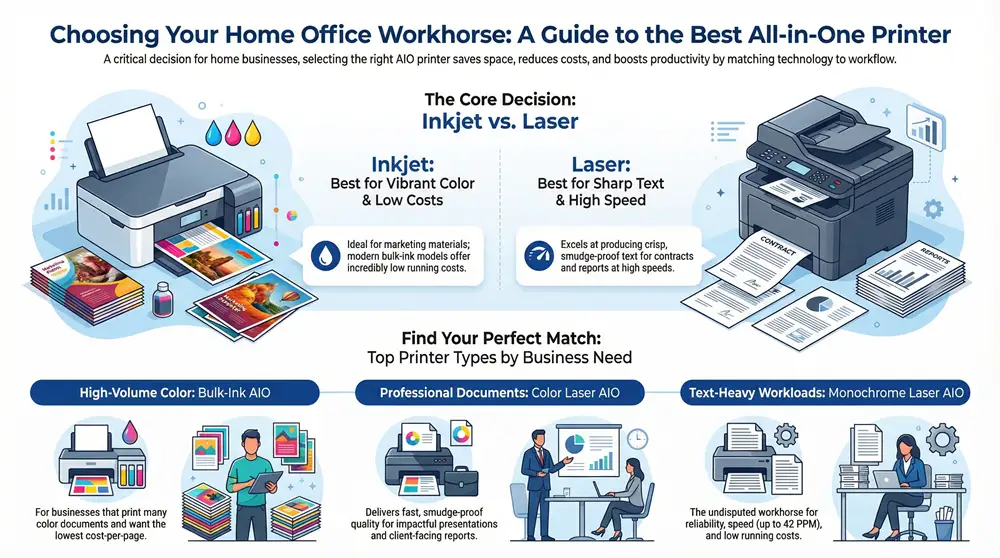
- High-Volume/Low Cost: Bulk-ink models (like Epson EcoTank Pro) – 25 PPM, 0.3-0.9 cents per page
- Professional Documents: Color laser AIOs – 25-35 PPM, sharp text, security features
- Text-Heavy Work: Monochrome laser AIOs – up to 42 PPM, lowest running costs
- Budget-Friendly: Entry-level inkjet AIOs – basic features, wireless connectivity
Starting a home business means making every dollar and every square inch count. Your printer choice impacts your daily productivity more than almost any other piece of office equipment. As one expert put it: “What do single-person home offices and multinational conglomerates have in common? Sooner or later, they all need a printer.”
The key is matching the technology to your workflow. Modern bulk-ink printers can cost as little as 0.3 cents per black and white page, while laser printers offer speeds up to 42 pages per minute for time-sensitive documents. Features like automatic document feeders (ADF) and duplex printing can cut your manual tasks in half.
This guide cuts through the marketing noise to help you choose based on real-world factors: your actual print volume, the types of documents you create, and your long-term costs. We’ll show you exactly which features matters and which ones are just expensive add-ons you don’t need.
Key Features to Look For in a Home Business Copier, Printer, and Scanner
Choosing the right all-in-one (AIO) printer involves so much more than just the price tag. Think of it as finding a reliable team member for your daily tasks! It’s truly about matching the technology and features to your unique workflow. This ensures you get efficiency and cost-effectiveness for years to come. When looking for the best home business copier printer and scaner, we consider a range of essential features that lift a good machine to a truly great business partner.
Inkjet vs. Laser: Which Technology is Right for You?
The very first big decision you’ll face is between inkjet technology and laser technology. This choice impacts everything from how your documents look to your long-term running costs. It’s a classic office equipment showdown, and both options have their unique strengths.
Inkjet printers are often the champions of vibrant color. This makes them absolutely ideal for creating eye-catching marketing materials, graphic-heavy documents, and even beautiful photos. They work by spraying tiny droplets of liquid ink onto your paper. Historically, ink cartridges could be a bit pricey, but modern bulk-ink printers have truly revolutionized this. These models offer incredibly low running costs, sometimes as little as 0.3 cents per black and white page. Plus, they tend to use much less electricity than comparable laser printers, which can be a nice bonus for your energy bill. However, it’s good to know that inkjet prints might be less resistant to moisture and fading compared to laser output, so consider this for documents you need to keep forever.
On the other hand, laser printers have long been the workhorses of the office. They truly excel at producing crisp, sharp, and smudge-proof text at impressive speeds. These machines use toner powder and a clever heat process to create images, making them perfect for contracts, invoices, and high-volume text document printing. Laser printers apply toner to an entire page in one quick pass, which helps them achieve their legendary speed. While they might have a higher initial price tag and use a bit more electricity during operation, their toner output is generally more durable and very cost-effective for high-volume black and white printing, making the cost per page often lower in the long run for text.
So, how do you decide which one is right for your home business? If your main need is for super-sharp, fast text documents in high volumes, a laser printer is often the more economical and efficient choice. But if you need vibrant color, photo-quality prints, or have lower print volumes but still want super low ongoing costs, a bulk-ink inkjet printer could be your perfect match. For an even deeper dive into the specifics of print quality and cost, check out our guide on Inkjet vs Laser Printers.
Essential Productivity Features for the best home business copier printer and scaner
To really boost your efficiency, look for features that can automate those time-consuming tasks. We know your time is precious when running a home business, and these smart features are designed to give you more of it back.
- An Automatic Document Feeder (ADF) is an absolute game-changer. It’s crucial for scanning or copying multi-page documents without you having to manually feed each sheet. Imagine needing to scan a 20-page contract – with an ADF, you just load the stack, and it does all the work, saving you from standing there, page by page.
- Duplex printing and duplex scanning are another must-have. This amazing feature allows for automatic two-sided printing and scanning. Not only can this cut your paper costs in half, but it also helps reduce your environmental footprint and creates much more professional-looking reports and presentations. Some advanced models even offer single-pass duplex scanning, which scans both sides of a page at the same time, making it incredibly fast! To understand more about this efficiency booster, take a look at What Does Duplex Scanning Mean?. If you’re looking to digitize documents efficiently, knowing How to Scan Multiple Pages into One PDF is a skill that will serve you well.
- Finally, robust mobile printing and cloud services capabilities are essential for the modern home business. These features let you manage your tasks from almost anywhere. Whether you’re printing a document from your smartphone just before a meeting, or scanning a receipt directly to your cloud storage for easy accounting, these options offer unparalleled flexibility.
Understanding Speed, Volume, and Connectivity
A printer’s specifications tell a story about its performance. When investing in the best home business copier printer and scaner, understanding these numbers is key to finding a long-term partner for your workflow, not just a temporary gadget.
Print speed (PPM), measured in pages per minute, can vary quite a bit. While a budget-friendly inkjet might offer around 15 PPM, some high-end laser models can zoom along at over 42 PPM. If you frequently print large documents, deal with client-facing materials, or need quick turnaround times, a higher PPM is a critical factor for your productivity. For example, some professional models boast speeds up to 42 pages per minute, which can make a real difference when deadlines loom!
It’s also super important to understand monthly volume. You’ll often see two numbers: the maximum monthly duty cycle and the recommended monthly volume. The duty cycle is the absolute theoretical maximum number of pages a printer could handle in a month without breaking down. However, consistently pushing your printer to this limit will dramatically shorten its lifespan. The recommended volume, typically around 10% of the maximum duty cycle, is what the manufacturer suggests for optimal performance and longevity. Make sure to choose a printer with a recommended volume that comfortably aligns with your typical monthly output to ensure your new machine lasts for years to come.
When it comes to connectivity, you have a few great options. While Wi-Fi is incredibly convenient for a clean, cable-free setup and allows multiple devices to connect easily, a hardwired Ethernet connection often provides the most stable and secure network for a busy business environment. Many excellent printers offer both options, along with a trusty USB port for direct connection to a single computer. You might also find other wireless options like Wi-Fi Direct, Bluetooth, and NFC (Near Field Communication), which are great for quick, peer-to-peer printing from mobile devices without needing a router.
Our Top Picks for the Best Home Business Copier Printer and Scanner in 2025
Based on reliability, cost-effectiveness, and feature sets, we’ve carefully categorized our top picks to help you find a printer that aligns perfectly with your specific home business needs. From our extensive research and hands-on testing, we’ve seen a clear shift towards more efficient and incredibly reliable options, with brands like Brother consistently earning recommendations for their rock-solid stability. Let’s find your perfect office partner!
Best for High-Volume and Low Running Costs: The Bulk-Ink AIO
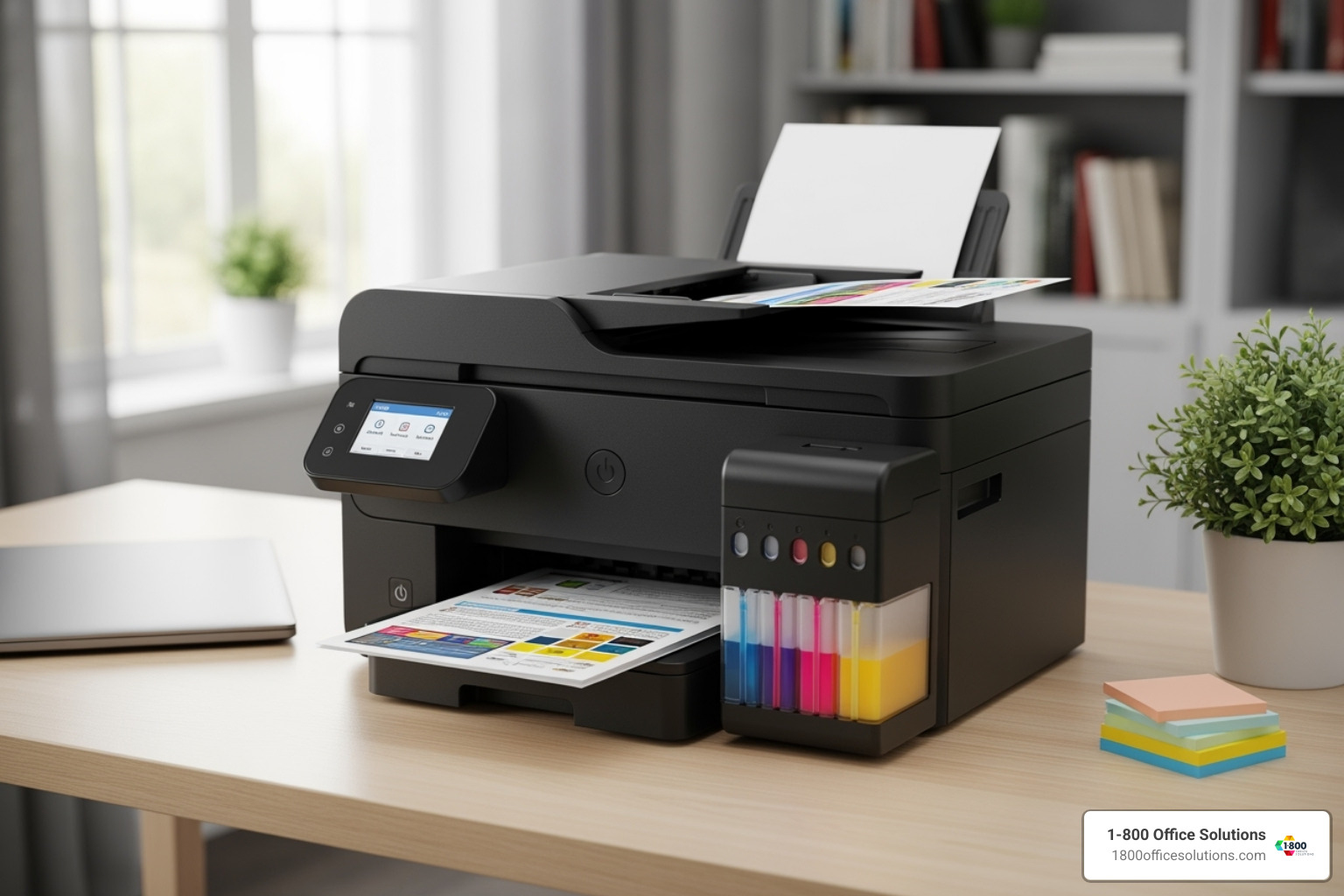
For businesses that print a significant number of color documents, a bulk-ink AIO is truly a game-changer. These clever printers use large, refillable ink tanks instead of traditional, often pricey cartridges. This innovative design drives the cost per page down to less than a cent, which is a huge win for your budget and peace of mind!
Take the Epson EcoTank Pro ET-5850, for example. It’s a prime choice for high-volume printing, boasting per-page costs of about 2 cents for both black and color pages. It also offers impressive speeds up to 25 PPM and a substantial 550-sheet input capacity. Another excellent option for home offices is the Canon Pixma G7020 MegaTank All-in-One. It delivers incredibly low running costs (0.3 cents mono, 0.9 cents color) and a 200-sheet capacity, making it a fantastic value for even moderate printing needs. These bulk-ink systems are absolutely perfect for anyone who wants to print a lot without constantly worrying about ink expenses.
Best for Fast, Professional Documents: The Color Laser AIO
If your business thrives on producing crisp, professional-quality documents quickly, then a color laser AIO is definitely your best bet. These machines are champions at delivering fast print speeds (typically 25-35 PPM) and sharp text that won’t smudge, making them ideal for creating impactful presentations, vibrant marketing materials, and important reports.
Consider the HP Color LaserJet Pro MFP 3301fdw, which offers speeds up to 26 PPM, or the HP OfficeJet Pro 9135e, which is specifically designed for small businesses and home offices and features a generous 500-sheet paper capacity. Top models in this category also come packed with advanced security features to protect your sensitive data, and they often include single-pass duplex scanning for incredible efficiency, handling both sides of a page in one go. You’ll also find reliable paper handling, ensuring a smooth, uninterrupted workflow. The Brother MFC-L3780CDW stands out as a strong contender, offering excellent color laser AIO functionality with superb quality and manageable running costs, making it a clear choice for small and home offices that need color. To learn more about balancing speed, quality, and functionality, explore our guide on The Best All-in-One Printer for Small Businesses.
Best Workhorse for Black & White Printing: The Monochrome Laser AIO

For law offices, accountants, and any business that primarily deals with text-heavy documents, a monochrome laser AIO is truly the undisputed champion. These printers are renowned for their incredible reliability and blistering speeds (some reaching up to 42 PPM), all while offering a remarkably low total cost of ownership and a compact footprint that fits beautifully into any home office setup. For instance, the HP LaserJet Pro MFP 4101fdw can hit those impressive speeds of up to 42 PPM.
Their legendary stability means you can truly “set it and forget it,” focusing on your business instead of your printer. Brother printers, in particular, are consistently recommended for their stability and long-term reliability in this category, with many users reporting years of problem-free service. The Brother MFC-L5915DW is a fantastic example, providing a winning combination of low running cost and high capacity, perfect for medium or even larger home offices with heavy-duty print needs. These machines are built like tanks, ready to handle thousands of pages with minimal fuss, making them incredibly cost-effective over their long lifespan. Find more about What is Monochrome Printing? and its many benefits for your business.
Best Budget-Friendly Option for Startups: The Entry-Level AIO
Starting a new home business or if you have lighter printing needs, there’s no need to overspend to get a reliable device. A budget-friendly AIO offers a fantastic balance of essential features and affordability, giving you the capabilities you need without a hefty price tag. These are typically inkjet models that provide good all-around performance for all your printing, scanning, and copying tasks.
While they might not boast the lightning speed of a laser printer, they consistently deliver solid color quality and come equipped with essential features like wireless connectivity and an ADF, making them a perfect starting point. They’re ideal for businesses that might print occasionally but still require the flexibility and convenience of an all-in-one device. Look for models like the Canon Pixma MG3620 or the HP DeskJet 2827e, which offer reliable basic print, scan, and copy functions at a truly accessible price point. This proves that you absolutely don’t have to break the bank to find a capable best home business copier printer and scaner to support your growing venture.
Beyond the Box: Ongoing Costs, Security, and Maintenance
The moment you unbox your new printer is just the beginning of its journey with your home business. The true value of a business printer isn’t just in its initial price tag. It’s revealed through its long-term operational costs, how well it keeps your sensitive information safe, and how durable it proves to be. When you’re searching for the best home business copier printer and scaner, it’s crucial to look at this bigger picture.
Calculating the True Cost of Ownership
Think of your printer as a long-term investment, not just a one-time purchase. To truly understand what you’re spending, you need to look beyond the sticker price. This is where the Total Cost of Ownership (TCO) comes in. It includes all those ongoing expenses that pop up after you buy the machine.
For starters, there’s the cost of ink or toner. This can vary wildly depending on whether you’re buying individual cartridges, signing up for a subscription service, or using bulk refills. While a bulk-ink printer might seem pricier upfront, its cost per page can be incredibly low, saving you a lot in the long run compared to traditional cartridges.
Don’t forget about other maintenance items, like drum units in laser printers, which need replacing over time. And then there’s the energy bill! A printer that uses less power can make a noticeable difference. Always look for an ENERGY STAR certification to ensure your chosen model is as efficient as possible. These seemingly small costs really add up over the years. Knowing these factors can help you Save Money from Photocopier Costs for your business.
Why Security Matters for Your Business Printer
Nearly every device in your office is connected to the internet, and that includes your printer. A network-connected printer isn’t just a convenient tool; it can also be a potential doorway for cyber threats if it’s not protected. Keeping your business data and client information confidential is absolutely paramount. That’s why it’s so important to choose a printer with built-in security features.
Imagine printing a sensitive client contract, only to have it sit in the output tray for anyone to see. Features like Secure Print prevent this by requiring a PIN or password to release a print job. This concept is closely related to “Follow Me Printing,” which allows you to send a job and then retrieve it from any printer on your network after authenticating. Check out What is Follow Me Printing? to learn more.
Other crucial security features include User Authentication, which controls who can access specific printer functions, and Encrypted Network Communications, which protects data as it travels between your computer and the printer. Some advanced models even offer Firmware Protection to prevent malicious code from being installed on the printer itself. Leading brands integrate advanced security to safeguard your information, ensuring that your confidential client or business information remains secure, protecting both your reputation and your data.
Lifespan, Durability, and Finding the best home business copier printer and scaner support
Your business printer is a significant investment, and you want it to last. A great indicator of a model’s durability is its recommended monthly print volume. Choosing a printer that’s rated for your typical workload helps prevent premature wear and tear. For example, a printer designed to handle 2,000 pages a month will certainly last longer under that workload than one only rated for 500 pages.
Many reputable brands are consistently praised by users for their stability and long lifespan. Brother printers, for instance, are often recommended for their reliability, with many users reporting that these machines can print tens of thousands of pages with only consumable replacements. We’ve even seen cases where a single Brother laser printer has churned out over 100,000 pages! That’s what we call a true workhorse.
Should you ever need help, having access to reliable support is absolutely key. This includes readily available drivers, troubleshooting resources, and responsive customer service. For businesses in our service areas, like Orlando, FL, Atlanta, GA, or Philadelphia, PA, knowing you have local support for Printer Maintenance Near Me can be a real lifesaver. A durable printer, combined with accessible and dependable support, means less downtime for your home office and more time for you to focus on growing your business.
Frequently Asked Questions about Home Business Printers
When you’re setting up your home office, it’s natural to have questions about the tools that will power your daily operations. Your best home business copier printer and scaner is a big decision, so let’s tackle some common questions that pop up.
How important is print speed for a home business?
Think about your daily workflow: are you printing a quick invoice here and there, or are you consistently churning out multi-page reports for clients? For those times when you’re facing deadlines or dealing directly with clients, print speed becomes incredibly important. Imagine having a big proposal due; you don’t want to be waiting ages for pages to slowly emerge! In these client-facing roles, or if you frequently print large documents, a faster printer (say, 30+ pages per minute, or PPM) can really save you time and make you look more professional. Every second counts when you’re on the clock.
However, if your printing needs are mostly for internal documents, quick drafts, or just occasional use, you probably don’t need a speed demon. A moderate speed, around 15-20 PPM, will likely be perfectly sufficient. It’s all about matching the printer’s pace to your business’s pace.
Should I get an all-in-one printer or separate devices?
For the vast majority of home businesses, an all-in-one (AIO) device is simply the smartest choice. Why juggle multiple machines when one can do it all? An AIO combines printing, scanning, copying, and often faxing into a single, sleek unit. This means significant space savings on your desk, less clutter with fewer cables, and usually a lower upfront cost compared to buying separate devices. It also simplifies your setup and connectivity, making your life easier.
That said, there are very specific scenarios where separate devices might make sense. For example, if your business revolves around digitizing thousands of old documents, a dedicated, super high-speed scanner with advanced features might be more efficient than the scanner built into an AIO. Or, if you need to print massive blueprints or artwork, a specialized large-format printer would be necessary. But for the typical home business that needs a versatile tool for everyday tasks, the convenience and cost-effectiveness of an AIO make it the clear winner.
Are ink subscription services worth it?
Ink subscription services can be a real lifesaver for convenience, especially if you have a pretty consistent printing rhythm. They work by monitoring your ink levels and automatically shipping new cartridges right to your door before you even realize you’re running low. This means no more last-minute dashes to the store and no workflow interruptions when you’re in the middle of an important project. For busy home businesses, that kind of seamless operation can be invaluable.
However, these services aren’t for everyone. If your printing volume is all over the map—super high one month, almost nothing the next—you might find yourself paying for ink you’re not using, or running out of your allotted pages too quickly. In such cases, or if you’ve invested in a bulk-ink printer with its incredibly low per-page costs, it’s a good idea to compare the subscription cost against buying high-yield cartridges or refilling ink tanks yourself. Always take a moment to read the fine print on terms and conditions, including cancellation policies and any limits on rollover pages, to ensure it truly offers the best value for your unique printing habits.
Conclusion: Finding the Right Partner for Your Office Technology Needs
So, after diving deep into home office printers, you’ve probably realized that the “best home business copier printer and scaner” isn’t a magical, one-size-fits-all solution. Instead, it’s the device that perfectly matches your unique business demands. Think of it as finding the right teammate for your growing venture – one that supports your specific needs for print volume, quality, speed, and budget.
We’ve explored how looking beyond the initial price tag to understand the Total Cost of Ownership (TCO) is key. This includes factoring in those ongoing expenses like ink or toner, maintenance, and even energy consumption. And remember those essential productivity features we talked about? Things like an ADF (Automatic Document Feeder) for easy scanning, duplexing for two-sided printing, and reliable connectivity are not just nice-to-haves; they’re game-changers that save you precious time and money. Investing wisely in these areas ensures your printer genuinely supports your growth, rather than becoming a bottleneck.
As your business grows and changes, so will your technology needs. It’s an exciting journey, and having the right support can make all the difference. That’s where partnering with an office solutions expert, like us at 1-800 Office Solutions, comes in. We’re here to help you scale effectively, making sure you always have the right tools for the job, whether you’re just starting out or expanding rapidly. We specialize in providing custom office equipment solutions, from flexible copier and printer leasing options to managed IT services. Our goal is to ensure businesses, from Miami Lakes, FL, to King of Prussia, PA, have access to reliable and cost-efficient technology that keeps them moving forward.
For businesses ready to take the next step, managed print services can offer even greater cost savings and reliability. It’s all about optimizing your printing environment and proactively managing supplies and maintenance, so you can focus on what you do best. We’re committed to being your trusted, authoritative source for all your office equipment needs. Ready to find your perfect office technology partner? Explore our flexible copier leasing options or connect with us to learn more about how our comprehensive services can benefit your business.