


Understanding Managed IT Services Cost for Modern Businesses

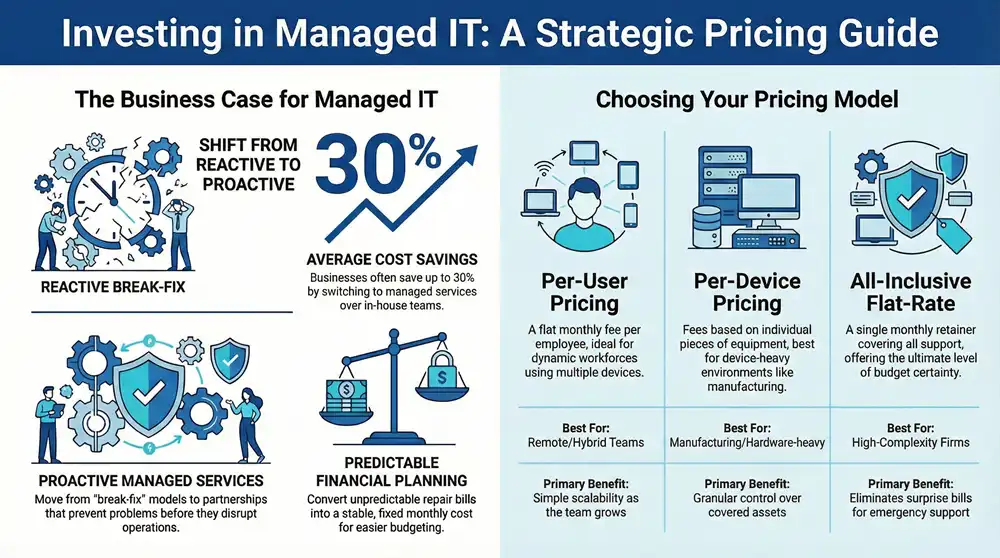
Determining your managed IT services cost is a crucial step in strategic business planning. This is not merely an expense, but an investment that transforms your technology from a reactive cost center into a predictable, strategic asset that enhances efficiency and security. Understanding the factors that influence this cost is the first step toward making a sound financial decision for your company.
Why Managed IT Is a Strategic Investment
Partnering with a managed service provider (MSP) represents a fundamental shift in how you manage technology. You move away from the traditional break-fix model—where you only seek help after something has failed—and enter a proactive partnership. This approach is centered on preventing problems before they disrupt operations, securing your data, and ensuring business continuity so your team can remain productive.

This proactive strategy converts unpredictable IT expenses into a stable, fixed monthly cost, eliminating frustrating surprise invoices.
The objective is to align your technology with your business goals. A quality MSP acts as an extension of your team, providing the specialized expertise needed to manage your infrastructure and defend against cyber threats. This frees your employees to concentrate on their core responsibilities, which naturally boosts productivity and supports sustainable growth. To explore this topic further, see our detailed guide on what a managed service provider does.
The Growing Demand for Outsourced Expertise
The value of this model is widely recognized. The global managed IT services market reached USD 335.4 billion and is projected to grow to USD 731.1 billion by 2030. This significant growth highlights a major trend: businesses of all sizes, particularly small and mid-sized enterprises, are increasingly relying on MSPs for everything from network administration to advanced cybersecurity.
This proactive IT model delivers substantial advantages that justify the investment:
- Predictable Budgeting: A flat-rate monthly fee eliminates unexpected repair bills and simplifies financial planning.
- Enhanced Security: You gain immediate access to enterprise-grade security tools and specialists that would be prohibitively expensive to hire in-house.
- Increased Uptime: Proactive monitoring identifies and resolves minor issues before they escalate into major incidents that halt business operations.
- Access to Specialists: Your team has a direct line to certified experts in networking, cloud computing, and cybersecurity without the high cost of full-time salaries.
Breaking Down Common MSP Pricing Models
Before you can finalize your IT budget, you must understand how providers bill for their services. Most Managed Service Providers (MSPs) utilize one of three primary pricing models. Each is structured differently, offers distinct benefits, and is better suited to certain types of businesses.
Choosing the right model is similar to selecting a mobile phone plan. Some users prefer to pay for actual data usage, while others opt for a simple, unlimited monthly fee to avoid surprises. Making the correct choice is the first step toward making your IT costs predictable and scalable, whereas the wrong one can lead to unexpected bills and budget overruns.
This visual illustrates the three main approaches to investing in managed IT.
As you can see, your IT investment flows into one of these structures, allowing you to select a plan based on your number of employees, equipment count, or a simple flat rate covering all services.
The Per-User Pricing Model
The per-user model is arguably the most popular and straightforward. You pay a flat monthly fee for each employee requiring IT support, regardless of the number of devices they use.
This approach is ideal for companies where employees use multiple devices—such as a desktop in the office, a laptop for travel, and a smartphone. It simplifies budgeting, as your costs scale directly with your team. When you hire a new employee, you know precisely how much your IT expenses will increase.
- Best For: Businesses with a dynamic workforce, a high number of remote or hybrid employees, or staff who rely on several devices.
- Pros: Highly predictable costs that are easy to budget. It simplifies adding or removing users and typically covers all of an employee’s IT needs.
- Cons: It can become costly for companies with many part-time staff or users who have minimal technology needs.
The Per-Device Pricing Model
With the per-device model, you are charged a separate flat fee for each piece of equipment the MSP manages. Consider it an à la carte menu for your technology.
This method provides granular control over which assets are covered, making it an excellent option for businesses with more devices than people, such as a manufacturing facility with dozens of networked machines. The main drawback is that it can be difficult to track, and costs can fluctuate as you add or retire hardware.
This model demands diligent asset management. If forgotten devices remain connected to your network, you could be paying for unnecessary support—or worse, leaving unsecured endpoints vulnerable to attack.
The All-Inclusive Flat-Rate Model
The all-inclusive, or flat-rate, model is exactly as it sounds: a single, fixed monthly fee that covers virtually all of your IT support and management requirements. This is not just a subscription; it’s a comprehensive retainer for your entire technology environment.
The price is determined by the overall complexity of your infrastructure—your number of users, devices, and servers, plus any specialized services required, like advanced cybersecurity or 24/7 helpdesk support. While the upfront monthly cost is typically higher, it offers the ultimate budget predictability by eliminating surprise bills for project work or emergency support.
- Best For: Companies that require absolute budget certainty and a true, hands-off IT partnership without worrying about out-of-scope charges.
- Pros: The gold standard for cost predictability. It covers nearly every IT need and incentivizes your MSP to be proactive, as they bear the cost of fixing any issues.
- Cons: It comes with a higher monthly price tag and may include services that a very small business does not yet require.
Comparing Managed IT Services Pricing Models
To help you compare these models side-by-side, we have created a summary table. This should clarify which approach best aligns with your company’s needs, budget, and growth strategy.
Selecting the right model is a critical first step in controlling your managed IT services cost. It ensures you only pay for what you need, helps you budget with confidence, and aligns your provider’s incentives with your business objectives.
Key Factors That Shape Your Final IT Quote
While the pricing model provides a basic framework, several other critical variables will shape the final number on your IT quote. Understanding these factors is key to decoding your managed IT services cost and ensuring you can compare provider proposals accurately.
Think of it like purchasing a car. The base model has one price, but adding features like all-wheel drive, advanced safety systems, and a premium audio system will alter the final cost. Your IT environment functions similarly. The size of your company, the complexity of your technology, and your specific requirements all play a significant role. Let’s examine these factors.
Company Size and Device Count
The most direct cost driver is the scale of your operation. A 10-person startup has a vastly different IT footprint than a 150-employee company with multiple locations. Providers use your user and device counts to establish a baseline for the support, monitoring, and maintenance effort required.
- Number of Users: This directly correlates to the volume of helpdesk support your team will need. More users mean more potential support tickets, software licenses to manage, and security training to conduct.
- Number of Devices: This includes every piece of hardware connected to your network—desktops, laptops, servers, printers, firewalls, and mobile phones. Each device must be monitored, patched, and secured, adding to the overall workload.
Simply put, a larger team with more endpoints increases the potential attack surface and likelihood of issues, which is reflected in the monthly fee.
Complexity of Your IT Infrastructure
The current state of your technology stack is another major component of the pricing puzzle. A business operating on modern, cloud-based applications will be simpler (and less expensive) to manage than one relying on legacy on-premise systems.
Any reputable Managed Service Provider (MSP) will begin with an assessment to understand your environment.
They will evaluate factors such as:
- On-Premise vs. Cloud: Managing physical servers in a closet requires significantly more hands-on effort for maintenance and repairs than managing a cloud environment in Microsoft Azure or AWS.
- Age of Hardware: Older equipment is more prone to failure and often lacks modern security features, requiring more intensive monitoring and eventual replacement.
- Software and Applications: A company using standard cloud applications like Microsoft 365 is straightforward to support. In contrast, a business using custom-developed or industry-specific legacy software demands specialized knowledge.
If your infrastructure is complex or aging, a modernization project may be necessary before a standard managed services agreement can begin. This is typically quoted as a separate, one-time cost.
Your Required Cybersecurity Posture
Cybersecurity is no longer an optional add-on; it is a core component of any managed IT service. However, the level of protection you require will significantly impact your cost. A basic plan might include antivirus and a firewall, but most businesses today need a much more robust defense.
A strong cybersecurity strategy is not an expense; it is a critical investment in business continuity. The cost of a single data breach, including fines and reputational damage, can far exceed the annual cost of proactive protection.
Advanced security services that will increase the cost include:
- Endpoint Detection and Response (EDR): This goes beyond traditional antivirus to actively hunt for and neutralize threats on employee devices.
- 24/7 Security Operations Center (SOC): This is a dedicated team of security analysts monitoring your network around the clock for suspicious activity.
- Compliance Management: If you operate in a regulated industry like healthcare (HIPAA) or defense (CMMC), you need specialized services to ensure you meet strict data protection standards.
As a general rule, the more sensitive the data you handle, the more you should expect to invest in securing it.
Service Level and Support Needs
Finally, your expected level of service plays a crucial role. Not every business requires an IT technician on call at 3 AM on a Sunday. Your Service Level Agreement (SLA) is the document that defines the provider’s guaranteed response times and hours of availability, and this directly impacts pricing.
For a 25-person team, this often covers unlimited help desk support during business hours, network monitoring, and routine maintenance. Security services can account for 20-35% of this cost, which is crucial for protecting against modern threats. You can discover more insights about how MSPs structure their pricing on mytekrescue.com.
A plan with 24/7/365 support will naturally cost more than a standard 9-to-5 plan because the provider must staff accordingly. Similarly, a contract guaranteeing a 15-minute response time for critical issues will be priced higher than one with a four-hour window. The key is to match your support level to your actual business needs so you are not overpaying for availability you will never use.
Estimating Your IT Budget with Confidence

Now, let’s translate these concepts into practice. Moving from abstract pricing models to a concrete number you can use in your budget is essential. To accurately determine your managed IT services cost, you need a reliable method for connecting your company’s specific needs to a dollar figure. This process is about making an informed investment that aligns perfectly with your operational requirements.
The goal is to build a budget based on data, not speculation. Consider the key components: the number of employees, the quantity of servers, and the precise level of support you require. These are the primary variables that determine your final monthly cost. Once you understand how they interact, the overall investment becomes much clearer.
Using an IT Cost Calculator for a Baseline
You don’t have to start from scratch. Tools like an IT Cost Calculator are designed to provide a strong starting point by generating a custom estimate based on your company’s vital statistics. By inputting your core numbers, you can get an instant, data-driven baseline for a realistic monthly cost.
Here’s an example of what our IT Cost Calculator tool can show you after you input your business details.
This tool simplifies the complexity. It draws a direct line from the scale of your operation to a potential monthly fee, giving you a solid figure to use in budget discussions. From there, you can refine the details with a prospective provider.
A Sample Cost Scenario
Let’s illustrate this with a practical example. Imagine a professional services firm with 30 employees. They use a standard suite of office software, rely on cloud storage, and require robust security to protect sensitive client data. They are comfortable with support during normal business hours (9-to-5) and do not need 24/7 on-call assistance.
What if they need more? Now, suppose the same firm decides to enhance its security with advanced features like Endpoint Detection and Response (EDR) and wants the assurance of 24/7 support.
This example demonstrates how your decisions directly shape the final cost. By understanding these variables, you can make informed choices that balance your business needs with your budget. For more guidance on structuring your finances, our guide on planning your office technology budget offers valuable insights. This step-by-step approach will help you budget with confidence and select a plan that delivers real value.
Calculating the True ROI of Managed Services
When evaluating the managed IT services cost, it is easy to focus solely on the monthly invoice. However, to truly understand the value, you must look beyond that number and consider the total return on investment (ROI). This is not just an expense; it is a strategic partnership that can transform your IT from a volatile, unpredictable cost center into a stable asset that facilitates growth.
The best way to see this is by comparing a typical managed services plan with the true, fully-loaded cost of an in-house IT team. Many business owners only consider salaries, but the actual cost is always much higher once you account for all the hidden expenses.
Uncovering the Hidden Costs of In-House IT
An internal IT department comes with a long list of expenses that are easily overlooked but add up quickly. To make a fair comparison against a managed service provider (MSP), you must account for these factors.
Here are the most significant ones:
- Fully-Loaded Salaries: This extends far beyond base pay. You must include payroll taxes, health insurance, retirement contributions, and paid time off. In total, this can add 25-40% to the base salary for each employee.
- Recruitment and Onboarding: Finding, interviewing, and training skilled IT talent is both expensive and time-consuming. If that employee leaves, you must restart the entire costly process.
- Continuous Training: Technology is constantly evolving. Your internal staff requires ongoing training and new certifications to keep up with the latest systems and security threats, which means you are paying for courses, exams, and travel.
- Software and Hardware Tools: A professional in-house team needs a sophisticated toolkit for network monitoring, helpdesk ticketing, and security management. The licenses for these professional-grade tools can cost thousands of dollars annually.
When you sum it all up, the true cost of even a small two-person IT team can easily exceed $150,000 per year. For most small and mid-sized businesses, this is not a financially viable option.
The Financial Impact of Productivity and Downtime
Beyond direct expenses, the most significant ROI from managed services comes from something harder to quantify: minimizing costly downtime and boosting team productivity. Unplanned outages do not just stop work; they halt revenue-generating activities, erode client trust, and divert your entire team from their primary responsibilities. An MSP’s entire mission is proactive maintenance—solving problems before they happen.
This proactive approach is a game-changer compared to the reactive nature of many internal teams, who are often so consumed with daily firefighting that they have no time for strategic prevention. Our guide comparing the break-fix vs. managed services models delves deeper into this critical distinction.
By focusing on prevention, a managed service provider helps you reclaim thousands of dollars in lost productivity. Every hour your team can work without interruption is a direct contribution to your bottom line, turning your IT investment into a powerful productivity driver.
In fact, it is not uncommon for businesses to save up to 30% by switching to managed IT services over an in-house team. One analysis revealed that a company that transitioned to an MSP saw its monthly spend increase from $4,800 to $5,200, but its downtime incidents dropped from 14 to just 3 per year. The result was an estimated $38,500 in saved productivity, creating a significant positive financial impact. By preventing just a few hours of downtime each month, the service more than pays for itself.
Choosing the Right MSP for Your Budget
You now have a solid understanding of the costs and the value you should expect for your investment. The final and most critical step is selecting the right IT partner.
Making an informed decision here prevents you from being locked into an ineffective contract and ensures your managed IT services cost translates into tangible business value. The goal is to find a partner who becomes a strategic asset, not just another line item on your expense report.
The key to vetting potential providers is asking the right questions. This goes beyond the monthly fee—you need to investigate their transparency, their team’s expertise, and their commitment to your success. A provider who is evasive or gives vague answers is a major red flag.
Your Vetting Checklist for MSPs
Before you consider signing an agreement, use these essential questions to guide your evaluation. The quality of their answers will reveal much about their technical capabilities, customer service philosophy, and overall reliability.
- Service Level Agreements (SLAs): Be specific. Ask for their guaranteed response and resolution times for different types of issues. What are the penalties if they fail to meet these guarantees?
- Technician Certifications: Who will be working on your account? Inquire about their team’s qualifications and specializations. You need to know if they have certified professionals in critical areas like cybersecurity, cloud platforms (Azure, AWS), or advanced networking.
- Security Protocols: How do they protect you, and how do they protect their own systems? Ask about their security stack, their incident response plan, and any compliance frameworks they adhere to.
- Client References: This is non-negotiable. Ask to speak with a few of their current clients, preferably those in your industry or of a similar size. This provides an honest, unbiased perspective on their real-world performance.
- Contract Terms: It is time to read the fine print. Look closely for hidden fees, automatic renewal clauses, and restrictive cancellation policies. A trustworthy partner will offer a clear, flexible agreement.
A strong MSP partnership is built on transparency. The initial conversations should feel less like a sales pitch and more like a strategic consultation where they seek to understand your business goals first.
By using this checklist, you can confidently compare providers beyond just their price tags. This process empowers you to find a partner who not only fits your budget but also aligns perfectly with your long-term vision for growth and security.
What’s Usually in a Standard Plan?
Think of a standard managed IT plan as the foundation for your business’s technology. While the exact services will differ between providers, you can generally expect a core set of features designed to keep you secure and operational.
Most plans will bundle:
- Helpdesk Support: This is your team’s lifeline for everyday tech issues, from password resets to software malfunctions. The goal is to resolve problems quickly and get them back to work.
- Proactive Network Monitoring: Your provider will maintain 24/7 surveillance of your network, servers, and computers to spot and fix problems before they cause downtime.
- Data Backup and Disaster Recovery: This is essential. Your critical business data is backed up regularly, ensuring you can recover quickly from a system failure, cyberattack, or other disaster.
- Cybersecurity Essentials: You will receive fundamental protections like managed antivirus, anti-malware software, and firewall management to defend against common digital threats.
- Patch Management: Providers handle the continuous stream of software and operating system updates, closing security vulnerabilities and ensuring everything runs smoothly.
Should I Watch Out for Hidden Fees?
An excellent question. A trustworthy Managed Service Provider (MSP) is transparent about all costs, but some may have extra charges hidden in the fine print. It is always wise to read your agreement carefully and ask direct questions before signing.
Be aware of these common additional charges:
- After-Hours or Emergency Support: Some contracts only cover standard business hours. If you need assistance at night, on weekends, or on holidays, you could face a high hourly rate.
- On-Site Visits: While remote support is typically unlimited, some MSPs bill extra for dispatching a technician to your physical location.
- Project Work: Major initiatives fall outside the scope of daily support. Tasks like an office move, a major cloud migration, or a complete hardware refresh will almost always be quoted as a separate, one-time project.
What Are the Typical Contract Lengths?
Since managed services is a long-term partnership, most providers seek a commitment that allows them to implement and refine a comprehensive IT strategy for your business. The most common contract terms are one, two, or three years.
Often, a longer commitment results in a lower monthly rate, as it provides the MSP with predictable revenue. A one-year term is a great starting point, giving you sufficient time to evaluate the partnership before committing to a multi-year agreement. Just be sure to check for any auto-renewal clauses and understand the cancellation policies.
How Can I Lower My Managed IT Costs?
While cutting corners on IT is a recipe for disaster, there are smart ways to manage your spending without compromising quality or security. It comes down to aligning the services you pay for with your actual business needs.
The real key to controlling costs is to stop paying for services you aren’t using. A frank assessment of how your business operates and what level of risk you’re comfortable with will make sure your plan delivers real value, not just a long list of features.
For example, if your team works strictly from 9-to-5, do you really need to pay a premium for 24/7 support? Probably not. Another effective tip is to regularly audit your user accounts and devices. This ensures you are not paying for licenses or support for former employees or obsolete equipment. The best MSPs offer flexible, tiered plans that allow you to scale your services up or down as your business evolves.
Now that you have a clear understanding of how managed IT services are priced, the next step is to get a quote tailored to your business. At 1-800 Office Solutions, we provide transparent, comprehensive managed IT and cybersecurity services designed to fit your budget and support your growth.