Monochrome Printing: The Black and White of It

AI Overview:
This blog explains that monochrome printers use only black toner to create sharp, professional text and images. It outlines why businesses prefer them—lower cost per page, faster speeds, less maintenance, and reduced environmental impact. The article also compares monochrome vs. grayscale printing, showing when to use each for best results.
Finally, it guides readers on choosing the right monochrome printer based on speed, resolution, and paper handling, helping businesses make cost-efficient printing decisions.
What Does Monochrome Mean in a Printer?
It means the printer uses only one color, typically black, to produce text and images. Here’s a quick breakdown:
- Monochrome Printing: Printing that uses a single color.
- Purpose: Ideal for printing in black and white.
- Cost Efficiency: More economical than color printing.
- Common Use: Business documents, legal papers, formal communications.
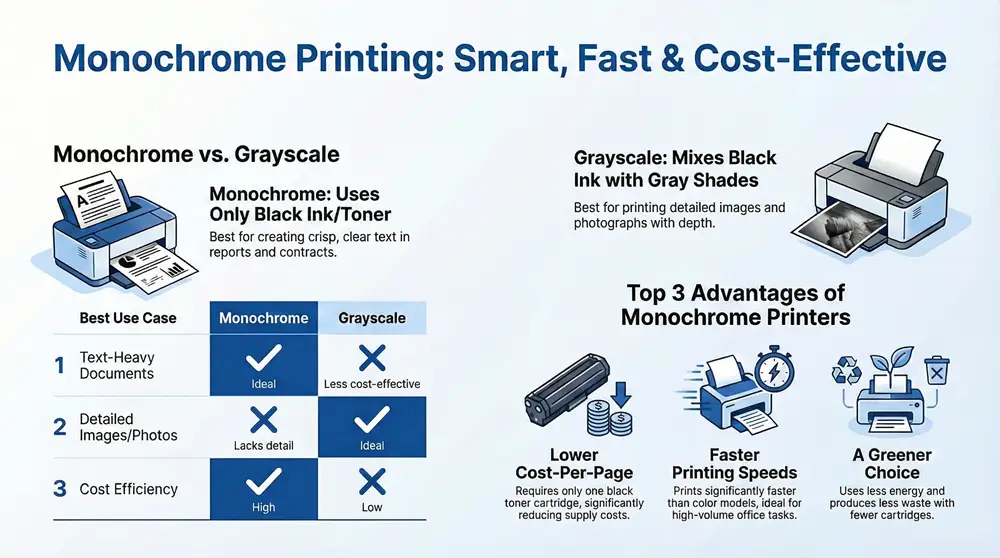
Monochrome printers are all about simplicity and efficiency. They print using a single color—usually black. This makes them perfect for producing crisp, clear text and images without the complexity or cost of color printing.
Single Color Printing
When we talk about monochrome printing, we’re referring to the use of just one color. While this might sound limiting, it’s a powerhouse for creating black-and-white documents. Whether you’re printing reports, invoices, or legal documents, a monochrome printer handles these tasks with precision and speed.
Black Ink: The Standard Choice
In most cases, the single color used is black. Black ink or toner is not only cost-effective but also provides excellent contrast, making text easy to read. For businesses, this means producing professional-looking documents without breaking the bank.
Monochrome Laser Printers
These printers are a favorite in many offices. Monochrome laser printers use a laser beam to produce an image on a drum. This drum then attracts toner particles, which are transferred to paper using heat. The result? Sharp, clear prints at a fraction of the cost of color printing.
Here’s why monochrome laser printers are a staple in many workplaces:
- Speed: They can print pages quickly, which is crucial for high-volume tasks.
- Efficiency: Using a single toner cartridge reduces maintenance and lowers costs.
- Durability: They produce durable prints that are resistant to smudging.
In short, monochrome printers are a smart choice for businesses that need reliable, high-quality printing without the added costs of color. They focus on what matters—producing clear, professional documents efficiently.
By understanding what does monochrome mean in a printer, you can make informed decisions about your office printing needs. Keep reading to explore how monochrome compares to grayscale printing.
Monochrome vs. Grayscale Printing
When it comes to black-and-white printing, you have two main options: monochrome and grayscale. While both produce documents without color, they use different processes that cater to different needs.
Printing Processes: Monochrome vs. Grayscale
In monochrome printing, your printer uses only black ink or toner. It creates images and text by placing black dots on the paper, leaving white spaces where needed. This method is straightforward and cost-effective, making it ideal for documents with lots of text or simple graphics.
On the flip side, grayscale printing is a bit more complex. It combines black ink with shades of gray to create depth and detail. This is done by mixing black with small amounts of color ink to produce various shades of gray. Grayscale is perfect for images and graphics where subtle shading and contrast are important.
Grayscale Images: When Detail Matters
If you’re printing images or documents with intricate graphics, grayscale is the way to go. The different shades of gray can highlight details and give your images a more refined look. This is especially useful for photographs or detailed charts where contrast and depth are key.
For example, a black-and-white photograph printed in grayscale will show more detail and texture than if it were printed in monochrome. This is because the grayscale process captures the nuances that pure black-and-white cannot.
Black-and-White Text: Monochrome for Clarity
For text-heavy documents like reports, contracts, or invoices, monochrome printing shines. It ensures that your text is sharp and clear, with high contrast against the white paper. This makes reading easier and more professional-looking, which is crucial in business settings.
Moreover, using monochrome for text saves on ink costs. Since it only requires black toner, you avoid using expensive color cartridges unnecessarily. This efficiency is why many offices prefer monochrome printers for their everyday needs.
In summary, choosing between monochrome and grayscale depends on what you’re printing. If you need crisp, clear text, go for monochrome. If you’re printing detailed images, grayscale will provide better results. Understanding these differences can help you make the most of your printer and ensure your documents look their best.
Next, we’ll dive into the advantages of using monochrome printers and why they might be the right choice for your business.
Advantages of Monochrome Printers
Monochrome printers are a go-to choice for many businesses, and for good reason. They offer several key benefits that can save you money, time, and even help the environment.
Cost Per Page: Keep Expenses Low
One of the biggest perks of monochrome printers is their low cost per page. Unlike color printers, which require multiple cartridges (black, cyan, magenta, and yellow), monochrome printers only need one black toner cartridge. This means fewer supplies to buy and less frequent replacements, resulting in significant savings over time.
Printing Speed: Fast and Efficient
If speed is what you need, monochrome printers deliver. They generally print faster than their color counterparts. For example, the Canon imageCLASS LBP236dw can churn out up to 40 pages per minute, compared to the 25 ppm of some color models. This makes them perfect for environments where high-volume printing is a daily task.
Environmental Impact: A Greener Choice
Monochrome printers are also kinder to the environment. They use less energy and produce less waste, as they don’t rely on multiple cartridges. Additionally, many monochrome models, like the Kyocera Ecosys P2040dw, are designed with long-life components that further reduce waste and the printer’s total cost of ownership.
By choosing a monochrome printer, you’re not just saving money and time—you’re also making a more sustainable choice for the planet.
In the next section, we’ll guide you through choosing the right monochrome printer for your needs, focusing on factors like print speed, resolution, and paper handling.
Choosing the Right Monochrome Printer
Selecting the perfect monochrome printer for your needs can make a huge difference in efficiency and quality. Let’s break down the key factors you should consider: print speed, dpi resolution, and paper handling.
Print Speed: How Fast Do You Need to Go?
When it comes to print speed, monochrome printers have the upper hand. They can churn out pages at impressive rates, which is crucial for businesses with high-volume printing needs. For instance, the Xerox B315/DNI can print up to 42 pages per minute. If you’re in an environment where documents need to be printed quickly, look for a model with a high ppm (pages per minute) rating.
DPI Resolution: Sharpness Matters
Resolution, measured in dots per inch (dpi), determines the clarity and detail of your printed documents. For most business documents, a resolution of 600 dpi is sufficient. However, if you require sharper text and images, consider a printer with a higher dpi. The HP LaserJet Pro MFP M428fdw, for example, offers a crisp 1200 x 1200 dpi, ensuring professional-quality prints every time.
Paper Handling: Flexibility and Capacity
Paper handling is another crucial factor. You need a printer that can manage the types and volumes of paper you use. Look for features like multiple paper trays and expandable input options. This flexibility allows you to print on different media types, such as envelopes and labels, without constantly reloading the printer.
For instance, Brother printers offer manual feed slots for easy envelope printing. Automatic duplexing is another handy feature, allowing double-sided printing to save paper and reduce costs.
In summary, when choosing a monochrome printer, consider your specific needs in terms of speed, clarity, and paper handling. The right printer should not only meet your current demands but also adapt to future growth.
Frequently Asked Questions about Monochrome Printing
Is a monochrome printer better?
Monochrome printers are often a smart choice for professional environments that focus on printing black-and-white text. They are cost-efficient because they use only black toner, which is generally cheaper than color cartridges. This means lower operating costs and fewer cartridge replacements.
Monochrome printers are also known for their speed. They can print documents quickly, which is ideal for businesses or offices with high-volume printing needs. The Brother HL-L2390DW, for example, offers fast printing speeds and is designed to handle large workloads efficiently.
Should I print in grayscale or monochrome?
The choice between grayscale and monochrome depends on what you're printing. If your document is mostly text, monochrome is the way to go. It uses just black toner, making it more cost-effective.
However, if you're printing images or graphics, grayscale can provide better results. Grayscale printing uses different shades of gray to create more detail and contrast. This is achieved by mixing black with some color ink, which is why it might use more expensive color cartridges.
In short, choose monochrome for text-heavy documents and grayscale if you need to print detailed images.
Do monochrome printers need ink?
Monochrome printers use black toner, not ink. Toner is a powder used in laser printers, and it's more efficient than liquid ink used in inkjet printers. This makes monochrome printing not only faster but also more cost-effective.
Toner cartridges last longer and can print more pages than ink cartridges, leading to significant cost savings over time. This makes them an excellent choice for offices looking to reduce printing costs without sacrificing quality.
In conclusion, understanding whether to use monochrome or grayscale printing and knowing that monochrome printers use toner can help you make informed decisions about your printing needs.
Conclusion
When it comes to meeting your business’s printing needs, 1-800 Office Solutions offers a range of monochrome printing options that are both efficient and cost-effective. Monochrome printers are ideal for businesses that primarily need to print black-and-white documents. They offer significant savings on printing costs due to their use of only black toner, which is cheaper and lasts longer than color cartridges.
Monochrome printing not only saves money but also improves productivity. These printers are designed for speed, making them perfect for high-volume environments. They can handle large workloads with ease, ensuring that your business operations remain smooth and uninterrupted.
Additionally, monochrome printers have a lower environmental impact. By using fewer cartridges and generating less waste, they contribute to a greener office environment. This aligns well with businesses looking to reduce their carbon footprint while maintaining high-quality printing standards.
Choosing the right monochrome printer can significantly benefit your business. Whether you need a compact printer for a small office or a robust machine for a larger operation, 1-800 Office Solutions has the expertise and the products to meet your needs. Our team is ready to help you find the perfect solution that fits your budget and improves your office’s efficiency.
For more information on how monochrome printing can benefit your business, visit our monochrome print service page. Let us help you make the best choice for your printing needs.