Understanding the Cost of Document Scanning: A Definitive Pricing Guide

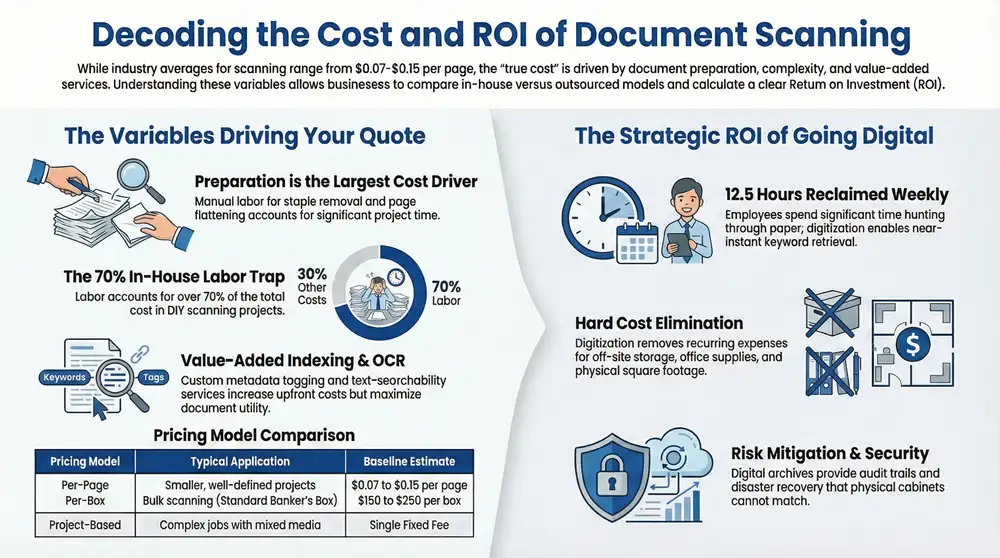
Estimating the cost of digitizing your business documents can feel overwhelming. While industry averages often quote $0.07 to $0.15 per page or $150 to $250 per box, these figures are only a starting point. The true cost of document scanning is shaped by the unique needs of your project, from the condition of your files to the level of searchability you require. This guide provides a clear, expert breakdown of the factors that influence pricing, so you can build an accurate budget and make an informed investment.
Why Document Scanning Costs Vary So Much
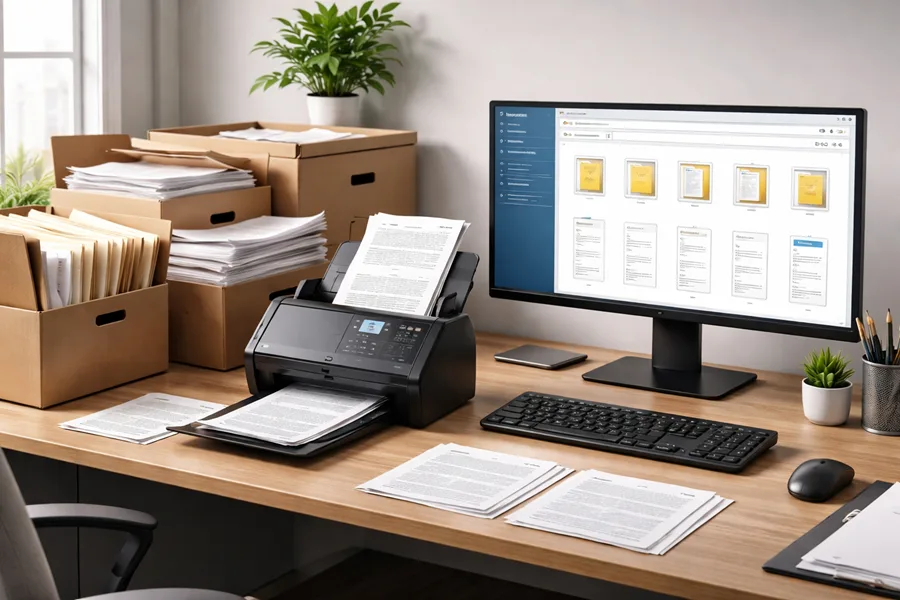
Trying to nail down the cost of document scanning is a bit like getting a quote for a custom construction project. You wouldn’t expect a single price per square foot to cover everything, and the same logic applies here. You’re not just paying to turn paper into pixels; you’re investing in a process that transforms cluttered file cabinets into secure, searchable, and instantly usable digital assets.
The real cost—and the real value—is in the details.
This guide will walk you through the pricing structures and the key factors that actually drive the cost. We’ll break down the common models vendors use and explain why services like document prep and indexing are so critical to the overall investment. Knowing this will help you read between the lines of any quote and make a smart decision for your business.
The Most Common Pricing Models
Scanning vendors usually build their quotes around a few core models. Each one fits different types of projects, so understanding them is the first step to figuring out your budget.
- Per-Page Pricing: This is the most straightforward model. It’s perfect for smaller, well-defined projects where you have a good idea of the exact page count.
- Per-Box Pricing: For larger, bulk scanning jobs, this is the go-to. It gives you a predictable cost for a standard banker’s box, which typically holds around 2,500 pages.
- Project-Based Pricing: If your project is complex, with a mix of document types or special handling requirements, a vendor will likely quote a single fixed fee for the whole job.
To make it even clearer, here’s a quick breakdown of how these models stack up.
Quick Guide to Document Scanning Price Models
Choosing the right model depends entirely on the scale and complexity of your archives. A small law firm with a few dozen boxes of case files will have very different needs than a hospital digitizing decades of patient records.
Digital Transformation Is a Growing Priority
The move away from paper isn’t just a trend; it’s a fundamental shift in how businesses operate. The global market for document scanning services is proof, valued at $6.04 billion in 2025 and expected to nearly double to around $12 billion by 2035. This boom shows just how many organizations now see digitization as a core part of their strategy, not just a back-office task.
The core idea behind digitization isn’t just to replicate a filing cabinet on a computer. It’s to unlock the information trapped on paper, making it a functional, secure, and valuable part of your daily workflow.
Of course, different technologies come with their own unique cost structures. To get a feel for how specialized services are priced, it can be helpful to look at related fields. For example, learning about understanding the cost of 3D laser scanning services shows how complexity and technology directly influence the final price, a principle that holds true for document scanning as well.
The Hidden Factors Driving Your Scanning Costs
Ever wonder why two quotes for the same scanning project can be miles apart? It’s because the real cost isn’t just about how many pages you have. The final number is driven by the nitty-gritty details of the job—the “hidden” factors that determine the actual work involved.
Getting a handle on these variables is the key to budgeting accurately and comparing quotes apples-to-apples. It shifts the conversation from a simple per-page price to a real understanding of what it takes to get your project done right.
Document Preparation: Where the Real Work Happens
Before a single page hits the scanner, it needs to be prepped. This is, without a doubt, the most labor-intensive part of any digitization project and a huge chunk of your total cost. Picture a team of people manually going through every single box and file you hand over.
This prep work involves a few critical, hands-on steps:
- Staple and Clip Removal: Every single staple, paper clip, and binder clip has to go. This prevents jams and protects the high-speed scanning equipment from damage.
- Unfolding and Repairing: Folded, creased, or torn pages need to be carefully flattened out or patched up with special tape to make sure they scan cleanly.
- Removing Sticky Notes: Post-it notes have to be peeled off. If the information on them is important, they’re often scanned separately and re-associated with the original page.
This is meticulous, time-consuming work. A box of clean, single-sided 8.5″ x 11″ pages is going to be far cheaper to process than a box filled with crumpled, stapled, and mixed-size documents.
The Impact of Document Characteristics
Not all paper is created equal. The physical state and size of your documents have a direct line to the scanning process and, by extension, the price tag. These details dictate the kind of equipment needed and how much manual handling is required.
Think about these common variables:
- Document Volume: Just like buying in bulk, document scanning has economies of scale. A project with 500 boxes will almost always get you a lower cost per page than a project with only five boxes.
- Paper Size and Type: Standard office paper is easy. But what about large-format items like architectural blueprints, engineering drawings, or old maps? Those need specialized wide-format scanners and skilled operators, which bumps up the cost.
- Document Condition: Are your files old, brittle, or faded? Fragile documents can’t be zipped through an automatic feeder. They need to be handled delicately, often on a flatbed scanner—a much slower, and therefore more expensive, process.
Value-Added Services: OCR and Indexing
Just getting a digital picture of a document is only half the battle. To actually use that information, you need to make it searchable and easy to find. This is where value-added services come in. They add to the cost, but they also add immense value.
The goal of a digitization project isn’t just to get rid of paper; it’s to transform static documents into dynamic, searchable business assets that improve efficiency and secure your data.
Optical Character Recognition (OCR) is the tech that turns the text in an image into actual data your computer can read. This makes your scanned PDFs completely searchable, letting you find a specific invoice or clause just by typing a keyword. Basic OCR is often standard, but if you need higher accuracy or have complex documents, the price can go up.
Indexing and Metadata is how you create a digital filing system. It’s the process of “tagging” each document with key information so you can pull it up later. For instance, an invoice could be indexed by:
- Invoice Number
- Vendor Name
- Date
- Amount Due
The more index fields you need, the more manual data entry or sophisticated software is required, which adds to the project’s cost. A simple three-field index will be cheaper than one that needs ten.
Security and Compliance Requirements
Finally, if your documents are sensitive, the level of security and regulatory compliance required will absolutely affect the cost. Handling protected information isn’t a casual affair; it demands a rigorous, secure process from start to finish. For industries like healthcare, finance, or law, things like HIPAA compliant document management introduce strict security and privacy rules that can’t be ignored.
These requirements mean the vendor has to invest in:
- Secure Facilities: Think controlled access, 24/7 surveillance, and locked-down storage for your physical files.
- Vetted Personnel: Every employee who touches your documents needs a background check and specialized training.
- Chain of Custody: You need a documented audit trail that tracks your documents from the moment they leave your office to the second the digital files are delivered and the originals are either returned or destroyed.
These measures aren’t optional—they’re essential for protecting your data, and their cost is built into the final price to ensure it’s done right.
In-House Scanning vs. Outsourcing: A Cost Analysis

One of the biggest forks in the road when you’re planning a digitization project is deciding whether to tackle it in-house or bring in a professional service. At first glance, the DIY route seems like the cheaper option. You already have a team, maybe even an office scanner. How hard can it be?
But when you really start to crunch the numbers, a different story emerges. The true cost of in-house scanning is loaded with hidden expenses that can quickly turn a “money-saving” project into a surprisingly expensive headache. The key is to look beyond the sticker price and understand the Total Cost of Ownership (TCO). While outsourcing gives you a clear, predictable cost, a DIY project is a mix of direct and indirect expenses—hardware, software, labor, and maintenance—that add up fast.
The True Cost of In-House Document Scanning
Setting up your own scanning operation involves a lot more than just buying a scanner off the shelf. The market for professional-grade document scanner hardware hit around $6.19 billion in 2024 and is expected to climb to $10.76 billion by 2032. As you can see from market analysis by GMI Insights, this isn’t about small office equipment; it’s a serious investment.
And that’s just the starting point. Let’s break down everything you’d actually need to budget for:
- High-Speed Scanners: That all-in-one printer in the corner isn’t going to cut it. You need a commercial-grade workhorse that can handle thousands of pages a day without jamming, overheating, or breaking down. These machines can easily cost several thousand dollars.
- Specialized Software: Getting a picture of the document is only step one. You’ll need software for OCR (to make text searchable), indexing, quality checks, and managing the final digital files. These often come with hefty licensing fees or recurring subscriptions.
- Dedicated Labor: This is the big one—the most underestimated expense by far. Document prep alone is a massive time sink. You’ll have to pull an employee from their actual job or hire temp staff, which means paying for their salary, benefits, and the time it takes to train them.
- Ongoing Maintenance and Support: Pro scanners need regular upkeep to perform well, and software needs constant updates. These operational costs are a crucial part of an honest TCO calculation.
When you add it all up, the cost of diverting your team from their core, revenue-generating work to a complex administrative task can easily erase any savings you thought you were making.
A common mistake is to only calculate the cost of the scanner itself. The reality is that labor—the hours spent prepping, scanning, indexing, and performing quality checks—typically accounts for over 70% of the total in-house project cost. Things like document size, the level of prep needed, and searchability requirements create different paths, and each one has its own price tag.
To put this in perspective, let’s look at a real-world example of a medium-sized project involving 50 boxes of documents.
The Benefits of Outsourcing to a Scanning Service
Outsourcing takes that long, messy list of variable costs and turns it into a single, predictable line item on a proposal. A professional scanning company has already poured money into the best tech and has a team of experts who do this all day, every day. That level of specialization creates efficiencies of scale that an in-house team just can’t match.
The advantages are pretty clear:
- Predictable Costs: You get a simple quote—per-page, per-box, or per-project. No surprise bills when a scanner breaks or you need another software license.
- Expertise and Efficiency: These teams are masters of document prep and quality control. They can fly through thousands of documents an hour, a speed that would be impossible for an untrained internal team.
- Advanced Technology: Vendors use high-speed, high-resolution scanners and sophisticated software that deliver far better image quality, OCR accuracy, and indexing precision.
- Guaranteed Security: Reputable services operate out of secure facilities with vetted staff and a strict chain of custody, so your sensitive information is protected from start to finish.
For companies with significant archives, handing the job over to professional bulk scanning services is almost always the smarter, more cost-effective play. It lets your people stay focused on what they do best and ensures your digitization project gets done right, right away. This turns a potential operational nightmare into a managed, predictable investment.
Calculating the ROI of Your Digitization Project
Thinking of document scanning as just another expense is missing the bigger picture; smart businesses see it for what it is—a strategic investment. The initial invoice is only one piece of the puzzle. When you shift your focus from the upfront price tag to the long-term financial return, the true value of going digital snaps into focus, letting you calculate a clear return on investment (ROI).
A real ROI analysis looks past the scanning bill and starts adding up the real-world gains you’ll see across your entire operation. It answers the one question that really matters: “How will this project make us more profitable, efficient, and secure?” This mindset helps justify the cost of document scanning by proving it pays for itself.
Quantifying Your Tangible Gains
The most straightforward way to measure ROI is to track the hard costs you’ll eliminate and the productivity you’ll get back. These aren’t abstract ideas; they are real numbers that show up on your bottom line.
Start by tallying up the most obvious savings:
- Reclaimed Office Space: Figure out the square footage your filing cabinets are eating up right now. Multiply that number by your cost per square foot, and you’ll see the value of the space you can repurpose for activities that actually make money.
- Eliminated Storage Fees: If you’re paying for off-site document storage, those monthly bills vanish. This is a direct, recurring saving that adds up fast over a year.
- Reduced Supply Costs: Your budget for paper, toner, folders, and filing cabinets will shrink dramatically, cutting down on those constant office supply runs.
The High Cost of Wasted Labor
Beyond physical supplies, the biggest money pit in any paper-based system is wasted time. The labor cost tied to shuffling paper is staggering. In fact, office workers can spend between 7.6 and 12.5 hours per week just hunting for information buried in physical files.
By digitizing your documents, you turn hours of frustrating searching into seconds of simple keyword retrieval. That recovered time means your team can finally focus on their core jobs, help customers, and drive growth instead of getting bogged down in administrative tasks.
Here’s a practical example: If five employees each save just two hours a week by using a digital system, you regain 10 hours of productive labor weekly. At a loaded hourly rate of $35, that translates to a direct saving of $350 per week, or over $18,000 annually. This is just one of the key benefits of a document management system that directly impacts your bottom line.
Measuring Intangible and Risk-Mitigation Benefits
While it’s tougher to put an exact dollar amount on them, the “soft” benefits of digitization offer massive financial protection and make your business more resilient. Think of these as your company’s insurance policy, and they are a critical part of the total ROI.
Consider the financial value of:
- Enhanced Data Security: A centralized digital system gives you superior access controls, audit trails, and encryption. A locked filing cabinet can’t even come close. The cost of a single data breach can be devastating, making digitization an incredibly powerful way to manage risk.
- Disaster Recovery: Digital files backed up to the cloud are safe from fires, floods, and theft. The ability to get your operations back online instantly after a disaster is priceless, protecting you from crippling downtime and data loss.
- Improved Compliance: Need to pull documents for an audit or legal request? With a searchable digital archive, it’s effortless. This slashes the risk of non-compliance fines and lowers the legal bills associated with hunting down paper records by hand.
When you add up the concrete cost savings, the reclaimed productivity, and the strengthened security, the ROI of a document scanning project becomes undeniable. It’s an investment that pays dividends by making your company more efficient, less risky, and better at using its resources.
Actionable Ways to Reduce Scanning Costs
Taking control of your document scanning budget doesn’t have to mean sacrificing quality. With a bit of strategic thinking, you can knock down the overall cost of a scanning project while actually getting more value out of it. It’s all about making smart, small adjustments that add up to big savings.
The secret? Minimize the manual labor your scanning vendor has to do. The less time they spend on tedious prep work, the lower your final bill will be. This simple principle puts you in the driver’s seat.
Prepare Your Documents In-House
One of the most direct ways to cut costs is to handle the basic document prep yourself. Before you send off those boxes, get your team to go through and remove all staples, paper clips, binder clips, and sticky notes. Make sure every page is unfolded and facing the same direction.
This one step can slash vendor labor charges by a surprising amount. Yes, it takes some internal effort, but the savings are almost always worth the time, especially on larger jobs where prep work can be a huge chunk of the total cost.
The more “scanner-ready” your documents are, the less you’ll pay for prep services. Think of it like packing your own boxes before a move—the better you organize everything upfront, the smoother and cheaper the whole process becomes.
Be Strategic About What You Scan
Let’s be honest: not every piece of paper in your file cabinets needs to be digitized. A classic mistake is to scan everything without stopping to ask if it has any real business value. This “scan-it-all” approach is a surefire way to inflate your costs for no good reason.
A much smarter approach is to sort your documents first:
- Active Files: These are your top priority. Digitize anything you need for daily operations, legal compliance, or frequent look-ups.
- Archival Files: For older documents you rarely touch, ask yourself if they really need to be scanned. It might be far more cost-effective to keep them in physical storage or securely shred them if their retention period is over.
- Redundant Copies: Get rid of duplicates and old drafts before they ever see a scanner. You only want to pay to digitize the final, official version of any document.
Leverage Volume and Consolidate Projects
Scanning vendors, like most service businesses, give better pricing for bigger jobs. You can use the principle of economies of scale to your advantage and seriously lower your cost per page. Instead of scanning a few boxes here and there throughout the year, try consolidating everything into one large, annual project.
Doing this puts you in a great position to negotiate a bulk scanning discount, which can significantly drop your per-box or per-page rate. It also makes project management easier on your end, turning a bunch of small headaches into one streamlined operation.
Optimize Your Indexing and OCR Needs
Services like indexing and Optical Character Recognition (OCR) are what make your digital files truly useful, but they also add to the price tag. The key is to pay only for what you actually need. Don’t sign up for a complicated, ten-field indexing scheme if a simple three-field index (like Client Name, Document Type, and Date) gets the job done.
Similarly, while OCR is crucial for making documents searchable, talk to your vendor about the level of accuracy you require. For most internal archives, a standard accuracy rate is perfectly fine and much more affordable than the near-perfect accuracy needed for highly specialized legal or data extraction projects. Knowing how to scan multiple pages into one PDF can also simplify the process and keep related documents neatly bundled from the get-go. By making these informed choices, you become a smarter buyer and ensure your budget is spent where it counts.
Frequently Asked Questions About Scanning Costs
To help you sort through the final details, we’ve put together some quick, clear answers to the questions that pop up most often when people are looking at a scanning quote. These are the little things that can make a big difference in your final project cost.
How Is the Price for OCR and Data Extraction Calculated?
This is a great question because the cost for Optical Character Recognition (OCR) isn’t a simple flat fee. It all comes down to complexity and how accurate you need the data to be. Basic OCR, the kind that just makes a PDF text-searchable, is usually pretty cheap. It’s often baked into the per-page price or costs just a few extra cents per page.
But when you get into advanced data extraction—that’s where you’re pulling specific info like invoice numbers, client names, or dates out of documents to put into a database—the pricing model changes. This is typically charged per field or per document. Why? Because it uses more powerful software and often requires a human to double-check the results for near-perfect accuracy. The more fields you need to pull, the more it’s going to cost.
Are There Extra Charges for Large-Format Documents?
Yes, you can almost always expect to pay more for scanning large-format items like architectural blueprints, engineering drawings, or old maps. The high-speed scanners that chew through standard paper are built for letter and legal sizes. Anything bigger needs a specialized wide-format scanner, which is slower and requires a skilled operator to handle it.
Because of this, the cost is usually figured out per document or per square foot, not per page. Be prepared for a significantly higher price point here, as you’re paying for specialized equipment and the careful labor needed for these delicate, oversized materials.
Key Takeaway: That “per-page” price you see on quotes almost always refers to standard 8.5″ x 11″ or 8.5″ x 14″ paper. Make sure to ask about any non-standard sizes in your files to avoid surprise charges down the line.
Do Enhanced Security Measures Affect the Final Price?
They absolutely do. Any reputable scanning vendor will have solid baseline security, but projects with highly sensitive information—think medical records, financial data, or legal files—demand extra security protocols. These measures are non-negotiable for compliance and managing risk, and they do add to the cost.
Here are a few of the security and compliance services that will influence your final price:
- Chain of Custody Tracking: This gives you a detailed, documented trail of your boxes from the moment they leave your office until they’re destroyed.
- Secure Transportation: Using locked, GPS-tracked vehicles to move your documents.
- Vetted Personnel: Requiring background checks and special training for every team member who handles your files.
- Secure Destruction: Providing certified shredding and a formal certificate of destruction.
Think of these as an insurance policy. They add layers of assurance to the project and are built into the total cost to guarantee your information stays protected every step of the way.
Ready to transform your paper archives into secure, accessible digital assets? The experts at 1-800 Office Solutions leverage over 40 years of industry experience to guide businesses like yours through the digitization process. We provide transparent pricing and practical solutions to help you manage your documents more effectively. Get a fast, no-obligation quote today to discover a smarter path forward.