What Is Unified Communications? A Guide to Transforming Modern Teams

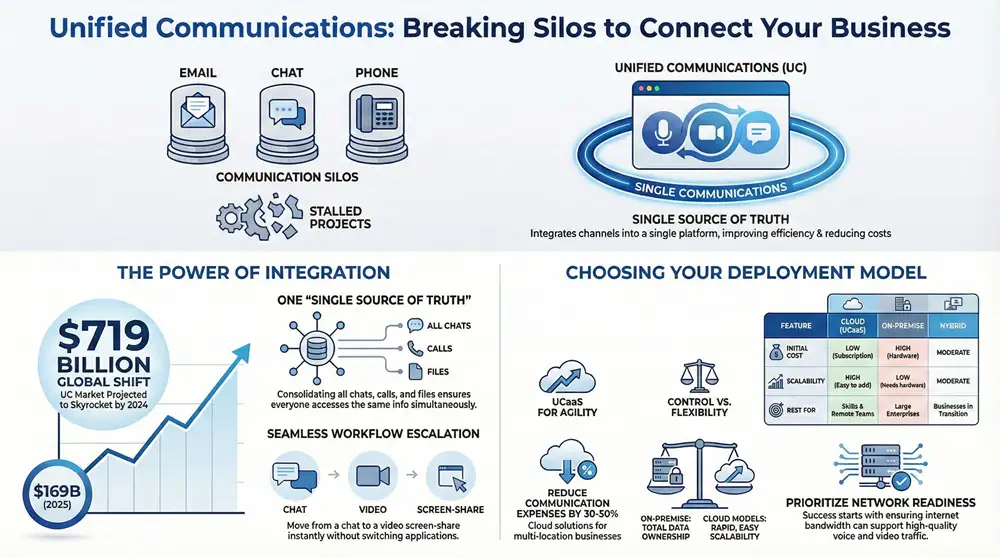
Are your teams struggling to keep track of conversations spread across email, chat, and video calls? Disconnected communication tools create silos, slow down projects, and lead to costly mistakes. Unified Communications (UC) solves this by merging all your business communication channels—voice, video, messaging, and collaboration—into a single, integrated platform. This guide explains what unified communications is, how it works, and why it is essential for driving productivity and growth.
Breaking Down Communication Silos

When your teams use separate applications for different tasks, critical information gets lost. A project update is sent via email, a key decision is made in a chat app, and an urgent client request comes in over a phone call. This fragmentation creates communication silos—invisible barriers that disrupt workflows and hinder collaboration.
Unified communications is engineered to demolish these walls. It functions as a central hub where every conversation, file, and meeting is accessible in one place. Instead of juggling a dozen single-purpose apps, your team gets one powerful, cohesive platform that works seamlessly across any device, from anywhere.
A Single Source Of Truth
This integrated approach establishes a “single source of truth.” All project-related interactions, including chats, calls, meetings, and shared files, are consolidated within a single environment. A team member can initiate a chat, escalate it to a video call to share their screen, and send a summary—all without switching applications. This seamless flow ensures everyone has access to the same information, at the same time, keeping projects on track.
For a deeper analysis of how these platforms are reshaping modern work, explore this ultimate guide to communication platforms for digital workplaces.
Market projections underscore this shift. The global unified communications market is forecasted to grow from USD 169.90 billion in 2025 to USD 719.79 billion by 2034. This rapid expansion signals that UC technology is becoming an indispensable asset for any forward-thinking business.
Unified Communications At A Glance
To summarize, here is a quick overview of what unified communications delivers.
| Concept | Description |
|---|---|
| What It Is | A single platform integrating phone, video, messaging, and collaboration tools. |
| Who It’s For | Any business aiming to eliminate communication barriers and enhance team collaboration. |
| Primary Benefit | Creates a “single source of truth” that accelerates decision-making and boosts efficiency. |
This table highlights the core value of UC: integrating communication tools to create a more fluid and productive work environment.
The Core Components Of A UC System
A robust Unified Communications system is an ecosystem of essential technologies working in harmony. Understanding these components is key to appreciating how the platform functions as more than just the sum of its parts. Let’s examine the foundational elements that enable a truly collaborative and modern workplace.
Voice And Telephony Services
At the core of nearly every UC system is a reliable Voice over Internet Protocol (VoIP) phone system. VoIP transmits calls over the internet instead of traditional phone lines, offering significant cost savings and unparalleled flexibility. This transforms the business phone from a static desk appliance into a dynamic communication hub that travels with you.
For example, an employee can take a client call on their desk phone, seamlessly transfer it to their mobile app while leaving the office, and later receive an email with a voicemail transcription. This capability ensures business continuity and eliminates missed opportunities. A modern hosted phone system is the engine that makes this possible.
Video Conferencing And Collaboration
High-definition video conferencing is non-negotiable for remote and hybrid teams. It reduces travel expenses, bridges geographical distances, and fosters stronger professional relationships than audio-only calls. Research confirms this, with 90% of people reporting that video makes it easier to convey their message effectively.
Modern UC platforms elevate video meetings with powerful collaboration tools:
- Screen Sharing: Ideal for demonstrating software, reviewing proposals with clients, or editing documents collaboratively.
- Digital Whiteboards: Provide a shared virtual canvas for brainstorming sessions, strategic planning, and visualizing ideas in real time.
- Meeting Recordings: Allow for the capture and archiving of entire sessions, creating a valuable resource for training or for team members who were unable to attend.
These features ensure virtual meetings are just as productive—and often more efficient—than in-person gatherings.
Messaging And Presence
Instant messaging (IM) is an essential tool for quick questions and real-time updates that don’t warrant a formal email. By integrating chat into the UC platform, all project-related discussions become organized, searchable, and centrally located, which significantly reduces inbox clutter.
One of the most valuable features is presence. This simple status indicator (e.g., Available, Busy, In a Meeting) shows who is available to connect at a glance. It prevents unnecessary interruptions and helps teams resolve issues faster by quickly identifying the right person at the right time.
When voice, video, and messaging are unified, communication becomes effortless. Your team has the ideal tool for any scenario, all accessible from a single, intuitive interface. This deep integration is what transforms separate applications into a productivity-driving platform.
Choosing The Right UC Deployment Model

Once you understand the capabilities of unified communications, the next step is selecting the right deployment model. This decision impacts cost, control, and scalability, so it’s critical to align your choice with your business needs. The three primary models are cloud-based, on-premise, and hybrid, each designed for different operational priorities.
Cloud Solutions: Unified Communications as a Service (UCaaS)
Unified Communications as a Service (UCaaS) is the most popular and rapidly growing deployment model. With UCaaS, a third-party provider hosts and manages the entire infrastructure in the cloud. Your business accesses the full suite of tools—voice, video, and messaging—via an internet connection for a predictable monthly subscription fee per user.
This model eliminates the need for expensive on-site hardware and the specialized IT staff required to maintain it. The global UCaaS market is projected to reach USD 215.53 billion by 2032, driven by its cost-effectiveness and flexibility. For businesses with multiple locations, a cloud solution can reduce communication expenses by 30-50%.
On-Premise and Hybrid Models
The traditional approach is an on-premise model, where a business purchases, houses, and manages all the necessary servers and hardware in-house. This provides complete control over the system and data, which is a requirement for organizations with stringent security or regulatory compliance mandates. However, it requires a significant upfront capital investment and ongoing maintenance responsibilities.
A hybrid model offers a balance between the two, blending the security of on-premise infrastructure with the agility of the cloud. For example, a company might keep its core telephony system on-site for control while leveraging a cloud provider for video conferencing to better support remote workers. This approach allows businesses to modernize strategically. Many companies pursuing this path seek partners that offer turnkey network solutions to ensure seamless integration.
This decision tree provides a visual guide for choosing the best-fit model for your organization.
As the flowchart illustrates, the choice depends on whether your priority is total control or ultimate flexibility. If a cloud model seems right for you, our guide on cloud migration tips for unified communications can help you navigate a smooth transition.
Comparing UC Deployment Models: Cloud vs. On-Premise vs. Hybrid
This side-by-side comparison clarifies the trade-offs between the three models. The optimal choice depends on your company’s budget, IT resources, and strategic goals.
| Feature | Cloud (UCaaS) | On-Premise | Hybrid |
|---|---|---|---|
| Initial Cost | Low (Subscription-based) | High (Hardware purchase) | Moderate (Mix of both) |
| Control | Low (Vendor-managed) | High (Full ownership) | Moderate (Control key assets) |
| Scalability | High (Easy to add/remove users) | Low (Requires new hardware) | Moderate (Cloud portion is scalable) |
| Maintenance | None (Handled by provider) | High (Managed by internal IT) | Moderate (Internal IT & provider) |
| Security | Managed by provider | Managed by internal team | Shared responsibility |
| Best For | SMBs, remote teams, rapid growth | Large enterprises, strict compliance | Businesses in transition, specific needs |
There is no single “best” option—only the best fit for your organization. UCaaS delivers agility, on-premise provides maximum control, and hybrid offers a balanced, customized solution.
The Tangible Business Benefits Of Unified Communications
Implementing a unified communications platform delivers powerful, measurable results that extend far beyond technical features. By streamlining how teams connect, UC creates real-world value that translates into a significant competitive advantage. The most impactful benefit is a direct improvement in productivity and project velocity.
When communication is frictionless, work gets done faster. Instead of waiting for email replies or playing phone tag, team members get immediate answers through chat or by launching an impromptu video call. This removes the small but cumulative delays that stall progress on critical tasks.
Driving Cost Savings and Enhancing Experiences
One of the most immediate benefits is significant cost reduction. Consolidating multiple tools—phone systems, video conferencing services, and messaging apps—into a single platform from one vendor eliminates redundant subscription fees. This also reduces the IT overhead required for maintenance and support, freeing up technical staff for more strategic initiatives.
A well-integrated system improves both the employee and customer experience. It empowers your team to provide faster, more informed responses, leading to higher client satisfaction and a more efficient workforce.
For example, a construction firm used its UC platform to resolve an on-site issue in minutes instead of days. A field supervisor initiated a video call with the project architect, shared live footage of the problem, and displayed blueprints on a shared screen for an immediate decision. This instant collaboration prevented a costly work stoppage, turning a potential week-long delay into a rapid resolution. This real-world success demonstrates the value of an effective unified communication solution.
Meeting the Needs of a Modern Workforce
The unified communications market is expected to grow by USD 97.32 billion between 2024 and 2029, largely driven by the adoption of flexible work policies like Bring Your Own Device (BYOD).
With 75% of enterprises projected to support personal devices by 2025, a secure, unified platform is no longer optional—it is a necessity. In the architecture, engineering, and construction (AEC) industry, integrating UC with wide-format printing workflows can reduce project delays by up to 35% by enabling instant design reviews. You can find more insights on this growing market on Technavio.com.
Weaving UC Into Your Business Workflows
An effective unified communications platform should enhance your existing operations, not complicate them. The true power of UC is unlocked when it integrates seamlessly with your daily business processes, becoming the connective tissue that allows information to flow effortlessly between core systems. This integration creates a connected ecosystem that automates tasks and saves valuable time.
Connecting UC with Core Business Systems
Integrating your UC platform with a Customer Relationship Management (CRM) system provides immense value for sales and support teams. When an incoming call is received, a screen pop-up can instantly display the customer’s complete history, including recent purchases and past support tickets.
This immediate context enables:
- Personalized Interactions: Agents can greet customers by name and address their needs without requiring them to repeat information.
- Faster Resolutions: Teams can quickly understand a customer’s situation and provide accurate, informed support on the first contact.
- Automated Logging: Call details, chat transcripts, and meeting notes can be automatically logged in the CRM, ensuring a complete and accurate record of every interaction without manual data entry.
Automating Project and Document Management
UC integrations also transform internal collaboration. When connected to project management and document systems, teams can launch a video call directly from a specific task to discuss deliverables.
By automating these critical workflows, you eliminate the need for employees to constantly switch between applications. This reduces manual work, prevents information silos, and creates a single source of truth that improves organizational efficiency.
During a call, collaborators can open a shared document, edit it in real time, and save the updated version directly back to the project folder. This seamless process ensures everyone is working from the most current information, which eliminates version control issues and keeps projects moving forward. A well-integrated UC platform becomes the central nervous system of your business.
Your Practical UC Implementation Checklist
Transitioning to a unified communications system can feel like a major undertaking, but a structured approach simplifies the process. This checklist outlines the key steps for a successful rollout, helping you avoid common pitfalls and ensure your team is set up for success from day one.
A successful implementation begins with a thorough assessment of your current communication tools and workflows. Identify the specific problems you need to solve. Are teams frustrated with application overload? Are remote employees feeling disconnected? Are you paying for redundant services? Documenting these challenges will provide a clear set of goals for your new UC platform.
Key Planning and Evaluation Steps
With your requirements defined, you can begin evaluating potential solutions. This process is about finding a strategic partner who understands your business and can support your growth, not just a vendor with a long list of features.
Your evaluation checklist should include:
- Assess Network Readiness: Your internet connection is the foundation of a UC system. Ensure your network has sufficient bandwidth to support high-quality voice and video traffic without performance issues.
- Evaluate Provider Capabilities: Look beyond marketing materials. Ask potential vendors about their service level agreements (SLAs), security certifications, and customer support availability. Confirm they offer 24/7 assistance.
- Confirm Security and Compliance: This is non-negotiable. Ensure any platform you consider meets industry-specific regulations, such as HIPAA for healthcare or GDPR for data privacy.
Ensuring Smooth Adoption and Long-Term Success
The final and most critical phase of implementation focuses on your team. The most advanced technology is ineffective if no one uses it.
Planning for user adoption is just as important as the technical configuration. A successful transition requires clear communication, comprehensive training, and ongoing support to build employee confidence with the new tools.
Schedule role-specific training sessions to demonstrate how the platform solves daily challenges. Create quick-start guides and identify internal “champions” who can provide peer-to-peer support. By prioritizing the user experience, you ensure your new UC system is not just installed—it is fully embraced.
Frequently Asked Questions About Unified Communications
To conclude our guide on what is unified communications, we’ve compiled answers to some of the most common questions from business leaders. This section addresses key concerns regarding security, scalability, and integration to help you make an informed decision.
How Secure Are Cloud-Based UC Platforms?
Reputable UCaaS providers prioritize security. Top-tier platforms are built with robust, multi-layered security measures to protect your data, including end-to-end encryption for all communications, multi-factor authentication to prevent unauthorized access, and regular third-party security audits.
A significant advantage of a managed cloud solution is that the provider handles all security updates and patches automatically. This ensures your system is continuously protected against emerging threats without burdening your internal IT team.
Can Unified Communications Scale With My Business?
Yes. Scalability is a primary benefit of cloud-based UC solutions. Adding or removing users is typically as simple as adjusting your subscription plan, a process that can often be completed in minutes. This agility allows your communication system to grow in lockstep with your business, whether you are hiring a new department or expanding to a new location. You never have to worry about outgrowing your system or overinvesting in unused capacity.
Is It Difficult To Integrate UC With Our Existing Software?
No, modern UC platforms are designed for integration. Leading providers offer extensive libraries of pre-built connectors for popular business applications, including CRM systems and project management tools. This enables a seamless flow of information between systems, such as automatically logging all customer calls in your CRM. Before selecting a provider, confirm they support integrations with your company's specific software stack to maximize your return on investment from day one.
Ready to modernize your business communications? The experts at 1-800 Office Solutions can design a unified communications system that boosts productivity and reduces costs. Get a personalized quote today and discover a better way to connect.